Virus on external hard drive

James78

New member
Local time
12:50 PM
Messages
9
Location
South Africa
Hey people.

Last night my girlfriend plugged an external/portable hard drive into her Mac OSX and message came up saying there is a virus on the HD. So she unplugged the drive in fear of being infected and shut down the Mac before I could have a look what was said in the message.

So I ran a scan from my laptop with MSE and got the following viruses :
-Trojan:Win32/Orsam!rts
-VirTool:Win32/Obfuscator.C
-Virus:Win32/Virut.BM
-Trojan:Unix/Rootkit.C

(she brings home a lot of media from a network hub at work)

So here is my problemo...

-Trojan:Unix/Rootkit.C - was removed

-Trojan:Win32/Orsam!rts - was quarantined but showed up on 2nd scan

-Virus:Win32/Virut.BM - and - VirTool:Win32/Obfuscator.C - I get this error message from MSE on both scans :
Microsoft Security Essentials encountered the following error: Error code 0x8007065e. Data of this type is not supported.

Guys I am clueless on how to proceed and want to do so cautiously.

-Please could you guys help me remove these threats without formatting the portable HD
- Is there a chance I could infect my PC (did a scan just now and MSE says my baby is still clean:D)
(Running Windows Ultimate 32bit on a Toshiba laptop)

* Ive scanned the external HD with Maleware-Bytes and Ad Aware and they have picked up nothing...
 
Last edited:

My Computer

Computer Manufacturer/Model Number
Toshiba
OS
Windows 7 Ultimate 6.1.7600 Build 7600 X86-based PC
CPU
Intel(R) Core(TM)2 Duo CPU T7100 @1.8GHz, 1801Mhz. 2 Cores
Motherboard
not sure - Satellite A200 ???
Memory
2.0 GB
Graphics Card(s)
ATI Mobility Radeon HD 2600 1012MB
Sound Card
High Definition Audio Device
Monitor(s) Displays
Generic PnP Monitor
Screen Resolution
1280 x 800 (32 bit)(60 HZ)
Hard Drives
FUJITSU MHW2160BH PL ATA Device 150 GB
PSU
External ?
Case
Toshiba LapTop
Hey people.

Last night my girlfriend plugged an external/portable hard drive into her Mac OSX and message came up saying there is a virus on the HD. So she unplugged the drive in fear of being infected and shut down the Mac before I could have a look what was said in the message.

So I ran a scan from my laptop with MSE and got the following viruses :
-Trojan:Win32/Orsam!rts
-VirTool:Win32/Obfuscator.C
-Virus:Win32/Virut.BM
-Trojan:Unix/Rootkit.C

(she brings home a lot of media from a network hub at work)

So here is my problemo...

-Trojan:Unix/Rootkit.C - was removed

-Trojan:Win32/Orsam!rts - was quarantined but showed up on 2nd scan

-Virus:Win32/Virut.BM - and - VirTool:Win32/Obfuscator.C - I get this error message from MSE on both scans :
Microsoft Security Essentials encountered the following error: Error code 0x8007065e. Data of this type is not supported.

Guys I am clueless on how to proceed and want to do so cautiously.

-Please could you guys help me remove these threats without formatting the portable HD
- Is there a chance I could infect my PC (did a scan just now and MSE says my baby is still clean:D)
(Running Windows Ultimate 32bit on a Toshiba laptop)

* Ive scanned the external HD with Maleware-Bytes and Ad Aware and they have picked up nothing...
Scan your PC with Avast and Hitman Pro.
 

My Computer

Computer Manufacturer/Model Number
Samsung NP530U4B-S02IN
OS
Windows® 8 Pro (64-bit)
CPU
Intel® Core™ i5 Processor 2467M (1.60GHz, 3MB L3 Cache)
Motherboard
Samsung Electronics
Memory
6GB DDR3 System Memory at 1,333MHz (on BD 4GB + 2GB x 1)
Graphics Card(s)
AMD Radeon™ HD7550M 1GB DDR3 (Ext. Graphic)
Sound Card
Realtek High Definition Audio
Monitor(s) Displays
35.56cm (14.0) SuperBright 300nit HD LED Display
Screen Resolution
1366x768
Hard Drives
1TB S-ATA II Hard Drive (5400RPM) with ExpressCache 16GB SSD
Internet Speed
sucks
Antivirus
Microsoft Security Essentials
Browser
Google Chrome (Sync enabled)
Sweet, Will download Avast and run the scan on the portable HD and then PC.
Will my PC be at risk if I plug in the hard drive ?
 

My Computer

Computer Manufacturer/Model Number
Toshiba
OS
Windows 7 Ultimate 6.1.7600 Build 7600 X86-based PC
CPU
Intel(R) Core(TM)2 Duo CPU T7100 @1.8GHz, 1801Mhz. 2 Cores
Motherboard
not sure - Satellite A200 ???
Memory
2.0 GB
Graphics Card(s)
ATI Mobility Radeon HD 2600 1012MB
Sound Card
High Definition Audio Device
Monitor(s) Displays
Generic PnP Monitor
Screen Resolution
1280 x 800 (32 bit)(60 HZ)
Hard Drives
FUJITSU MHW2160BH PL ATA Device 150 GB
PSU
External ?
Case
Toshiba LapTop
Sweet, Will download Avast and run the scan on the portable HD and then PC.
Will my PC be at risk if I plug in the hard drive ?
Yes it might be. But install the anti virus on the main PC so that it can prevent any infection.
 

My Computer

Computer Manufacturer/Model Number
Samsung NP530U4B-S02IN
OS
Windows® 8 Pro (64-bit)
CPU
Intel® Core™ i5 Processor 2467M (1.60GHz, 3MB L3 Cache)
Motherboard
Samsung Electronics
Memory
6GB DDR3 System Memory at 1,333MHz (on BD 4GB + 2GB x 1)
Graphics Card(s)
AMD Radeon™ HD7550M 1GB DDR3 (Ext. Graphic)
Sound Card
Realtek High Definition Audio
Monitor(s) Displays
35.56cm (14.0) SuperBright 300nit HD LED Display
Screen Resolution
1366x768
Hard Drives
1TB S-ATA II Hard Drive (5400RPM) with ExpressCache 16GB SSD
Internet Speed
sucks
Antivirus
Microsoft Security Essentials
Browser
Google Chrome (Sync enabled)
Read about Virus:Win32/Virut.BM
http://www.microsoft.com/security/portal/Threat/Encyclopedia/Entry.aspx?Name=Virus:Win32/Virut.BM

You're not only dealing with Virut but you are also dealing with a lot of other malware as well.
What I suggest in your case is to format and reinstall the OS. This is because, Virut is a file infector which infects every .exe present on your system. The problem with Virut is, this is a buggy file infector and that's why scanners cannot disinfect them properly either > result > files are corrupted, won't work anymore.
And as I already explained, Virut infects every .exe. This means that you may not delete these files, but they should be disinfected. And since it's a buggy virus, the files cannot be properly disinfected.
This unfortunately means that this is a game over situation and there's nothing much you can do besides formatting and reinstalling Windows.
Don't backup your files either, because when you backup .exe files, they are also infected. You can however backup pictures and documents.
 

My Computer

Computer type
PC/Desktop
Computer Manufacturer/Model Number
Bruce ... somewhere in his 40's
OS
Windows 7 Ultimate 32bit SP1
CPU
Intel(R) Core(TM)2 Quad CPU @ 2.40GHz, 2400 MHz
Motherboard
INTEL/D975XBX2
Memory
4 GB
Graphics Card(s)
ATI Radeon HD 2600 Pro
Monitor(s) Displays
Samsung SyncMaster 914v
Screen Resolution
1280 x 1024
Hard Drives
2/500GB each ... ST3500630AS ATA Device.
One is not connected
PSU
Rocketfish 700 W
Case
G.Skill Gigabyte Chassis
Keyboard
Standard PS/2 Keyboard
Mouse
Microsoft PS/2 Mouse
Internet Speed
DSL
Antivirus
Avira Internet Security
Browser
IE 11
Other Info
ATI HDMI Audio
That sounds like a nasty son of a bitch he has there :(
 

My Computer

Computer Manufacturer/Model Number
Over Clockers Ultima Viper 2.80Ghz
OS
Windows 7 Ultimate 64 - OEM Service Pack 1
CPU
Intel Core i7 930 2.80Ghz Bloomfield Socket LGA 1366
Motherboard
Gigabyte GA-X58A-UD3R Intel X58 Socket 1366 DDR3
Memory
Patriot Viper 6GB 3x2GB DDR3 PC3-1200C9 1600Mhz Tri Channel
Graphics Card(s)
Asus ATI Radeon HD 5770 CuCore 1024MB GDDR5 PCI Express
Sound Card
Realtek ALC889 @ Intel 82801JB ICH10 - High Definition Audio
Monitor(s) Displays
Samsung SyncMaster 920N 19"
Screen Resolution
1280*1024
Hard Drives
1 x OCZ Vertex2 Series 120GB 2.5" SATA-II SSD
1 x Seagate Barracuda 7200.12 1TB SATA-II 32MB Cache
1 x Western Digital Caviar Green 2TB SATA-II 64 MB Cache
PSU
Corsair TX 650W ATX SLi
Case
Antec 902 Ultimate Gaming Case Black
Cooling
Prolimatech Megahalems Rev B CPU Cooler Socket 775/1156/1366
Keyboard
Microsoft Comfort Curve Keyboard
Mouse
Microsoft Optical USB
Internet Speed
ADSL24 FTTC 34.2 Mbps Down 7.1Mbps Up
Other Info
OcUK 22x DVDSATA ReWriter Black
Akasa AK-FN058 Apache Black Super Silent 120mm Fan
Printer Epson Stylus Photo R300
Scanner Canon Canoscan 8000F
Hi Denesh and Jacee. Many thanks for the help so far.

I might not have explained myself well in my first post, sorry. The external hard drive doesn't have an OS, its just used to store pictures, videos, games, etc.
Im not sure if that makes a difference? Can the virus still infect other exe. files on the drive. "Virut is a file infector which infects every .exe present on your system".

In other words, would I treat the infected hard drive/media device(with no OS) the same way I would my Computer?
So far Ive scanned the previously infected folders that MSE said were infected and Avast came up with the following, which it deleted,

win32:Vitro (3 of these)
win32:Trojan-gen
win32:junkpoly[Cryp]
error:the file is a decompression bomb(42110) (many of these msg's)

So now Im running a full scan of the media device (its at 25% and going for 55 minutes ):)

Thanks
James
 

My Computer

Computer Manufacturer/Model Number
Toshiba
OS
Windows 7 Ultimate 6.1.7600 Build 7600 X86-based PC
CPU
Intel(R) Core(TM)2 Duo CPU T7100 @1.8GHz, 1801Mhz. 2 Cores
Motherboard
not sure - Satellite A200 ???
Memory
2.0 GB
Graphics Card(s)
ATI Mobility Radeon HD 2600 1012MB
Sound Card
High Definition Audio Device
Monitor(s) Displays
Generic PnP Monitor
Screen Resolution
1280 x 800 (32 bit)(60 HZ)
Hard Drives
FUJITSU MHW2160BH PL ATA Device 150 GB
PSU
External ?
Case
Toshiba LapTop
win32:Vitro <-- new variation of Virut
PolyMorphic Win32:Vitro Most Viraulent Virus : Tech-Linkblog.com

win32:junkpoly[Cryp] <-- more Virut
A virus that can perform various modifications in Windows system files including logon functions. Win32:JunkPoly [Cryp] can also disable Windows registry editor, Task Manager and kill various running programs on the compromised computer.

win32:Trojan-gen <-- Backdoor Trojan

I sure wouldn't want to save anything on that external hard drive if it was mine!!
 

My Computer

Computer type
PC/Desktop
Computer Manufacturer/Model Number
Bruce ... somewhere in his 40's
OS
Windows 7 Ultimate 32bit SP1
CPU
Intel(R) Core(TM)2 Quad CPU @ 2.40GHz, 2400 MHz
Motherboard
INTEL/D975XBX2
Memory
4 GB
Graphics Card(s)
ATI Radeon HD 2600 Pro
Monitor(s) Displays
Samsung SyncMaster 914v
Screen Resolution
1280 x 1024
Hard Drives
2/500GB each ... ST3500630AS ATA Device.
One is not connected
PSU
Rocketfish 700 W
Case
G.Skill Gigabyte Chassis
Keyboard
Standard PS/2 Keyboard
Mouse
Microsoft PS/2 Mouse
Internet Speed
DSL
Antivirus
Avira Internet Security
Browser
IE 11
Other Info
ATI HDMI Audio
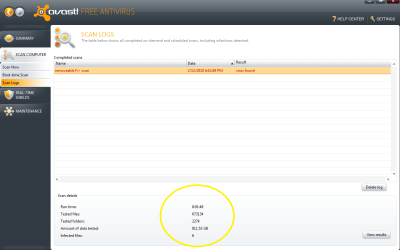
Damn!!! That is not what I wanted to hear... Guess I'll have to format.... :sick:

Just out of interest
- the scan took 8 hours...
- 800 Gigs of media :cry:
- 6 additional infections were found

I know you said you wouldn't advise to save anything, but is there no way I could safely keep some of the stuff. I dont mind deleting all exe. files etc, there are soo many photos and video's I would really love to keep. In fact the pics are irreplaceable, I just cant bring myself to del them.(and some of the home vids)

Is it ok to navigate through the external hard drive without infecting my PC, and save some of the pics etc to a flash drive? (PC is virus free)

Sorry about all the question:)
Thanks a lot for all the help
 

Attachments

  • Avast Scan.png
    Avast Scan.png
    30.3 KB · Views: 379

My Computer

Computer Manufacturer/Model Number
Toshiba
OS
Windows 7 Ultimate 6.1.7600 Build 7600 X86-based PC
CPU
Intel(R) Core(TM)2 Duo CPU T7100 @1.8GHz, 1801Mhz. 2 Cores
Motherboard
not sure - Satellite A200 ???
Memory
2.0 GB
Graphics Card(s)
ATI Mobility Radeon HD 2600 1012MB
Sound Card
High Definition Audio Device
Monitor(s) Displays
Generic PnP Monitor
Screen Resolution
1280 x 800 (32 bit)(60 HZ)
Hard Drives
FUJITSU MHW2160BH PL ATA Device 150 GB
PSU
External ?
Case
Toshiba LapTop
You can save your personal pictures and documents. Look at my posts above.
 

My Computer

Computer type
PC/Desktop
Computer Manufacturer/Model Number
Bruce ... somewhere in his 40's
OS
Windows 7 Ultimate 32bit SP1
CPU
Intel(R) Core(TM)2 Quad CPU @ 2.40GHz, 2400 MHz
Motherboard
INTEL/D975XBX2
Memory
4 GB
Graphics Card(s)
ATI Radeon HD 2600 Pro
Monitor(s) Displays
Samsung SyncMaster 914v
Screen Resolution
1280 x 1024
Hard Drives
2/500GB each ... ST3500630AS ATA Device.
One is not connected
PSU
Rocketfish 700 W
Case
G.Skill Gigabyte Chassis
Keyboard
Standard PS/2 Keyboard
Mouse
Microsoft PS/2 Mouse
Internet Speed
DSL
Antivirus
Avira Internet Security
Browser
IE 11
Other Info
ATI HDMI Audio
Will do, many many thanx. :D
 

My Computer

Computer Manufacturer/Model Number
Toshiba
OS
Windows 7 Ultimate 6.1.7600 Build 7600 X86-based PC
CPU
Intel(R) Core(TM)2 Duo CPU T7100 @1.8GHz, 1801Mhz. 2 Cores
Motherboard
not sure - Satellite A200 ???
Memory
2.0 GB
Graphics Card(s)
ATI Mobility Radeon HD 2600 1012MB
Sound Card
High Definition Audio Device
Monitor(s) Displays
Generic PnP Monitor
Screen Resolution
1280 x 800 (32 bit)(60 HZ)
Hard Drives
FUJITSU MHW2160BH PL ATA Device 150 GB
PSU
External ?
Case
Toshiba LapTop
I think I had that same virus on my old desktop and laptop. All .exe were messed up and I couldn't access task manager. I had an external drive hooked up to the desktop and it has only movies, pics, and music on it. I don't think there are any .exe files on the hard drive. So, I want to access the files in the hard drive, but am scared to hook the hard drive up to my new computer for fear of it spreading. In the previous post someone mentions you can copy files safely - so is it safe to just plug in the external drive and copy files? I need to make folders so I can use the HD for my PS3.
 

My Computer

Computer Manufacturer/Model Number
MSI A6200
OS
Windows 7 Home 64 bit
CPU
Intel Pentium P6000
Memory
3 GB DDR3
Graphics Card(s)
Intel GMA HD
Back
Top