I didn't download or listen to any advice the other guy posted. A new member with a handful of posts isn't one to trust in my opinion. He might know what he is talking about but I have done most of my exchanges with these gurus. At first I thought it was something with the svchost process (random google search), but after running everything, you didn't make any reference to it, so I think the thread is incorrectly titled. New title... There is something wrong with my computer, just running too slow, almost overnight, and I don't know what it is or what caused it. One thing I have noticed though is that as soon as I start task manager, CPU usage is over 70%, but then drops to zero. This is with no open applications, just background processes. Is that normal? To me it seems almost like something is hiding it.
Results below:
Microsoft Windows [Version 6.1.7601]
Copyright (c) 2009 Microsoft Corporation. All rights reserved.
C:\Windows\system32>
C:\Windows\system32>tasklist /svc /fi "imagename eq svchost.exe"
Image Name PID Services
========================= ======== ============================================
svchost.exe 872 DcomLaunch, PlugPlay, Power
svchost.exe 984 RpcEptMapper, RpcSs
svchost.exe 384 AudioSrv, Dhcp, eventlog, lmhosts
svchost.exe 644 AudioEndpointBuilder, hidserv, IPBusEnum,
Netman, PcaSvc, SysMain, TrkWks, UxSms,
WdiSystemHost, Wlansvc, WPDBusEnum, wudfsvc
svchost.exe 792 EventSystem, fdPHost, FontCache, netprofm,
nsi, WdiServiceHost, WinHttpAutoProxySvc
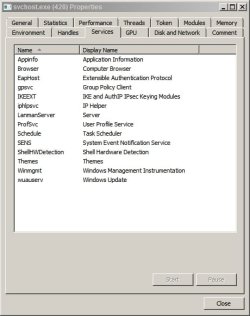
svchost.exe 1028 AeLookupSvc, Appinfo, BITS, Browser,
CertPropSvc, EapHost, gpsvc, IKEEXT,
IpHlpSvc, LanmanServer, MMCSS, ProfSvc,
Schedule, SENS, SessionEnv,
ShellHWDetection, Themes, Winmgmt
svchost.exe 1284 CryptSvc, Dnscache, LanmanWorkstation,
NlaSvc, TermService
svchost.exe 1604 BFE, DPS, MpsSvc
svchost.exe 1720 FDResPub, Mcx2Svc, SSDPSRV
svchost.exe 1464 hpqcxs08, hpqddsvc
svchost.exe 2652 Net Driver HPZ12
svchost.exe 2996 Pml Driver HPZ12
svchost.exe 3016 PolicyAgent
svchost.exe 2496 stisvc
svchost.exe 2536 HPSLPSVC
svchost.exe 6108 WinDefend
C:\Windows\system32>