virus possibly related to svchost.exe

Any further suggestions to continue correcting the system? I didn't mean for the last post to appear as solved, just that I think I may be making progress.
 

My Computer My Computer

At a glance

Windows 7 64 Bit
Computer type
PC/Desktop
Computer Manufacturer/Model Number
HP
OS
Windows 7 64 Bit
svchost high usage

I had a similar issue once. The solution that worked for me was:

Downloaded and installed Process Hacker:

Overview - Process Hacker

Downloaded and installed RAMmap:

RAMMap

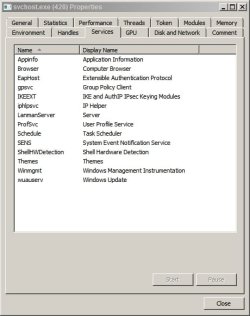
Used RAMmap to get the PID of the troublesome svchost process. Used Process Hacker to view details and checked services associated with the svchost process. Found that windows update service was listed in the services tab for that process. Stopped the windows update service and usage returned to normal levels.

The cause was a failed windows update and repairing windows updates, (cleaning windows updates temp files and windows updates history then running the windows updates repair hotfix) followed by a reboot did the trick.
 

Attachments

  • 2013-11-23 17_43_14-svchost.jpg
    2013-11-23 17_43_14-svchost.jpg
    30.8 KB · Views: 41

My Computer My Computer

At a glance

Microsoft Windows 7 Home Premium 64-bit 7601 ...AMD C-60 APU with Radeon(tm) HD Graphics4.00 GBAMD Radeon HD 6290 Graphics
Computer type
Laptop
Computer Manufacturer/Model Number
ASUS
OS
Microsoft Windows 7 Home Premium 64-bit 7601 Multiprocessor Free Service Pack 1
CPU
AMD C-60 APU with Radeon(tm) HD Graphics
Motherboard
ASUSTeK COMPUTER INC. X501U
Memory
4.00 GB
Graphics Card(s)
AMD Radeon HD 6290 Graphics
Sound Card
(1) AMD High Definition Audio Device (2) Realtek High Defi
Screen Resolution
1366 x 768 x 32 bits (4294967296 colors) @ 60 Hz
Hard Drives
Hitachi HTS545050A7E380 SATA Disk Device
Antivirus
Comodo CIS & FW, SecureAplus App Whitelisting, Threatfire
Browser
Cyberfox 64bit, Opera 64bit, Airfox
Other Info
Spy-The-Spy, HitmanPro.Alert, Norton Connect Safe, MJRegWatcher, BitDefender TrafficLight, Voodoo Shield, Zemana AntiMalware
Svchost.exe runs background computer processes like services, which do not have a user interface.

You do not need to download any additional tools, though.

Please go to a Command Prompt:
Start > Programs > Accessories right-click Command Prompt
Select: Run as Administrator

Using the mouse, copy the following text inside the code box:
Code:
TASKLIST /SVC /FI "IMAGENAME EQ SVCHOST.EXE"
Paste the above at the blinking cursor of the Command Prompt
Press: Enter

To obtain and post the results, go to the small icon on the top left of the Command Prompt frame
Go to Edit > Select All
Then, Edit > Copy

The info is now copied to the clipboard.

:ar: Paste the info to your next post.

Close out of the Command Prompt by typing: exit
 
Last edited:

My Computer My Computer

At a glance

Windows 7 Home Premium
Computer type
PC/Desktop
Computer Manufacturer/Model Number
An ol' eMachines
OS
Windows 7 Home Premium
Internet Speed
Fine for me...I'm retired!
Please follow everything that cottonball has asked you to do! You will have the best help staying with cb's advice! ;)
 

My Computer My Computer

At a glance

Windows 7 Ultimate 32bit SP1Intel(R) Core(TM)2 Quad CPU @ 2.40GHz, 2400 MHz4 GBATI Radeon HD 2600 Pro
Computer type
PC/Desktop
Computer Manufacturer/Model Number
Bruce ... somewhere in his 40's
OS
Windows 7 Ultimate 32bit SP1
CPU
Intel(R) Core(TM)2 Quad CPU @ 2.40GHz, 2400 MHz
Motherboard
INTEL/D975XBX2
Memory
4 GB
Graphics Card(s)
ATI Radeon HD 2600 Pro
Monitor(s) Displays
Samsung SyncMaster 914v
Screen Resolution
1280 x 1024
Hard Drives
2/500GB each ... ST3500630AS ATA Device.
One is not connected
PSU
Rocketfish 700 W
Case
G.Skill Gigabyte Chassis
Keyboard
Standard PS/2 Keyboard
Mouse
Microsoft PS/2 Mouse
Internet Speed
DSL
Antivirus
Avira Internet Security
Browser
IE 11
Other Info
ATI HDMI Audio
I didn't download or listen to any advice the other guy posted. A new member with a handful of posts isn't one to trust in my opinion. He might know what he is talking about but I have done most of my exchanges with these gurus. At first I thought it was something with the svchost process (random google search), but after running everything, you didn't make any reference to it, so I think the thread is incorrectly titled. New title... There is something wrong with my computer, just running too slow, almost overnight, and I don't know what it is or what caused it. One thing I have noticed though is that as soon as I start task manager, CPU usage is over 70%, but then drops to zero. This is with no open applications, just background processes. Is that normal? To me it seems almost like something is hiding it.

Results below:
Microsoft Windows [Version 6.1.7601]
Copyright (c) 2009 Microsoft Corporation. All rights reserved.

C:\Windows\system32>
C:\Windows\system32>tasklist /svc /fi "imagename eq svchost.exe"

Image Name PID Services
========================= ======== ============================================
svchost.exe 872 DcomLaunch, PlugPlay, Power
svchost.exe 984 RpcEptMapper, RpcSs
svchost.exe 384 AudioSrv, Dhcp, eventlog, lmhosts
svchost.exe 644 AudioEndpointBuilder, hidserv, IPBusEnum,
Netman, PcaSvc, SysMain, TrkWks, UxSms,
WdiSystemHost, Wlansvc, WPDBusEnum, wudfsvc
svchost.exe 792 EventSystem, fdPHost, FontCache, netprofm,
nsi, WdiServiceHost, WinHttpAutoProxySvc
svchost.exe 1028 AeLookupSvc, Appinfo, BITS, Browser,
CertPropSvc, EapHost, gpsvc, IKEEXT,
IpHlpSvc, LanmanServer, MMCSS, ProfSvc,
Schedule, SENS, SessionEnv,
ShellHWDetection, Themes, Winmgmt
svchost.exe 1284 CryptSvc, Dnscache, LanmanWorkstation,
NlaSvc, TermService
svchost.exe 1604 BFE, DPS, MpsSvc
svchost.exe 1720 FDResPub, Mcx2Svc, SSDPSRV
svchost.exe 1464 hpqcxs08, hpqddsvc
svchost.exe 2652 Net Driver HPZ12
svchost.exe 2996 Pml Driver HPZ12
svchost.exe 3016 PolicyAgent
svchost.exe 2496 stisvc
svchost.exe 2536 HPSLPSVC
svchost.exe 6108 WinDefend

C:\Windows\system32>

 

My Computer My Computer

At a glance

Windows 7 64 Bit
Computer type
PC/Desktop
Computer Manufacturer/Model Number
HP
OS
Windows 7 64 Bit
Hmmmm...

This is a tough one.

Let's see if we can pinpoint a cause.
The following log contains info about Plug and Play devices and driver installations.

:info: Please go to Start, and in the Search programs and files box above it, copy/paste the following text inside the code box:

Code:
%WINDIR%\inf\setupapi.dev.log

In the results that appear above, double-click: setupapi.dev
Notepad opens, but, give it a few seconds to load the info.

:ar: When done, please provide the setupapi.dev.log info in your reply.
 

My Computer My Computer

At a glance

Windows 7 Home Premium
Computer type
PC/Desktop
Computer Manufacturer/Model Number
An ol' eMachines
OS
Windows 7 Home Premium
Internet Speed
Fine for me...I'm retired!
I'm back out of town and away from my desktop for a couple days, but I will run it and get back to you on Wednesday. As always, thanks for the advice.
 

My Computer My Computer

At a glance

Windows 7 64 Bit
Computer type
PC/Desktop
Computer Manufacturer/Model Number
HP
OS
Windows 7 64 Bit
See you when you get back!
 

My Computer My Computer

At a glance

Windows 7 Home Premium
Computer type
PC/Desktop
Computer Manufacturer/Model Number
An ol' eMachines
OS
Windows 7 Home Premium
Internet Speed
Fine for me...I'm retired!
I got back early in advance of the storm. The setupapi.dev was run but the log cannot be attached. It is too large, about 9.6 MB. Any suggestions? Split and upload in parts? Thanks.
 

My Computer My Computer

At a glance

Windows 7 64 Bit
Computer type
PC/Desktop
Computer Manufacturer/Model Number
HP
OS
Windows 7 64 Bit
My apology for the delay!! :o

Try breaking it up into Part I. II and III

See how that goes.
 

My Computer My Computer

At a glance

Windows 7 Home Premium
Computer type
PC/Desktop
Computer Manufacturer/Model Number
An ol' eMachines
OS
Windows 7 Home Premium
Internet Speed
Fine for me...I'm retired!
I don't know why I didn't think of this before, but looking over the attachment limitations for file types, I just zipped the file together and it allowed me to upload. The setupapi.dev.log is attached. Thanks for the help.
 

Attachments

My Computer My Computer

At a glance

Windows 7 64 Bit
Computer type
PC/Desktop
Computer Manufacturer/Model Number
HP
OS
Windows 7 64 Bit
Thanks for providing the report.

Must let you know that reading device driver logs is definitely not my thing.

With that said, there appears to be a group of Hardware Initiated calls on the setupapi.dev.log related to
some drivers.

You may want to post your concerns and the setupapi.dev.log in the Drivers forum:
Drivers - Windows 7 Help Forums

Someone there may be able to provide some guidance on this issue.
 

My Computer My Computer

At a glance

Windows 7 Home Premium
Computer type
PC/Desktop
Computer Manufacturer/Model Number
An ol' eMachines
OS
Windows 7 Home Premium
Internet Speed
Fine for me...I'm retired!
How would you suggest I phrase that in the Drivers Forum? Like I said, I don't know what the issue is or how to title it, so any help with that would be appreciated.
 

My Computer My Computer

At a glance

Windows 7 64 Bit
Computer type
PC/Desktop
Computer Manufacturer/Model Number
HP
OS
Windows 7 64 Bit
Hold off for a day or so!

After posting, thought of an advisor who is well qualified to deal with these types of issues (I think), and asked for him to take a look at the log posted.

He is in England, so there is a time difference involved.

Hopefully, he will be here sometime tomorrow.
 

My Computer My Computer

At a glance

Windows 7 Home Premium
Computer type
PC/Desktop
Computer Manufacturer/Model Number
An ol' eMachines
OS
Windows 7 Home Premium
Internet Speed
Fine for me...I'm retired!
Hi guys,

These driver installation logs aren't really my forte, but I've had to deal with them in the past so have a little experience with them. The good news is that I can't see any unrepaired errors in your log, but the bad news is that the problem must lie elsewhere. Let's get an up to date FRST log and see what things look like there:

Farbar Recovery Scan Tool (FRST)

  1. Run FRST.
  2. Click Scan to start FRST.
  3. When FRST finishes scanning, a log, FRST.txt, will open.
  4. Copy (Ctrl+C) and Paste (Ctrl+V) the contents of this log into your next post please.

Also, whilst we review this, I would like you to follow these instructions:

How to perform a clean boot in Windows 8.1, Windows 8, Windows 7, or Windows Vista

Click on this to expand the instructions:

How to determine what is causing the problem by performing a clean boot

Then click on:

Windows 7 and Windows Vista

Then, when you have finished narrowing down the culprit (if you do find one), revert your startup files to their normal values by following the instructions under:

How to reset the computer to start as usual after clean boot troubleshooting

Tom
 

My Computer My Computer

At a glance

Windows 8.1 Pro x64Intel i7 3770K @4.5GHzCorsair Vengeance 2x4GB DDR3 1600MHz Low Prof...Gigabyte Radeon HD 7850 (2GB GDDR5)
Computer type
PC/Desktop
Computer Manufacturer/Model Number
Build #1
OS
Windows 8.1 Pro x64
CPU
Intel i7 3770K @4.5GHz
Motherboard
ASUS P8Z77-V PRO
Memory
Corsair Vengeance 2x4GB DDR3 1600MHz Low Profile (White)
Graphics Card(s)
Gigabyte Radeon HD 7850 (2GB GDDR5)
Sound Card
Integrated on motherboard
Monitor(s) Displays
23" LG LCD/LED IPS
Screen Resolution
1920*1080
Hard Drives
Samsung EVO 128GB SSD
Seagate Barracuda 2GB 7200rpm
2x Seagate FreeAgent [500gb]
PSU
Corsair TX650W V2 (80+ Bronze)
Case
NZXT Phantom 410 White
Cooling
Corsair H100 Water Cooler
Keyboard
Microsoft Desktop 2000 Wireless Keyboard
Mouse
Microsoft Desktop 2000 Wireless Mouse
Internet Speed
95 Mb/s Download 70 Mb/s Upload
Antivirus
MSE + MBAM Pro
Browser
Firefox
The results of the FRST scan are attached. It still takes a significant amount of time to run compared to my other machine. I set up the clean boot but it is taking awhile (over an hour) to run the restart. The restart/ shutdown process has been dragging on since this issue, but I will attempt to narrow it down to see which service is causing it. Thanks for the instruction.
 

Attachments

My Computer My Computer

At a glance

Windows 7 64 Bit
Computer type
PC/Desktop
Computer Manufacturer/Model Number
HP
OS
Windows 7 64 Bit
What are your thoughts on these cottonball/Jacee? I'm not allowed to remove any malware yet, but these don't look very good to me:

S3 Asynrsrvbfr;
S1 aleglkvm; \??\C:\Windows\system32\drivers\aleglkvm.sys [x]
S1 bhszzscg; \??\C:\Windows\system32\drivers\bhszzscg.sys [x]
S1 fbbhzhmo; \??\C:\Windows\system32\drivers\fbbhzhmo.sys [x]
S1 fizrehbq; \??\C:\Windows\system32\drivers\fizrehbq.sys [x]
S1 tgefigxr; \??\C:\Windows\system32\drivers\tgefigxr.sys [x]
S1 vtizivqe; \??\C:\Windows\system32\drivers\vtizivqe.sys [x]
S1 yoyloawn; \??\C:\Windows\system32\drivers\yoyloawn.sys [x]

Tom
 

My Computer My Computer

At a glance

Windows 8.1 Pro x64Intel i7 3770K @4.5GHzCorsair Vengeance 2x4GB DDR3 1600MHz Low Prof...Gigabyte Radeon HD 7850 (2GB GDDR5)
Computer type
PC/Desktop
Computer Manufacturer/Model Number
Build #1
OS
Windows 8.1 Pro x64
CPU
Intel i7 3770K @4.5GHz
Motherboard
ASUS P8Z77-V PRO
Memory
Corsair Vengeance 2x4GB DDR3 1600MHz Low Profile (White)
Graphics Card(s)
Gigabyte Radeon HD 7850 (2GB GDDR5)
Sound Card
Integrated on motherboard
Monitor(s) Displays
23" LG LCD/LED IPS
Screen Resolution
1920*1080
Hard Drives
Samsung EVO 128GB SSD
Seagate Barracuda 2GB 7200rpm
2x Seagate FreeAgent [500gb]
PSU
Corsair TX650W V2 (80+ Bronze)
Case
NZXT Phantom 410 White
Cooling
Corsair H100 Water Cooler
Keyboard
Microsoft Desktop 2000 Wireless Keyboard
Mouse
Microsoft Desktop 2000 Wireless Mouse
Internet Speed
95 Mb/s Download 70 Mb/s Upload
Antivirus
MSE + MBAM Pro
Browser
Firefox
I managed to run a clean boot a couple times, but the computer is still slow, even with the other processes not present, so I think it may be a Windows issue. Now when I load in safe mode, it runs more 'normal' as it did prior to whatever issue. My question is what Windows processes are not run in safe mode that may be loaded in a clean boot? I think the problem may lay with one of those, which I am now guessing is a possible hardware issue.
 

My Computer My Computer

At a glance

Windows 7 64 Bit
Computer type
PC/Desktop
Computer Manufacturer/Model Number
HP
OS
Windows 7 64 Bit
Let's nuke those drivers/service in Post #37, and see if it makes any difference...

Please open notepad (Start > All Programs > Accessories > Notepad)
Copy the entire contents inside the code box below (Do not copy the word 'code') to Notepad.
Save it to the Desktop, and name it: fixlist.txt

Code:
start
S3 Asynrsrvbfr; 
S1 aleglkvm; \??\C:\Windows\system32\drivers\aleglkvm.sys [x]
S1 bhszzscg; \??\C:\Windows\system32\drivers\bhszzscg.sys [x]
S1 fbbhzhmo; \??\C:\Windows\system32\drivers\fbbhzhmo.sys [x]
S1 fizrehbq; \??\C:\Windows\system32\drivers\fizrehbq.sys [x]
S1 tgefigxr; \??\C:\Windows\system32\drivers\tgefigxr.sys [x]
S1 vtizivqe; \??\C:\Windows\system32\drivers\vtizivqe.sys [x]
S1 yoyloawn; \??\C:\Windows\system32\drivers\yoyloawn.sys [x]
C:\Users\Steve\AppData\Local\Temp\NVI2_29.DLL
end
NOTICE: This script is written specifically for this computer!!!
Running this on another computer may cause damage to the Operating System.

Now, please run FRST, and press the Fix button, just once, and wait.

When done, the tool creates a report on the Desktop called: Fixlog.txt
:ar: Please post the Fixlog.txt in your reply.
 

My Computer My Computer

At a glance

Windows 7 Home Premium
Computer type
PC/Desktop
Computer Manufacturer/Model Number
An ol' eMachines
OS
Windows 7 Home Premium
Internet Speed
Fine for me...I'm retired!
Looks like those services were deleted. Fixlog.txt is attached. No noticeable immediate change. It is attempting a restart now.
 

Attachments

My Computer My Computer

At a glance

Windows 7 64 Bit
Computer type
PC/Desktop
Computer Manufacturer/Model Number
HP
OS
Windows 7 64 Bit
Back
Top