vista 32+7 64 multiboot

dmakalaster

New member
Local time
10:37 AM
Messages
2
Greetings all. I've searched far and wide for information regarding my problem but have come to the conclusion that I may be the only one.
I installed windows 7 on a primary partition that I assigned z, it is NOT listed as active. All seams to work great. The boot screen works as it should and I am able to boot into either OS with only one problem. Every second or third time I switch between vista 32 and 7 64 I end up needing to do CHKDSK on various partitions. All my data(pictures, music, etc..) are on a separate disk(partition)

Disk 0=55mb (EISA configuration)---15GB (E:) Recovery (primary)---197GB (C:) vista(primary,active)---85GB (D:) windows 7 (primary)

When switching between OS the active one becomes C and renames the other one. Perhaps they are communicating and making changes between one another? Then when I switch OS it doesn't agree with the changes?

I tried easybcd and ireboot with the same results. Not really sure I installed them right? I installed them on vista, do they need to be installed on both? I don't think so.....Thanks in advance for any help.
 

My Computer My Computer

OS
Vista home
When switching between OS the active one becomes C and renames the other one. Perhaps they are communicating and making changes between one another? Then when I switch OS it doesn't agree with the changes?

Welcome dmakalaster,

This is normal. There's no renaming or changes going on though. When each OS boots, they check the drive letters assigned by the OS. C: just happens to be what each of your OS has made it.

In dual boot scenario like this, one OS does not communicate or tell the other anything. So there's no intelligence as far as that is concerned.

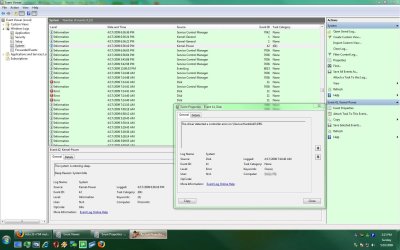
Have you checked the event viewer, under windows logs then system, for anything with a red ! here? Find any related errors or yellow exclamation points?
 

Attachments

  • Untitled-Captured-01.jpg
    Untitled-Captured-01.jpg
    173.4 KB · Views: 117

My Computer My Computer

Computer Manufacturer/Model Number
self built
OS
7600.20510 x86
CPU
P4 550 3.4 GHz HT running at 3.5 GHz
Motherboard
MSI PM8M3-V (MS-7211 v1.x) Micro-ATX mainboard
Memory
OCZ 2 GB(2x1GB) DDR400mHz running @ 414 mHz
Graphics Card(s)
HIS Radeon HD 3850 IceQ 3 Turbo HDMI Dual DL-DVI AGP
Sound Card
MOTU Traveler firewire studio interface 192 kHz 24 bit
Monitor(s) Displays
22" widescreen Acer X223W LCD, 17" Compaq P75 CRT
Screen Resolution
1680x1050 and 1280x1024
Hard Drives
SATA I x2 WD, 400 GB and 120 GB, SATA 2 WD Caviar Black 1 TB
PSU
350W generic
Case
Cybertronpc, it glows blue
Cooling
stock cpu fan, Ice-Q 3 gpu and system, many case fans
Keyboard
Logitch Classical Keyboard 200
Mouse
Logitech Mediaplay cordless
Internet Speed
1792/448 kbits/sec
Other Info
SATA II PCI fake RAID adapter, 1 GB Readyboost, original ATI Remote Wonder (even works with WMC perfectly), Logitech Rumblepad 2 game controller x2
Seems to be fixed

I'm not really sure why but the problem seems to have vanished. I used the windows 7 disc and clicked repair. I thought it said there were 0 errors but I admit I didn't read the log completely. But it hasn't opened chkdsk since I've done it(about 15 boots).
 

My Computer My Computer

OS
Vista home
When dual booting two different versions or editions of Windows on the same drive the usual advice given in many articles is seeing the second OS primary assigned the D drive letter while the present version booted into is C. Depending on how many other drives on the system that could also be F, G, H, as the lower more commonly used alternates. The Z or other higher letter beyond K is generally designated to remove drives like external usb hard drives or usb flash drives while seeing internal drives assigned in a more consecutive order.

The good thing there is no longer seeing the chkdsk utility automatically appearing on each or every other startup which would likely point to a problem with the partition table information.The automatic repair tool probably fixed a minor problem by simply rewriting the boot entry or replacing a system file so Windows would then run normally.

As far as the two tools from Neosmart those will easily run on both 32bit and 64bit 7 RCs as well as on Vista due to the basically identical method used by the boot loaders for each. The Ireboot tool is for selecting the OS that will be booted into before exiting the one you are in at present. That will override the default OS if you are booting into another.
 

My Computers My Computers

System One System Two

  • Computer type
    PC/Desktop
    Computer Manufacturer/Model Number
    Custom builds = 2
    OS
    W7 Ultimate x64/W10 Pro x64/W11 Pro Triple Boot - Main PC W7 Remote PC Micro ATX W7 Pro x64/W11 Pro
    CPU
    AMD Phenom II X4 975 Deneb 3.6ghz - 965 2nd remote pc
    Motherboard
    Gigabyte GA-790XTA-UD4-Gigabyte GA-880GM-D2H remote pc
    Memory
    Kingston Hyper X DDR3 1600 1.5v 16gb - Hyper X Fury 8gb 2nd
    Graphics Card(s)
    MSI HD Radeon 5750 1gb - MSI HD Radeon 6450 on mini tower
    Sound Card
    Creative Labs X-Fi Xtreme Audio P - Realtek onooard 2nd case
    Monitor(s) Displays
    ASUS VW199T-P 19" HP 2082a Main-HP 2082a 20" remote pc
    Screen Resolution
    Asus 1440x900 - HP 1600x900
    Hard Drives
    WD Black 1TB HD per OS W7, W10, and pending W11 presently on 500gb OS Drive - Pending Triple 1TB HDs for Spanned Storage/backup volume
    Single 2TB external USB enclosure, single 1TB System 7 Host/Boot drive, Pending 8TB external HD for system image b
    PSU
    Corsair 750TX - primary / Corsair CX600 - second
    Case
    Antec 900-2 - SSD compatible / NZXT Vulcan mini tower
    Cooling
    Zalman CNPS9900A
    Keyboard
    AZIO L70 Backlit Letters Gaming - ONN Cordless/USB
    Mouse
    MSI DS200 Programmable, Logitech Cordless
    Internet Speed
    30mbps upgrade - primary hard wired - mini tower usb WiFi
    Antivirus
    GFI VIPRE Internet Security 2014 on W7 2016 beta on W10,
    Browser
    Cyberfox, WaterFox 64bit FF variants, FireFox x64, Pale Moon
    Other Info
    Accomdata fan cooled usb 2.0 PIDE/Sata II, III external enclosure.
    Sambient usb/eSata PATA/Sata II, III external enclosure.
  • Computer type
    PC/Desktop
    System Manufacturer/Model Number
    CUSTOM ASSEMBLY
    OS
    W7 Pro x64/W11 Pro
    CPU
    AMD Deneb 3.6ghz - 965
    Motherboard
    Gigabyte GA-880GM-D2H remote pc
    Memory
    Kingston Hyper X Fury 8gb
    Graphics Card(s)
    MSI HD Radeon 6450 DVI Output
    Sound Card
    Realtek onooard Creative or Other separate PENDING
    Monitor(s) Displays
    VIZIO 32" LCD TV Separate LCD Pending
    Screen Resolution
    1600x1080
    Hard Drives
    WD 500GB OS Host/Boot WD Green 1TB Storage/Backup
    PSU
    Corsair 600W - THERMALTAKE 600W spare case
    Case
    NZXT Vulcan mini tower
    Cooling
    Twin 120mm Top Fans - 240mm Side Cover
    Keyboard
    ONN Cordless/USB Logitech Cordless
    Mouse
    ONN USB/Cordless - Logitech Cordless
    Internet Speed
    DSL 5G
    Browser
    MS Edge, FireFox, WaterFox x64, FireFox Nightly
    Other Info
    OS Testing-Remote Access to Main TeamViewer
Back
Top