
Vista boot animation on new 7 install

gregrocker

New member
Guru
Local time
12:30 PM
Messages
50,634
Clean installing Win7 on an XP Dell Dimension 2400 after upgrading RAM.

Twice installed but still getting Vista boot animation instead of Win7. Worse yet, it goes black after two passes then waits about ten seconds before getting a cursor and then blue Starting Screen.

XP is on first partition in a dual boot which I've hidden so owner has path back to XP if desired.

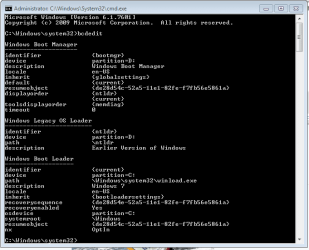
I have checked BCDedit which shows EN so it knows where to look for animation file.

Had bad resolution until driver was installed but the problem persists.
Hardware tests OK.

Anyone had this before and solved it? The BCDEdit is all I find.

Not sure I'll deliver Win7 if this can't be solved since there's a black hole in the startup which I've not seen before.
 

My Computer My Computer

At a glance

Windows 7 Ultimate SP1 64-BitIntel Core i7 870 @ 2.93GHz8Gb Dual-Channel DDR3 @ 664MHznVidia GeForce GTX 460 1024MB dedicated RAM
Computer Manufacturer/Model Number
HP Pavilion Elite 495UK
OS
Windows 7 Ultimate SP1 64-Bit
CPU
Intel Core i7 870 @ 2.93GHz
Motherboard
MSI 2A9C (CPU1)
Memory
8Gb Dual-Channel DDR3 @ 664MHz
Graphics Card(s)
nVidia GeForce GTX 460 1024MB dedicated RAM
Sound Card
Realtek HD Audio
Monitor(s) Displays
HP2310i
Screen Resolution
1920 x 1080
Hard Drives
1x1954GB Hitachi HDS22020ALA 330 (RAID), 1x1954GB Hitachi External for backup and storage
PSU
460W
Case
HP Elite
Cooling
Air cooled
Keyboard
Logitech K750 solar-powered keyboard
Mouse
Logitech Wireless M180 mouse
Internet Speed
2Mb
Other Info
Pure Avanti Flow Internet Radio with iPod Dock, 64Gb iPod, HP USB Speakers, Sony MDR-V500 Headphones, Sony Vaio F-Series Laptop
Yes that's where I got the BCDedit fix, but EN file is intact so it knows where to look for animation file.

Capture.PNGclick to enlarge

Low res can also cause this but I have good res now after driver install.

If I thought XP was the cause I would wipe the HD to reinstall after saving it as an image.
 
What's your screen resolution?

If it's less than 1024x768, the Windows 7 boot screen will appear as the Vista boot screen.
 

My Computer My Computer

At a glance

Windows 7 Ultimate SP1 64-BitIntel Core i7 870 @ 2.93GHz8Gb Dual-Channel DDR3 @ 664MHznVidia GeForce GTX 460 1024MB dedicated RAM
Computer Manufacturer/Model Number
HP Pavilion Elite 495UK
OS
Windows 7 Ultimate SP1 64-Bit
CPU
Intel Core i7 870 @ 2.93GHz
Motherboard
MSI 2A9C (CPU1)
Memory
8Gb Dual-Channel DDR3 @ 664MHz
Graphics Card(s)
nVidia GeForce GTX 460 1024MB dedicated RAM
Sound Card
Realtek HD Audio
Monitor(s) Displays
HP2310i
Screen Resolution
1920 x 1080
Hard Drives
1x1954GB Hitachi HDS22020ALA 330 (RAID), 1x1954GB Hitachi External for backup and storage
PSU
460W
Case
HP Elite
Cooling
Air cooled
Keyboard
Logitech K750 solar-powered keyboard
Mouse
Logitech Wireless M180 mouse
Internet Speed
2Mb
Other Info
Pure Avanti Flow Internet Radio with iPod Dock, 64Gb iPod, HP USB Speakers, Sony MDR-V500 Headphones, Sony Vaio F-Series Laptop
Right, it was very low during install until the driver was updated as I noted. But it's got good res now.
 
Greg, did you want to maintain the dual partition, or delete it for just Win 7?
 

My Computer My Computer

At a glance

Systems 1 and 2: Windows 7 Enterprise x64, Wi...System 1: i7 [email protected], System 2: AMD FX-41...System 1: 8GB System 2: 8GBSystem 1: ATI FirePro V4800 System 2: Radeon ...
Computer Manufacturer/Model Number
Dell and Custom
OS
Systems 1 and 2: Windows 7 Enterprise x64, Win 8 Developer
CPU
System 1: i7 [email protected], System 2: AMD FX-4100 Zambezi 3.6G
Motherboard
System 1:Dell 06NWYK System 2: ASUS M5A97 AM3+
Memory
System 1: 8GB System 2: 8GB
Graphics Card(s)
System 1: ATI FirePro V4800 System 2: Radeon HD 6850
Sound Card
System 1: onboard System 2: onboard
Monitor(s) Displays
System1: Viewsonic HDMI 24"
Screen Resolution
System 1: 1920x1080 System 2: 1920x1080
Hard Drives
System 1: Mirrored .5B drives System 2: Seagate Barracuda ST1000DM003 1TB 7200 RPM 64MB Cache SATA 6.0Gb/s
Case
System 1: Dell System 2: Cooler Master
Internet Speed
10 MBPS
I kept the XP partition in a Dual Boot but turned it's timer off.

Just now I hid XP paritition by moving the System boot files to Win7 while marking Active. Behavior is the same. I might image XP and wipe the HD to clean the boot sector then try a clean reinstall of 7, but I'm not delivering it with 7 if I can't solve the Vista animation with 10 second blackout during startup.

I should mention this Dell also has a stubborn 20 second pause on the Dell BIOS loading bar. It is BIOS version 05 which is latest (2005) but I cannot reflash it because it only offers floppy support for BIOS updating. I have unplugged floppy for now and about to pull the bezel to see if jumpers are correct on DVD and separate CD Master/slave since DVD will not boot or register correctly in BIOS. But the BIOS pause is same even with all but HD unplugged.

I'm starting to hate old hardware in spite of having a lot of it myself. It's hardly worth working on except for practice and favors for friends.
 
Pulled the CMOS battery (no defaults in Setup) which solved the stalled BIOS loading bar. About to Acronis the whole HD then clean reinstall after wiping the boot sector.

I have to go in to BIOS setup to turn off the DVD drive to get CD drive to boot via BIOS boot menu.

Any other ideas?
 

My Computer My Computer

At a glance

Systems 1 and 2: Windows 7 Enterprise x64, Wi...System 1: i7 [email protected], System 2: AMD FX-41...System 1: 8GB System 2: 8GBSystem 1: ATI FirePro V4800 System 2: Radeon ...
Computer Manufacturer/Model Number
Dell and Custom
OS
Systems 1 and 2: Windows 7 Enterprise x64, Win 8 Developer
CPU
System 1: i7 [email protected], System 2: AMD FX-4100 Zambezi 3.6G
Motherboard
System 1:Dell 06NWYK System 2: ASUS M5A97 AM3+
Memory
System 1: 8GB System 2: 8GB
Graphics Card(s)
System 1: ATI FirePro V4800 System 2: Radeon HD 6850
Sound Card
System 1: onboard System 2: onboard
Monitor(s) Displays
System1: Viewsonic HDMI 24"
Screen Resolution
System 1: 1920x1080 System 2: 1920x1080
Hard Drives
System 1: Mirrored .5B drives System 2: Seagate Barracuda ST1000DM003 1TB 7200 RPM 64MB Cache SATA 6.0Gb/s
Case
System 1: Dell System 2: Cooler Master
Internet Speed
10 MBPS
I had rebuilt BCD using EasyBCD from Win7, and using PW boot disk to Rebuild MBR.

I tried the commands given in your link's Option Two which completed successfully but I still get the Vista animation for two passes and it now goes blank for 20+ seconds before getting the cursor and start screen.

I'm going to back up an Acronis image of the entire HD now and clean reinstall after wiping the HD/boot sector as a last resort.

Meanwhile does anyone recognize this behavior: I have to enter BIOS setup to disable DVD drive to get CD drive to boot on BIOS Boot Menu. DVD is set master, CD slave. DVD won't boot. Could this be jumpers?

Edit: Acronis boot CD is barely readable in boot mode due to bad resolution. Hmm.
I wonder if there's a way to install the Intel display driver to installer for clean reinstall to get better resolution during install - never had it this bad.
 
Sorry if this was mentioned in one of the links.

Did you try this?

"Bcdedit -store c:\boot\BCD -set <GUID> locale en-US"
 

My Computer My Computer

At a glance

Systems 1 and 2: Windows 7 Enterprise x64, Wi...System 1: i7 [email protected], System 2: AMD FX-41...System 1: 8GB System 2: 8GBSystem 1: ATI FirePro V4800 System 2: Radeon ...
Computer Manufacturer/Model Number
Dell and Custom
OS
Systems 1 and 2: Windows 7 Enterprise x64, Win 8 Developer
CPU
System 1: i7 [email protected], System 2: AMD FX-4100 Zambezi 3.6G
Motherboard
System 1:Dell 06NWYK System 2: ASUS M5A97 AM3+
Memory
System 1: 8GB System 2: 8GB
Graphics Card(s)
System 1: ATI FirePro V4800 System 2: Radeon HD 6850
Sound Card
System 1: onboard System 2: onboard
Monitor(s) Displays
System1: Viewsonic HDMI 24"
Screen Resolution
System 1: 1920x1080 System 2: 1920x1080
Hard Drives
System 1: Mirrored .5B drives System 2: Seagate Barracuda ST1000DM003 1TB 7200 RPM 64MB Cache SATA 6.0Gb/s
Case
System 1: Dell System 2: Cooler Master
Internet Speed
10 MBPS
Yeah it's the first thing I tried - known fix for Vista animation replacing Win7. Have had EN locale all along.
 
Back
Top