Vista Home Premium to Win 7 Pro In Place Upgrade

So I should have enough room to create a data partition to store my data. Assuming this, am I on track? Steps 4-6 are still the parts I am not 100% sure on

I will answer your questions on this in my next post OK. ;)


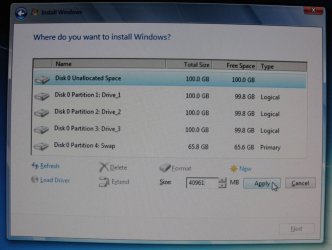
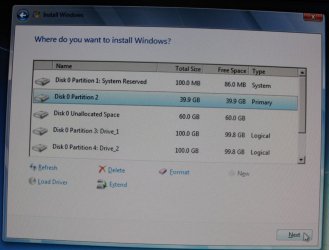
The first simulation I did in VirtualBox and this one I just did on my actual PC on real hardware and I got the exact same results, see my camera images/snips below.


click to enlarge
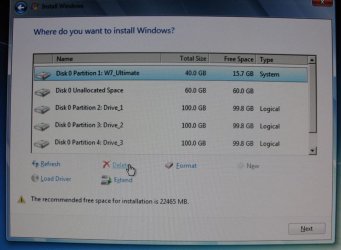
1.JPG2.JPG

3.JPG4.JPG
 

My Computer My Computer

At a glance

W 7 64-bit UltimateIntel Q9550 Yorkfield8GB Dominator 8500C5DATI : XFX 5870
Computer Manufacturer/Model Number
* BFK Customs *
OS
W 7 64-bit Ultimate
CPU
Intel Q9550 Yorkfield
Motherboard
ASUS P5Q Pro
Memory
8GB Dominator 8500C5D
Graphics Card(s)
ATI : XFX 5870
Sound Card
Realtek HD Audio 7-1
Monitor(s) Displays
1x 47" LCD HDMI & 3x 26" LCD HDMI
Screen Resolution
1920x1080P & 1920x1200
Hard Drives
1x 80GB Intel X25-M G2 SSD : 1x 500GB & 1x 640GB WD Caviar Black(s)
PSU
Corsair 620HX
Case
Cooler Master RC-690
Cooling
Tuniq Tower 120, 2x 140mm and 3x 120mm case fans
Keyboard
Microsoft 500
Mouse
Razer Diamondback 3G
Internet Speed
14 Mb/s
Other Info
1x Koutech 3Gb/s SATA HDD Hot Swap Rack
I have another quick question.

I will keep my data and programs partition as one (Partition D). In the event that I reinstall Windows, I understand that most programs will not work due to the registry ect. being wiped. To properly reinstall such programs, I just manually deleted all of the programs folders and files right? Then I'd install them.

About the partitions I decided I will do the following. If I am still not understanding something let me know:

1) I have a 1TB drive with a single partition (Vista, data, ect.). I have 300GB or so of unused space. Within Vista I will create a new partition (drive/partition D). I will place my data on this partition.

2) I will install Windows 7. I will format and install it over my former partition/drive C during the Windows 7 installer. When Windows 7 is installing, I will shrink the partition down to 60GB.

3) This will leave me with roughly 570GB or so of unallocated space, correct?

4) I will create a 3rd partition (drive/partition F?) with this unallocated space.

5) I will extend my data partition/drive D over partition F. I will now have all of my data and 830GB of total usable space.

6) Windows 7 will create a System Reserve partition (100MB) automatically during installation, correct?

I'll be creating the partitions and installing Win 7 in 5 or possibly less hours. Wish me luck.

Hello mate.

5) You can create a partition of the unallocated space but there will be other ways to combine the 2 partitions, Windows will not Extend/Merge to the left natively; after you have Windows 7 installed, post back here with another snip and we'll pick it up from there, ok.

6) If you use the Windows 7 installer to delete the Vista partition and use the installer to create a partition the SysResv will be automatically issued.
 

My Computer My Computer

At a glance

W 7 64-bit UltimateIntel Q9550 Yorkfield8GB Dominator 8500C5DATI : XFX 5870
Computer Manufacturer/Model Number
* BFK Customs *
OS
W 7 64-bit Ultimate
CPU
Intel Q9550 Yorkfield
Motherboard
ASUS P5Q Pro
Memory
8GB Dominator 8500C5D
Graphics Card(s)
ATI : XFX 5870
Sound Card
Realtek HD Audio 7-1
Monitor(s) Displays
1x 47" LCD HDMI & 3x 26" LCD HDMI
Screen Resolution
1920x1080P & 1920x1200
Hard Drives
1x 80GB Intel X25-M G2 SSD : 1x 500GB & 1x 640GB WD Caviar Black(s)
PSU
Corsair 620HX
Case
Cooler Master RC-690
Cooling
Tuniq Tower 120, 2x 140mm and 3x 120mm case fans
Keyboard
Microsoft 500
Mouse
Razer Diamondback 3G
Internet Speed
14 Mb/s
Other Info
1x Koutech 3Gb/s SATA HDD Hot Swap Rack
It would be nice to know how many other exceptions there are to this rule.

What rule?
 

My Computer My Computer

At a glance

ME/XP/Vista/Win7
OS
ME/XP/Vista/Win7
I have another quick question.

I will keep my data and programs partition as one (Partition D). In the event that I reinstall Windows, I understand that most programs will not work due to the registry ect. being wiped. To properly reinstall such programs, I just manually deleted all of the programs folders and files right? Then I'd install them.

About the partitions I decided I will do the following. If I am still not understanding something let me know:

1) I have a 1TB drive with a single partition (Vista, data, ect.). I have 300GB or so of unused space. Within Vista I will create a new partition (drive/partition D). I will place my data on this partition.

2) I will install Windows 7. I will format and install it over my former partition/drive C during the Windows 7 installer. When Windows 7 is installing, I will shrink the partition down to 60GB.

3) This will leave me with roughly 570GB or so of unallocated space, correct?

4) I will create a 3rd partition (drive/partition F?) with this unallocated space.

5) I will extend my data partition/drive D over partition F. I will now have all of my data and 830GB of total usable space.

6) Windows 7 will create a System Reserve partition (100MB) automatically during installation, correct?

I'll be creating the partitions and installing Win 7 in 5 or possibly less hours. Wish me luck.

Hello mate.

5) You can create a partition of the unallocated space but there will be other ways to combine the 2 partitions, Windows will not Extend/Merge to the left natively; after you have Windows 7 installed, post back here with another snip and we'll pick it up from there, ok.

6) If you use the Windows 7 installer to delete the Vista partition and use the installer to create a partition the SysResv will be automatically issued.


Thank you. I am going to double check and make sure my back up HDD is working 100%, unplug it and being the installation process of Win 7.

Hopefully I'll be back in an hour.
 

My Computer My Computer

At a glance

Vista
OS
Vista
We have our fingers crossed for you; we'll be here. ;)
 

My Computer My Computer

At a glance

W 7 64-bit UltimateIntel Q9550 Yorkfield8GB Dominator 8500C5DATI : XFX 5870
Computer Manufacturer/Model Number
* BFK Customs *
OS
W 7 64-bit Ultimate
CPU
Intel Q9550 Yorkfield
Motherboard
ASUS P5Q Pro
Memory
8GB Dominator 8500C5D
Graphics Card(s)
ATI : XFX 5870
Sound Card
Realtek HD Audio 7-1
Monitor(s) Displays
1x 47" LCD HDMI & 3x 26" LCD HDMI
Screen Resolution
1920x1080P & 1920x1200
Hard Drives
1x 80GB Intel X25-M G2 SSD : 1x 500GB & 1x 640GB WD Caviar Black(s)
PSU
Corsair 620HX
Case
Cooler Master RC-690
Cooling
Tuniq Tower 120, 2x 140mm and 3x 120mm case fans
Keyboard
Microsoft 500
Mouse
Razer Diamondback 3G
Internet Speed
14 Mb/s
Other Info
1x Koutech 3Gb/s SATA HDD Hot Swap Rack
Are you saying you were able to get the installer to create System Reserved in Unallocated Space when a data partition remains?

If so SeaVixen was correct. I was quoting the rule that you won't get SysReserved on a prepartitioned HD. It would be nice to know how many other exceptions there are to this rule.

If you make three partitions & the one you install Windows to is Unallocated, System Reserved will be made.
 

My Computer My Computer

At a glance

ME/XP/Vista/Win7
OS
ME/XP/Vista/Win7
I am installing Win 7 right now (on another PC). I decided against making new partitions for the moment as it seemed problematic. Within the installer I formatted drive C entirely. It didn't give me an option to shrink the drive, so I will do that in disk manager.

I will then copy my data from my back up HDD.

Edit: Decided against making a partition. Too troublesome. So far Win 7 is very slow, a lot of stuttering, a lot of "Program Is Not Responding".

I hope the latest updates and SP1 fix this, or I am going back to Vista.
 
Last edited:

My Computer My Computer

At a glance

Vista
OS
Vista
Back
Top