Vista Home Premium Updated to Windows 7 Professional

kinolie

New member
Local time
12:29 PM
Messages
21
I was running Windows Vista Home Premium. I purchased an upgrade for Windows 7 Professional that I downloaded from a website. Now when I turn my computer on I get a black screen where you choose to open with Windows 7 or Vista. I also keep getting a screen pop up that says D:\ volume only has 66mb of free disk space available. It says I have to restore 300mb or system restore may not be able to undo or track harmful changes.

Basically I have no idea what I did, but I need to remove Vista from my computer and have no idea how to. Can anyone help?
 

My Computer My Computer

At a glance

Windows 7 Professional
Computer Manufacturer/Model Number
Dell Inspiron 1520
OS
Windows 7 Professional

My Computer My Computer

At a glance

Windows 7 Professional x64Intel i7 2600K OC'd @ 4620 MHz16GB GSkill Sniper 2133 Mhz (4x4GB)EVGA GeForce GTX 480 SuperClocked+
Computer Manufacturer/Model Number
Custom
OS
Windows 7 Professional x64
CPU
Intel i7 2600K OC'd @ 4620 MHz
Motherboard
Asus P8Z68-V Pro
Memory
16GB GSkill Sniper 2133 Mhz (4x4GB)
Graphics Card(s)
EVGA GeForce GTX 480 SuperClocked+
Sound Card
Realtek High Definition Audio
Monitor(s) Displays
2x Acer S273HLbmii 27"
Screen Resolution
2 x 1920x1080
Hard Drives
64GB Crucial M4 SSD

Storage: Hitachi 1TB 5400RPM, Samsung 1.5TB 5400RPM
PSU
Corsair HW Series 750w (modular)
Case
Cooler Master HAF 932 Advanced Blue Edition
Cooling
CM Hyper 212+ CPU cooler, 3x 230mm + 1x 140mm case fans
Keyboard
Logitech MK320 (wireless)
Mouse
Logitech MK320 (wireless)
Internet Speed
30 Mb/s : 2 Mb/s
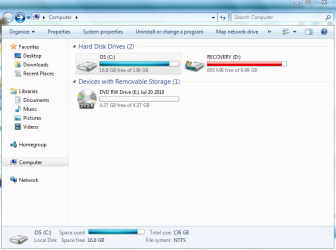
I have a 32 bit system. I did the disk clean up. Here is the screen shot. I think I did it of the correct thing.
 

Attachments

  • Screen Shot.PNG
    Screen Shot.PNG
    33.4 KB · Views: 27

My Computer My Computer

At a glance

Windows 7 Professional
Computer Manufacturer/Model Number
Dell Inspiron 1520
OS
Windows 7 Professional

My Computer My Computer

At a glance

Windows 7 Professional x64Intel i7 2600K OC'd @ 4620 MHz16GB GSkill Sniper 2133 Mhz (4x4GB)EVGA GeForce GTX 480 SuperClocked+
Computer Manufacturer/Model Number
Custom
OS
Windows 7 Professional x64
CPU
Intel i7 2600K OC'd @ 4620 MHz
Motherboard
Asus P8Z68-V Pro
Memory
16GB GSkill Sniper 2133 Mhz (4x4GB)
Graphics Card(s)
EVGA GeForce GTX 480 SuperClocked+
Sound Card
Realtek High Definition Audio
Monitor(s) Displays
2x Acer S273HLbmii 27"
Screen Resolution
2 x 1920x1080
Hard Drives
64GB Crucial M4 SSD

Storage: Hitachi 1TB 5400RPM, Samsung 1.5TB 5400RPM
PSU
Corsair HW Series 750w (modular)
Case
Cooler Master HAF 932 Advanced Blue Edition
Cooling
CM Hyper 212+ CPU cooler, 3x 230mm + 1x 140mm case fans
Keyboard
Logitech MK320 (wireless)
Mouse
Logitech MK320 (wireless)
Internet Speed
30 Mb/s : 2 Mb/s
Is that going to remove Windows vista from my computer though?
 

My Computer My Computer

At a glance

Windows 7 Professional
Computer Manufacturer/Model Number
Dell Inspiron 1520
OS
Windows 7 Professional

My Computer My Computer

At a glance

Windows 7 Professional x64Intel i7 2600K OC'd @ 4620 MHz16GB GSkill Sniper 2133 Mhz (4x4GB)EVGA GeForce GTX 480 SuperClocked+
Computer Manufacturer/Model Number
Custom
OS
Windows 7 Professional x64
CPU
Intel i7 2600K OC'd @ 4620 MHz
Motherboard
Asus P8Z68-V Pro
Memory
16GB GSkill Sniper 2133 Mhz (4x4GB)
Graphics Card(s)
EVGA GeForce GTX 480 SuperClocked+
Sound Card
Realtek High Definition Audio
Monitor(s) Displays
2x Acer S273HLbmii 27"
Screen Resolution
2 x 1920x1080
Hard Drives
64GB Crucial M4 SSD

Storage: Hitachi 1TB 5400RPM, Samsung 1.5TB 5400RPM
PSU
Corsair HW Series 750w (modular)
Case
Cooler Master HAF 932 Advanced Blue Edition
Cooling
CM Hyper 212+ CPU cooler, 3x 230mm + 1x 140mm case fans
Keyboard
Logitech MK320 (wireless)
Mouse
Logitech MK320 (wireless)
Internet Speed
30 Mb/s : 2 Mb/s
kinolie, Welcome to SevenForums
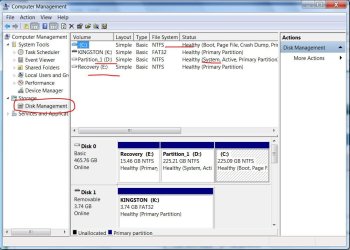
The path to disk management is Start/ right click computer/manage/disk management. As you can see from my snip. I have a dual boot with vista and seven on this computer. 7 is c and vista is d and recovery is e the recovery is for vista which was installed first. then I clean installed 7 to a new partition. I am thinking that you still have the recovery files left by vista. See for yourself what disk manager has to say and take a snip of it for us to look at so we can advise you better. Good luck to you with your install..
disk manage.JPG
 

My Computer My Computer

At a glance

Windows 7 Ulti. x64AMD Phenom 8450 triple-core 2.10 ghz4GBATI Radion HD 3200
Computer Manufacturer/Model Number
Gateway GT5692
OS
Windows 7 Ulti. x64
CPU
AMD Phenom 8450 triple-core 2.10 ghz
Memory
4GB
Graphics Card(s)
ATI Radion HD 3200
Monitor(s) Displays
Gateway FPD1775W
Screen Resolution
1280x720
Hard Drives
465.6613 Gibibytes
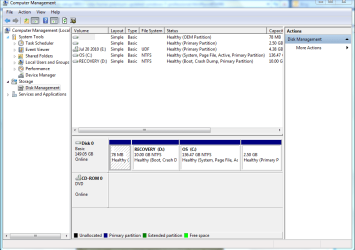
Oh, ok Thank you!!!! Here it is.
 

Attachments

  • Screen Shot.PNG
    Screen Shot.PNG
    30.4 KB · Views: 25

My Computer My Computer

At a glance

Windows 7 Professional
Computer Manufacturer/Model Number
Dell Inspiron 1520
OS
Windows 7 Professional

My Computer My Computer

At a glance

Windows 7 Professional x64Intel i7 2600K OC'd @ 4620 MHz16GB GSkill Sniper 2133 Mhz (4x4GB)EVGA GeForce GTX 480 SuperClocked+
Computer Manufacturer/Model Number
Custom
OS
Windows 7 Professional x64
CPU
Intel i7 2600K OC'd @ 4620 MHz
Motherboard
Asus P8Z68-V Pro
Memory
16GB GSkill Sniper 2133 Mhz (4x4GB)
Graphics Card(s)
EVGA GeForce GTX 480 SuperClocked+
Sound Card
Realtek High Definition Audio
Monitor(s) Displays
2x Acer S273HLbmii 27"
Screen Resolution
2 x 1920x1080
Hard Drives
64GB Crucial M4 SSD

Storage: Hitachi 1TB 5400RPM, Samsung 1.5TB 5400RPM
PSU
Corsair HW Series 750w (modular)
Case
Cooler Master HAF 932 Advanced Blue Edition
Cooling
CM Hyper 212+ CPU cooler, 3x 230mm + 1x 140mm case fans
Keyboard
Logitech MK320 (wireless)
Mouse
Logitech MK320 (wireless)
Internet Speed
30 Mb/s : 2 Mb/s
You have very little free space on your C drive. If it was me, I'd download the Microsoft tool and make the .iso file, which you can burn as a disc image, and then do a clean install. Considering you only have the downloaded version of Windows 7, this should be a necessary step regardless.
 

My Computer My Computer

At a glance

Windows 7 Ultimate x64 SP1Intel Core i7-260012 GB Patriot Extreme DDR3-1333Nvidia GTX 470
OS
Windows 7 Ultimate x64 SP1
CPU
Intel Core i7-2600
Motherboard
Gigabyte GA-P67A-UD3P-B3
Memory
12 GB Patriot Extreme DDR3-1333
Graphics Card(s)
Nvidia GTX 470
Monitor(s) Displays
Dell UltraSharp 2209WA
Hard Drives
OCZ Agility3 240 GB, WD5001AALS, WD7501AALS
PSU
OCZ ModStream 700W
Case
CoolerMaster HAF 912 Advanced
Cooling
CoolerMaster Hyper 212 Plus
I was running Windows Vista Home Premium. I purchased an upgrade for Windows 7 Professional that I downloaded from a website. Now when I turn my computer on I get a black screen where you choose to open with Windows 7 or Vista. I also keep getting a screen pop up that says D:\ volume only has 66mb of free disk space available. It says I have to restore 300mb or system restore may not be able to undo or track harmful changes.

Basically I have no idea what I did, but I need to remove Vista from my computer and have no idea how to. Can anyone help?
kinolie.. Looks to me like you need to reinstall your windows 7 by doing a clean install. I could be wrong but I think you have installed 7 on your recovery partition. Look at your disk manage pic and you see lots of partitions where you normally would like to have two. One recover and one main os. If do a clean install you can clean that up and for sure be rid of vista. when doing install follow the tutorial and pay paticulal attention to number 7 and 8.Pay attention to the tip.If you have more than one partition on this hard drive and want to get rid them to make one big drive again, then select a partition and click on this will instruct you how to delete all your small partitions and make just one large about 150 gigs looks like. Then windows will create a 100mb recovery partition for you. you will be much happier with your install. Good luck to you.
http://www.sevenforums.com/tutorials/1649-clean-install-windows-7-a.html
 

My Computer My Computer

At a glance

Windows 7 Ulti. x64AMD Phenom 8450 triple-core 2.10 ghz4GBATI Radion HD 3200
Computer Manufacturer/Model Number
Gateway GT5692
OS
Windows 7 Ulti. x64
CPU
AMD Phenom 8450 triple-core 2.10 ghz
Memory
4GB
Graphics Card(s)
ATI Radion HD 3200
Monitor(s) Displays
Gateway FPD1775W
Screen Resolution
1280x720
Hard Drives
465.6613 Gibibytes
I would gladly do what you are suggesting...however I haven't the foggiest idea how to do it. I just got a message that says I now have 0mb... so I definitey need to do something. Is there anyway you could instruct me on how to do it? Or point me in the direction?
 

My Computer My Computer

At a glance

Windows 7 Professional
Computer Manufacturer/Model Number
Dell Inspiron 1520
OS
Windows 7 Professional
Oh,also, I do not have a dvd or cd to download windows 7 from as I downloaded it from a site. However, every place I go to get help begins with putting in the cd and turning the computer on...however I can't do that... Any ideas?

Also, I just checked and I have


Healthy (oem partition)
Healthy (primary partition)
July 10 (E:) UDF Healthy (primary partition)
OS (C:) NTFS Healthy (system,page file, active, primary partition) Recovery (D:) NTFS Healthy (boot, crash dump, primary partition)

the third one is dated july 20 2010 which Is when I installed 7... Is this the way it is supposed to look?
 

My Computer My Computer

At a glance

Windows 7 Professional
Computer Manufacturer/Model Number
Dell Inspiron 1520
OS
Windows 7 Professional
Why can't you do that? Don't you have a DVD burner or blank DVD? Microsoft has a tool available on the same download site that will make the disc image for you.
 

My Computer My Computer

At a glance

Windows 7 Ultimate x64 SP1Intel Core i7-260012 GB Patriot Extreme DDR3-1333Nvidia GTX 470
OS
Windows 7 Ultimate x64 SP1
CPU
Intel Core i7-2600
Motherboard
Gigabyte GA-P67A-UD3P-B3
Memory
12 GB Patriot Extreme DDR3-1333
Graphics Card(s)
Nvidia GTX 470
Monitor(s) Displays
Dell UltraSharp 2209WA
Hard Drives
OCZ Agility3 240 GB, WD5001AALS, WD7501AALS
PSU
OCZ ModStream 700W
Case
CoolerMaster HAF 912 Advanced
Cooling
CoolerMaster Hyper 212 Plus

My Computer My Computer

At a glance

Windows 7 Ulti. x64AMD Phenom 8450 triple-core 2.10 ghz4GBATI Radion HD 3200
Computer Manufacturer/Model Number
Gateway GT5692
OS
Windows 7 Ulti. x64
CPU
AMD Phenom 8450 triple-core 2.10 ghz
Memory
4GB
Graphics Card(s)
ATI Radion HD 3200
Monitor(s) Displays
Gateway FPD1775W
Screen Resolution
1280x720
Hard Drives
465.6613 Gibibytes
Have you saved Backup(s) to your D partition? This sometimes happens with the Recovery partition. Post up a screenshot showing all of the folders in D and we can help you sort it out.

Surely you saved the Win7 file you downloaded (maybe to D?) since you paid a lot for it. It needs to be burned to a DVD or written to flash stick and kept to be used for reinstalls or emergency repairs.

It is recommended to make the Recovery Disks first before wiping the HD to reinstall, however that will likely not work now that you have overwritten the OS (Vista?). So after sorting out the files in D, we can help you attempt to run the Recovery from boot to see if it will work, then either retrieve the Recov image file to back up or decide if you want to keep the Recovery partition if it will run.

Whether or not you clean reinstall, you'll need to consider a second HD or external for storage, including a Win7 backup image so you never have to reinstall again.
 
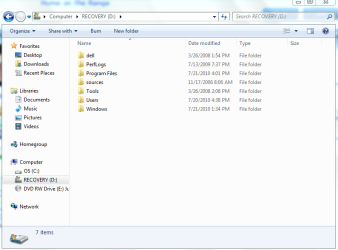
Thank you all sooooo much! I still have no clue what I am doing and am very grateful for your help! Here is the screen shot of D. I hope I did it correctly.
 

Attachments

  • Screenshot.PNG
    Screenshot.PNG
    28.3 KB · Views: 17

My Computer My Computer

At a glance

Windows 7 Professional
Computer Manufacturer/Model Number
Dell Inspiron 1520
OS
Windows 7 Professional
It looks like you did install Win7 to the REcovery Partition. Let's also see a screenshot of the folders in C to be sure.

Have you made Recovery Disks from that Recovery partition before it was corrupted? What disks were supplied by Dell?

In preparation for wiping the HD to clean reinstall, you'll need to determine if you have the ability to recover to factory condition which is sometimes required if you need to service hardware warranty or if you want to sell the computer but keep your Win7.

If you don't Vista Recovery Disks then test the Recov partition: back up your files, reboot and press Cntrl F11 to see if Recovery runs and what options it gives you before bailing out. If it does you might want to keep the Recov partition after removing Win7 files out of it, if you think you might need it for the reasons stated.

You then need to burn the Win7 download to DVD using ImgBurn at 4x speed. View attachment 86707 You can buy a 3 pack of quality DVD's off the rack at Walgreens for $2.

Back up all of your files, boot the Win7 DVD to wipe the HD using this: http://www.sevenforums.com/tutorials/91339-ssd-hdd-optimize-windows-reinstallation.html Then Custom install to the partition created, use the drivers given by installer or optional Windows Updates after install, or find any missing drivers on the Drivers/Apps disk or the Dell Support Downloads webpage for your tag number.
 
Here is the screenshot of C. I did not make recovery disks before I installed 7.
 

Attachments

  • Screenshot.PNG
    Screenshot.PNG
    58.6 KB · Views: 9

My Computer My Computer

At a glance

Windows 7 Professional
Computer Manufacturer/Model Number
Dell Inspiron 1520
OS
Windows 7 Professional
Back
Top