Vista Home Premium Updated to Windows 7 Professional

I was running Windows Vista Home Premium. I purchased an upgrade for Windows 7 Professional that I downloaded from a website. Now when I turn my computer on I get a black screen where you choose to open with Windows 7 or Vista.

Basically I have no idea what I did, but I need to remove Vista from my computer and have no idea how to. Can anyone help?
kinolie, You say you get a screen that says you can open vista. Have you opened vista and searched for your downloaded win 7. You downloaded it to vista then ran setup exe. So if you can find that downloaded folder then you can make a bootable dvd from that using the tool from microsoft or the tutorial that I linked you to. If this is not posible then try going to the web site that you downloaded your copy of 7pro from and see if they have an option to have a copy of your download sent to you in the form of a dvd.
 

My Computer My Computer

At a glance

Windows 7 Ulti. x64AMD Phenom 8450 triple-core 2.10 ghz4GBATI Radion HD 3200
Computer Manufacturer/Model Number
Gateway GT5692
OS
Windows 7 Ulti. x64
CPU
AMD Phenom 8450 triple-core 2.10 ghz
Memory
4GB
Graphics Card(s)
ATI Radion HD 3200
Monitor(s) Displays
Gateway FPD1775W
Screen Resolution
1280x720
Hard Drives
465.6613 Gibibytes
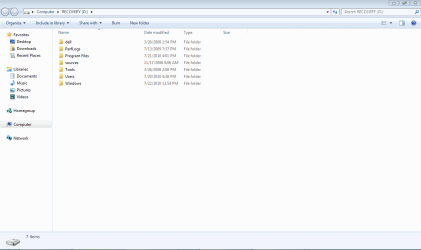
I can't figure out how to open in vista now. I folowed someone elses instructions and deleted it form the (msconfig boot manager thing) so now everytime I boot the computer it goes striaght into windows 7, I can't figure out how to open it in vista so that I can put the windows 7 installation files on a disc. Also, I think I did install windows 7 on my recovery space.
 

My Computer My Computer

At a glance

Windows 7 Professional
Computer Manufacturer/Model Number
Dell Inspiron 1520
OS
Windows 7 Professional
Also, I think I did install windows 7 on my recovery space.
Honestly, at this point, I'd be asking friends for a copy of the disc, or trying to obtain one from the site I bought Windows 7 from. After that, I'd back up my data and do a clean, fresh install.

Maybe I'm missing something as well, but can you still boot to Windows 7? If so, why can't you grab your installation files from within Windows 7? I also didn't see an answer to this, but why isn't it possible to make the dosc yourself? Do you not have a DVD burner and a blank DVD?
 

My Computer My Computer

At a glance

Windows 7 Ultimate x64 SP1Intel Core i7-260012 GB Patriot Extreme DDR3-1333Nvidia GTX 470
OS
Windows 7 Ultimate x64 SP1
CPU
Intel Core i7-2600
Motherboard
Gigabyte GA-P67A-UD3P-B3
Memory
12 GB Patriot Extreme DDR3-1333
Graphics Card(s)
Nvidia GTX 470
Monitor(s) Displays
Dell UltraSharp 2209WA
Hard Drives
OCZ Agility3 240 GB, WD5001AALS, WD7501AALS
PSU
OCZ ModStream 700W
Case
CoolerMaster HAF 912 Advanced
Cooling
CoolerMaster Hyper 212 Plus
I can't figure out how to open in vista now. I folowed someone elses instructions and deleted it form the (msconfig boot manager thing) so now everytime I boot the computer it goes striaght into windows 7, I can't figure out how to open it in vista so that I can put the windows 7 installation files on a disc. Also, I think I did install windows 7 on my recovery space.
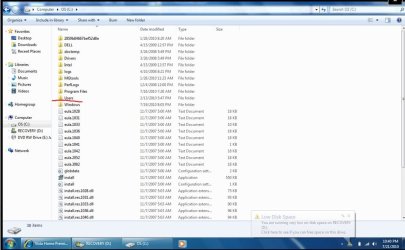
Open your users folder on your c drive and look for your win 7 download.
kinolie 1.JPG
 

My Computer My Computer

At a glance

Windows 7 Ulti. x64AMD Phenom 8450 triple-core 2.10 ghz4GBATI Radion HD 3200
Computer Manufacturer/Model Number
Gateway GT5692
OS
Windows 7 Ulti. x64
CPU
AMD Phenom 8450 triple-core 2.10 ghz
Memory
4GB
Graphics Card(s)
ATI Radion HD 3200
Monitor(s) Displays
Gateway FPD1775W
Screen Resolution
1280x720
Hard Drives
465.6613 Gibibytes
when I get on vlite and open c: and then desktop and then click on "expanded setup" I just keep getting the error screen that access is denied. I think if I could figure out how to boot in vista I might be ok. But I can't figure out how to boot into vista.

yes I have blank dvds and a dvd burner and I am booted onto windows 7 right now...but I don't know how to make the bootable installation cd...
 

My Computer My Computer

At a glance

Windows 7 Professional
Computer Manufacturer/Model Number
Dell Inspiron 1520
OS
Windows 7 Professional
when I get on vlite
I'm confused as to how/why vLite is being used here
yes I have blank dvds and a dvd burner and I am booted onto windows 7 right now...but I don't know how to make the bootable installation cd...
We answered that several times already. Once you get to your downloaded installation files, or you redownload them, grab the tool Microsoft provides on the same site. It will take those installation files, and make you a bootable installation disc or bootable installation flash drive. The entire process would take about 5 minutes.

Microsoft Store: Windows 7 USB/DVD Download Tool Help
 

My Computer My Computer

At a glance

Windows 7 Ultimate x64 SP1Intel Core i7-260012 GB Patriot Extreme DDR3-1333Nvidia GTX 470
OS
Windows 7 Ultimate x64 SP1
CPU
Intel Core i7-2600
Motherboard
Gigabyte GA-P67A-UD3P-B3
Memory
12 GB Patriot Extreme DDR3-1333
Graphics Card(s)
Nvidia GTX 470
Monitor(s) Displays
Dell UltraSharp 2209WA
Hard Drives
OCZ Agility3 240 GB, WD5001AALS, WD7501AALS
PSU
OCZ ModStream 700W
Case
CoolerMaster HAF 912 Advanced
Cooling
CoolerMaster Hyper 212 Plus
I am not downloading it from microsoft. I downloaded it from a school webite that I bought it from and there is not a tool on that website. I also cannot redownload it because now I do not have enought freespace and it will not allow me to do so.
 

My Computer My Computer

At a glance

Windows 7 Professional
Computer Manufacturer/Model Number
Dell Inspiron 1520
OS
Windows 7 Professional
when I get on vlite and open c: and then desktop and then click on "expanded setup" I just keep getting the error screen that access is denied. I think if I could figure out how to boot in vista I might be ok. But I can't figure out how to boot into vista.

yes I have blank dvds and a dvd burner and I am booted onto windows 7 right now...but I don't know how to make the bootable installation cd...
Sorry thats not working for you. Try this to take ownership of the files. Then try again to use the tools or the tutorials that have been suggested. Good luck to you.

http://www.sevenforums.com/tutorials/1911-take-ownership-shortcut.html
 

My Computer My Computer

At a glance

Windows 7 Ulti. x64AMD Phenom 8450 triple-core 2.10 ghz4GBATI Radion HD 3200
Computer Manufacturer/Model Number
Gateway GT5692
OS
Windows 7 Ulti. x64
CPU
AMD Phenom 8450 triple-core 2.10 ghz
Memory
4GB
Graphics Card(s)
ATI Radion HD 3200
Monitor(s) Displays
Gateway FPD1775W
Screen Resolution
1280x720
Hard Drives
465.6613 Gibibytes
Does anyone know how I can boot into my c drive/Vista instead of Windows 7 which is the recovery partition that my computer automatically boots into?
 

My Computer My Computer

At a glance

Windows 7 Professional
Computer Manufacturer/Model Number
Dell Inspiron 1520
OS
Windows 7 Professional
I am not downloading it from microsoft. I downloaded it from a school webite that I bought it from and there is not a tool on that website.
The files are likely the same, so the Microsoft tool would still work. I'm not sure why you are so resistant to this method, because it will solve the problem for you.

If you need to boot back into Vista, you'd have to run a repair on it, but you'd need a regular Vista disc, and not a recovery disc.

Get access to your downloaded files (several ways have been posted), then use the Microsoft tool to make a bootable disc. Backup your data, wipe the drive clean, and install Windows 7 clean. Simple as that.
 

My Computer My Computer

At a glance

Windows 7 Ultimate x64 SP1Intel Core i7-260012 GB Patriot Extreme DDR3-1333Nvidia GTX 470
OS
Windows 7 Ultimate x64 SP1
CPU
Intel Core i7-2600
Motherboard
Gigabyte GA-P67A-UD3P-B3
Memory
12 GB Patriot Extreme DDR3-1333
Graphics Card(s)
Nvidia GTX 470
Monitor(s) Displays
Dell UltraSharp 2209WA
Hard Drives
OCZ Agility3 240 GB, WD5001AALS, WD7501AALS
PSU
OCZ ModStream 700W
Case
CoolerMaster HAF 912 Advanced
Cooling
CoolerMaster Hyper 212 Plus
If you're using Vlite then it sounds like you got box files downloaded from your school instead of the ISO which you burn to DVD.

MS attempted to make good on millions of student downloads which were not provided ISO's here: Microsoft Fixes Windows 7 Student Edition Upgrade Problems The link is to HP so run this to unlock all versions to install your licensed version: http://lifehacker.com/5438005/eicfg...-use-any-product-key-with-your-windows-7-disc

Use the official MS tool to either burn ISO to DVD or write to flashstick: http://www.sevenforums.com/tutorials/31541-windows-7-usb-dvd-download-tool.html?filter[2]=General%20Tips

Back up your files, boot the Win7 DVD and wipe the HD: http://www.sevenforums.com/tutorials/91339-ssd-hdd-optimize-windows-reinstallation.html

Then clean install using one of the workarounds to install Upgrade to clean HD: http://www.sevenforums.com/tutorials/31402-clean-install-upgrade-windows-7-version.html

You should be able to copy your files out of Vista without starting it, but if you want to start it install EasyBCD 2.0 to Win7 and add Vista on the Add tab.
 
Thank you all so much for all of your help! I really appreciate it! I finally was able to re-dowload the iso on a friends computer and install it on the c: drive where it is supposed to be. However, now I still have everything on the recovery drive... does anyone know how I can wipe all that stuff off the recovery drive?
 

My Computer My Computer

At a glance

Windows 7 Professional
Computer Manufacturer/Model Number
Dell Inspiron 1520
OS
Windows 7 Professional
Kinolie.. Glad that you have now a good install of win 7. Everything is running better now. We will need a new picture of your disk management. This will show us what you now have on your drive. If you did not wipe it clean before installing then you will want to use a program such as Partition Wizard to move some space around. Good luck to you. :D
 

My Computer My Computer

At a glance

Windows 7 Ulti. x64AMD Phenom 8450 triple-core 2.10 ghz4GBATI Radion HD 3200
Computer Manufacturer/Model Number
Gateway GT5692
OS
Windows 7 Ulti. x64
CPU
AMD Phenom 8450 triple-core 2.10 ghz
Memory
4GB
Graphics Card(s)
ATI Radion HD 3200
Monitor(s) Displays
Gateway FPD1775W
Screen Resolution
1280x720
Hard Drives
465.6613 Gibibytes
Ok, here are screen shots. One of the c partition, one of the recovery and then one of the general screen. Also, am I supposed to have four partitions? Again, thank you all so much for all your help!
 

Attachments

  • Screenshot 1.PNG
    Screenshot 1.PNG
    23.1 KB · Views: 8
  • Screenshot of C.PNG
    Screenshot of C.PNG
    28.8 KB · Views: 4
  • Screenshot of Recovery.PNG
    Screenshot of Recovery.PNG
    17.8 KB · Views: 4

My Computer My Computer

At a glance

Windows 7 Professional
Computer Manufacturer/Model Number
Dell Inspiron 1520
OS
Windows 7 Professional
If you follow our advice and do the clean install, you should only see two partitions (unless you split up your C drive on purpose, then it would be three). You wouldn't need the recovery partition anymore, as you'd have your install disc. You'd see the 100 MB system partition, and then the rest as C. I'm not sure why you have 2.5 GB just hanging out there, unused and unassigned, but that would all be rectified with a clean install anyway.
 

My Computer My Computer

At a glance

Windows 7 Ultimate x64 SP1Intel Core i7-260012 GB Patriot Extreme DDR3-1333Nvidia GTX 470
OS
Windows 7 Ultimate x64 SP1
CPU
Intel Core i7-2600
Motherboard
Gigabyte GA-P67A-UD3P-B3
Memory
12 GB Patriot Extreme DDR3-1333
Graphics Card(s)
Nvidia GTX 470
Monitor(s) Displays
Dell UltraSharp 2209WA
Hard Drives
OCZ Agility3 240 GB, WD5001AALS, WD7501AALS
PSU
OCZ ModStream 700W
Case
CoolerMaster HAF 912 Advanced
Cooling
CoolerMaster Hyper 212 Plus
I just put the iso on a cd and ran it, but it asks which partition to place it on, so I chose C.... I guess I'm not sure what I did wrong or how to fix it. I thought what I did was a clean install.
 

My Computer My Computer

At a glance

Windows 7 Professional
Computer Manufacturer/Model Number
Dell Inspiron 1520
OS
Windows 7 Professional
I just put the iso on a cd and ran it, but it asks which partition to place it on, so I chose C.... I guess I'm not sure what I did wrong or how to fix it. I thought what I did was a clean install.
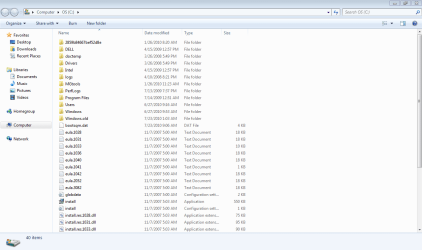
Looks like you still have a little bit to do but first answer a few questions. How is your install running. Does it boot fast and run fast when opening programs and on the internet? Your C partition is still very full and if you had done a clean install it should only be around 20 GB but your shows 136 GB? If you are unconcerned about your data that has been carried over from vista then you can run a disk clean up. I see in your pic that you have a folder called windows old. this has all your stuff from Vista in it. Grab what you want to keep from it and then clean it up to try and gain some room back for your c drive. Hope this helps you for a start.
From your disk management, you are booting into your c with win 7 on it. It is also your system active partition which means your boot files are there and you can do pretty much anything you like to your other partitions. Lets concentrate on cleaning up your c drive. Make sure that you do step 6 of the instructions. this will delete windows old. folder.
http://www.sevenforums.com/tutorials/818-disk-cleanup-open-use.html?ltr=D
 

My Computer My Computer

At a glance

Windows 7 Ulti. x64AMD Phenom 8450 triple-core 2.10 ghz4GBATI Radion HD 3200
Computer Manufacturer/Model Number
Gateway GT5692
OS
Windows 7 Ulti. x64
CPU
AMD Phenom 8450 triple-core 2.10 ghz
Memory
4GB
Graphics Card(s)
ATI Radion HD 3200
Monitor(s) Displays
Gateway FPD1775W
Screen Resolution
1280x720
Hard Drives
465.6613 Gibibytes
It does run great actually and I just followed your instructions and ran the disk cleanup which gave me a lot more space on the c drive, (106 free of 136) however even though I ran it on the recovery drive, it is still almost completely full. I don't need any of the old files from vista, I have them on cds. Now I just need to figure out how to wipe all that stuff off my recover drive...also someone said I should only have one partition and i have four? Any ideas on how I fix either of these?
 

My Computer My Computer

At a glance

Windows 7 Professional
Computer Manufacturer/Model Number
Dell Inspiron 1520
OS
Windows 7 Professional
It does run great actually and I just followed your instructions and ran the disk cleanup which gave me a lot more space on the c drive, (106 free of 136) however even though I ran it on the recovery drive, it is still almost completely full. I don't need any of the old files from vista, I have them on cds. Now I just need to figure out how to wipe all that stuff off my recover drive...also someone said I should only have one partition and i have four? Any ideas on how I fix either of these?
Well thats good clean up kinolie ;)
Now have a look at the link and it has a free download for the software. It also has some good instructions on how to use it to do what you need. I think you need to read the ones I redmarked. Delete then move everything to the right side of your c partition. It would be good to back up your stuff before hand. Good luck to you.
BEST FREE Partition Manager Software for Windows supports all 32-bit & 64 bit Windows No-server OS.
kinolie 2.JPG
 

My Computer My Computer

At a glance

Windows 7 Ulti. x64AMD Phenom 8450 triple-core 2.10 ghz4GBATI Radion HD 3200
Computer Manufacturer/Model Number
Gateway GT5692
OS
Windows 7 Ulti. x64
CPU
AMD Phenom 8450 triple-core 2.10 ghz
Memory
4GB
Graphics Card(s)
ATI Radion HD 3200
Monitor(s) Displays
Gateway FPD1775W
Screen Resolution
1280x720
Hard Drives
465.6613 Gibibytes
Back
Top