Vista Home Premium Updated to Windows 7 Professional

I downloaded the software, however I'm not sure what to do with it. I'm not sure which partitions I am supposed to keep and which to get rid of and I'm not sure if I get rid of the recovery partion or just wipe it clean, and I also have no idea how to wipe it clean...I apologize for the continuous quesitons, I am just really confused. I see on the partition program you posted that there is a wipe partition and format partition section. Should I just wipe the recovery partition? Is that what I should be doing?
 

My Computer My Computer

At a glance

Windows 7 Professional
Computer Manufacturer/Model Number
Dell Inspiron 1520
OS
Windows 7 Professional
Use the official MS tool to either burn ISO to DVD or write to flashstick: http://www.sevenforums.com/tutorials/31541-windows-7-usb-dvd-download-tool.html?filter[2]=General%20Tips

Back up your files, boot the Win7 DVD and wipe the HD: http://www.sevenforums.com/tutorials/91339-ssd-hdd-optimize-windows-reinstallation.html

Then clean install using one of the workarounds to install Upgrade to clean HD: http://www.sevenforums.com/tutorials/31402-clean-install-upgrade-windows-7-version.html

You should be able to copy your files out of Vista without starting it, but if you want to start it install EasyBCD 2.0 to Win7 and add Vista on the Add tab.

Why did you ignore the step to wipe the HD to optimize and give you a clean slate for the reinstall?

As a result you still have the corrupted Recovery Partition you stuffed with the previous Win7 install and a useless utility partition sitting on the prime lower HD address.

If you don't want to reinstall following the steps given, then you'll need to use free Partition Wizard bootable CD to delete the useless partitions you left to corrupt your new install, then Resize Win7 back into the deleted space. This may require repairing the MBR using the DVD for Startup Repair run three times.

I can give you the steps if you'll follow them.
 
I'm sorry I wasn't ignoring the steps you gave me, but they are confusing and I wasn't sure what to do. I'm also terrified of wiping the hard drive in case i do something wrong. The bootable cd I made doesn't work unless I'm logged on. When I put the cd in and start the computer, nothing happens until I log on to windows and then open up the file. So I'm a little nervouse if I wipe the harddrive that I am going to put the cd in and nothing will happen and then my computer will be worthless to me. I know you understand what you are doing but it is very confusing to me.
 

My Computer My Computer

At a glance

Windows 7 Professional
Computer Manufacturer/Model Number
Dell Inspiron 1520
OS
Windows 7 Professional
If you start the computer with the DVD in the drive and are not prompted to "Press any key to boot from DVD" then you need to set your DVD drive to boot first in BIOS setup: Boot Order - How to Change the Boot Order in BIOS - BIOS Boot Order

Once you can boot the DVD, follow the instructions for wiping the HD using DISKPART from the DVD Command Line, which you access by pressing Shift F10 from the first screen.

If setting DVD to boot first or wiping HD with DISKPART is intimidating to you, download and burn to CD free Partition Wizard bootable CD which will autostart with computer, then select 1 for screen resolution, on the Disk tab select Wipe Disk and write zeros the the HD which is the deepest clean (takes about an hour per 320GB). http://www.sevenforums.com/tutorials/93322-partition-wizard-use-bootable-cd.html

Then using the graphical map shown in Partition Wizard, create new partition(s) as you wish, format Primary NTFS, type in a label like "Windows 7" or "Data," etc. Then look over the map carefully to make sure you have the partitions exactly as you want them.

Now restart with Win7 DVD in drive, choose Custom Install, click on first partition you created to install Win7, doublecheck you have selected the first partition on the HD, then install.

Ask back if you have any questions.
 
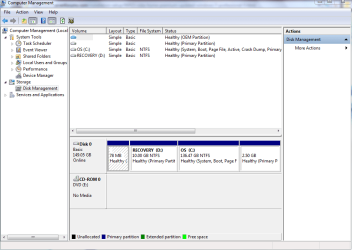
I will try what you said, I just hae a few questions first. I currently have four partitions. 1. OEM partition. 2. Healthy(primary parition) 3. NTFS Healthy (system, boot, page file, acgtive, crash dump, primary parition) 3. NTFS Healthy (primary partition). Should I have all of these? If not, which ones do I eliminate and how many should I actually have? I really don't know anything about partitions. I'll follow the instructions from diskpart, what do I do after that? Does the installoation immediately start?
 

My Computer My Computer

At a glance

Windows 7 Professional
Computer Manufacturer/Model Number
Dell Inspiron 1520
OS
Windows 7 Professional

My Computer My Computer

At a glance

ME/XP/Vista/Win7
OS
ME/XP/Vista/Win7
I'm sorry I wasn't ignoring the steps you gave me, but they are confusing and I wasn't sure what to do. I'm also terrified of wiping the hard drive in case i do something wrong. The bootable cd I made doesn't work unless I'm logged on. When I put the cd in and start the computer, nothing happens until I log on to windows and then open up the file. So I'm a little nervouse if I wipe the harddrive that I am going to put the cd in and nothing will happen and then my computer will be worthless to me. I know you understand what you are doing but it is very confusing to me.
kinolie.. You say in the above quote " The bootable cd I made doesn't work unless I'm logged on. When I put the cd in and start the computer, nothing happens until I log on..." Sorry but I don't think you made a bootable dvd. Do not delete your c until you can get your windows install dvd to start from boot. i'm just saying your c drive is working for you now. :D
 

My Computer My Computer

At a glance

Windows 7 Ulti. x64AMD Phenom 8450 triple-core 2.10 ghz4GBATI Radion HD 3200
Computer Manufacturer/Model Number
Gateway GT5692
OS
Windows 7 Ulti. x64
CPU
AMD Phenom 8450 triple-core 2.10 ghz
Memory
4GB
Graphics Card(s)
ATI Radion HD 3200
Monitor(s) Displays
Gateway FPD1775W
Screen Resolution
1280x720
Hard Drives
465.6613 Gibibytes
Here is the screen shot of disk management...
 

Attachments

  • Disk Management Screen shot.PNG
    Disk Management Screen shot.PNG
    27.5 KB · Views: 4

My Computer My Computer

At a glance

Windows 7 Professional
Computer Manufacturer/Model Number
Dell Inspiron 1520
OS
Windows 7 Professional
Can you boot the DVD now using the tutorial I posted above to show you how to set DVD drive to boot first?

As you stuffed your Recovery Partition by installing Win7 there, it is best that you wipe that partition as well as the now-useless 78mb OEM first partition.

Personally I would wipe the entire HD using the DISKPART commands which I have linked several times now, then reinstall to the partition which is created in that tutorial.

But if you want to keep your new install you already made on C, you can use free Partition Wizard CD to delete the first two partitions and then Resize C into the preferred lower HD space to the left.

Let us know which you prefer and we will walk you through it. This is not something to be afraid of, as we will be here to help you along. This is how you learn to master your computer.
 
The bootable cd I made doesn't work unless I'm logged on.
If you use the tool I linked to, it will make the bootable DVD for you. Then, make sure you are hitting a key when the disc says so, or else it will skip the bootable DVD and continue to boot from your hard drive.
Should I have all of these? If not, which ones do I eliminate and how many should I actually have? I really don't know
I'm starting to think you should find a friend to look over your shoulder for this. If you boot from the DVD, you can wipe the drive cleaning, meaning it has no partitions. Then, during the Windows install, you'll get to pick. It will create a 100 MB system utilities partition for you. After that, you'll need one for C and that's it, unless you want a separate D drive for data storage.
 

My Computer My Computer

At a glance

Windows 7 Ultimate x64 SP1Intel Core i7-260012 GB Patriot Extreme DDR3-1333Nvidia GTX 470
OS
Windows 7 Ultimate x64 SP1
CPU
Intel Core i7-2600
Motherboard
Gigabyte GA-P67A-UD3P-B3
Memory
12 GB Patriot Extreme DDR3-1333
Graphics Card(s)
Nvidia GTX 470
Monitor(s) Displays
Dell UltraSharp 2209WA
Hard Drives
OCZ Agility3 240 GB, WD5001AALS, WD7501AALS
PSU
OCZ ModStream 700W
Case
CoolerMaster HAF 912 Advanced
Cooling
CoolerMaster Hyper 212 Plus
Yes, I can boot the DVD drive using what I posted. I would be willing to do whichever is easier. I have not added anything to the new windows 7 parition yet because I assumed I may have to delete it again, so I would be willing to wipe the HD using the DISKPART commands as long as someone can tell me how many paritions and need and exactly what to do so I don't ruin my computer!
 

My Computer My Computer

At a glance

Windows 7 Professional
Computer Manufacturer/Model Number
Dell Inspiron 1520
OS
Windows 7 Professional
so I would be willing to wipe the HD using the DISKPART commands as long as someone can tell me how many paritions and need and exactly what to do so I don't ruin my computer!
You seem to have a habit of missing what people tell you. perhaps that is why this is three pages and counting.

You said above you couldn't boot from the DVD, but now you can? Okay, let's assume you can boot from the Windows 7 DVD that you made. Backup your data, and boot from the DVD you made. When you get to the partitions, delete them all. Then, create either one large C drive, or just create a C drive to the size you want, and leave the rest untouched (to eventually be D). That choice is up to you and how you want to store your data. You don't need a D drive. The system will then tell you it is creating a 100 MB system utilities partition, and then the install will continue.

This is a very simple process, and only take a few minutes once your data is backed up. You don't need the OEM partition, because you don't need to restore to an older OS. Your new Windows 7 DVD you made IS your method of reinstall.
 

My Computer My Computer

At a glance

Windows 7 Ultimate x64 SP1Intel Core i7-260012 GB Patriot Extreme DDR3-1333Nvidia GTX 470
OS
Windows 7 Ultimate x64 SP1
CPU
Intel Core i7-2600
Motherboard
Gigabyte GA-P67A-UD3P-B3
Memory
12 GB Patriot Extreme DDR3-1333
Graphics Card(s)
Nvidia GTX 470
Monitor(s) Displays
Dell UltraSharp 2209WA
Hard Drives
OCZ Agility3 240 GB, WD5001AALS, WD7501AALS
PSU
OCZ ModStream 700W
Case
CoolerMaster HAF 912 Advanced
Cooling
CoolerMaster Hyper 212 Plus
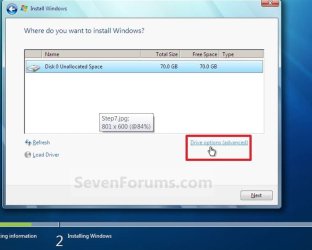
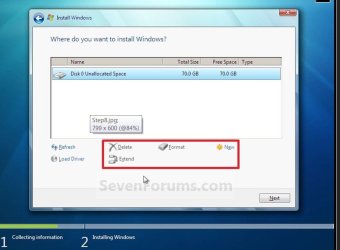
Kinolie.. Clean install when you get to the screen that asks where you want to do your install pick advanced drive options. Then when that screen opens you will have your four partitions. select one and you will be able to click on delete. Delete and format all of them and then select new and it will show you how big select that and format then pick next and away you go. piece of cake brother.
kinolie 3.JPG

kinolie 4.JPG
 

My Computer My Computer

At a glance

Windows 7 Ulti. x64AMD Phenom 8450 triple-core 2.10 ghz4GBATI Radion HD 3200
Computer Manufacturer/Model Number
Gateway GT5692
OS
Windows 7 Ulti. x64
CPU
AMD Phenom 8450 triple-core 2.10 ghz
Memory
4GB
Graphics Card(s)
ATI Radion HD 3200
Monitor(s) Displays
Gateway FPD1775W
Screen Resolution
1280x720
Hard Drives
465.6613 Gibibytes
Back
Top