Vista SP2 is out

My Computer My Computer

OS
Win 7 RC 64bit b7229
CPU
Intel Core 2 DUO E8400 3,0Ghz 6Mb STEP E0
Motherboard
ASUS P5Q-E
Memory
TEAM GROUP ELITE DDR2 800 PC8500 (5-5-5-15) 2*2GB
Graphics Card(s)
Club3D ATI HD4850 Acrtic Cooling Ed. 512Mb 256Bit GDDR-3
Sound Card
Sound Blaster Audigy 2ZS
Monitor(s) Displays
LG 22" W2252TQ 2Ms 10000:1 DVI
Screen Resolution
1680X1050
Hard Drives
WD SATA2 400GB
Maxtor SATA2 500GB
Samsung SATA2 250GB
PSU
Top Silent ATX 560W
Case
ThermalTake Tsunami Dream
Cooling
Zalman CNPS 9700 NT
Keyboard
Trust Slim
Mouse
Razer Copperhead 2000 DPI
Internet Speed
8mbps
in fact i was asking an italian version. actually only english, spanish, french, german and japanese are available.
The other language versions are on their way.
 

My Computer My Computer

OS
Windows 7
32 Bit here.

Code:
[B]32-bit (x86) Windows Vista and Server 2008 SP2 RTM (Wave 1 - All 36 Languages)[/B]
Build: 6002.18005.090410-1830
File Name: Windows6.0-KB948465-X86.exe
Size: 498,781,016 bytes (475.67 MB)
CRC: 8D07A886
MD5: CAD218B99FC301836E385049C75F5EAF
SHA1: 7F8AA802E157282D84CF47950281DE53A8C26F22
HTTP: [URL="http://depositfiles.com/files/6uhdv1g4v"][COLOR=#0000ff]Windows6.0-KB948465-X86.exe[/COLOR][/URL]
BitTorrent: [URL="http://depositfiles.com/files/8lbukgako"][COLOR=#0000ff]MICROSOFT.WINDOWS.VISTA.AND.SERVER.2008.SP2.RTM.X86.W1.RIP.DVD-WZTiSO.torrent[/COLOR][/URL] or [URL="http://depositfiles.com/files/qrx7gp77h"][COLOR=#0000ff]Windows6.0-KB948465-X86.torrent[/COLOR][/URL]

64 Bit here.
Code:
[URL="http://www.sevenforums.com/#"]
[/URL][B][COLOR=#000000](x64) Windows Vista and Server 2008 SP2 RTM (Wave 1 - All 36 Languages)[/COLOR][/B]
 
Build: 6002.18005.090410-1830
File Name: Windows6.0-KB948465-X64.exe
Size: 781,893,560 bytes (745.67 MB)
CRC: 19C1676E
MD5: DB35DF98AE5A6FD085386580A6EE8B55
SHA1: F0E46DEB7734B8ED277B0CF2304EE2BABC4D9B1C
HTTP: [URL="http://depositfiles.com/files/pxqfkvitn"][COLOR=#0000ff]Windows6.0-KB948465-X64.exe[/COLOR][/URL]
BitTorrent: [URL="http://depositfiles.com/files/22mmwz44u"][COLOR=#0000ff]MICROSOFT.WINDOWS.VISTA.AND.SERVER.2008.SP2.RTM.X64.W1.RIP.DVD-WZTiSO.torrent[/COLOR][/URL] or [URL="http://depositfiles.com/files/e7q6ftqv6"][COLOR=#0000ff]Windows6.0-KB948465-X64.torrent[/COLOR][/URL]

Hope this helps. As you can see the Official link is there also.
 
32 Bit here.

Code:
[B]32-bit (x86) Windows Vista and Server 2008 SP2 RTM (Wave 1 - All 36 Languages)[/B]
Build: 6002.18005.090410-1830
File Name: Windows6.0-KB948465-X86.exe
Size: 498,781,016 bytes (475.67 MB)
CRC: 8D07A886
MD5: CAD218B99FC301836E385049C75F5EAF
SHA1: 7F8AA802E157282D84CF47950281DE53A8C26F22
HTTP: [URL="http://depositfiles.com/files/6uhdv1g4v"][COLOR=#0000ff]Windows6.0-KB948465-X86.exe[/COLOR][/URL]
BitTorrent: [URL="http://depositfiles.com/files/8lbukgako"][COLOR=#0000ff]MICROSOFT.WINDOWS.VISTA.AND.SERVER.2008.SP2.RTM.X86.W1.RIP.DVD-WZTiSO.torrent[/COLOR][/URL] or [URL="http://depositfiles.com/files/qrx7gp77h"][COLOR=#0000ff]Windows6.0-KB948465-X86.torrent[/COLOR][/URL]
64 Bit here.
Code:
[URL="http://www.sevenforums.com/#"]
[/URL][B][COLOR=#000000](x64) Windows Vista and Server 2008 SP2 RTM (Wave 1 - All 36 Languages)[/COLOR][/B]
 
Build: 6002.18005.090410-1830
File Name: Windows6.0-KB948465-X64.exe
Size: 781,893,560 bytes (745.67 MB)
CRC: 19C1676E
MD5: DB35DF98AE5A6FD085386580A6EE8B55
SHA1: F0E46DEB7734B8ED277B0CF2304EE2BABC4D9B1C
HTTP: [URL="http://depositfiles.com/files/pxqfkvitn"][COLOR=#0000ff]Windows6.0-KB948465-X64.exe[/COLOR][/URL]
BitTorrent: [URL="http://depositfiles.com/files/22mmwz44u"][COLOR=#0000ff]MICROSOFT.WINDOWS.VISTA.AND.SERVER.2008.SP2.RTM.X64.W1.RIP.DVD-WZTiSO.torrent[/COLOR][/URL] or [URL="http://depositfiles.com/files/e7q6ftqv6"][COLOR=#0000ff]Windows6.0-KB948465-X64.torrent[/COLOR][/URL]
Hope this helps. As you can see the Official link is there also.


ok thank you, but i already had rtm but someone said me that the rtw is better. Isnt't it?
 

My Computer My Computer

OS
Win 7 RC 64bit b7229
CPU
Intel Core 2 DUO E8400 3,0Ghz 6Mb STEP E0
Motherboard
ASUS P5Q-E
Memory
TEAM GROUP ELITE DDR2 800 PC8500 (5-5-5-15) 2*2GB
Graphics Card(s)
Club3D ATI HD4850 Acrtic Cooling Ed. 512Mb 256Bit GDDR-3
Sound Card
Sound Blaster Audigy 2ZS
Monitor(s) Displays
LG 22" W2252TQ 2Ms 10000:1 DVI
Screen Resolution
1680X1050
Hard Drives
WD SATA2 400GB
Maxtor SATA2 500GB
Samsung SATA2 250GB
PSU
Top Silent ATX 560W
Case
ThermalTake Tsunami Dream
Cooling
Zalman CNPS 9700 NT
Keyboard
Trust Slim
Mouse
Razer Copperhead 2000 DPI
Internet Speed
8mbps
^ No, neither is better.
RTM = Release to Manufacturing
RTW = Release to Web

Whichever you get your hands on first is fine. They're identical, the only difference is the way you get it.
 

My Computer My Computer

OS
Windows 7
You can create your own system rescue disk. It'll suffice.
Look in your start menu--> program list

Regards
Mukul

i cant boot!
 

My Computer My Computer

Computer Manufacturer/Model Number
Acer Aspire 8730-6951
OS
Windows 7 Build 7600 64bit/Ubuntu/Leopard
Memory
4 GB
Graphics Card(s)
NVidia Geforce 9600m GT
to my mind MS needed to put out SP2 before 7's release to test 7's compatibility. By simple observation i deduced that SP2 contains major parts of 7's core improvements on the vista base, by releasing SP2 they had an enormous preinstalled testbed.

Not bad going, MS finally got it right, i.e. they marketed a product which is basically a moderate update of Vista but got it completely hyped to the skies. And that's every vendors dream, selling a hype.

In actual fact they just repackaged Vista and are going to (re)sell it for major bucks. Smart business acumen.

A scam also, but what hype isn't?

Under very close examination here since the beta releases I can easily dispute that one fast! 7 won't simply be any Vista Part #2 but see an entirely new core element to start with generally referred to as the MinWin kernel. Some good information is seen on the links posted on the thread that goes through that quite a bit. http://www.sevenforums.com/news/11077-truth-about-minwin-heart-windows-7-a.html

Having both RCs on at the same time as Vista here each on separate drives as stand alone installation I have a good first hand look at how things compare especially with SP2 out. 7 still comes out on top in a variety of ways while Vista is still a good stable version seen there.

One link on the threads pretty well sums up how MS reached the same conclusion about Windows simply getting too large and the need to start over from the core elements first.
 

My Computers My Computers

System One System Two

  • Computer type
    PC/Desktop
    Computer Manufacturer/Model Number
    Custom builds = 2
    OS
    W7 Ultimate x64/W10 Pro x64/W11 Pro Triple Boot - Main PC W7 Remote PC Micro ATX W7 Pro x64/W11 Pro
    CPU
    AMD Phenom II X4 975 Deneb 3.6ghz - 965 2nd remote pc
    Motherboard
    Gigabyte GA-790XTA-UD4-Gigabyte GA-880GM-D2H remote pc
    Memory
    Kingston Hyper X DDR3 1600 1.5v 16gb - Hyper X Fury 8gb 2nd
    Graphics Card(s)
    MSI HD Radeon 5750 1gb - MSI HD Radeon 6450 on mini tower
    Sound Card
    Creative Labs X-Fi Xtreme Audio P - Realtek onooard 2nd case
    Monitor(s) Displays
    ASUS VW199T-P 19" HP 2082a Main-HP 2082a 20" remote pc
    Screen Resolution
    Asus 1440x900 - HP 1600x900
    Hard Drives
    WD Black 1TB HD per OS W7, W10, and pending W11 presently on 500gb OS Drive - Pending Triple 1TB HDs for Spanned Storage/backup volume
    Single 2TB external USB enclosure, single 1TB System 7 Host/Boot drive, Pending 8TB external HD for system image b
    PSU
    Corsair 750TX - primary / Corsair CX600 - second
    Case
    Antec 900-2 - SSD compatible / NZXT Vulcan mini tower
    Cooling
    Zalman CNPS9900A
    Keyboard
    AZIO L70 Backlit Letters Gaming - ONN Cordless/USB
    Mouse
    MSI DS200 Programmable, Logitech Cordless
    Internet Speed
    30mbps upgrade - primary hard wired - mini tower usb WiFi
    Antivirus
    GFI VIPRE Internet Security 2014 on W7 2016 beta on W10,
    Browser
    Cyberfox, WaterFox 64bit FF variants, FireFox x64, Pale Moon
    Other Info
    Accomdata fan cooled usb 2.0 PIDE/Sata II, III external enclosure.
    Sambient usb/eSata PATA/Sata II, III external enclosure.
  • Computer type
    PC/Desktop
    System Manufacturer/Model Number
    CUSTOM ASSEMBLY
    OS
    W7 Pro x64/W11 Pro
    CPU
    AMD Deneb 3.6ghz - 965
    Motherboard
    Gigabyte GA-880GM-D2H remote pc
    Memory
    Kingston Hyper X Fury 8gb
    Graphics Card(s)
    MSI HD Radeon 6450 DVI Output
    Sound Card
    Realtek onooard Creative or Other separate PENDING
    Monitor(s) Displays
    VIZIO 32" LCD TV Separate LCD Pending
    Screen Resolution
    1600x1080
    Hard Drives
    WD 500GB OS Host/Boot WD Green 1TB Storage/Backup
    PSU
    Corsair 600W - THERMALTAKE 600W spare case
    Case
    NZXT Vulcan mini tower
    Cooling
    Twin 120mm Top Fans - 240mm Side Cover
    Keyboard
    ONN Cordless/USB Logitech Cordless
    Mouse
    ONN USB/Cordless - Logitech Cordless
    Internet Speed
    DSL 5G
    Browser
    MS Edge, FireFox, WaterFox x64, FireFox Nightly
    Other Info
    OS Testing-Remote Access to Main TeamViewer
:sarc: Sure. Been running side by side since day one, can't say there's a whole lot of difference except slightly lighter load on idle in 7 and some GUI additions which anyone with some skill had already adapted himself using 3rd party additions. And libraries i need like a hole in the head.

Micro, Nano, Pico kernel or not, it's result that counts.

But hey if you want to pay $$$$ for a marketing trick MS won't stop you (and me neither)
 

My Computer My Computer

Computer Manufacturer/Model Number
me and myself
OS
vista x64/ win 7 x64
CPU
phenom 9950 BE
Motherboard
ASUS M2A-VM HDMI
Memory
8 gb
Graphics Card(s)
nvidia gts 250
Sound Card
realtek HD onboard
Monitor(s) Displays
dual hd 19" tft
Screen Resolution
1440x900
Hard Drives
2 x 500 gb WDC
1 x 500 gb Seagate
1 x 1000 gb Seagate
1 80 gb raptor
1 usb 160 gb
Cooling
standard issue
Keyboard
logitech g11
Mouse
usb wireless MS laser 6000
Internet Speed
18 mb (according to my provider :)
I've been in touch with a few people lately that never ran XP simply bypassing that from 2000 right into Vista now trying out the RC that would say otherwise. One was even hesitant at first not wanting to lose the time needed for seeing the 64bit RC go on replacing the 64bit Vista Ultimate until getting that on and running it a few days after getting all softwares on.

Where the differences will be noticed the most however will still be on older systems like a few running 7 with only 512mb of memory and an old single core cpu. Here besides a few minor annoyances 7 with a few small bugs it comes out in front of the pack.
 

My Computers My Computers

System One System Two

  • Computer type
    PC/Desktop
    Computer Manufacturer/Model Number
    Custom builds = 2
    OS
    W7 Ultimate x64/W10 Pro x64/W11 Pro Triple Boot - Main PC W7 Remote PC Micro ATX W7 Pro x64/W11 Pro
    CPU
    AMD Phenom II X4 975 Deneb 3.6ghz - 965 2nd remote pc
    Motherboard
    Gigabyte GA-790XTA-UD4-Gigabyte GA-880GM-D2H remote pc
    Memory
    Kingston Hyper X DDR3 1600 1.5v 16gb - Hyper X Fury 8gb 2nd
    Graphics Card(s)
    MSI HD Radeon 5750 1gb - MSI HD Radeon 6450 on mini tower
    Sound Card
    Creative Labs X-Fi Xtreme Audio P - Realtek onooard 2nd case
    Monitor(s) Displays
    ASUS VW199T-P 19" HP 2082a Main-HP 2082a 20" remote pc
    Screen Resolution
    Asus 1440x900 - HP 1600x900
    Hard Drives
    WD Black 1TB HD per OS W7, W10, and pending W11 presently on 500gb OS Drive - Pending Triple 1TB HDs for Spanned Storage/backup volume
    Single 2TB external USB enclosure, single 1TB System 7 Host/Boot drive, Pending 8TB external HD for system image b
    PSU
    Corsair 750TX - primary / Corsair CX600 - second
    Case
    Antec 900-2 - SSD compatible / NZXT Vulcan mini tower
    Cooling
    Zalman CNPS9900A
    Keyboard
    AZIO L70 Backlit Letters Gaming - ONN Cordless/USB
    Mouse
    MSI DS200 Programmable, Logitech Cordless
    Internet Speed
    30mbps upgrade - primary hard wired - mini tower usb WiFi
    Antivirus
    GFI VIPRE Internet Security 2014 on W7 2016 beta on W10,
    Browser
    Cyberfox, WaterFox 64bit FF variants, FireFox x64, Pale Moon
    Other Info
    Accomdata fan cooled usb 2.0 PIDE/Sata II, III external enclosure.
    Sambient usb/eSata PATA/Sata II, III external enclosure.
  • Computer type
    PC/Desktop
    System Manufacturer/Model Number
    CUSTOM ASSEMBLY
    OS
    W7 Pro x64/W11 Pro
    CPU
    AMD Deneb 3.6ghz - 965
    Motherboard
    Gigabyte GA-880GM-D2H remote pc
    Memory
    Kingston Hyper X Fury 8gb
    Graphics Card(s)
    MSI HD Radeon 6450 DVI Output
    Sound Card
    Realtek onooard Creative or Other separate PENDING
    Monitor(s) Displays
    VIZIO 32" LCD TV Separate LCD Pending
    Screen Resolution
    1600x1080
    Hard Drives
    WD 500GB OS Host/Boot WD Green 1TB Storage/Backup
    PSU
    Corsair 600W - THERMALTAKE 600W spare case
    Case
    NZXT Vulcan mini tower
    Cooling
    Twin 120mm Top Fans - 240mm Side Cover
    Keyboard
    ONN Cordless/USB Logitech Cordless
    Mouse
    ONN USB/Cordless - Logitech Cordless
    Internet Speed
    DSL 5G
    Browser
    MS Edge, FireFox, WaterFox x64, FireFox Nightly
    Other Info
    OS Testing-Remote Access to Main TeamViewer
YMMV. However placing a new OS as being the salvation of outdated computers is somewhat bizarre.
The only place outdated computers still have a future is in 3rd world countries and i'm pretty sure they are not going to pay $300 to run a computer they got for free.

As per my system spec i have a medium range box, and as i said often before it's not constructed to run benchmarks well but to run apps that i need in everyday life.

And if a microkernel might shave off 1 picosecond on a cycle thats very interesting for technogeeks and looks great in benchmark graphs but not adding any real value then i don't see the point paying vast sums for it.

Windows 7 should have been Vista SP2, and i'm actually quite sure it was meant to be by the developers but the marketingdepartment saw a great opportunity and took it.

And i must admit they played it very very well. First time i'm impressed by them actually.
 

My Computer My Computer

Computer Manufacturer/Model Number
me and myself
OS
vista x64/ win 7 x64
CPU
phenom 9950 BE
Motherboard
ASUS M2A-VM HDMI
Memory
8 gb
Graphics Card(s)
nvidia gts 250
Sound Card
realtek HD onboard
Monitor(s) Displays
dual hd 19" tft
Screen Resolution
1440x900
Hard Drives
2 x 500 gb WDC
1 x 500 gb Seagate
1 x 1000 gb Seagate
1 80 gb raptor
1 usb 160 gb
Cooling
standard issue
Keyboard
logitech g11
Mouse
usb wireless MS laser 6000
Internet Speed
18 mb (according to my provider :)
Well when I say "side by side" that not only applies to two separate installations seen on two separate drives but the exact same programs running on both RCs as well as Vista here.

With a clean install of Vista just having been done here to see both SPs go on fresh as well I still found the RCs loaded up stepping out in front again for not pulling cpu down as they load up as well as the faster boot to finish loading time. In fact they took on XP now gone as well seeing faster start up and shutdown times while XP didn't have much more then the basics on there.
 

My Computers My Computers

System One System Two

  • Computer type
    PC/Desktop
    Computer Manufacturer/Model Number
    Custom builds = 2
    OS
    W7 Ultimate x64/W10 Pro x64/W11 Pro Triple Boot - Main PC W7 Remote PC Micro ATX W7 Pro x64/W11 Pro
    CPU
    AMD Phenom II X4 975 Deneb 3.6ghz - 965 2nd remote pc
    Motherboard
    Gigabyte GA-790XTA-UD4-Gigabyte GA-880GM-D2H remote pc
    Memory
    Kingston Hyper X DDR3 1600 1.5v 16gb - Hyper X Fury 8gb 2nd
    Graphics Card(s)
    MSI HD Radeon 5750 1gb - MSI HD Radeon 6450 on mini tower
    Sound Card
    Creative Labs X-Fi Xtreme Audio P - Realtek onooard 2nd case
    Monitor(s) Displays
    ASUS VW199T-P 19" HP 2082a Main-HP 2082a 20" remote pc
    Screen Resolution
    Asus 1440x900 - HP 1600x900
    Hard Drives
    WD Black 1TB HD per OS W7, W10, and pending W11 presently on 500gb OS Drive - Pending Triple 1TB HDs for Spanned Storage/backup volume
    Single 2TB external USB enclosure, single 1TB System 7 Host/Boot drive, Pending 8TB external HD for system image b
    PSU
    Corsair 750TX - primary / Corsair CX600 - second
    Case
    Antec 900-2 - SSD compatible / NZXT Vulcan mini tower
    Cooling
    Zalman CNPS9900A
    Keyboard
    AZIO L70 Backlit Letters Gaming - ONN Cordless/USB
    Mouse
    MSI DS200 Programmable, Logitech Cordless
    Internet Speed
    30mbps upgrade - primary hard wired - mini tower usb WiFi
    Antivirus
    GFI VIPRE Internet Security 2014 on W7 2016 beta on W10,
    Browser
    Cyberfox, WaterFox 64bit FF variants, FireFox x64, Pale Moon
    Other Info
    Accomdata fan cooled usb 2.0 PIDE/Sata II, III external enclosure.
    Sambient usb/eSata PATA/Sata II, III external enclosure.
  • Computer type
    PC/Desktop
    System Manufacturer/Model Number
    CUSTOM ASSEMBLY
    OS
    W7 Pro x64/W11 Pro
    CPU
    AMD Deneb 3.6ghz - 965
    Motherboard
    Gigabyte GA-880GM-D2H remote pc
    Memory
    Kingston Hyper X Fury 8gb
    Graphics Card(s)
    MSI HD Radeon 6450 DVI Output
    Sound Card
    Realtek onooard Creative or Other separate PENDING
    Monitor(s) Displays
    VIZIO 32" LCD TV Separate LCD Pending
    Screen Resolution
    1600x1080
    Hard Drives
    WD 500GB OS Host/Boot WD Green 1TB Storage/Backup
    PSU
    Corsair 600W - THERMALTAKE 600W spare case
    Case
    NZXT Vulcan mini tower
    Cooling
    Twin 120mm Top Fans - 240mm Side Cover
    Keyboard
    ONN Cordless/USB Logitech Cordless
    Mouse
    ONN USB/Cordless - Logitech Cordless
    Internet Speed
    DSL 5G
    Browser
    MS Edge, FireFox, WaterFox x64, FireFox Nightly
    Other Info
    OS Testing-Remote Access to Main TeamViewer
Well, actually me too. I've dedicated even two equal disks (WDC 500) to each os, installed all applications with the same parameters separately on both os's (except that don't work under 7)

In normal everyday usage there's no difference at all. Even when i run Windowblinds to skin Vista (which doesnt work yet with 7) i can perceive no difference in responsiveness.

The only real tangible difference there is, is being able to set Audio Endpoints without shutting the app, a smaller footprint of 7 by about 100 mb and a slightly lighter idle processor load.

The other cosmetic changes are not really progress but just diversions on a theme.

Once apps are running i can perceive using my tools at hand (Process Lasso) no important differences worth paying for.
 

My Computer My Computer

Computer Manufacturer/Model Number
me and myself
OS
vista x64/ win 7 x64
CPU
phenom 9950 BE
Motherboard
ASUS M2A-VM HDMI
Memory
8 gb
Graphics Card(s)
nvidia gts 250
Sound Card
realtek HD onboard
Monitor(s) Displays
dual hd 19" tft
Screen Resolution
1440x900
Hard Drives
2 x 500 gb WDC
1 x 500 gb Seagate
1 x 1000 gb Seagate
1 80 gb raptor
1 usb 160 gb
Cooling
standard issue
Keyboard
logitech g11
Mouse
usb wireless MS laser 6000
Internet Speed
18 mb (according to my provider :)
Did you know you can bring back the Classic Windows look in 7? You simply go into the Control Panel>system or right click on the Computer icon on the desktop and then click on the advance system settings>Performance button and set that for performance or custom to disable all of the animations.
 

Attachments

  • SYSTEM PERFORMANCE.jpg
    SYSTEM PERFORMANCE.jpg
    103.3 KB · Views: 31

My Computers My Computers

System One System Two

  • Computer type
    PC/Desktop
    Computer Manufacturer/Model Number
    Custom builds = 2
    OS
    W7 Ultimate x64/W10 Pro x64/W11 Pro Triple Boot - Main PC W7 Remote PC Micro ATX W7 Pro x64/W11 Pro
    CPU
    AMD Phenom II X4 975 Deneb 3.6ghz - 965 2nd remote pc
    Motherboard
    Gigabyte GA-790XTA-UD4-Gigabyte GA-880GM-D2H remote pc
    Memory
    Kingston Hyper X DDR3 1600 1.5v 16gb - Hyper X Fury 8gb 2nd
    Graphics Card(s)
    MSI HD Radeon 5750 1gb - MSI HD Radeon 6450 on mini tower
    Sound Card
    Creative Labs X-Fi Xtreme Audio P - Realtek onooard 2nd case
    Monitor(s) Displays
    ASUS VW199T-P 19" HP 2082a Main-HP 2082a 20" remote pc
    Screen Resolution
    Asus 1440x900 - HP 1600x900
    Hard Drives
    WD Black 1TB HD per OS W7, W10, and pending W11 presently on 500gb OS Drive - Pending Triple 1TB HDs for Spanned Storage/backup volume
    Single 2TB external USB enclosure, single 1TB System 7 Host/Boot drive, Pending 8TB external HD for system image b
    PSU
    Corsair 750TX - primary / Corsair CX600 - second
    Case
    Antec 900-2 - SSD compatible / NZXT Vulcan mini tower
    Cooling
    Zalman CNPS9900A
    Keyboard
    AZIO L70 Backlit Letters Gaming - ONN Cordless/USB
    Mouse
    MSI DS200 Programmable, Logitech Cordless
    Internet Speed
    30mbps upgrade - primary hard wired - mini tower usb WiFi
    Antivirus
    GFI VIPRE Internet Security 2014 on W7 2016 beta on W10,
    Browser
    Cyberfox, WaterFox 64bit FF variants, FireFox x64, Pale Moon
    Other Info
    Accomdata fan cooled usb 2.0 PIDE/Sata II, III external enclosure.
    Sambient usb/eSata PATA/Sata II, III external enclosure.
  • Computer type
    PC/Desktop
    System Manufacturer/Model Number
    CUSTOM ASSEMBLY
    OS
    W7 Pro x64/W11 Pro
    CPU
    AMD Deneb 3.6ghz - 965
    Motherboard
    Gigabyte GA-880GM-D2H remote pc
    Memory
    Kingston Hyper X Fury 8gb
    Graphics Card(s)
    MSI HD Radeon 6450 DVI Output
    Sound Card
    Realtek onooard Creative or Other separate PENDING
    Monitor(s) Displays
    VIZIO 32" LCD TV Separate LCD Pending
    Screen Resolution
    1600x1080
    Hard Drives
    WD 500GB OS Host/Boot WD Green 1TB Storage/Backup
    PSU
    Corsair 600W - THERMALTAKE 600W spare case
    Case
    NZXT Vulcan mini tower
    Cooling
    Twin 120mm Top Fans - 240mm Side Cover
    Keyboard
    ONN Cordless/USB Logitech Cordless
    Mouse
    ONN USB/Cordless - Logitech Cordless
    Internet Speed
    DSL 5G
    Browser
    MS Edge, FireFox, WaterFox x64, FireFox Nightly
    Other Info
    OS Testing-Remote Access to Main TeamViewer
Anyone know why since I upgraded Vista to SP2, now during bootup it always does a disk check Disk c: ok Disk d: ok Disk e: ok etc. Seems like this ads an additional minute to start-up time.

I went to msconfig>boot expecting something may have changed there like some kind of diagnostic setting but nothing. It almost seems like safe mode when you see all the text on a black screen before it gets to the disk check. I'd rather get rid of this annoying POST screen. Suggestions?
 

My Computer My Computer

OS
Windows: 7100 RC1 & Vista SP2
Anyone know why since I upgraded Vista to SP2, now during bootup it always does a disk check Disk c: ok Disk d: ok Disk e: ok etc. Seems like this ads an additional minute to start-up time.

I went to msconfig>boot expecting something may have changed there like some kind of diagnostic setting but nothing. It almost seems like safe mode when you see all the text on a black screen before it gets to the disk check. I'd rather get rid of this annoying POST screen. Suggestions?

Sounds like you've got what they call 'the dirty bit' set each time you boot up and a chkdsk is occuring. Somehow it's got stuck and is not clearing. If you Google for the term 'dirty bit' and stuck or set you should find a way to clear it and boot up normally.
Of course if your disks are really corrupted chkdsk may have be having trouble fixing them. In which case the dirty bit stays set.
 

My Computer My Computer

OS
Vista x32
Thanks I will check it out. Hopefully it fixes it. Weird thing is the beta version of SP2 worked like a charm.
 

My Computer My Computer

OS
Windows: 7100 RC1 & Vista SP2
Seems like the fix for cleaning the dirty bit didn't work for me. This also before it runs the CHKDSK is it says loading windows software and you see things listed in the system32 folder. Then a banner showing Windows Vista SP2 build 6900 or something appears then the CHKDSK and everything always comes out clean then it boots into Windows. Annoying...
 

My Computer My Computer

OS
Windows: 7100 RC1 & Vista SP2
Anyone know why since I upgraded Vista to SP2, now during bootup it always does a disk check Disk c: ok Disk d: ok Disk e: ok etc. Seems like this ads an additional minute to start-up time.

Sounds like you've got what they call 'the dirty bit' set each time you boot up and a chkdsk is occuring. Somehow it's got stuck and is not clearing. If you Google for the term 'dirty bit' and stuck or set you should find a way to clear it and boot up normally.
Of course if your disks are really corrupted chkdsk may have be having trouble fixing them. In which case the dirty bit stays set.

On a clean primary seeing a totally fresh install of the Vista test build seeing all updates handed out to SP2 beta testers the boot process automatically checks all disks by default while quite a bit faster paced then you would see with a scheduled check disk.

MS made it part of the boot process to alert the user if problems like bad sectors come up rather then waiting until something catastropic happens like a drive failure or something now buggy like an invalid boot sector or partition table problem.

Personally while not seeing this on the 32bit Vista it was interesting to that visible on the 64bit Vista Ultimate SP2 build downloaded from Technet for a good look over.
 

My Computers My Computers

System One System Two

  • Computer type
    PC/Desktop
    Computer Manufacturer/Model Number
    Custom builds = 2
    OS
    W7 Ultimate x64/W10 Pro x64/W11 Pro Triple Boot - Main PC W7 Remote PC Micro ATX W7 Pro x64/W11 Pro
    CPU
    AMD Phenom II X4 975 Deneb 3.6ghz - 965 2nd remote pc
    Motherboard
    Gigabyte GA-790XTA-UD4-Gigabyte GA-880GM-D2H remote pc
    Memory
    Kingston Hyper X DDR3 1600 1.5v 16gb - Hyper X Fury 8gb 2nd
    Graphics Card(s)
    MSI HD Radeon 5750 1gb - MSI HD Radeon 6450 on mini tower
    Sound Card
    Creative Labs X-Fi Xtreme Audio P - Realtek onooard 2nd case
    Monitor(s) Displays
    ASUS VW199T-P 19" HP 2082a Main-HP 2082a 20" remote pc
    Screen Resolution
    Asus 1440x900 - HP 1600x900
    Hard Drives
    WD Black 1TB HD per OS W7, W10, and pending W11 presently on 500gb OS Drive - Pending Triple 1TB HDs for Spanned Storage/backup volume
    Single 2TB external USB enclosure, single 1TB System 7 Host/Boot drive, Pending 8TB external HD for system image b
    PSU
    Corsair 750TX - primary / Corsair CX600 - second
    Case
    Antec 900-2 - SSD compatible / NZXT Vulcan mini tower
    Cooling
    Zalman CNPS9900A
    Keyboard
    AZIO L70 Backlit Letters Gaming - ONN Cordless/USB
    Mouse
    MSI DS200 Programmable, Logitech Cordless
    Internet Speed
    30mbps upgrade - primary hard wired - mini tower usb WiFi
    Antivirus
    GFI VIPRE Internet Security 2014 on W7 2016 beta on W10,
    Browser
    Cyberfox, WaterFox 64bit FF variants, FireFox x64, Pale Moon
    Other Info
    Accomdata fan cooled usb 2.0 PIDE/Sata II, III external enclosure.
    Sambient usb/eSata PATA/Sata II, III external enclosure.
  • Computer type
    PC/Desktop
    System Manufacturer/Model Number
    CUSTOM ASSEMBLY
    OS
    W7 Pro x64/W11 Pro
    CPU
    AMD Deneb 3.6ghz - 965
    Motherboard
    Gigabyte GA-880GM-D2H remote pc
    Memory
    Kingston Hyper X Fury 8gb
    Graphics Card(s)
    MSI HD Radeon 6450 DVI Output
    Sound Card
    Realtek onooard Creative or Other separate PENDING
    Monitor(s) Displays
    VIZIO 32" LCD TV Separate LCD Pending
    Screen Resolution
    1600x1080
    Hard Drives
    WD 500GB OS Host/Boot WD Green 1TB Storage/Backup
    PSU
    Corsair 600W - THERMALTAKE 600W spare case
    Case
    NZXT Vulcan mini tower
    Cooling
    Twin 120mm Top Fans - 240mm Side Cover
    Keyboard
    ONN Cordless/USB Logitech Cordless
    Mouse
    ONN USB/Cordless - Logitech Cordless
    Internet Speed
    DSL 5G
    Browser
    MS Edge, FireFox, WaterFox x64, FireFox Nightly
    Other Info
    OS Testing-Remote Access to Main TeamViewer
I installed SP2 on Vista Home Premium. Didn't notice any major change like improvement in boot-up time etc which people have been reporting :(
But I hope atleast it'll stop crashing now. SP1 used to crash every week.
 

My Computer My Computer

Computer Manufacturer/Model Number
Sony VAIO VGN-CS14G
OS
Vista Home Premium 32-bit/ Win7 RC/ Debian Lenny
CPU
Core 2 Duo 2.2GHz
Memory
2GB
Hard Drives
250GB SATA
Internet Speed
192Kbps/ 2Mbps
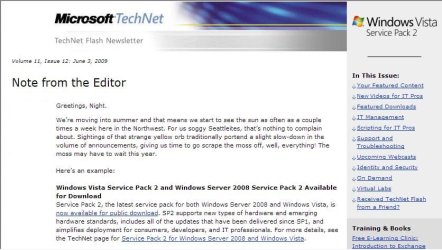
It didn't make any difference here at all for startup or shutdown times. The Tecnnet newsletter sheds a little light on seeing support added to Vista for newer hardwares. I suspect that may include support for the new USB 3.0 standard that will be coming for home users in 2010 as well.
 

Attachments

  • TECHNET VISTA SP2 LETTER.jpg
    TECHNET VISTA SP2 LETTER.jpg
    65.2 KB · Views: 9

My Computers My Computers

System One System Two

  • Computer type
    PC/Desktop
    Computer Manufacturer/Model Number
    Custom builds = 2
    OS
    W7 Ultimate x64/W10 Pro x64/W11 Pro Triple Boot - Main PC W7 Remote PC Micro ATX W7 Pro x64/W11 Pro
    CPU
    AMD Phenom II X4 975 Deneb 3.6ghz - 965 2nd remote pc
    Motherboard
    Gigabyte GA-790XTA-UD4-Gigabyte GA-880GM-D2H remote pc
    Memory
    Kingston Hyper X DDR3 1600 1.5v 16gb - Hyper X Fury 8gb 2nd
    Graphics Card(s)
    MSI HD Radeon 5750 1gb - MSI HD Radeon 6450 on mini tower
    Sound Card
    Creative Labs X-Fi Xtreme Audio P - Realtek onooard 2nd case
    Monitor(s) Displays
    ASUS VW199T-P 19" HP 2082a Main-HP 2082a 20" remote pc
    Screen Resolution
    Asus 1440x900 - HP 1600x900
    Hard Drives
    WD Black 1TB HD per OS W7, W10, and pending W11 presently on 500gb OS Drive - Pending Triple 1TB HDs for Spanned Storage/backup volume
    Single 2TB external USB enclosure, single 1TB System 7 Host/Boot drive, Pending 8TB external HD for system image b
    PSU
    Corsair 750TX - primary / Corsair CX600 - second
    Case
    Antec 900-2 - SSD compatible / NZXT Vulcan mini tower
    Cooling
    Zalman CNPS9900A
    Keyboard
    AZIO L70 Backlit Letters Gaming - ONN Cordless/USB
    Mouse
    MSI DS200 Programmable, Logitech Cordless
    Internet Speed
    30mbps upgrade - primary hard wired - mini tower usb WiFi
    Antivirus
    GFI VIPRE Internet Security 2014 on W7 2016 beta on W10,
    Browser
    Cyberfox, WaterFox 64bit FF variants, FireFox x64, Pale Moon
    Other Info
    Accomdata fan cooled usb 2.0 PIDE/Sata II, III external enclosure.
    Sambient usb/eSata PATA/Sata II, III external enclosure.
  • Computer type
    PC/Desktop
    System Manufacturer/Model Number
    CUSTOM ASSEMBLY
    OS
    W7 Pro x64/W11 Pro
    CPU
    AMD Deneb 3.6ghz - 965
    Motherboard
    Gigabyte GA-880GM-D2H remote pc
    Memory
    Kingston Hyper X Fury 8gb
    Graphics Card(s)
    MSI HD Radeon 6450 DVI Output
    Sound Card
    Realtek onooard Creative or Other separate PENDING
    Monitor(s) Displays
    VIZIO 32" LCD TV Separate LCD Pending
    Screen Resolution
    1600x1080
    Hard Drives
    WD 500GB OS Host/Boot WD Green 1TB Storage/Backup
    PSU
    Corsair 600W - THERMALTAKE 600W spare case
    Case
    NZXT Vulcan mini tower
    Cooling
    Twin 120mm Top Fans - 240mm Side Cover
    Keyboard
    ONN Cordless/USB Logitech Cordless
    Mouse
    ONN USB/Cordless - Logitech Cordless
    Internet Speed
    DSL 5G
    Browser
    MS Edge, FireFox, WaterFox x64, FireFox Nightly
    Other Info
    OS Testing-Remote Access to Main TeamViewer
Back
Top