Vista Windows Sidebar - Reinstate on Windows 7

Sidebar - Vista Sidebar on Windows 7

How to Reinstate the Vista Sidebar on Windows 7

   Information
This will show you how to reinstate the Vista Windows Sidebar on Windows 7.


METHOD ONE

Reinstate Vista Windows Sidebar on Windows 7

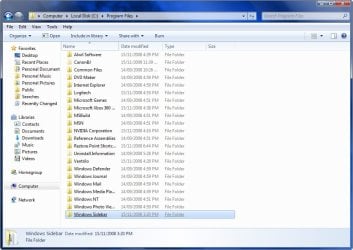
1. First Close all running Gadgets and Check Task Manager to Make sure it is not running and then go to C:\Program Files\Windows Sidebar. 2008-11-18_202259.jpg
2. Download the Take Ownership shortcut to add it to the right click context menu by going here http://www.sevenforums.com/tutorials/1911-take-ownership-shortcut.html

3. Right click on the Sidebar folder and select Take Ownership

4. Rename the Original Folder to Windows Sidebar (2)

5. Go to the Windows Sidebar Programs folder in Vista and copy it.

6. Now just paste the Vista folder in the Programs folder on your Windows 7 partition.

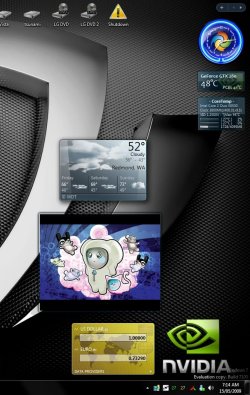
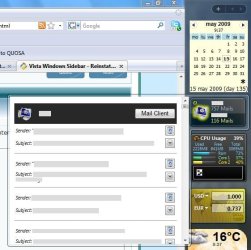
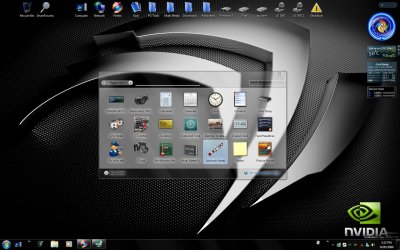
7. Right Click on the screen and select Gadgets and now you should have the Vista sidebar. Vista Sidebar .jpg
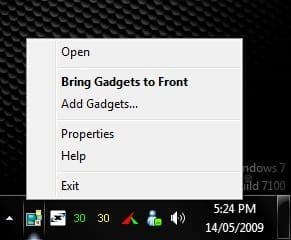
8. To close the sidebar just go to the icon in the system tray, right click and select exit. Close Sidebar.jpg


METHOD TWO

Reinstate Vista Windows Sidebar on Windows 7

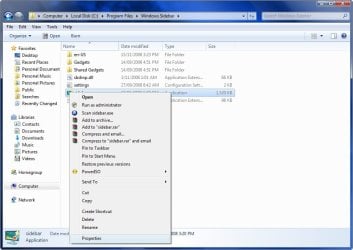
1. First Close all running Gadgets and Check Task Manager to Make sure it is not running and then go to C:\Program Files\Windows Sidebar. 2008-11-18_202259.jpg
2. Right click on a file and select Properties. 2008-11-18_202335.jpg
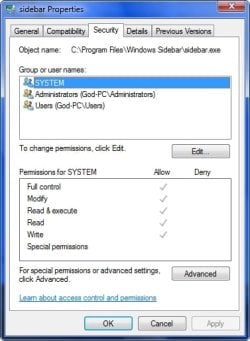
3. Go to the Security Tab and click on Advanced. 2008-11-18_202357.jpg
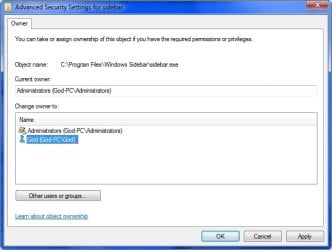
4. Go to the Owner Tab and select Edit. 2008-11-18_202425.jpg
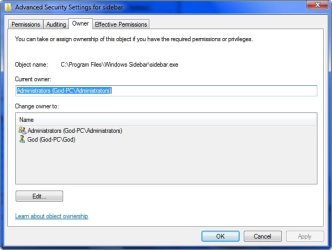
5. Select your user name and hit OK. 2008-11-18_202458.jpg
6. Go back to step 3 now and instead of Advanced select Edit.

7. Select your user name and tick the box with Full control and hit OK. 2008-11-18_204230.jpg
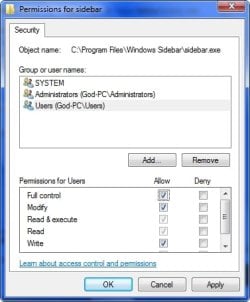
  • OK now you have done that for every file in the Windows sidebar folder except the Gadgets Folder, you can now delete or replace the files.
8. Copy the Windows Sidebar Folder and Paste it somewhere for a backup if you want to Revert your changes.

9. Go to the Sidebar Folder in Vista and copy all the files except the Gadgets Folder and Paste it in the Windows 7 Sidebar folder and overwrite the existing files and folders.

10. Right Click on the screen and select Gadgets and now you should have the Vista sidebar.


STEP TWO

Add Vista Sidebar Gadgets to Windows 7


   Note
This is an optional extra for getting all of your Gadgets from Vista to use in Windows 7
1. First close your sidebar and check Task Manager to make sure it is not running.

2. Go to folder options and select Show Hidden Files.

3. Now go to your Vista Drive and go to folder Users\your user name\AppData\Local\Microsoft\Windows Sidebar\Gadgets and copy all of the folders in that folder. 2008-11-18_213546.jpg
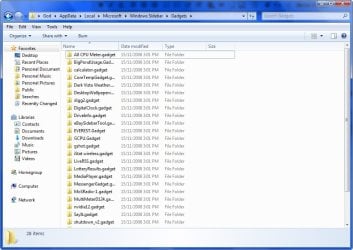
4. Now go to the same folder on your Windows 7 drive and Paste the files in that folder.

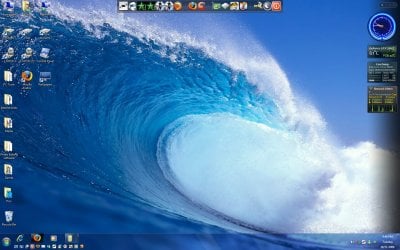
5. Start your sidebar again by Right Clicking on the Desktop and selecting Gadgets and now you should have all the gadgets you were using on Vista, Enjoy! 2008-11-18_214623.jpg


STEP THREE

Add NEW Gadgets to the Vista Sidebar


There is a problem installing new gadgets when using the Vista sidebar and you will need to follow this workaround to be able.

1. Download new Gadget

2. Download 7-Zip and install

3. Right click on the Gadget.exe and go to the 7-Zip tab and Extract Files. 2009-05-29_041521.jpg
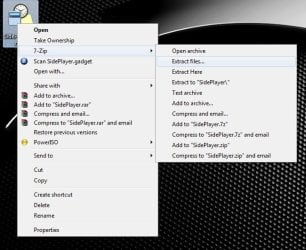
4. Now you have the folder on your desktop you will need to add .Gadget to the folder name and move it to the Gadgets folder as mentioned in Step Two.


TO UNDO CHANGES FOLLOW THESE INSTRUCTIONS

1. Opening the Start Menu and then type: cmd and Open as Administrator

2. Type: sfc /scannow

3. Let it complete and restart and all changes will undone.

For more information on scf /scannow look here.

 
Last edited by a moderator:
I did follow the tutorial! I must have made a mistake somewhere along the way, because I can get the gadgets to appear and work, but I can't get the multiple page effect.:confused:

Perhaps I should undo what I've done, and try again.

P.S. Thanks for the quick reply!
 

My Computer My Computer

At a glance

windows 7 x64 Home Premiumintel q6600g.skill 8gb ddr2 1066 (pc2 8500)evga geforce 9800 gtx 512 mb
Computer Manufacturer/Model Number
me / #1
OS
windows 7 x64 Home Premium
CPU
intel q6600
Motherboard
gigbyte ga ep45 ud3l
Memory
g.skill 8gb ddr2 1066 (pc2 8500)
Graphics Card(s)
evga geforce 9800 gtx 512 mb
Screen Resolution
1680 x 1050
Hard Drives
wd caviar black 500 gb
wd caviar black 1tb
wd elements 1tb external hd x2
PSU
raidmax 500w
Case
smilodon (yes, t'was the pretty blue lites that got me!)
Well because I have never tried that particular feature, I tried it myself and can confirm that you should get multiple pages using the tutorial.

2009-05-14_163652.jpg2009-05-14_163707.jpg
 

My Computer My Computer

At a glance

Windows 7 Ultimate Vista Ultimate x64Core 2 Duo E8500 3.16Ghz @ 3.8Ghz2x2Gigs Patriot PC2-6400 LLInno3D GeForce GTX260 216 SP
Computer Manufacturer/Model Number
Home Brew
OS
Windows 7 Ultimate Vista Ultimate x64
CPU
Core 2 Duo E8500 3.16Ghz @ 3.8Ghz
Motherboard
eVGA 750i FTW
Memory
2x2Gigs Patriot PC2-6400 LL
Graphics Card(s)
Inno3D GeForce GTX260 216 SP
Monitor(s) Displays
ASUS VW222U 22" 2ms Response time
Screen Resolution
1680x1050
Hard Drives
SATA 150GB
SATA II 250GB
USB IDE 750GB Ext.
PSU
HYTEC 600W & Thermaltake 650W Toughpower Power Exp
Case
Thermaltake Armor LCS (Liquid Cooling System)
Cooling
Liquid Cooling System
Keyboard
Logitech G15 Gaming Keyboard
Mouse
Logitech G9 Gaming Mouse
I have updated the tutorial with an easier method for anyone having issues with the old one, so for anyone having problems with the old Tutorial, Try Method One.
 

My Computer My Computer

At a glance

Windows 7 Ultimate Vista Ultimate x64Core 2 Duo E8500 3.16Ghz @ 3.8Ghz2x2Gigs Patriot PC2-6400 LLInno3D GeForce GTX260 216 SP
Computer Manufacturer/Model Number
Home Brew
OS
Windows 7 Ultimate Vista Ultimate x64
CPU
Core 2 Duo E8500 3.16Ghz @ 3.8Ghz
Motherboard
eVGA 750i FTW
Memory
2x2Gigs Patriot PC2-6400 LL
Graphics Card(s)
Inno3D GeForce GTX260 216 SP
Monitor(s) Displays
ASUS VW222U 22" 2ms Response time
Screen Resolution
1680x1050
Hard Drives
SATA 150GB
SATA II 250GB
USB IDE 750GB Ext.
PSU
HYTEC 600W & Thermaltake 650W Toughpower Power Exp
Case
Thermaltake Armor LCS (Liquid Cooling System)
Cooling
Liquid Cooling System
Keyboard
Logitech G15 Gaming Keyboard
Mouse
Logitech G9 Gaming Mouse
Mr Grim: can you open flyouts in your sidebar?
 

My Computer My Computer

At a glance

Server 2008
OS
Server 2008

My Computer My Computer

At a glance

Windows 7 Ultimate Vista Ultimate x64Core 2 Duo E8500 3.16Ghz @ 3.8Ghz2x2Gigs Patriot PC2-6400 LLInno3D GeForce GTX260 216 SP
Computer Manufacturer/Model Number
Home Brew
OS
Windows 7 Ultimate Vista Ultimate x64
CPU
Core 2 Duo E8500 3.16Ghz @ 3.8Ghz
Motherboard
eVGA 750i FTW
Memory
2x2Gigs Patriot PC2-6400 LL
Graphics Card(s)
Inno3D GeForce GTX260 216 SP
Monitor(s) Displays
ASUS VW222U 22" 2ms Response time
Screen Resolution
1680x1050
Hard Drives
SATA 150GB
SATA II 250GB
USB IDE 750GB Ext.
PSU
HYTEC 600W & Thermaltake 650W Toughpower Power Exp
Case
Thermaltake Armor LCS (Liquid Cooling System)
Cooling
Liquid Cooling System
Keyboard
Logitech G15 Gaming Keyboard
Mouse
Logitech G9 Gaming Mouse
I'm back! After a good night's sleep, I thought I'd try again. (I've got to stop playing with my system at two in the morning... nothing good comes of it.)

I see you added an additional way to get the Vista sidebar into Windows 7. I used the new method and it worked! Mostly...

I have the Vista sidebar, with the multiple page function and the mini sidebar toolbar on the top... which is good. And if I click on the "+" to get more gadgets, it takes me to the gadget box. (Again, good so far...)

When I click on the "Get more gadgets online" link in the box, it takes me directly to the Vista gadget webpage. That means the sidebar itself is the Vista sidebar. Great!

However, I still have two problems.

1. If I try to grab a new gadget from the webpage, it never installs. Whether I tell it to "open with Windows sidebar", or I save it to my desktop and try to install it from there, the gadget never installs. Nothing visible happens at all. It doesn't appear in the sidebar, nor in the gadget dialog box. If I check Process Explorer, I can see the sidebar.exe running... so it may be trying (and failing) to open the new gadget. I dunno.

2. The gadgets that appear with the sidebar don't seem to be Vista gadgets. I think they are the Win 7 destop gadgets I installed a few days ago.

In short, I think I have the Vista sidebar, but its filled with Win 7 gadgets.

I also seem to have gadget files in three separate places... in the new sidebar (x64, renamed "Windows sidebar"), under the old sidebar (renamed "Windows sidebar (2)"), and in Windows sidebar (x86). And they are all the same... all Win 7 desktop gadgets.

Got any ideas what I did wrong? Any advice is appreciated!:confused:
 

My Computer My Computer

At a glance

windows 7 x64 Home Premiumintel q6600g.skill 8gb ddr2 1066 (pc2 8500)evga geforce 9800 gtx 512 mb
Computer Manufacturer/Model Number
me / #1
OS
windows 7 x64 Home Premium
CPU
intel q6600
Motherboard
gigbyte ga ep45 ud3l
Memory
g.skill 8gb ddr2 1066 (pc2 8500)
Graphics Card(s)
evga geforce 9800 gtx 512 mb
Screen Resolution
1680 x 1050
Hard Drives
wd caviar black 500 gb
wd caviar black 1tb
wd elements 1tb external hd x2
PSU
raidmax 500w
Case
smilodon (yes, t'was the pretty blue lites that got me!)
Mr Grim: This is what I mean. Picture was taken from my Computer at work running Server 2008 - this is what doesn't work in W7.
 

Attachments

  • Sidebar-Flyout.jpg
    Sidebar-Flyout.jpg
    43.1 KB · Views: 701

My Computer My Computer

At a glance

Server 2008
OS
Server 2008
I wonder if there is a way to reserve the right border of the screen for gadgets, so I could get a pseudo-sidebar with the original W7-gadgets. Some programs like desktop sidebar do this, maybe there is a simple way or tool that I don't know (yet).
 

My Computer My Computer

At a glance

Server 2008
OS
Server 2008
Thought I might add that after you reinstate vista sidebar you will no longer be able to add gadgets from microsoft website, the only option is to download and install all gadgets before you convert. You can of course enable and disable all gadgets in your gadget folder though.

Mr grim maybe this piece of info could go somewhere in your tutorial so ppl dont do whole of it then realise that you then cant add any more gadgets. :)
 

My Computer My Computer

At a glance

windows 74GB OCZ @ 810MhzEVGA Gtx 280 @610/900
Computer Manufacturer/Model Number
Custom Built
OS
windows 7
Motherboard
Abit IP35
Memory
4GB OCZ @ 810Mhz
Graphics Card(s)
EVGA Gtx 280 @610/900
Sound Card
creative X_FI
Monitor(s) Displays
LG 24 inch lcd
Screen Resolution
1650x1080
Hard Drives
150 GB -WD velociraptor
640 GB -WD
PSU
Thermaltake truepower 700w
Case
Coolermaster CM 690 modded
Cooling
Thermaltake Big water
Keyboard
Logitech media elite
Mouse
Logitech G9
Thought I might add that after you reinstate vista sidebar you will no longer be able to add gadgets from microsoft website, the only option is to download and install all gadgets before you convert. You can of course enable and disable all gadgets in your gadget folder though.

Mr grim maybe this piece of info could go somewhere in your tutorial so ppl dont do whole of it then realise that you then cant add any more gadgets. :)

There is an extra step in the tutorial on how to add new gadgets, thanks for bringing it up. :)
 

My Computer My Computer

At a glance

Windows 7 Ultimate Vista Ultimate x64Core 2 Duo E8500 3.16Ghz @ 3.8Ghz2x2Gigs Patriot PC2-6400 LLInno3D GeForce GTX260 216 SP
Computer Manufacturer/Model Number
Home Brew
OS
Windows 7 Ultimate Vista Ultimate x64
CPU
Core 2 Duo E8500 3.16Ghz @ 3.8Ghz
Motherboard
eVGA 750i FTW
Memory
2x2Gigs Patriot PC2-6400 LL
Graphics Card(s)
Inno3D GeForce GTX260 216 SP
Monitor(s) Displays
ASUS VW222U 22" 2ms Response time
Screen Resolution
1680x1050
Hard Drives
SATA 150GB
SATA II 250GB
USB IDE 750GB Ext.
PSU
HYTEC 600W & Thermaltake 650W Toughpower Power Exp
Case
Thermaltake Armor LCS (Liquid Cooling System)
Cooling
Liquid Cooling System
Keyboard
Logitech G15 Gaming Keyboard
Mouse
Logitech G9 Gaming Mouse
There is an extra step in the tutorial on how to add new gadgets, thanks for bringing it up. :)


Nice one Mr.Grim good workaround ! :geek: Why didnt I think of that! LOL
 

My Computer My Computer

At a glance

windows 74GB OCZ @ 810MhzEVGA Gtx 280 @610/900
Computer Manufacturer/Model Number
Custom Built
OS
windows 7
Motherboard
Abit IP35
Memory
4GB OCZ @ 810Mhz
Graphics Card(s)
EVGA Gtx 280 @610/900
Sound Card
creative X_FI
Monitor(s) Displays
LG 24 inch lcd
Screen Resolution
1650x1080
Hard Drives
150 GB -WD velociraptor
640 GB -WD
PSU
Thermaltake truepower 700w
Case
Coolermaster CM 690 modded
Cooling
Thermaltake Big water
Keyboard
Logitech media elite
Mouse
Logitech G9
There is an extra step in the tutorial on how to add new gadgets, thanks for bringing it up. :)

As 7-zip names the folder to the gadget name it does nopt put it as *.gadget eg

mediaplayer gadget folder name by extracting by 7-zip would become folder mediaplayer it needs to be renamed mediaplayer.gadget otherwise windows will not see the gadget, hope this helps :D
 

My Computer My Computer

At a glance

windows 74GB OCZ @ 810MhzEVGA Gtx 280 @610/900
Computer Manufacturer/Model Number
Custom Built
OS
windows 7
Motherboard
Abit IP35
Memory
4GB OCZ @ 810Mhz
Graphics Card(s)
EVGA Gtx 280 @610/900
Sound Card
creative X_FI
Monitor(s) Displays
LG 24 inch lcd
Screen Resolution
1650x1080
Hard Drives
150 GB -WD velociraptor
640 GB -WD
PSU
Thermaltake truepower 700w
Case
Coolermaster CM 690 modded
Cooling
Thermaltake Big water
Keyboard
Logitech media elite
Mouse
Logitech G9
As 7-zip names the folder to the gadget name it does nopt put it as *.gadget eg

mediaplayer gadget folder name by extracting by 7-zip would become folder mediaplayer it needs to be renamed mediaplayer.gadget otherwise windows will not see the gadget, hope this helps :D

Thank you, added. :)
 

My Computer My Computer

At a glance

Windows 7 Ultimate Vista Ultimate x64Core 2 Duo E8500 3.16Ghz @ 3.8Ghz2x2Gigs Patriot PC2-6400 LLInno3D GeForce GTX260 216 SP
Computer Manufacturer/Model Number
Home Brew
OS
Windows 7 Ultimate Vista Ultimate x64
CPU
Core 2 Duo E8500 3.16Ghz @ 3.8Ghz
Motherboard
eVGA 750i FTW
Memory
2x2Gigs Patriot PC2-6400 LL
Graphics Card(s)
Inno3D GeForce GTX260 216 SP
Monitor(s) Displays
ASUS VW222U 22" 2ms Response time
Screen Resolution
1680x1050
Hard Drives
SATA 150GB
SATA II 250GB
USB IDE 750GB Ext.
PSU
HYTEC 600W & Thermaltake 650W Toughpower Power Exp
Case
Thermaltake Armor LCS (Liquid Cooling System)
Cooling
Liquid Cooling System
Keyboard
Logitech G15 Gaming Keyboard
Mouse
Logitech G9 Gaming Mouse
Hi - Hope you can help - I installed Windows 7 Ultimate and sidebar/gadgets worked fine for 2 days then now it's white down the right side even when I reboot during the bootup and logon screens and I can't access the gadgets as they are hidden under the white sidebar.
 

My Computer My Computer

At a glance

Windows 7
OS
Windows 7
So you installed the Vista sidebar and now it's turned white, did you follow the tutorial and rename the original sidebar folder, if so then go into task manager and kill the sidebar.exe and remove the Vista Sidebar folder and rename the Windows 7 one and check to see it is working again.
 

My Computer My Computer

At a glance

Windows 7 Ultimate Vista Ultimate x64Core 2 Duo E8500 3.16Ghz @ 3.8Ghz2x2Gigs Patriot PC2-6400 LLInno3D GeForce GTX260 216 SP
Computer Manufacturer/Model Number
Home Brew
OS
Windows 7 Ultimate Vista Ultimate x64
CPU
Core 2 Duo E8500 3.16Ghz @ 3.8Ghz
Motherboard
eVGA 750i FTW
Memory
2x2Gigs Patriot PC2-6400 LL
Graphics Card(s)
Inno3D GeForce GTX260 216 SP
Monitor(s) Displays
ASUS VW222U 22" 2ms Response time
Screen Resolution
1680x1050
Hard Drives
SATA 150GB
SATA II 250GB
USB IDE 750GB Ext.
PSU
HYTEC 600W & Thermaltake 650W Toughpower Power Exp
Case
Thermaltake Armor LCS (Liquid Cooling System)
Cooling
Liquid Cooling System
Keyboard
Logitech G15 Gaming Keyboard
Mouse
Logitech G9 Gaming Mouse
Hi Thanks for the help - however I have Windows 7 Ultimate clean installed on an old Laptop and so have no Vista files.

I've tried downloading the Windows Sidebar (X86).zip
from your tutorial - however it will not allow me to download it.
 
Last edited by a moderator:

My Computer My Computer

At a glance

Windows 7
OS
Windows 7
Sorry I though you meant that you had installed the Vista Sidebar and that it was causing the problem, if that's not the case try opening an elevated command prompt and type sfc /scannow and see if it finds any integrity errors and then restart Windows.

If you are still having the problem after that then you can try a system restore or a Repair Install, if all else fails then you will need to reinstall windows.
 

My Computer My Computer

At a glance

Windows 7 Ultimate Vista Ultimate x64Core 2 Duo E8500 3.16Ghz @ 3.8Ghz2x2Gigs Patriot PC2-6400 LLInno3D GeForce GTX260 216 SP
Computer Manufacturer/Model Number
Home Brew
OS
Windows 7 Ultimate Vista Ultimate x64
CPU
Core 2 Duo E8500 3.16Ghz @ 3.8Ghz
Motherboard
eVGA 750i FTW
Memory
2x2Gigs Patriot PC2-6400 LL
Graphics Card(s)
Inno3D GeForce GTX260 216 SP
Monitor(s) Displays
ASUS VW222U 22" 2ms Response time
Screen Resolution
1680x1050
Hard Drives
SATA 150GB
SATA II 250GB
USB IDE 750GB Ext.
PSU
HYTEC 600W & Thermaltake 650W Toughpower Power Exp
Case
Thermaltake Armor LCS (Liquid Cooling System)
Cooling
Liquid Cooling System
Keyboard
Logitech G15 Gaming Keyboard
Mouse
Logitech G9 Gaming Mouse
Mr GRiM,

To get Vista sidebar on W7, all I ever had to do was:

1) Rename Vista's sidebar folder and copy to W7 Program Files
2) Close all running gadgets
3) Reboot and rename each quickly before Action Center does it's thing
4) :D

Works every time for me!
 
Last edited:

My Computer My Computer

At a glance

Windows 7 RCCore 2 Duo T7200 2GHz2GBFireGL V5250
Computer Manufacturer/Model Number
ThinkPad T60p
OS
Windows 7 RC
CPU
Core 2 Duo T7200 2GHz
Memory
2GB
Graphics Card(s)
FireGL V5250
Monitor(s) Displays
15.4" Widescreen
Screen Resolution
1680x1050
Other Info
☺ NEW COOL TOY: ASUS Eee PC 1000HE w/2GB 800MHz RAM, Samsung 64GB SLC SSD and, of course, Windows 7 ☺
Mr GRiM, what HTML codes do you use to put up these banners? :o
Capture.PNG
 

My Computer My Computer

At a glance

Windows 8 x64Intel Core i7 3630QMSamsung 8 GB DDR3 800 MhzATI Radeon HD Graphics 7670M + Intel HD Graph...
Computer type
Laptop
Computer Manufacturer/Model Number
Samsung
OS
Windows 8 x64
CPU
Intel Core i7 3630QM
Motherboard
Intel HM76
Memory
Samsung 8 GB DDR3 800 Mhz
Graphics Card(s)
ATI Radeon HD Graphics 7670M + Intel HD Graphics 4000
Screen Resolution
1366x768
Hard Drives
SAMSUNG Spinpoint M8 1TB
Internet Speed
4 Mb/sDownload Speed, 2 Mb/s Upload Speed
Antivirus
avast!
In 7600 still not working correctly

I have just installed the first leaked 7600 build. The problem with the non-working flyouts is still there after reinstating the Vista Sidebar. Did anybody find a solution for this problem in the meantime?
 

My Computer My Computer

At a glance

Server 2008
OS
Server 2008
Back
Top