Solved Visual C++ Error Runtime Library

seventrad

New member
Local time
4:49 PM
Messages
50
Hi,

When I access a folder with a video file (rmvb) the error below appears:

error.jpg

I don't open the video file. I only open the folder with the video file inside and the error appears.

I downloaded and install the Visual C++ Runtime 2010 (x86 and x64) from Microsoft website but didn't works.
 

My Computer

OS
Windows 7 Ultimate x64 SP1
Uninstall Visual C++ completely and restart. Uninstall also Windows media player because it could be related to the thumbnail display of the icon.
 

My Computer

OS
32 bit Windows 7
Questions

Uninstall Visual C++ completely and restart. Uninstall also Windows media player because it could be related to the thumbnail display of the icon.

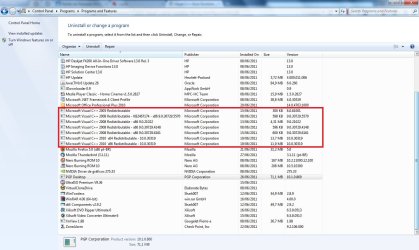
I need to unninstall all Visual C++ or only the 2010 release?

visualcpp.jpg

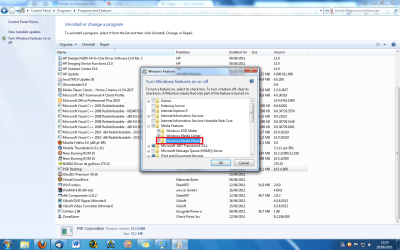
I need to unninstall the Windows Media Player too?

wmp.png

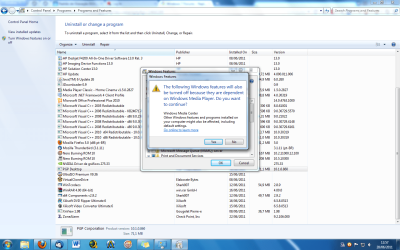
But, WMP is necessary for other programs in Windows.

wmp_warning.png

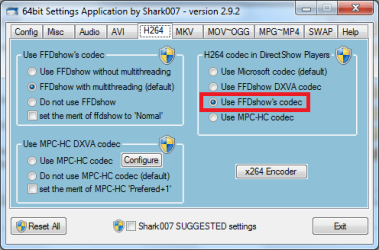
I use Win7codecs with Media Player Classic Home Cinema. I don't use Windows Media Player. The thundbnails are created by the FFDShow's codec.

win7codec.png

:confused:???
 

My Computer

OS
Windows 7 Ultimate x64 SP1
Hello, I would uninstall the Classic Media Player, since it has caused the error. Uninstall the 2010 C++ and use Shark's SUGGESTED settings. Use Windows Media Player and see if that helps.

Another thing to try is to uninstall the Shark codecs and use Cole2K Advanced instead.

Real Media files have historically been very buggy and required special players and the like. Have a look at RMVB Codecs.
 

My Computer

Computer type
PC/Desktop
Computer Manufacturer/Model Number
Home Built Desktop By DataTech
OS
Windows 7 Ultimate X64 SP1
CPU
Intel i5-2550K, Differing ~4.4-4.8GHz No built in GPU
Motherboard
ASUS P8Z68-V PRO/GEN3
Memory
16GB G.Skill Sniper 1866MHz @ 2133MHz 2x8GB
Graphics Card(s)
ASUS GTX650TIB-DC2OC-2GD5, (650TI Boost)
Sound Card
Onboard Realtek 5-1
Monitor(s) Displays
Samsung P2570HD
Screen Resolution
1920x1080
Hard Drives
Samsung 840 Pro 256GB SSD for OS, 500GB Seagate Constellation (Enterprise drive) for Data
PSU
Corsair HX650W
Case
Inwin Dragon Rider
Cooling
Hyper 212 EVO w/two Noctua fans, push-pull, @1300 RPM
Keyboard
E-Z Eyes, bright yellow keys with large characters
Mouse
steelseries SENSEI Laser Pro Gaming
Internet Speed
48-51Mbs Mbs down, 11 Mbs up Xfinity Cable
Antivirus
Norton Internet Security 2013
Browser
IE 10, Opera, Pale Moon if needed
Other Info
4 case fans, LG BluRay-RE, ASUS DVD-RW, Mr. Fusion power supply, 1.21 gigawatts.
Uninstalling C++ runtime libariess is not a good idea.
doing so may break other programs like antivirus detection.

A good solution is to use Metafox (it can be downloaded from my tools page) to create MKV's from those rmvb files.

It cant get any easier to use. Once installed, there is an icon on your desktop. All you have to do is drag n drop the rmvb, or even a whole folder of rmvb's to the Metafox desktop icon and it willl instantly create MKV's using the original audio/video contents of the rmvb.
 

My Computer

Computer Manufacturer/Model Number
Selfbuilt
OS
Windows 7 Ultimate 64bit
CPU
i7 2600k
Motherboard
asus P8Z68-V LE
Memory
16GB (4x4) corsair vengeance
Graphics Card(s)
Intel HD3000 iGPU / AMD HD6870 1024MB
Sound Card
bitstreamed to an Onkyo 609
Monitor(s) Displays
Asus VE278 27" LED / Bravia EX7 60" LED
Screen Resolution
native 1080p x2
Hard Drives
4x 2TB int. + 2x 2TB external and a SSD for the boot drive.
PSU
650w Antec
Case
NZXT tempest evo
Cooling
air/stock
Keyboard
Dell
Mouse
logitech m505
Internet Speed
dual: cable/blackberry tether for travel use
Other Info
BD re-writer //
asus notebook G73Jw
Solution!

Hi,

I found a another solution: don't create thumbnail of the rmvb files!

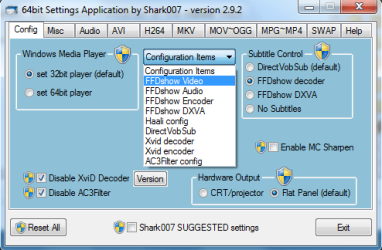
Got to Start>>Programs>>Win7codecs>>Settings Application (x64)>>Config (Tab)>>Configuration Items>>FFDShow Video

64settings.png

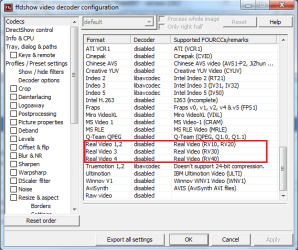
then disable options "Real Video 1,2,3,4".

realvideo.png

Did work for me!

Note:
I can playback rmvb files normally!
 

My Computer

OS
Windows 7 Ultimate x64 SP1
Great to hear you solved it 7trad!:D
 

My Computer

Computer type
PC/Desktop
Computer Manufacturer/Model Number
Home Built Desktop By DataTech
OS
Windows 7 Ultimate X64 SP1
CPU
Intel i5-2550K, Differing ~4.4-4.8GHz No built in GPU
Motherboard
ASUS P8Z68-V PRO/GEN3
Memory
16GB G.Skill Sniper 1866MHz @ 2133MHz 2x8GB
Graphics Card(s)
ASUS GTX650TIB-DC2OC-2GD5, (650TI Boost)
Sound Card
Onboard Realtek 5-1
Monitor(s) Displays
Samsung P2570HD
Screen Resolution
1920x1080
Hard Drives
Samsung 840 Pro 256GB SSD for OS, 500GB Seagate Constellation (Enterprise drive) for Data
PSU
Corsair HX650W
Case
Inwin Dragon Rider
Cooling
Hyper 212 EVO w/two Noctua fans, push-pull, @1300 RPM
Keyboard
E-Z Eyes, bright yellow keys with large characters
Mouse
steelseries SENSEI Laser Pro Gaming
Internet Speed
48-51Mbs Mbs down, 11 Mbs up Xfinity Cable
Antivirus
Norton Internet Security 2013
Browser
IE 10, Opera, Pale Moon if needed
Other Info
4 case fans, LG BluRay-RE, ASUS DVD-RW, Mr. Fusion power supply, 1.21 gigawatts.
Back
Top