Visual C ++

seekermeister

Old School
Guru
Gold Member
VIP
Local time
3:59 AM
Messages
6,618
Location
Indian Territory
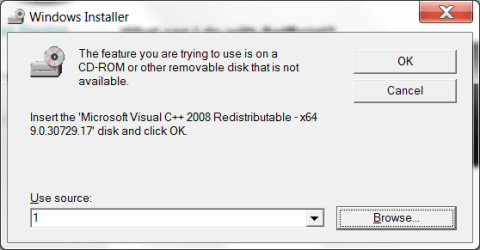
For some time now, each time that I install certain programs or drivers, a window appears, as in the first screenshot below. Since I have no idea of how to deal with it, I've always canceled it out, and the installation continued normally, and the program or driver always seems to be okay. Despite this, it is both annoying and worrisome.

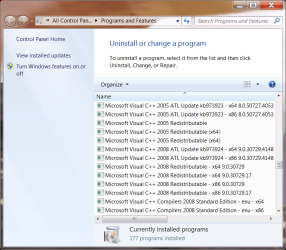
As can be seen in the second screenshot, it appears that the version of C ++ that it is looking for is installed,along with a number of others that have accumulated over time. I'm uncertain if they all need to be there or not, but either way, how do I deal with the issue above?
 

Attachments
  • Logitech.png
    Logitech.png
    10.2 KB · Views: 3
  • C++.png
    C++.png
    68.2 KB · Views: 6

My Computer

Computer Manufacturer/Model Number
DIY
OS
W7x64 Pro, SuSe 12.1/** W7 x64 Pro, XP MCE
CPU
Phenom II 1090T w/Noctua NH-D14 /**4400+ X2 w/CM Hyper TX 3
Motherboard
ASRock 890FX Deluxe 4/**A8N-SLI
Memory
2 x 2GB Patriot PGS34g1600LLKA/**4x1GB Corsair VS
Graphics Card(s)
EVGA GTX460 SC/**EVGA 8800GTS
Sound Card
Asus Xonar D2X/**Xonar D1
Monitor(s) Displays
Acer X233H, Dell E152FPc /**LG M237-WD
Screen Resolution
1920x1080 & 1024x768/**1980x1080
Hard Drives
WDC 2TB, 1.5TB, 1TB, 500GB,Seagate 500GB , Maxtor 80GB /**500GB Seagate & WDC 1TB Black
PSU
CM RS600 w/ APC BX1000G/**Antec 500 TP w/ APC BX1000
Case
HAF922/**Antec 1040IIB
Cooling
3x200mm, 1x140 and 1x120mm/**5x80mm fans
Keyboard
Logitech Media USB/**Saitek Eclipse
Mouse
Cordless Trackman Wheel/**Ditto
Internet Speed
3.3Mbps
Other Info
SB 560 5.1 w/ Sennheiser RS140/**Creative T20 speakers, Dvico FusionHDTV7 Gold RT, Cisco E3000, HP 5510V AIO, Linksys E3000, Belkin F5U237 hub and **F5D8055 adapter
(** = 2nd rig)
For some time now, each time that I install certain programs or drivers, a window appears, as in the first screenshot below. Since I have no idea of how to deal with it, I've always canceled it out, and the installation continued normally, and the program or driver always seems to be okay. Despite this, it is both annoying and worrisome.

As can be seen in the second screenshot, it appears that the version of C ++ that it is looking for is installed,along with a number of others that have accumulated over time. I'm uncertain if they all need to be there or not, but either way, how do I deal with the issue above?

It might be because you've got the MS Visual C++ Compiler 2008 SE installed.

I would not get rid of the redistributable package at all, because it will anyway reinstall from another app. When it says it reinstall C++ (2005 or 2008) it is only checking which version (SP1 or normal), then cancel internaly if it sees the right one. That would be why it continue install without any errors (appart that first windows)
 

My Computer

Computer type
PC/Desktop
Computer Manufacturer/Model Number
Custom Build
OS
Windows 7 Professional SP1 - x64 [Non-UEFI Boot]
CPU
Ivy Bridge Core i5 3570K (Delidded)
Motherboard
Asus P8Z77-V LE PLUS
Memory
G.Skill "Ares" DDR3 PC3-12800 - 1600MHz (16Gb)
Graphics Card(s)
Asus Dual-RX480-O4G
Sound Card
Creative Sound Blaster Z w/5.1 sound system
Monitor(s) Displays
Asus IPS 23"
Screen Resolution
16/9
Hard Drives
Internal:
500Go Sata 6Gb/s (x2)
500Go Sata 3Gb/s (x2)
SSD 60Go Sata 6Gb/s
PSU
In Win C 900W Series 80+ Platinum
Case
Thermaltake Chaser A71
Cooling
Custom Water Cooling Loop
Keyboard
Cooler Master QuickFire XTi
Mouse
Razer Imperator 2012 (4G)
Antivirus
MSE
Browser
IE 11.0.xxx Rtm
Other Info
"Raid0" with Intel Smart Response Technology (HDD/SSD)
I would try uninstalling that particular redist package, cleaning up (perhaps with the windows installer cleanup utility, even though MS no longer supports it), then reinstalling.
 

My Computer

Computer Manufacturer/Model Number
Too many to describe...
OS
Windows 7 x64 pro/ Windows 7 x86 Pro/ XP SP3 x86
Back
Top