Hello eveybody,
Im new here, and came across this site while looking for help with an issue I have with Windows 7 and running VM.
I just got a new laptop for work which is Windows 7 OS. My old laptop is XP with SP3 on it.
So here was my idea:
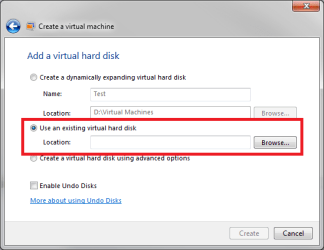
I could grab a VHD "image" of my old laptop, using the Disk2vhd utility from Microsoft (link to utility: Disk2vhd), and then in Windows 7, i could just run my old machine right there. So no need to reinstall all my applications, copy all my data, etc (im a network administrator).
here is whats going on:
I sucessfully grabbed the VHD of my old computer, and transfered it to my new laptop (which by the way, has hardware virtulization, and has run Windows XP Mode without issue).
When I browse (i just put it in a temp folder off the C: drive) to the VHD file, and select the file, i only get the following options: Organize, Open With, Burn and New Folder.
So, im at a loss as to why I can run this VHD of my old XP laptop.
Someone said I could use VMware to convert my old XP laptop, and then use another free VMware product to run it, but I really dont want to have to load some 3rd party software, when this should be able to work.
So, anyone out there that can help me with this issue? I would really appreciate any help.
Jason, "DeVoiD"
Im new here, and came across this site while looking for help with an issue I have with Windows 7 and running VM.
I just got a new laptop for work which is Windows 7 OS. My old laptop is XP with SP3 on it.
So here was my idea:
I could grab a VHD "image" of my old laptop, using the Disk2vhd utility from Microsoft (link to utility: Disk2vhd), and then in Windows 7, i could just run my old machine right there. So no need to reinstall all my applications, copy all my data, etc (im a network administrator).
here is whats going on:
I sucessfully grabbed the VHD of my old computer, and transfered it to my new laptop (which by the way, has hardware virtulization, and has run Windows XP Mode without issue).
When I browse (i just put it in a temp folder off the C: drive) to the VHD file, and select the file, i only get the following options: Organize, Open With, Burn and New Folder.
So, im at a loss as to why I can run this VHD of my old XP laptop.
Someone said I could use VMware to convert my old XP laptop, and then use another free VMware product to run it, but I really dont want to have to load some 3rd party software, when this should be able to work.
So, anyone out there that can help me with this issue? I would really appreciate any help.
Jason, "DeVoiD"
Last edited:
My Computer
- Computer Manufacturer/Model Number
- HP EliteBook - 8530w
- OS
- Windows 7
- CPU
- Intel Duo T9600 @ 2.89GHz
- Motherboard
- Dont Know
- Memory
- 4GB
- Graphics Card(s)
- Nvidia Quadro 512Mb
- Sound Card
- dont care
- Monitor(s) Displays
- Laptop Display 15.5 Inch
- Hard Drives
- 1 x 300Gb Sata 2 - 3 GBits/sec
- PSU
- External
- Case
- laptop
- Cooling
- a fan - duh