Solved Vmware - Could not find component on update server.

bonedriven

New member
Member
Local time
1:18 PM
Messages
69
Location
France
Hi forum.

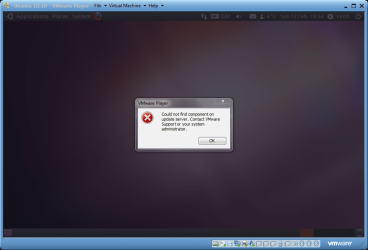
I've just uninstalled my Vmware player v3 and installed Vmware player 4.0.2. Now I can never install/update vmware tools in my vmware machine. If I click on the menu "Reinstall vmware tools" or click on the pop up at the bottom "update vmware tools" I only get this message " Could not find component on update server. Contact VMware Support or your system administrator."

I have tried reinstalled Vmware player 4.0.2 but still have this problem. I have no internet problem with my computer. Everything else works fine.

Thank you for your help!

Edit: Built in Windows 7 firewall and no other security programs running in the background.
 

My Computer

Computer Manufacturer/Model Number
Thinkpad
OS
Windows 7 Ultimate 64bit
Mouse
Logitech MX518
Internet Speed
570kb/s :(
Hi,

I have exactly the same problem - I wondered if it's required (with version 4.0.2) to upgrade to get the VMWare tools?

Lets see if anyone else has the same issue.

Regards,
Golden
 

My Computer

Computer type
PC/Desktop
Computer Manufacturer/Model Number
Golden Mk. I.4
OS
Windows 10 Pro x64 ; Xubuntu x64
CPU
Intel i7 860 @ 2.80 GHz O/C'ed to 4.0GHz
Motherboard
Gigabyte P55A-UD3R Rev.1. Award BIOS F13
Memory
16GB Corsair Vengance DDR3 @ 661 MHz Dual Channel (9-9-9-24)
Graphics Card(s)
EVGA NVidia GTX 560 1024MB
Sound Card
Realtek Integrated
Monitor(s) Displays
Dual Samsung SyncMaster 2494HS
Screen Resolution
1920*1080 and 1920*1080
Hard Drives
1*Samsung 840 EVO 120GB SSD;
1*OCZ Vertex 2 60GB SSD;
2*Samsung F3 SpinPoint 1TB in RAID0;
1*Samsung F1 SpinPoint 1TB;
2*Western Digital 1TB External USB 3.0
1*Western Digital 500GB External USB 3.0
1*Seagate 500GB External USB 2.0
PSU
Thermaltake ToughPower QFan 750W
Case
Thermaltake Element S VK60001W2Z
Cooling
Corsair H60 Water Cooling, 2*230mm and 2*80mm case fans
Keyboard
Logitech G110
Mouse
Logitech MX518
Hi,

I have exactly the same problem - I wondered if it's required (with version 4.0.2) to upgrade to get the VMWare tools?

Lets see if anyone else has the same issue.

Regards,
Golden

Maybe you have run into this thread too.

And the first step: "fist download VMWare Tools for Linux from official website and once you complete the downloading then make click on the *.exe file"

But it seems that I can't find Vmware tools for linux from official website. :rolleyes:
 

My Computer

Computer Manufacturer/Model Number
Thinkpad
OS
Windows 7 Ultimate 64bit
Mouse
Logitech MX518
Internet Speed
570kb/s :(
Mmmm. I'm not sure.....I've asked Jimbo to have a look at this when he gest the time. He seems very knowlegable when it comes to VMWare, so lets see if he has any suggestions.

Regards,
Golden
 

My Computer

Computer type
PC/Desktop
Computer Manufacturer/Model Number
Golden Mk. I.4
OS
Windows 10 Pro x64 ; Xubuntu x64
CPU
Intel i7 860 @ 2.80 GHz O/C'ed to 4.0GHz
Motherboard
Gigabyte P55A-UD3R Rev.1. Award BIOS F13
Memory
16GB Corsair Vengance DDR3 @ 661 MHz Dual Channel (9-9-9-24)
Graphics Card(s)
EVGA NVidia GTX 560 1024MB
Sound Card
Realtek Integrated
Monitor(s) Displays
Dual Samsung SyncMaster 2494HS
Screen Resolution
1920*1080 and 1920*1080
Hard Drives
1*Samsung 840 EVO 120GB SSD;
1*OCZ Vertex 2 60GB SSD;
2*Samsung F3 SpinPoint 1TB in RAID0;
1*Samsung F1 SpinPoint 1TB;
2*Western Digital 1TB External USB 3.0
1*Western Digital 500GB External USB 3.0
1*Seagate 500GB External USB 2.0
PSU
Thermaltake ToughPower QFan 750W
Case
Thermaltake Element S VK60001W2Z
Cooling
Corsair H60 Water Cooling, 2*230mm and 2*80mm case fans
Keyboard
Logitech G110
Mouse
Logitech MX518
As I described in a separate thread, I installed VM Playesr 3.1.5 with XP Mode. That is just two days ago.
When I opened VM Player, it prompted to download Vm Player 4.01 (not 4.02). Leave it for a few minutes. Then, it starts to download. I let the computer does the job. It automatically reboot the computer and uninstalled v. 3.1.5. The computer rebooted by iteself and started to install v. 4.01. Everything goes smoothly. A few minutes later, it will prompt to download VM tools ( I assume that thse are for v. 4.01). It downlaoded and insalled. Just be patient. Save your energy. Let the computer does the job. My VM Player runs excelelnt now (but with minor two errors which I am going to post soon).
 

My Computer

OS
Windows 7
Apparently it's a known issue but VWWare hasn't fixed it yet. The workaround, according to the VMWare Player forum, is to use an older version of VMWare Tools until VMWare gets around to uploading the files for the new version.
 

My Computer

Computer type
PC/Desktop
Computer Manufacturer/Model Number
Home Built desktop, Dell G15 5511 Gaming laptop,MS Surface Pro 7 tablet
OS
W10 Pro desktop, W11 laptop, W11 Pro tablet (all 64-bit)
CPU
3.7Ghz 8700K i7, i7-11800H, i7-1065G7
Motherboard
ASUS TUF Z370-Pro Gaming in desktop
Memory
16G desktop, 16G laptop, 4G tablet
Graphics Card(s)
AMD Radeon RX580, RTX 3060, Intel Iris Plus
Sound Card
High Definition Audio (Built-in to mobo)
Monitor(s) Displays
Samsung U32J59 32" (2x), 15.6", 12"
Screen Resolution
3840x2160, 3840x2160, 1920x1080, 2160x1440
Hard Drives
500G SSD for OS; 2T, 10T & 15T HDDs for Data on Desktop, 1TB SSD laptop, 128G SSD tablet.
PSU
Corsair CX 750M
Case
Antec 100
Cooling
CM 212+
Keyboard
IBM Model M - used continuously since 1986
Mouse
Microsoft Pro IntelliMouse
Internet Speed
400M down 8M up
Antivirus
Windows Defender
Browser
FireFox
Other Info
Built my first computer (8Mhz 8088cpu, 640K RAM, 20MB HDD, 2 360K floppy drives) in 1985 and have been building them for myself, relatives and friends ever since.
OMG, I have had enough problems with linux. I have tried so hard to make the shared folder to work with no success. Thought I might need a newer version of Vmware. Now this damn thing is causing problem too...
 

My Computer

Computer Manufacturer/Model Number
Thinkpad
OS
Windows 7 Ultimate 64bit
Mouse
Logitech MX518
Internet Speed
570kb/s :(
Thanks strollin
 

My Computer

Computer type
PC/Desktop
Computer Manufacturer/Model Number
Golden Mk. I.4
OS
Windows 10 Pro x64 ; Xubuntu x64
CPU
Intel i7 860 @ 2.80 GHz O/C'ed to 4.0GHz
Motherboard
Gigabyte P55A-UD3R Rev.1. Award BIOS F13
Memory
16GB Corsair Vengance DDR3 @ 661 MHz Dual Channel (9-9-9-24)
Graphics Card(s)
EVGA NVidia GTX 560 1024MB
Sound Card
Realtek Integrated
Monitor(s) Displays
Dual Samsung SyncMaster 2494HS
Screen Resolution
1920*1080 and 1920*1080
Hard Drives
1*Samsung 840 EVO 120GB SSD;
1*OCZ Vertex 2 60GB SSD;
2*Samsung F3 SpinPoint 1TB in RAID0;
1*Samsung F1 SpinPoint 1TB;
2*Western Digital 1TB External USB 3.0
1*Western Digital 500GB External USB 3.0
1*Seagate 500GB External USB 2.0
PSU
Thermaltake ToughPower QFan 750W
Case
Thermaltake Element S VK60001W2Z
Cooling
Corsair H60 Water Cooling, 2*230mm and 2*80mm case fans
Keyboard
Logitech G110
Mouse
Logitech MX518
Hi there
You need to install vmware tools from the VMWARE menu screen -- I couldn't get it to work via the install button in the VM.

Power on your VM in WINDOWED mode -- then when it's up and running use the MENU VM===>install vmware tools.

This should work.

Cheers
jimbo
 

My Computer

Computer type
PC/Desktop
Computer Manufacturer/Model Number
Custom built, several laptops HP/ASUS
OS
Linux CENTOS 7 / various Windows OS'es and servers
CPU
Intel i7 Intel i5
Memory
8GB, 16GB
Graphics Card(s)
On Motherboard
Sound Card
Realtek HD audio
Monitor(s) Displays
Apple Cinema display, Samsung LCD
Screen Resolution
1920 X 1080
Hard Drives
4 X 1TB SATA
Mouse
Toshiba wireless laser
Internet Speed
> 20MB up
Hi there
You need to install vmware tools from the VMWARE menu screen -- I couldn't get it to work via the install button in the VM.

Power on your VM in WINDOWED mode -- then when it's up and running use the MENU VM===>install vmware tools.

This should work.

Cheers
jimbo

That doesn't work for me jimbo.

screenshot111_2012-02-12.png
 

My Computer

Computer type
Laptop
Computer Manufacturer/Model Number
Hewlett-Packard/G62-107SA Notebook
OS
Microsoft Windows 7 Home Premium 64-bit Service Pack 1
CPU
Intel(R) Core(TM) i3 CPU M 330 @ 2.13GHz
Motherboard
Hewlett-Packard 1425
Memory
8 GB DDR3
Graphics Card(s)
Intel(R) HD Graphics
Sound Card
Realtek High Definition Audio
Monitor(s) Displays
Builtin
Screen Resolution
1366 x 768 x 32 bits (4294967296 colors) @ 60 Hz
Hard Drives
250 GB SATA Hard Disk Drive 7200 rpm
2TB Seagate GoFlex USB 2 Drive
1TB Iomega Prestige USB 2 Drive
1.5TB Iomega Prestige USB 2 Drive (Samsung)
2TB WD MyBook Live NAS.
Mouse
Logitech Anywhere MX
Internet Speed
152 Mbs download 10 Mbs upload
Antivirus
Norton 360
Browser
Chrome
Hi Kado,

See strollins post - seems to be a bug in that version. I get exactly the same message as you do.

Regards,
Golden
 

My Computer

Computer type
PC/Desktop
Computer Manufacturer/Model Number
Golden Mk. I.4
OS
Windows 10 Pro x64 ; Xubuntu x64
CPU
Intel i7 860 @ 2.80 GHz O/C'ed to 4.0GHz
Motherboard
Gigabyte P55A-UD3R Rev.1. Award BIOS F13
Memory
16GB Corsair Vengance DDR3 @ 661 MHz Dual Channel (9-9-9-24)
Graphics Card(s)
EVGA NVidia GTX 560 1024MB
Sound Card
Realtek Integrated
Monitor(s) Displays
Dual Samsung SyncMaster 2494HS
Screen Resolution
1920*1080 and 1920*1080
Hard Drives
1*Samsung 840 EVO 120GB SSD;
1*OCZ Vertex 2 60GB SSD;
2*Samsung F3 SpinPoint 1TB in RAID0;
1*Samsung F1 SpinPoint 1TB;
2*Western Digital 1TB External USB 3.0
1*Western Digital 500GB External USB 3.0
1*Seagate 500GB External USB 2.0
PSU
Thermaltake ToughPower QFan 750W
Case
Thermaltake Element S VK60001W2Z
Cooling
Corsair H60 Water Cooling, 2*230mm and 2*80mm case fans
Keyboard
Logitech G110
Mouse
Logitech MX518
Yes Golden but I thought jimbo had it working. Perhaps not though.
 

My Computer

Computer type
Laptop
Computer Manufacturer/Model Number
Hewlett-Packard/G62-107SA Notebook
OS
Microsoft Windows 7 Home Premium 64-bit Service Pack 1
CPU
Intel(R) Core(TM) i3 CPU M 330 @ 2.13GHz
Motherboard
Hewlett-Packard 1425
Memory
8 GB DDR3
Graphics Card(s)
Intel(R) HD Graphics
Sound Card
Realtek High Definition Audio
Monitor(s) Displays
Builtin
Screen Resolution
1366 x 768 x 32 bits (4294967296 colors) @ 60 Hz
Hard Drives
250 GB SATA Hard Disk Drive 7200 rpm
2TB Seagate GoFlex USB 2 Drive
1TB Iomega Prestige USB 2 Drive
1.5TB Iomega Prestige USB 2 Drive (Samsung)
2TB WD MyBook Live NAS.
Mouse
Logitech Anywhere MX
Internet Speed
152 Mbs download 10 Mbs upload
Antivirus
Norton 360
Browser
Chrome
Hi there
You need to install vmware tools from the VMWARE menu screen -- I couldn't get it to work via the install button in the VM.

Power on your VM in WINDOWED mode -- then when it's up and running use the MENU VM===>install vmware tools.

This should work.

Cheers
jimbo

That doesn't work for me jimbo.

View attachment 198037
Hi there
I'll try again for you

What VM were you trying to start
I'll re-install vmware again and take screen shots.

I'm currently running some XP and W2K3 VM's but installing vmware tools should not be a problem.

Re-install of the W2K3 server and VMWARE tools didn't give me any problem |

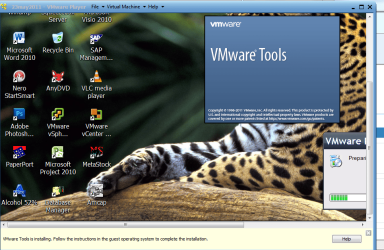
Here's my screenshot -- no prob installing vmware tools on W2K3 Server VM on vmware player -- build 4.01 528992 host system W7 X-64 Ultimate. (I usually use vmware workstation rel 8 but just tested this on vmware player to ensure my originals instructions were working OK -- seems fine for me).

I'll have to do some more research as I can't re-create your problems.

Cheers
jimbo
 

Attachments

  • vmwaretools.png
    vmwaretools.png
    215.4 KB · Views: 187

My Computer

Computer type
PC/Desktop
Computer Manufacturer/Model Number
Custom built, several laptops HP/ASUS
OS
Linux CENTOS 7 / various Windows OS'es and servers
CPU
Intel i7 Intel i5
Memory
8GB, 16GB
Graphics Card(s)
On Motherboard
Sound Card
Realtek HD audio
Monitor(s) Displays
Apple Cinema display, Samsung LCD
Screen Resolution
1920 X 1080
Hard Drives
4 X 1TB SATA
Mouse
Toshiba wireless laser
Internet Speed
> 20MB up
Jimbo45 - Are you using ver 4.02 of VMWare Player? I just went ahead and upgraded to 4.02 and I get the "... couldn't find component on server..." message when I attempt to update vmtools. I do have VMTools installed and running, when I check the "About VMTools" box it says it is running version 8.4.6. What version are you seeing?

I just checked the VMWare Player forums again and there are still multiple complaints about this.
 

My Computer

Computer type
PC/Desktop
Computer Manufacturer/Model Number
Home Built desktop, Dell G15 5511 Gaming laptop,MS Surface Pro 7 tablet
OS
W10 Pro desktop, W11 laptop, W11 Pro tablet (all 64-bit)
CPU
3.7Ghz 8700K i7, i7-11800H, i7-1065G7
Motherboard
ASUS TUF Z370-Pro Gaming in desktop
Memory
16G desktop, 16G laptop, 4G tablet
Graphics Card(s)
AMD Radeon RX580, RTX 3060, Intel Iris Plus
Sound Card
High Definition Audio (Built-in to mobo)
Monitor(s) Displays
Samsung U32J59 32" (2x), 15.6", 12"
Screen Resolution
3840x2160, 3840x2160, 1920x1080, 2160x1440
Hard Drives
500G SSD for OS; 2T, 10T & 15T HDDs for Data on Desktop, 1TB SSD laptop, 128G SSD tablet.
PSU
Corsair CX 750M
Case
Antec 100
Cooling
CM 212+
Keyboard
IBM Model M - used continuously since 1986
Mouse
Microsoft Pro IntelliMouse
Internet Speed
400M down 8M up
Antivirus
Windows Defender
Browser
FireFox
Other Info
Built my first computer (8Mhz 8088cpu, 640K RAM, 20MB HDD, 2 360K floppy drives) in 1985 and have been building them for myself, relatives and friends ever since.
Hi there
this might be a *Mea Culpa* but I did an upggade from version 4.0.1 build-528992 .

I'll try again installing 4.02 from Scratch.

I'm really busy at work at the moment so it might take me a day or two.

Cheers
jimbo
 

My Computer

Computer type
PC/Desktop
Computer Manufacturer/Model Number
Custom built, several laptops HP/ASUS
OS
Linux CENTOS 7 / various Windows OS'es and servers
CPU
Intel i7 Intel i5
Memory
8GB, 16GB
Graphics Card(s)
On Motherboard
Sound Card
Realtek HD audio
Monitor(s) Displays
Apple Cinema display, Samsung LCD
Screen Resolution
1920 X 1080
Hard Drives
4 X 1TB SATA
Mouse
Toshiba wireless laser
Internet Speed
> 20MB up
Hello Everyone:

I have VMware Player 4.02 and I cannot get it to work as well.

It is trying to use the site https://softwareupdate.vmware.com/cds which is empty.

As a workaround, I went here to the Operating system Specific Packages (OSP) page:

Operating System Specific Packages Home Page

From there, I found a link to go to the download site.

Index of /45848/tools

What I needed was the latest VMware Tools for Windows guests. I don't know if this is the best version, but it worked for me.

Index of /45848/tools/esx/latest/windows/x86

And I downloaded the following file (in my guest OS, 32-bit Windows XP mode):

http://packages.vmware.com/tools/esx/latest/windows/x86/VMware-tools-8.6.0-519389-i386.exe

I hope this helps. If you go up to /tools/esx/latest there are several other tools packages to download. I guess this is what I will have to do until VMware decides to fix this problem.
 

My Computer

OS
Windows 7 Ultimate x64
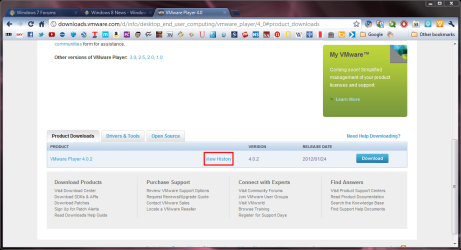
You can get a previous version of VMPlayer which has the tools If you go to the download page VMware Player 4.0
Scrollto the bottom of the page and click history.

screenshot112_2012-02-18.png

screenshot113_2012-02-18.png
 

My Computer

Computer type
Laptop
Computer Manufacturer/Model Number
Hewlett-Packard/G62-107SA Notebook
OS
Microsoft Windows 7 Home Premium 64-bit Service Pack 1
CPU
Intel(R) Core(TM) i3 CPU M 330 @ 2.13GHz
Motherboard
Hewlett-Packard 1425
Memory
8 GB DDR3
Graphics Card(s)
Intel(R) HD Graphics
Sound Card
Realtek High Definition Audio
Monitor(s) Displays
Builtin
Screen Resolution
1366 x 768 x 32 bits (4294967296 colors) @ 60 Hz
Hard Drives
250 GB SATA Hard Disk Drive 7200 rpm
2TB Seagate GoFlex USB 2 Drive
1TB Iomega Prestige USB 2 Drive
1.5TB Iomega Prestige USB 2 Drive (Samsung)
2TB WD MyBook Live NAS.
Mouse
Logitech Anywhere MX
Internet Speed
152 Mbs download 10 Mbs upload
Antivirus
Norton 360
Browser
Chrome
Thanks for the tip! But I don't want to downgrade. It used to work. I'd rather VMware fix this bug.
 

My Computer

OS
Windows 7 Ultimate x64
Thanks for the tip! But I don't want to downgrade. It used to work. I'd rather VMware fix this bug.

I agree, but it is a workaround and 4.0.2 is not much different to 4.0.1.
 

My Computer

Computer type
Laptop
Computer Manufacturer/Model Number
Hewlett-Packard/G62-107SA Notebook
OS
Microsoft Windows 7 Home Premium 64-bit Service Pack 1
CPU
Intel(R) Core(TM) i3 CPU M 330 @ 2.13GHz
Motherboard
Hewlett-Packard 1425
Memory
8 GB DDR3
Graphics Card(s)
Intel(R) HD Graphics
Sound Card
Realtek High Definition Audio
Monitor(s) Displays
Builtin
Screen Resolution
1366 x 768 x 32 bits (4294967296 colors) @ 60 Hz
Hard Drives
250 GB SATA Hard Disk Drive 7200 rpm
2TB Seagate GoFlex USB 2 Drive
1TB Iomega Prestige USB 2 Drive
1.5TB Iomega Prestige USB 2 Drive (Samsung)
2TB WD MyBook Live NAS.
Mouse
Logitech Anywhere MX
Internet Speed
152 Mbs download 10 Mbs upload
Antivirus
Norton 360
Browser
Chrome
Back
Top