Solved vmware player on windows 7

sue1966

New member
Local time
12:56 AM
Messages
4
hi, at present I have windows 7 home premium 64 bit, but at some point I hope to upgrade to windows 7 pro so that I can run VMware Player and play with eg linux. My question is - is it possible to run vmware on 7 pro? I've managed to get myself confused after reading about virtualisation on Win 7 Ultimate and Enterprise. On these it is possible to run a built in virtual disk, and I ended up with the impression that something like vmware player can only be run on ultimate and enterprise. A little advice would be helpful.
 

My Computer

OS
windows 7 home premium 64bit
VMware products exclusively like VMware Player & Workstation, work perfectly on every versions of Windows 7 without any worries other than your Hardware Configurations.
Take Care
 

My Computer

Computer Manufacturer/Model Number
Compaq Presario CQ61
OS
Windows 7 Home Premium Service Pack 1 x64
CPU
Intel(R) Core(TM)2 Duo CPU T6400 @ 2.00GHz
Memory
3GB
Graphics Card(s)
NVIDIA GeForce G 103M; Codename: G98
Screen Resolution
1366x768
hi achilleus, thanks for your quick reply. So I could download vmware on my win 7 home premium?
 

My Computer

OS
windows 7 home premium 64bit
hi achilleus, thanks for your quick reply. So I could download vmware on my win 7 home premium?

Of course, you can download and use it right away. No worries, I guarantee that!:thumbsup:
Take Care
 

My Computer

Computer Manufacturer/Model Number
Compaq Presario CQ61
OS
Windows 7 Home Premium Service Pack 1 x64
CPU
Intel(R) Core(TM)2 Duo CPU T6400 @ 2.00GHz
Memory
3GB
Graphics Card(s)
NVIDIA GeForce G 103M; Codename: G98
Screen Resolution
1366x768
many thanks for your help on this
 

My Computer

OS
windows 7 home premium 64bit
You can run VMWare on home basic, too. But for windows virtual PC with XP mode, you need a version higher than home premium.

EDIT : VMWare is a costly product. There is a nice free alternative , https://www.virtualbox.org/ . As good as VMWare.
 

My Computer

Computer type
PC/Desktop
Computer Manufacturer/Model Number
Self Assembled
OS
Microsoft Windows 10 Pro Insider Preview 64-bit
CPU
Intel(R) Core(TM) i3-4130 CPU @ 3.40GHz
Motherboard
Gigabyte Technology Co., Ltd. B85M-D3H
Memory
Corsair Vengence 4GB x2 (8.00GB Dual-Channel DDR3 @ 798MHz)
Graphics Card(s)
2047MB GeForce GTS 450 (ZOTAC International)
Sound Card
Onboard (Realtek High Definition Audio)
Monitor(s) Displays
LG Flatron E2040T
Screen Resolution
1600x900
Hard Drives
Western Digital 1 TB
Seagate 500 GB
PSU
Corsair VS550
Case
Cooler Master K380
Cooling
Cooler Master Seidon 120V Plus
Keyboard
Logitech MK260r
Mouse
Logitech MK260r
Internet Speed
PMPL Broadband
Antivirus
Windows Defender + MBAM
Browser
Firefox
Other Info
Dell Studio 15" Laptop

My Computer

Computer Manufacturer/Model Number
Compaq Presario CQ61
OS
Windows 7 Home Premium Service Pack 1 x64
CPU
Intel(R) Core(TM)2 Duo CPU T6400 @ 2.00GHz
Memory
3GB
Graphics Card(s)
NVIDIA GeForce G 103M; Codename: G98
Screen Resolution
1366x768
VMWare Player is free but there is a problem with the current version. Use VirtualBox as posted above. It works very well with Linux Guests.
 

My Computer

Computer type
Laptop
Computer Manufacturer/Model Number
Hewlett-Packard/G62-107SA Notebook
OS
Microsoft Windows 7 Home Premium 64-bit Service Pack 1
CPU
Intel(R) Core(TM) i3 CPU M 330 @ 2.13GHz
Motherboard
Hewlett-Packard 1425
Memory
8 GB DDR3
Graphics Card(s)
Intel(R) HD Graphics
Sound Card
Realtek High Definition Audio
Monitor(s) Displays
Builtin
Screen Resolution
1366 x 768 x 32 bits (4294967296 colors) @ 60 Hz
Hard Drives
250 GB SATA Hard Disk Drive 7200 rpm
2TB Seagate GoFlex USB 2 Drive
1TB Iomega Prestige USB 2 Drive
1.5TB Iomega Prestige USB 2 Drive (Samsung)
2TB WD MyBook Live NAS.
Mouse
Logitech Anywhere MX
Internet Speed
152 Mbs download 10 Mbs upload
Antivirus
Norton 360
Browser
Chrome
hi, thanks for the further replies and the suggestion of virtual box: more research for me!
 

My Computer

OS
windows 7 home premium 64bit
No problem su1966. When you do decide please post back what you think.
 

My Computer

Computer type
Laptop
Computer Manufacturer/Model Number
Hewlett-Packard/G62-107SA Notebook
OS
Microsoft Windows 7 Home Premium 64-bit Service Pack 1
CPU
Intel(R) Core(TM) i3 CPU M 330 @ 2.13GHz
Motherboard
Hewlett-Packard 1425
Memory
8 GB DDR3
Graphics Card(s)
Intel(R) HD Graphics
Sound Card
Realtek High Definition Audio
Monitor(s) Displays
Builtin
Screen Resolution
1366 x 768 x 32 bits (4294967296 colors) @ 60 Hz
Hard Drives
250 GB SATA Hard Disk Drive 7200 rpm
2TB Seagate GoFlex USB 2 Drive
1TB Iomega Prestige USB 2 Drive
1.5TB Iomega Prestige USB 2 Drive (Samsung)
2TB WD MyBook Live NAS.
Mouse
Logitech Anywhere MX
Internet Speed
152 Mbs download 10 Mbs upload
Antivirus
Norton 360
Browser
Chrome
Kado, what problem are you talking about with the latest version of vmware player? Is it the inability to contact the update server to download the latest versions of the VMWare tools? I ran into that a few weeks ago, wasn't sure if it was still an issue. I'm still running 1 or 2 incremental revisions back and things are working well.
 

My Computer

Computer Manufacturer/Model Number
Self-Built in July 2009
OS
Windows 7 Ultimate x64
CPU
Intel Q9550 2.83Ghz OC'd to 3.40Ghz
Motherboard
Gigabyte GA-EP45-UD3R rev. 1.1, F12 BIOS
Memory
8GB G.Skill PI DDR2-800, 4-4-4-12 timings
Graphics Card(s)
EVGA 1280MB Nvidia GeForce GTX570
Sound Card
Realtek ALC899A 8 channel onboard audio
Monitor(s) Displays
23" Acer x233H
Screen Resolution
1920x1080
Hard Drives
Intel X25-M 80GB Gen 2 SSD
Western Digital 1TB Caviar Black, 32MB cache. WD1001FALS
PSU
Corsair 620HX modular
Case
Antec P182
Cooling
stock
Keyboard
ABS M1 Mechanical
Mouse
Logitech G9 Laser Mouse
Internet Speed
15/2 cable modem
Other Info
Windows and Linux enthusiast. Logitech G35 Headset.
Kado, what problem are you talking about with the latest version of vmware player? Is it the inability to contact the update server to download the latest versions of the VMWare tools? I ran into that a few weeks ago, wasn't sure if it was still an issue. I'm still running 1 or 2 incremental revisions back and things are working well.

Yes I think it is still a problem. I uninstalled it and went back to my previous version and that works OK. It still isn't giving an automatic update to the latest version so I guess there is still a problem.
 

My Computer

Computer type
Laptop
Computer Manufacturer/Model Number
Hewlett-Packard/G62-107SA Notebook
OS
Microsoft Windows 7 Home Premium 64-bit Service Pack 1
CPU
Intel(R) Core(TM) i3 CPU M 330 @ 2.13GHz
Motherboard
Hewlett-Packard 1425
Memory
8 GB DDR3
Graphics Card(s)
Intel(R) HD Graphics
Sound Card
Realtek High Definition Audio
Monitor(s) Displays
Builtin
Screen Resolution
1366 x 768 x 32 bits (4294967296 colors) @ 60 Hz
Hard Drives
250 GB SATA Hard Disk Drive 7200 rpm
2TB Seagate GoFlex USB 2 Drive
1TB Iomega Prestige USB 2 Drive
1.5TB Iomega Prestige USB 2 Drive (Samsung)
2TB WD MyBook Live NAS.
Mouse
Logitech Anywhere MX
Internet Speed
152 Mbs download 10 Mbs upload
Antivirus
Norton 360
Browser
Chrome
Hi there
seems to be fine these days -- just install vmware tools from the VM menu (after vm is powered on in Windowed mode) and don't install via the right hand prompt at the bottom of the toolbar at the right hand bottom part of the screen (where the clock etc is).

Ensure you've downloaded the LATEST version -- the automatic update (vmware workstation) misses this but you can download manually --vmware player too.

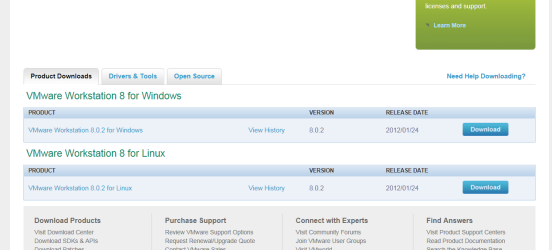
For those using vmware workstation - current version is 8.0.2 NOT 8.0.1 and it can be downloaded and innstalled manually.

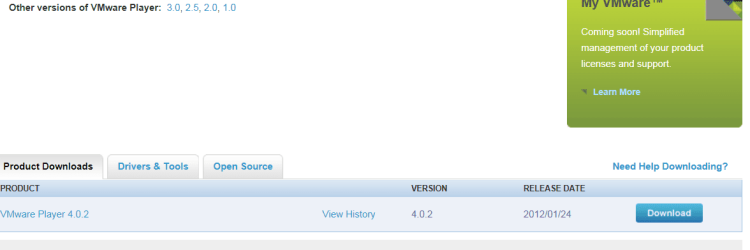
vmware player is at 4.0.2 also

Cheers
jimbo
 

Attachments

  • vmware8.png
    vmware8.png
    63.7 KB · Views: 21
  • vmwarepl.png
    vmwarepl.png
    33.5 KB · Views: 15

My Computer

Computer type
PC/Desktop
Computer Manufacturer/Model Number
Custom built, several laptops HP/ASUS
OS
Linux CENTOS 7 / various Windows OS'es and servers
CPU
Intel i7 Intel i5
Memory
8GB, 16GB
Graphics Card(s)
On Motherboard
Sound Card
Realtek HD audio
Monitor(s) Displays
Apple Cinema display, Samsung LCD
Screen Resolution
1920 X 1080
Hard Drives
4 X 1TB SATA
Mouse
Toshiba wireless laser
Internet Speed
> 20MB up
You can run VMWare on home basic, too. But for windows virtual PC with XP mode, you need a version higher than home premium.

EDIT : VMWare is a costly product. There is a nice free alternative , https://www.virtualbox.org/ . As good as VMWare.
==============================================================

VMware PLAYER is a freebie. Does "costly" mean resource use ??

Bob
 

My Computer

OS
Win 7 Home 64-bit
The full VMWare Workstation is a paid product around $200 . The free VMWare Player is what we are talking about here.
 

My Computer

Computer type
Laptop
Computer Manufacturer/Model Number
Hewlett-Packard/G62-107SA Notebook
OS
Microsoft Windows 7 Home Premium 64-bit Service Pack 1
CPU
Intel(R) Core(TM) i3 CPU M 330 @ 2.13GHz
Motherboard
Hewlett-Packard 1425
Memory
8 GB DDR3
Graphics Card(s)
Intel(R) HD Graphics
Sound Card
Realtek High Definition Audio
Monitor(s) Displays
Builtin
Screen Resolution
1366 x 768 x 32 bits (4294967296 colors) @ 60 Hz
Hard Drives
250 GB SATA Hard Disk Drive 7200 rpm
2TB Seagate GoFlex USB 2 Drive
1TB Iomega Prestige USB 2 Drive
1.5TB Iomega Prestige USB 2 Drive (Samsung)
2TB WD MyBook Live NAS.
Mouse
Logitech Anywhere MX
Internet Speed
152 Mbs download 10 Mbs upload
Antivirus
Norton 360
Browser
Chrome
Back
Top