Volume Control wont move sound card slider

samsung3D

New member
Local time
12:46 AM
Messages
3
I have E-MU 1212M sound card, Windows 7 and I can't fix this problem which I haven't had before. I reinstalled the Windows 7 and now I can't move my Volume Control and affect my sound card volume. My sound card volume wont move until I move it.
It's like my volume mixer is pre-effected,before my sound card.

any help will be appreciated, Thank you
 

Attachments
  • Capture.PNG
    Capture.PNG
    240 KB · Views: 118

My Computer My Computer

At a glance

Windows 7Intel Core2 Duo E4500 @ 2.20GHzApacer 3GBNvidia 8500GT
OS
Windows 7
CPU
Intel Core2 Duo E4500 @ 2.20GHz
Motherboard
Gigabyte 945GZM-S2
Memory
Apacer 3GB
Graphics Card(s)
Nvidia 8500GT
Sound Card
E-MU 1212M
My sound card volume wont move until I move it.
Did it before? The Windows volume control doesn't affect any of my players volumes, so if I have Winamp open for example, adjusting the volume with the Windows mixer control doesn't move the Winamp slider, nor does it move the WMP slider, which is why I leave Windows volume at full, and adjust the volume from within what ever program I'm using to watch a film or play music.
 

My Computer My Computer

At a glance

Windows 7 Ultimate x64 ®™Intel Core 2 Duo (2.2 GHz)2x 2GB Corsair (667 MHz)NVIDIA 8600M GS (256MB)
Computer Manufacturer/Model Number
Sony Vaio FZ21Z
OS
Windows 7 Ultimate x64 ®™
CPU
Intel Core 2 Duo (2.2 GHz)
Motherboard
Sony (Intel Chipset)
Memory
2x 2GB Corsair (667 MHz)
Graphics Card(s)
NVIDIA 8600M GS (256MB)
Sound Card
Sigmatel
Monitor(s) Displays
15.4" TFT X-Black
Screen Resolution
1280x800
Hard Drives
Western Digital 300GB Scorpio Black (7200rpm)
Mouse
Logitech Anywhere MX
Internet Speed
Sky 5MB
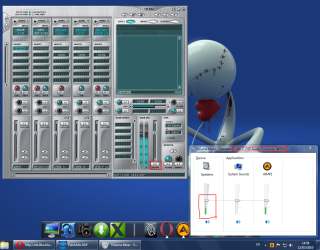
I know that the program slider wont move but when I was moving the Windows Volume Mixer, the Master volume slider of my sound card moved too. But now it isn't like before. See the picture, the Windows Volume Slider (master) is moved around 45-50% but the sound card slider wont move,it's still 0.

tnx for the fast response
 

My Computer My Computer

At a glance

Windows 7Intel Core2 Duo E4500 @ 2.20GHzApacer 3GBNvidia 8500GT
OS
Windows 7
CPU
Intel Core2 Duo E4500 @ 2.20GHz
Motherboard
Gigabyte 945GZM-S2
Memory
Apacer 3GB
Graphics Card(s)
Nvidia 8500GT
Sound Card
E-MU 1212M
If it did it before, all I can suggest is the usual, uninstall then reinstall the card and the software to see if that helps.
 

My Computer My Computer

At a glance

Windows 7 Ultimate x64 ®™Intel Core 2 Duo (2.2 GHz)2x 2GB Corsair (667 MHz)NVIDIA 8600M GS (256MB)
Computer Manufacturer/Model Number
Sony Vaio FZ21Z
OS
Windows 7 Ultimate x64 ®™
CPU
Intel Core 2 Duo (2.2 GHz)
Motherboard
Sony (Intel Chipset)
Memory
2x 2GB Corsair (667 MHz)
Graphics Card(s)
NVIDIA 8600M GS (256MB)
Sound Card
Sigmatel
Monitor(s) Displays
15.4" TFT X-Black
Screen Resolution
1280x800
Hard Drives
Western Digital 300GB Scorpio Black (7200rpm)
Mouse
Logitech Anywhere MX
Internet Speed
Sky 5MB
I found the solution!

I was searching for this type of problem but there is no other problem like this one (I didn't find on internet).
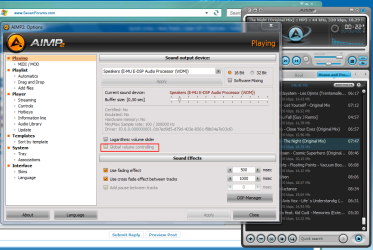
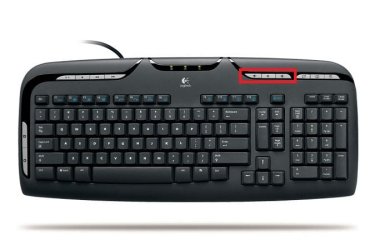
I use AIMP 2 and my EMU 1212m sound card. And in the AIMP preferences it has option "Global Volume Controlling", it was disabled, and I enabled it. There is a picture for how it looks like after I checked the "Global Volume Controlling". Now when I use my Media Buttons on my keyboard for changing the volume, Master Volume on my sound card moves too! After a month I found the solution. Thank you for any help you provided... I appreciate that.
I upload the pictures for people who has the same problem, or maybe an inspiration for similar problems like this one.
 

Attachments

  • Capture.PNG
    Capture.PNG
    66.9 KB · Views: 135
  • media keyboard.jpg
    media keyboard.jpg
    29.5 KB · Views: 194
  • Capture 2.PNG
    Capture 2.PNG
    120.2 KB · Views: 295

My Computer My Computer

At a glance

Windows 7Intel Core2 Duo E4500 @ 2.20GHzApacer 3GBNvidia 8500GT
OS
Windows 7
CPU
Intel Core2 Duo E4500 @ 2.20GHz
Motherboard
Gigabyte 945GZM-S2
Memory
Apacer 3GB
Graphics Card(s)
Nvidia 8500GT
Sound Card
E-MU 1212M
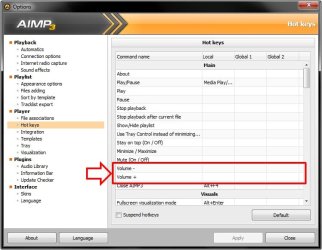
Here is how you do it !!

1. Go to 'Options' or 'Preferences' in AIMP Player.

2. Click on 'Hot Keys' under 'Player'.

3. Delete (click on the 'X' mark that appears when you click inside the cells for 'Local', Global 1', Global 2' etc.) all the entries against 'Volume -' and 'Volume +'

Thatz it !!

Now your default Playback device will be enabled and you can control the Volume from your Keyboard :D
 

Attachments

  • AIMP_Volume.jpg
    AIMP_Volume.jpg
    54.9 KB · Views: 15

My Computer My Computer

At a glance

Windows 7
OS
Windows 7
Back
Top