VPN connection not work anymore

wimkuijp

New member
Local time
3:14 AM
Messages
11
My VPN connection suddenly doesn't work anymore. The icon have a big red cross in it with the text: "Unavailable - device missing".
If I click on properties I get the message:"An unexpected error occurred".
The System Event Log show this errors:
-The Diagnostic Policy Service service terminated with the following error:
The system cannot find the file specified.
-The following boot-start or system-start driver(s) failed to load: WfpLwf
-The Secure Socket Tunneling Protocol Service service terminated with the following error: The system cannot find the file specified.
-The Remote Access Connection Manager service depends on the Secure Socket Tunneling Protocol Service service which failed to start because of the following error: The system cannot find the file specified.

I found out that it has something to do with the WAN-mini-ports. When I try to re-install them I get the message:"Windows encountered a problem installing the driver software for your device".
"Windows found driver software for your device but encountered an error while attempting to install it. The system cannot find the file specified".

I'm lost.
 

My Computer

Computer type
PC/Desktop
Computer Manufacturer/Model Number
custom build
OS
Windows 7 Pro 32bit
CPU
Pentium Dual Core 2.8 GHz
Motherboard
Asus P5KPL
Memory
2,00 GB
Hard Drives
Samsung HD502HJ ATA
Antivirus
MSE
Browser
Chrome
Which VPN?

Do you have any other VPNs installed?

Have you scanned for Viruses, Malware, Spyware?

John
 

My Computers

System One System Two

  • Computer type
    PC/Desktop
    Computer Manufacturer/Model Number
    HP Pavilion 6751c
    OS
    Win7, Win10, Win11
    Internet Speed
    100 Mbps
    Antivirus
    Norton 360
    Browser
    IE 11
  • Computer type
    PC/Desktop
    System Manufacturer/Model Number
    HP ENVY 750-514 & Dell XPS 8960
    OS
    Win7, Win10, Win11
    Antivirus
    Norton 360
I found out that it has something to do with the WAN-mini-ports. When I try to re-install them I get the message:"Windows encountered a problem installing the driver software for your device".
"Windows found driver software for your device but encountered an error while attempting to install it. The system cannot find the file specified".

I'm lost.

Have you tried to get the drivers from your Router's vendors site and try those?
 

My Computer

Computer type
PC/Desktop
Computer Manufacturer/Model Number
Custom Bulid/Self made
OS
Windows 11 x64
CPU
i5 2500K @ 3.3 GHz
Motherboard
ASUS P8 Z77 V pro
Memory
16 GB DDR 3 @ 1600Mhz
Graphics Card(s)
MSI 1050TI 4GB OC version
Sound Card
On Board (Realtek HD audio)
Monitor(s) Displays
Samsung 22" LCD
Screen Resolution
1920*1080
Hard Drives
Seagate 1 TB, WD 1TB, Seagate 2 TB ( I use a lot of space)
PSU
coolermaster 750 W
Case
Coolermaster HAF912
Cooling
Coolermaster hyper 212 EVO
Keyboard
Samsung
Mouse
Dell Wireless
Internet Speed
Wireless 50 Mbps
Antivirus
AVG 2016 Internet Security
Browser
Google Chrome
Which VPN?

Do you have any other VPNs installed?

Have you scanned for Viruses, Malware, Spyware?

John

Hi John.
No there are no other VPN's installed.
Yes. I did a full scan with MS Security essentials.
 

My Computer

Computer type
PC/Desktop
Computer Manufacturer/Model Number
custom build
OS
Windows 7 Pro 32bit
CPU
Pentium Dual Core 2.8 GHz
Motherboard
Asus P5KPL
Memory
2,00 GB
Hard Drives
Samsung HD502HJ ATA
Antivirus
MSE
Browser
Chrome
I found out that it has something to do with the WAN-mini-ports. When I try to re-install them I get the message:"Windows encountered a problem installing the driver software for your device".
"Windows found driver software for your device but encountered an error while attempting to install it. The system cannot find the file specified".

I'm lost.

Have you tried to get the drivers from your Router's vendors site and try those?

Hi
The drivers (for the mini-ports) are from Microsoft.
For my router I never had to install any drivers.
 

My Computer

Computer type
PC/Desktop
Computer Manufacturer/Model Number
custom build
OS
Windows 7 Pro 32bit
CPU
Pentium Dual Core 2.8 GHz
Motherboard
Asus P5KPL
Memory
2,00 GB
Hard Drives
Samsung HD502HJ ATA
Antivirus
MSE
Browser
Chrome
My VPN connection suddenly doesn't work anymore. The icon have a big red cross in it with the text: "Unavailable - device missing".
If I click on properties I get the message:"An unexpected error occurred".
The System Event Log show this errors:
-The Diagnostic Policy Service service terminated with the following error:
The system cannot find the file specified.
-The following boot-start or system-start driver(s) failed to load: WfpLwf
-The Secure Socket Tunneling Protocol Service service terminated with the following error: The system cannot find the file specified.
-The Remote Access Connection Manager service depends on the Secure Socket Tunneling Protocol Service service which failed to start because of the following error: The system cannot find the file specified.

I found out that it has something to do with the WAN-mini-ports. When I try to re-install them I get the message:"Windows encountered a problem installing the driver software for your device".
"Windows found driver software for your device but encountered an error while attempting to install it. The system cannot find the file specified".

I'm lost.

Did you run SFC/SCANNOW already? What are the results? http://www.sevenforums.com/tutorials/1538-sfc-scannow-command-system-file-checker.html

When did problems start?
 

My Computer

Computer type
Laptop
Computer Manufacturer/Model Number
ACER ASPIRE 5742G
OS
Microsoft Windows 7 Home Premium 64-bits 7601 Multiprocessor Free Service Pack 1
CPU
Intel(R) Core(TM) i3 CPU M 370 @ 2.40GHz
Motherboard
Acer Aspire 5742G
Memory
4,00 GB
Graphics Card(s)
ATI Mobility Radeon HD 5400 Series
Sound Card
(1) AMD High Definition Audio Device (2) Realtek High Defi
Screen Resolution
1366 x 768 x 32 bits (4294967296 colors) @ 60 Hz
Hard Drives
WDC WD5000BEVT-22ZAT0
open regedit and browse to HKEY_LOCAL_MACHINE\SYSTEM\CurrentControlSet\services\DPS\Parameters
Post output

Same for key HKEY_LOCAL_MACHINE\SYSTEM\CurrentControlSet\services\SstpSvc\Parameters
Same for key HKEY_LOCAL_MACHINE\SYSTEM\CurrentControlSet\services\WfpLwf
 

My Computer

Computer type
Laptop
Computer Manufacturer/Model Number
ACER ASPIRE 5742G
OS
Microsoft Windows 7 Home Premium 64-bits 7601 Multiprocessor Free Service Pack 1
CPU
Intel(R) Core(TM) i3 CPU M 370 @ 2.40GHz
Motherboard
Acer Aspire 5742G
Memory
4,00 GB
Graphics Card(s)
ATI Mobility Radeon HD 5400 Series
Sound Card
(1) AMD High Definition Audio Device (2) Realtek High Defi
Screen Resolution
1366 x 768 x 32 bits (4294967296 colors) @ 60 Hz
Hard Drives
WDC WD5000BEVT-22ZAT0
My VPN connection suddenly doesn't work anymore. The icon have a big red cross in it with the text: "Unavailable - device missing".
If I click on properties I get the message:"An unexpected error occurred".
The System Event Log show this errors:
-The Diagnostic Policy Service service terminated with the following error:
The system cannot find the file specified.
-The following boot-start or system-start driver(s) failed to load: WfpLwf
-The Secure Socket Tunneling Protocol Service service terminated with the following error: The system cannot find the file specified.
-The Remote Access Connection Manager service depends on the Secure Socket Tunneling Protocol Service service which failed to start because of the following error: The system cannot find the file specified.

I found out that it has something to do with the WAN-mini-ports. When I try to re-install them I get the message:"Windows encountered a problem installing the driver software for your device".
"Windows found driver software for your device but encountered an error while attempting to install it. The system cannot find the file specified".

I'm lost.

Did you run SFC/SCANNOW already? What are the results? http://www.sevenforums.com/tutorials/1538-sfc-scannow-command-system-file-checker.html

When did problems start?

I did run scf/ scannow:
Windows Resource Protection found corrupt files but was unable to fix some of them.
Details are included in the CBS.Log windir\Logs\CBS\CBS.log. For example
C:\Windows\Logs\CBS\CBS.log
That CBS log have 12767 lines and I don't know what to find in there.
 

My Computer

Computer type
PC/Desktop
Computer Manufacturer/Model Number
custom build
OS
Windows 7 Pro 32bit
CPU
Pentium Dual Core 2.8 GHz
Motherboard
Asus P5KPL
Memory
2,00 GB
Hard Drives
Samsung HD502HJ ATA
Antivirus
MSE
Browser
Chrome

My Computer

Computer type
Laptop
Computer Manufacturer/Model Number
ACER ASPIRE 5742G
OS
Microsoft Windows 7 Home Premium 64-bits 7601 Multiprocessor Free Service Pack 1
CPU
Intel(R) Core(TM) i3 CPU M 370 @ 2.40GHz
Motherboard
Acer Aspire 5742G
Memory
4,00 GB
Graphics Card(s)
ATI Mobility Radeon HD 5400 Series
Sound Card
(1) AMD High Definition Audio Device (2) Realtek High Defi
Screen Resolution
1366 x 768 x 32 bits (4294967296 colors) @ 60 Hz
Hard Drives
WDC WD5000BEVT-22ZAT0
Answer #7 as well
 

My Computer

Computer type
Laptop
Computer Manufacturer/Model Number
ACER ASPIRE 5742G
OS
Microsoft Windows 7 Home Premium 64-bits 7601 Multiprocessor Free Service Pack 1
CPU
Intel(R) Core(TM) i3 CPU M 370 @ 2.40GHz
Motherboard
Acer Aspire 5742G
Memory
4,00 GB
Graphics Card(s)
ATI Mobility Radeon HD 5400 Series
Sound Card
(1) AMD High Definition Audio Device (2) Realtek High Defi
Screen Resolution
1366 x 768 x 32 bits (4294967296 colors) @ 60 Hz
Hard Drives
WDC WD5000BEVT-22ZAT0
open regedit and browse to HKEY_LOCAL_MACHINE\SYSTEM\CurrentControlSet\services\DPS\Parameters
Post output

Same for key HKEY_LOCAL_MACHINE\SYSTEM\CurrentControlSet\services\SstpSvc\Parameters
Same for key HKEY_LOCAL_MACHINE\SYSTEM\CurrentControlSet\services\WfpLwf

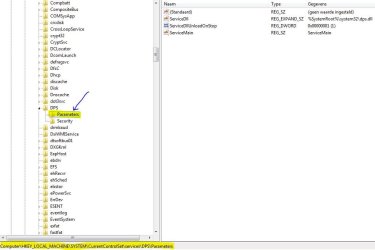
There is no Parameters key in DPS and SstpSvc.
This is what is in the DPS key:
Key Name: HKEY_LOCAL_MACHINE\SYSTEM\CurrentControlSet\services\DPS
Class Name: <NO CLASS>
Last Write Time: 14-7-2009 - 11:37
Value 0
Name: DisplayName
Type: REG_SZ
Data: @%systemroot%\system32\dps.dll,-500

Value 1
Name: ImagePath
Type: REG_EXPAND_SZ
Data: %SystemRoot%\System32\svchost.exe -k LocalServiceNoNetwork

Value 2
Name: Description
Type: REG_SZ
Data: @%systemroot%\system32\dps.dll,-501

Value 3
Name: ObjectName
Type: REG_SZ
Data: NT AUTHORITY\LocalService

Value 4
Name: ErrorControl
Type: REG_DWORD
Data: 0x1

Value 5
Name: Start
Type: REG_DWORD
Data: 0x2

Value 6
Name: Type
Type: REG_DWORD
Data: 0x20

Value 7
Name: ServiceSidType
Type: REG_DWORD
Data: 0x3

Value 8
Name: RequiredPrivileges
Type: REG_MULTI_SZ
Data: SeChangeNotifyPrivilege
SeCreateGlobalPrivilege
SeAssignPrimaryTokenPrivilege
SeImpersonatePrivilege

Value 9
Name: FailureActions
Type: REG_BINARY
Data:
00000000 80 51 01 00 00 00 00 00 - 00 00 00 00 03 00 00 00 .Q..............
00000010 14 00 00 00 01 00 00 00 - c0 d4 01 00 01 00 00 00 ........ÀÔ......
00000020 e0 93 04 00 00 00 00 00 - 00 00 00 00 à...........

Value 10
Name: DelayedAutoStart
Type: REG_DWORD
Data: 0


This is what is in the SstpSvc key:
Key Name: HKEY_LOCAL_MACHINE\SYSTEM\CurrentControlSet\services\SstpSvc
Class Name: <NO CLASS>
Last Write Time: 14-7-2009 - 11:37
Value 0
Name: DisplayName
Type: REG_SZ
Data: @%SystemRoot%\system32\sstpsvc.dll,-200

Value 1
Name: ImagePath
Type: REG_EXPAND_SZ
Data: %SystemRoot%\system32\svchost.exe -k LocalService

Value 2
Name: Description
Type: REG_SZ
Data: @%SystemRoot%\system32\sstpsvc.dll,-201

Value 3
Name: ObjectName
Type: REG_SZ
Data: NT Authority\LocalService

Value 4
Name: ErrorControl
Type: REG_DWORD
Data: 0x1

Value 5
Name: Start
Type: REG_DWORD
Data: 0x3

Value 6
Name: Type
Type: REG_DWORD
Data: 0x20

Value 7
Name: ServiceSidType
Type: REG_DWORD
Data: 0x1

Value 8
Name: RequiredPrivileges
Type: REG_MULTI_SZ
Data: SeChangeNotifyPrivilege

Value 9
Name: FailureActions
Type: REG_BINARY
Data:
00000000 80 51 01 00 00 00 00 00 - 00 00 00 00 03 00 00 00 .Q..............
00000010 14 00 00 00 01 00 00 00 - c0 d4 01 00 01 00 00 00 ........ÀÔ......
00000020 e0 93 04 00 00 00 00 00 - 00 00 00 00 à...........


And this is what is in the WfpLwf key:
Key Name: HKEY_LOCAL_MACHINE\SYSTEM\CurrentControlSet\services\WfpLwf
Class Name: <NO CLASS>
Last Write Time: 16-10-2013 - 16:14
Value 0
Name: Type
Type: REG_DWORD
Data: 0x1

Value 1
Name: Start
Type: REG_DWORD
Data: 0x1

Value 2
Name: ErrorControl
Type: REG_DWORD
Data: 0x1

Value 3
Name: Tag
Type: REG_DWORD
Data: 0x10

Value 4
Name: ImagePath
Type: REG_EXPAND_SZ
Data: system32\DRIVERS\wfplwf.sys

Value 5
Name: DisplayName
Type: REG_SZ
Data: WFP Lightweight Filter

Value 6
Name: Group
Type: REG_SZ
Data: NDIS

Value 7
Name: Description
Type: REG_SZ
Data: WFP Lightweight Filter

Value 8
Name: NdisMajorVersion
Type: REG_DWORD
Data: 0x6

Value 9
Name: NdisMinorVersion
Type: REG_DWORD
Data: 0x14


Key Name: HKEY_LOCAL_MACHINE\SYSTEM\CurrentControlSet\services\WfpLwf\Parameters
Class Name: <NO CLASS>
Last Write Time: 14-7-2009 - 11:39
Value 0
Name: DefaultFilterSettings
Type: REG_DWORD
Data: 0x1


Key Name: HKEY_LOCAL_MACHINE\SYSTEM\CurrentControlSet\services\WfpLwf\Parameters\Adapters
Class Name: <NO CLASS>
Last Write Time: 28-1-2013 - 4:24

Key Name: HKEY_LOCAL_MACHINE\SYSTEM\CurrentControlSet\services\WfpLwf\Parameters\Adapters\{7623A5DF-A50D-469F-AF22-0A6EE4A18BAF}
Class Name: <NO CLASS>
Last Write Time: 28-1-2013 - 4:24

Key Name: HKEY_LOCAL_MACHINE\SYSTEM\CurrentControlSet\services\WfpLwf\Parameters\Adapters\{7623A5DF-A50D-469F-AF22-0A6EE4A18BAF}\{B70D6460-3635-4D42-B866-B8AB1A24454C}-0000
Class Name: <NO CLASS>
Last Write Time: 28-1-2013 - 4:24

Key Name: HKEY_LOCAL_MACHINE\SYSTEM\CurrentControlSet\services\WfpLwf\Parameters\Adapters\{8BB1076F-039B-40E5-8EC0-C11013418CDB}
Class Name: <NO CLASS>
Last Write Time: 14-7-2009 - 11:39

Key Name: HKEY_LOCAL_MACHINE\SYSTEM\CurrentControlSet\services\WfpLwf\Parameters\Adapters\{8BB1076F-039B-40E5-8EC0-C11013418CDB}\{B70D6460-3635-4D42-B866-B8AB1A24454C}-0000
Class Name: <NO CLASS>
Last Write Time: 14-7-2009 - 11:39

Key Name: HKEY_LOCAL_MACHINE\SYSTEM\CurrentControlSet\services\WfpLwf\Parameters\NdisAdapters
Class Name: <NO CLASS>
Last Write Time: 28-1-2013 - 4:24

Key Name: HKEY_LOCAL_MACHINE\SYSTEM\CurrentControlSet\services\WfpLwf\Parameters\NdisAdapters\{7623A5DF-A50D-469F-AF22-0A6EE4A18BAF}
Class Name: <NO CLASS>
Last Write Time: 28-1-2013 - 4:24
Value 0
Name: InterfaceGuid
Type: REG_BINARY
Data:
00000000 5d 9e eb b0 c7 68 e2 11 - b9 26 e3 da 4f d6 86 9f ].ë°Çhâ.¹&ãÚOÖ..


Key Name: HKEY_LOCAL_MACHINE\SYSTEM\CurrentControlSet\services\WfpLwf\Parameters\NdisAdapters\{8BB1076F-039B-40E5-8EC0-C11013418CDB}
Class Name: <NO CLASS>
Last Write Time: 14-7-2009 - 11:39
Value 0
Name: InterfaceGuid
Type: REG_BINARY
Data:
00000000 f4 c6 9a e2 37 70 de 11 - 81 6d 80 08 3e df f9 14 ôÆ.â7pÞ..m..>ßù.


Key Name: HKEY_LOCAL_MACHINE\SYSTEM\CurrentControlSet\services\WfpLwf\Enum
Class Name: <NO CLASS>
Last Write Time: 16-10-2013 - 16:14
Value 0
Name: 0
Type: REG_SZ
Data: Root\LEGACY_WFPLWF\0000

Value 1
Name: Count
Type: REG_DWORD
Data: 0x1

Value 2
Name: NextInstance
Type: REG_DWORD
Data: 0x1

Value 3
Name: INITSTARTFAILED
Type: REG_DWORD
Data: 0x1

 

My Computer

Computer type
PC/Desktop
Computer Manufacturer/Model Number
custom build
OS
Windows 7 Pro 32bit
CPU
Pentium Dual Core 2.8 GHz
Motherboard
Asus P5KPL
Memory
2,00 GB
Hard Drives
Samsung HD502HJ ATA
Antivirus
MSE
Browser
Chrome
You don't have this Parameters key? You have the security key under it?
 

Attachments

  • Knipsel.JPG
    Knipsel.JPG
    52.1 KB · Views: 0

My Computer

Computer type
Laptop
Computer Manufacturer/Model Number
ACER ASPIRE 5742G
OS
Microsoft Windows 7 Home Premium 64-bits 7601 Multiprocessor Free Service Pack 1
CPU
Intel(R) Core(TM) i3 CPU M 370 @ 2.40GHz
Motherboard
Acer Aspire 5742G
Memory
4,00 GB
Graphics Card(s)
ATI Mobility Radeon HD 5400 Series
Sound Card
(1) AMD High Definition Audio Device (2) Realtek High Defi
Screen Resolution
1366 x 768 x 32 bits (4294967296 colors) @ 60 Hz
Hard Drives
WDC WD5000BEVT-22ZAT0
registry key HKEY_LOCAL_MACHINE\SYSTEM\CurrentControlSet\services\SstpSvc\Parameters exists?
HKEY_LOCAL_MACHINE\SYSTEM\CurrentControlSet\services\SstpSvc\Security exists?

Did you remove any virus? Did you have a virus? Till when was system operating normally?
 

My Computer

Computer type
Laptop
Computer Manufacturer/Model Number
ACER ASPIRE 5742G
OS
Microsoft Windows 7 Home Premium 64-bits 7601 Multiprocessor Free Service Pack 1
CPU
Intel(R) Core(TM) i3 CPU M 370 @ 2.40GHz
Motherboard
Acer Aspire 5742G
Memory
4,00 GB
Graphics Card(s)
ATI Mobility Radeon HD 5400 Series
Sound Card
(1) AMD High Definition Audio Device (2) Realtek High Defi
Screen Resolution
1366 x 768 x 32 bits (4294967296 colors) @ 60 Hz
Hard Drives
WDC WD5000BEVT-22ZAT0

My Computer

Computer type
Laptop
Computer Manufacturer/Model Number
ACER ASPIRE 5742G
OS
Microsoft Windows 7 Home Premium 64-bits 7601 Multiprocessor Free Service Pack 1
CPU
Intel(R) Core(TM) i3 CPU M 370 @ 2.40GHz
Motherboard
Acer Aspire 5742G
Memory
4,00 GB
Graphics Card(s)
ATI Mobility Radeon HD 5400 Series
Sound Card
(1) AMD High Definition Audio Device (2) Realtek High Defi
Screen Resolution
1366 x 768 x 32 bits (4294967296 colors) @ 60 Hz
Hard Drives
WDC WD5000BEVT-22ZAT0
Sstp is working now....

Thx for the reg files.
The Sstp service starts up without any error.
Although the DPS key looks correct now I still get the same error when I start up this service.
And in the Event log is still see the message: "The following boot-start or system-start driver(s) failed to load:
WfpLwf".
If I open the Device Mgr I see under Non-Plug and Play Drivers an exclamation mark at WFP-Lightweight Filter.
Device Status:"This device is not present, is not working properly, or does not have all its drivers installed. (Code 24)".

I see on other forums that there ate many people with problems with WAN mini-ports and VPN. And till now there is not any solution.

In the attachment the CBS-Log file. It's created after I merged the reg files!
 

My Computer

Computer type
PC/Desktop
Computer Manufacturer/Model Number
custom build
OS
Windows 7 Pro 32bit
CPU
Pentium Dual Core 2.8 GHz
Motherboard
Asus P5KPL
Memory
2,00 GB
Hard Drives
Samsung HD502HJ ATA
Antivirus
MSE
Browser
Chrome
-The Diagnostic Policy Service service terminated with the following error:
The system cannot find the file specified.

Still that error message?
C:\windows\system32\dps.dll is on system?
 

My Computer

Computer type
Laptop
Computer Manufacturer/Model Number
ACER ASPIRE 5742G
OS
Microsoft Windows 7 Home Premium 64-bits 7601 Multiprocessor Free Service Pack 1
CPU
Intel(R) Core(TM) i3 CPU M 370 @ 2.40GHz
Motherboard
Acer Aspire 5742G
Memory
4,00 GB
Graphics Card(s)
ATI Mobility Radeon HD 5400 Series
Sound Card
(1) AMD High Definition Audio Device (2) Realtek High Defi
Screen Resolution
1366 x 768 x 32 bits (4294967296 colors) @ 60 Hz
Hard Drives
WDC WD5000BEVT-22ZAT0
In CBS.log search yourself for:

[SR] Cannot repair

or

corrupted

----------------------
So many errors!!! Since when do you have the problems? Did you have and/or remove some virus?
 

My Computer

Computer type
Laptop
Computer Manufacturer/Model Number
ACER ASPIRE 5742G
OS
Microsoft Windows 7 Home Premium 64-bits 7601 Multiprocessor Free Service Pack 1
CPU
Intel(R) Core(TM) i3 CPU M 370 @ 2.40GHz
Motherboard
Acer Aspire 5742G
Memory
4,00 GB
Graphics Card(s)
ATI Mobility Radeon HD 5400 Series
Sound Card
(1) AMD High Definition Audio Device (2) Realtek High Defi
Screen Resolution
1366 x 768 x 32 bits (4294967296 colors) @ 60 Hz
Hard Drives
WDC WD5000BEVT-22ZAT0
Make sure that the wfplwf.sys file exists in the c:\windows\system32\DRIVERS folder
 

My Computer

Computer type
Laptop
Computer Manufacturer/Model Number
ACER ASPIRE 5742G
OS
Microsoft Windows 7 Home Premium 64-bits 7601 Multiprocessor Free Service Pack 1
CPU
Intel(R) Core(TM) i3 CPU M 370 @ 2.40GHz
Motherboard
Acer Aspire 5742G
Memory
4,00 GB
Graphics Card(s)
ATI Mobility Radeon HD 5400 Series
Sound Card
(1) AMD High Definition Audio Device (2) Realtek High Defi
Screen Resolution
1366 x 768 x 32 bits (4294967296 colors) @ 60 Hz
Hard Drives
WDC WD5000BEVT-22ZAT0
-The Diagnostic Policy Service service terminated with the following error:
The system cannot find the file specified.

Still that error message?
C:\windows\system32\dps.dll is on system?

Yes it's there. version 6.1.7601.17514
 

My Computer

Computer type
PC/Desktop
Computer Manufacturer/Model Number
custom build
OS
Windows 7 Pro 32bit
CPU
Pentium Dual Core 2.8 GHz
Motherboard
Asus P5KPL
Memory
2,00 GB
Hard Drives
Samsung HD502HJ ATA
Antivirus
MSE
Browser
Chrome
-The Diagnostic Policy Service service terminated with the following error:
The system cannot find the file specified.

Still that error message?
C:\windows\system32\dps.dll is on system?

Yes it's there. version 6.1.7601.17514
Since when do you have the problems? Did you have and/or remove some virus?

You live in the Netherlands now? If so.. your time is displayed incorrectly on sevenforums
 
Last edited:

My Computer

Computer type
Laptop
Computer Manufacturer/Model Number
ACER ASPIRE 5742G
OS
Microsoft Windows 7 Home Premium 64-bits 7601 Multiprocessor Free Service Pack 1
CPU
Intel(R) Core(TM) i3 CPU M 370 @ 2.40GHz
Motherboard
Acer Aspire 5742G
Memory
4,00 GB
Graphics Card(s)
ATI Mobility Radeon HD 5400 Series
Sound Card
(1) AMD High Definition Audio Device (2) Realtek High Defi
Screen Resolution
1366 x 768 x 32 bits (4294967296 colors) @ 60 Hz
Hard Drives
WDC WD5000BEVT-22ZAT0
Back
Top