
VSO.ConvertXToDVD.4.1.16.360

huffman

New member
Pro User
Local time
4:52 PM
Messages
715
I have used previous versions of VSOConvertXToDVD and without changing any of the preferences they burned automatically (this version does NOT).

I have been through all the preferences for burning on this version and I don't see anyway to make it burn automatically

If anyone is using this version, and knows how to get it to burn without it stopping after it converts the movie and I have to then tell it to burn I sure like to know.

Here is the Burn Settings Options:
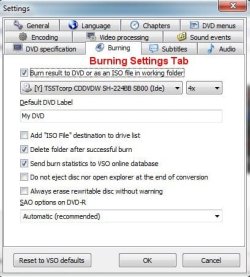
vso.jpg

Thanks
 

My Computer

OS
Windows 7 Pro
CPU
Intel(R) Pentium(R) Duel CPU E2200 2.20 Ghz
Motherboard
GA-G41M-ES2L
Memory
4 gb 2.96 Usable
Graphics Card(s)
Onboard
Sound Card
Onboard
Hard Drives
2 - 1TB WD Sata Drives
One of it's listed features is indeed Burn automatically to DVD after video conversion

I couldn't find an answer for you, but they do have an active forum

VSO Software Forum

I did find this tute

6. Burning

Burn result to DVD / as ISO file in working folder: If checked, program will burn DVD folder files to DVD after conversion has finished (when a blank DVD has been placed in burner and this type can hold the amount of created "data"). If not checked, the files will be saved in the working folder on your computer. Also you can select between an ISO image or your default burner. You must set ISO image before you start add video file(s) in a new project.

In the drop down menu, the burner detected is listed, if you have more than one they will be listed too and you can select the one of your choice.
On the right you can also set your burning speed: Recommended speed for Single Layer (DVD-5) is 4x or 6x, but do not go faster than half of the rated speed of disc. For Dual Layer (DVD-9) we recommend 2x. Note: the burn speed that will actually be used is the burn speed that is available for both your drive and disk (each have their own allowed speeds). Example if you select to burn at 2x, but your disk only allows for 4x, 6x, and 8x the disk will not be burnt at 2x as requested but the closest speed to that which case it would be burnt at 4x speed.

General Settings

A Guy
 

My Computer

Computer type
PC/Desktop
OS
Windows 10 Home x64
CPU
INTEL Core i5-750 Quad-Core 3.37GHz
Motherboard
ASUS P7P55D
Memory
HyperX Fury Black Series 8GB (2 x 4GB) 1866Mhz
Graphics Card(s)
EVGA GeForce GTX 750 Superclocked 1GB 128-Bit GDDR5
Monitor(s) Displays
LG 32MA68HY 32" IPS
Screen Resolution
1920 x 1080
Hard Drives
Samsung 840 Evo 120GB, SEAGATE 500GB Barracuda® 7200.12, SATA 3 Gb/s, 7200 RPM, 16MB cache
PSU
ANTEC TruePower New TP-550, 80 PLUS, 550W
Case
ANTEC Three Hundred Illusion
Cooling
COOLER MASTER Hyper 212 Plus, 4 x 120mm 1 x 140mm Noctua's
Internet Speed
85 + Mbps
Antivirus
Avast
Browser
Vivaldi
Back
Top