W7: DHCP works fine, but NO Static IP

kamaleon

New member
Local time
4:42 PM
Messages
5
I got a little problem getting the static ip configuration to work on one of the Windows 7 machine, DHCP works but i need to be static. Here is the layout of my network:

1. Modem conected to:

2. 4 port wireless router conected to:

3. 8 port SMC giga switch conected to:
3a. Windows 7 computer - static ip
3b. WinXP computer - static ip
3c. Network printer - static ip
3d. Network camera - static ip
3e. 5 port SMC giga switch

3e. The 5 port SMC giga switch conected to:
3ei: WinXP computer - static ip
3eii. Windows 7 computer - with two lan cards
Lan card 1: its a 10/100 card that works both in DHCP and static form. (its disabled right now)
Lan card 2: ITs a 10/100/1000 card that only seems to work in DHCP form. Once i set it up as static, the computer wont see the network (without connection).
warnsmall.png
warnsmall.png


Notes:
1. Both Windows 7 boxes are configured the same way except the ip number of course.
2. The ip range on the network is in the 192.168.1.xxx
3. Gateway and Primary DNS: 192.168.1.1
4. Subnet: 255.255.255.0
5. I have disabled IPv6 (read in forums that might help) still doesnt work.

I have ran out of ideas.. :s
 

My Computer My Computer

At a glance

W7amd athlon X2
Computer Manufacturer/Model Number
hp pavilion slimline
OS
W7
CPU
amd athlon X2
I assume you tried various static ip addresses within that subnet and are keeping track of which ones you are using. Have you tried connecting the pc directly to your router?

Also, consider disabling dhcp on your router.

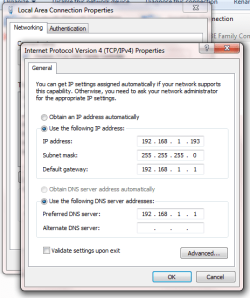
Does your adapter ip settings look similar to this?

Untitled3.png

Out of curiosity, what is the make of the LAN card and what drivers are you using? Windows or OEM?
 

My Computer My Computer

At a glance

Windows 7 Enterprise x64 SP1Intel Core i3-2100 @ 3.10GHz10 GB DDR3Asus EAH5450 series (Radeon)
Computer Manufacturer/Model Number
ATX Custom Build 2012
OS
Windows 7 Enterprise x64 SP1
CPU
Intel Core i3-2100 @ 3.10GHz
Motherboard
Intel DH67CL desktop ATX
Memory
10 GB DDR3
Graphics Card(s)
Asus EAH5450 series (Radeon)
Monitor(s) Displays
Samsung SyncMaster 226BW, Samsung Syncmaster P2450H
Screen Resolution
226BW: 1680 x 1050 & P2450H: 1920 x 1080
Hard Drives
Western Digital 320 GB sata (boot), Samsung 640 GB sata, Seagate 2 TB sata (data)
PSU
Cooler Master Extreme Power Plus 500W
Case
Thermaltake V3 Black Edition
Cooling
stock cooling with added intake fan
Keyboard
HP Wireless Elite Keyboard Wireless Keyboard
Mouse
Microsoft Touch
Internet Speed
Comcast Cable business class <=18Mb {averages 12Mb}
Other Info
Optical drives: LG SuperMulti Blue, HP DVD 1260T
Other: Kensington Bluetooth Receiver
Network: Buffalo Wireless N USB, DLink N router/DLink Ethernet Switch/DLink Xtreme N wireless bridge
Printer: HP Photosmart Plus, HP Officejet Pro 8600 Plus
PCs: HP dv6-3040us (7 x64 SP1), HP DM4-2165dx (7 x64 SP1), HP Pavilion zv6130us (7 x86), Apple Macbook Air (Lion)
************
Hi merkat106, thanks for your reply

The adapter settings look like the one you posted, i do keep track of the ip´s used and there are no conflicts in that regard.

I got all the other machines configured and working properly. I havent hooked this one up directly to the router, i would be inclined to do it if there was a recurring problem with other systems but its just this one. I´m sure i end up doing it if dotn fix it the way it is now.

The nic card used on this system is:
Brand: Intellinet
model: gigabit pci express
Drivers: windows installed them automatically but i will try the oem ones, thanks for the hint ;)
 

My Computer My Computer

At a glance

W7amd athlon X2
Computer Manufacturer/Model Number
hp pavilion slimline
OS
W7
CPU
amd athlon X2
kameleon,
I can recall having to add the static IP to the routers Client Reserved IP List and the problem you cite was no longer an issue, I think the problem you are experiencing is with the NIC, it might be a good idea to see if there is a firmware update for the NIC.
 

My Computer My Computer

At a glance

Vista 64 Ultimate, Windows 7 64 Ultimate, Ubu...i7 975 3.3 GHz Extreme (Factory OC'd to 3.6 GHz)18 Gb Tri-Channel 1066ATI 5970 2048 Mb
Computer Manufacturer/Model Number
DELL XPS Studio 435T
OS
Vista 64 Ultimate, Windows 7 64 Ultimate, Ubuntu 9.10
CPU
i7 975 3.3 GHz Extreme (Factory OC'd to 3.6 GHz)
Motherboard
DELL provided
Memory
18 Gb Tri-Channel 1066
Graphics Card(s)
ATI 5970 2048 Mb
Sound Card
X-Fi Extreme Gamer
Monitor(s) Displays
Vizio 37" HD-TV
Screen Resolution
1920 x 1080
Hard Drives
1.5 Tb HDD
1.5 Tb HDD
2.0 Tb Network Drive
512 Gb Crucial SSD
PSU
DELL Provided 475 watts
Case
DELL
Cooling
3 fans
Keyboard
Logitech Performance K350 Wireless
Mouse
Logitech Performance MX Wireless
Internet Speed
3 Mb up 750 Kb down
Other Info
Bamboo Fun Tablet, Belkin N+ Wireless router, Pioneer Dolby System Wireless Headphones, Bose 5.1 Dolby Surround Sound System, LifeCam VX 3000 Webcam, Blu-Ray/Hi Def DVD +RW combo and Blu-ray +RW,l 15 in 1 media card reader, Logitech Rumblepad 2, Hauppauge 2250 DTV Tuner with MS Media Center Remote

Laptop:Alienware M17x, Q9100 CPU, 8Gb RAM, 1920x1200 WUXGA LCD driven by 4870's in CrossFireX, Bl
i just updated the driver with the oem one. The controler is a realtek rtl8168b/8111b

same result, i can ping all other computers but i cant surf the web.

I will check for a firmware update also, thanks fishnbanjo
 

My Computer My Computer

At a glance

W7amd athlon X2
Computer Manufacturer/Model Number
hp pavilion slimline
OS
W7
CPU
amd athlon X2
Back
Top