Solved W7/Linux Mint dual boot upgade

johnwillyums

New member
Guru
Gold Member
VIP
Local time
1:05 PM
Messages
4,286
Location
Colne, Lancashire, UK
I folks,

Currently I'm running a dual boot with Windows 7 and Linux Mint 10. When I boot up I get Windows Boot Loader and default to W7. If I choose the second choice, Linux Mint, I go to GRUB and boot into Linux Mint.
Very shortly Linux Mint 11 will be released. The recommendation is for people to do a clean install.
I'm wondering whether, if I clean install Linux Mint 11 on the partition that LM 10 now occupies (on a separate HDD) it will mess up my boot. What I mean is whether GRUB will be my first boot loader and default into Linux.
I'd prefer to keep it as it is but I'm unsure about how to go about this upgrade.
For one thing Windows cannot see Linux so I'm kind of guessing which partition my current Linux install is on.
As I say, it's on a different HDD, so I could disconnect my Windows drive altogether. Not sure whether this would be a worthwhile thing to do though.

Any suggestions would be welcome, John:)
 
Last edited:

My Computer

Computer Manufacturer/Model Number
The Monolith. 3.1
OS
Windows 7 Home Premium 64 bit
CPU
i7 [email protected]
Motherboard
Gigabyte Z77-D3H
Memory
2x4GB Corsair Vegeance DDR3
Graphics Card(s)
XFX GTX 260 Black Edition
Sound Card
none-through large stereo hi fi
Monitor(s) Displays
Croosover 27MDP LED IPS Dell 2408 WFP
Screen Resolution
2560x1440 1920x1200
Hard Drives
1x Samsung 840Pro 128GB SSD
1x Samsung Spinpoint F1 1TB
PSU
Corsair AX 850 Watt
Case
Cooler Master ACTS 840
Cooling
Be Quiet! Dark Rock Pro
Keyboard
Enermax Aurora
Mouse
Logitech Ballmouse
Internet Speed
20MBPS
Hello John.


As you know which HDD is the Windows 7 HDD and so on ...


The best way would be to power down and disconnect all HDDs except the Windows 7 HDD, connect it to the #1 SATA port of the mobo and set it as the first boot device in the main BIOS, make sure Windows 7 is the Active partition and make sure it boots all by itself as the "System" partition.

Startup Repair - Run 3 Separate Times


Then power down and disconnect the Windows 7 HDD and connect the HDD you want to use for Linux and do the install to that; when finished power down and reconnect all the HDDs putting Windows 7 back at SATA #1 and use the one-time boot menu for your Gigabyte board (which is the F12 hot-key) to boot to whichever OS/HDD you want to boot at PC startup.


Post a snip of disk management to see and if you have questions be sure to ask. :)
 

My Computer

Computer Manufacturer/Model Number
* BFK Customs *
OS
W 7 64-bit Ultimate
CPU
Intel Q9550 Yorkfield
Motherboard
ASUS P5Q Pro
Memory
8GB Dominator 8500C5D
Graphics Card(s)
ATI : XFX 5870
Sound Card
Realtek HD Audio 7-1
Monitor(s) Displays
1x 47" LCD HDMI & 3x 26" LCD HDMI
Screen Resolution
1920x1080P & 1920x1200
Hard Drives
1x 80GB Intel X25-M G2 SSD : 1x 500GB & 1x 640GB WD Caviar Black(s)
PSU
Corsair 620HX
Case
Cooler Master RC-690
Cooling
Tuniq Tower 120, 2x 140mm and 3x 120mm case fans
Keyboard
Microsoft 500
Mouse
Razer Diamondback 3G
Internet Speed
14 Mb/s
Other Info
1x Koutech 3Gb/s SATA HDD Hot Swap Rack
Thanks BFK.

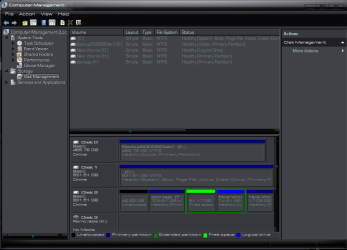
I'm getting confused here. I have attached a snip of computer management.
As you can see Disk 0(E) is a 500GB storage drive.
Disk 1 (C) is my Windows 7 install on a 1TB drive

Disk 2 is a bit of a mess. I have a 709GB storage space (F) for media etc, a 48GB unallocated, a 81GB partition showing as free space plus a 74GB New Volume (NTFS) and a 17GB New Volume (NTFS).

I believe that my Linux install is on the 81GB partition.
The 48GB unallocated was NTFS but I "deleted volume" thinking this would add it to my 709GB storage partition but it didn't
Ideally I would like to do that but I'm not sure how.
The 74GB partition and the 17GB partition are NTFS.
As I say, I believe the Linux install is on the 81GB partition as that shows as free space and not NTFS

I really shouldn't mess with things I don't understand:o

Thanks for your help, John:)
 

Attachments

  • compmanmay11.PNG
    compmanmay11.PNG
    30.3 KB · Views: 108
Last edited:

My Computer

Computer Manufacturer/Model Number
The Monolith. 3.1
OS
Windows 7 Home Premium 64 bit
CPU
i7 [email protected]
Motherboard
Gigabyte Z77-D3H
Memory
2x4GB Corsair Vegeance DDR3
Graphics Card(s)
XFX GTX 260 Black Edition
Sound Card
none-through large stereo hi fi
Monitor(s) Displays
Croosover 27MDP LED IPS Dell 2408 WFP
Screen Resolution
2560x1440 1920x1200
Hard Drives
1x Samsung 840Pro 128GB SSD
1x Samsung Spinpoint F1 1TB
PSU
Corsair AX 850 Watt
Case
Cooler Master ACTS 840
Cooling
Be Quiet! Dark Rock Pro
Keyboard
Enermax Aurora
Mouse
Logitech Ballmouse
Internet Speed
20MBPS
Hi John,

When Mint asks you where to put Grub, do NOT let it default. Instead manually select the Mint partition rather than the entire hard disk. This used to be the last screen on the Mint installation, and you had to select "Advanced" to get to it, but I think they changed that with 10.

So rather than installing to (for example) sda you would install it to sda3

Although if memory serves me, your installations are on seperate HDD's aren't they? If so then as long as Windows is the first boot device, all should work as it is now.
 

My Computer

Computer type
PC/Desktop
Computer Manufacturer/Model Number
Medion Erazer (note to self: insert model number) - with custom additions
OS
Windows 10 Pro x64
CPU
Intel Core i5 7400 @ 3.00GHz
Motherboard
OEM supllied with PC
Memory
8GB 2133Mhz DDR4 (OEM supplied)
Graphics Card(s)
Gygabyte Windforce GTX 1050Ti (Factory Overclocked)
Sound Card
Realtek
Monitor(s) Displays
Acer Al1980 + HKC
Screen Resolution
1360*768(HKC) / 1280*1024(Acer)
Hard Drives
1TB Toshiba
1TB WD Caviar Green
120GB Samsung Evo 840
PSU
OEM supplied (no power rating on case)
Case
OEM Supplied
Cooling
Stock
Keyboard
Logitech Wireless
Mouse
Logitect Wireless
Internet Speed
40Mb/s Down 10Mb/s Up
Antivirus
Defender
Browser
Firefox
Sorry, forgot to add it:)
 

My Computer

Computer Manufacturer/Model Number
The Monolith. 3.1
OS
Windows 7 Home Premium 64 bit
CPU
i7 [email protected]
Motherboard
Gigabyte Z77-D3H
Memory
2x4GB Corsair Vegeance DDR3
Graphics Card(s)
XFX GTX 260 Black Edition
Sound Card
none-through large stereo hi fi
Monitor(s) Displays
Croosover 27MDP LED IPS Dell 2408 WFP
Screen Resolution
2560x1440 1920x1200
Hard Drives
1x Samsung 840Pro 128GB SSD
1x Samsung Spinpoint F1 1TB
PSU
Corsair AX 850 Watt
Case
Cooler Master ACTS 840
Cooling
Be Quiet! Dark Rock Pro
Keyboard
Enermax Aurora
Mouse
Logitech Ballmouse
Internet Speed
20MBPS
Hello again, Martin has some good info for you above.


To clarify, since the Windows 7 partition is "System / Active" all you would have to do is to disconnect the HDDs except the Linux HDD and install to that and when done reconnect the others and use the F12 one-time boot menu to start the OS/HDD you want to boot at PC startup.


To me that's a better way that tying the OSs together the 'old' way, let the BIOS work for you.
 

My Computer

Computer Manufacturer/Model Number
* BFK Customs *
OS
W 7 64-bit Ultimate
CPU
Intel Q9550 Yorkfield
Motherboard
ASUS P5Q Pro
Memory
8GB Dominator 8500C5D
Graphics Card(s)
ATI : XFX 5870
Sound Card
Realtek HD Audio 7-1
Monitor(s) Displays
1x 47" LCD HDMI & 3x 26" LCD HDMI
Screen Resolution
1920x1080P & 1920x1200
Hard Drives
1x 80GB Intel X25-M G2 SSD : 1x 500GB & 1x 640GB WD Caviar Black(s)
PSU
Corsair 620HX
Case
Cooler Master RC-690
Cooling
Tuniq Tower 120, 2x 140mm and 3x 120mm case fans
Keyboard
Microsoft 500
Mouse
Razer Diamondback 3G
Internet Speed
14 Mb/s
Other Info
1x Koutech 3Gb/s SATA HDD Hot Swap Rack
Thanks BFK.


The 48GB unallocated was NTFS but I "deleted volume" thinking this would add it to my 709GB storage partition but it didn't
Ideally I would like to do that but I'm not sure how.


Thanks for your help, John:)


If you want to recover this into the "Storage" partition, have a look at Step Three of this tutorial at the link below for how, just disregard the first two steps are they are not needed in your situation.

Partition : Recover Space Used by an Older OS
 

My Computer

Computer Manufacturer/Model Number
* BFK Customs *
OS
W 7 64-bit Ultimate
CPU
Intel Q9550 Yorkfield
Motherboard
ASUS P5Q Pro
Memory
8GB Dominator 8500C5D
Graphics Card(s)
ATI : XFX 5870
Sound Card
Realtek HD Audio 7-1
Monitor(s) Displays
1x 47" LCD HDMI & 3x 26" LCD HDMI
Screen Resolution
1920x1080P & 1920x1200
Hard Drives
1x 80GB Intel X25-M G2 SSD : 1x 500GB & 1x 640GB WD Caviar Black(s)
PSU
Corsair 620HX
Case
Cooler Master RC-690
Cooling
Tuniq Tower 120, 2x 140mm and 3x 120mm case fans
Keyboard
Microsoft 500
Mouse
Razer Diamondback 3G
Internet Speed
14 Mb/s
Other Info
1x Koutech 3Gb/s SATA HDD Hot Swap Rack
Thanks to the both of you. That sounds simpler. To clarify:
So, if I disconnect Disk 0 and Disk 1 I shouldn't accidently hose my Windows 7 install.
If I then custom install Linux to the 81GB partition on Disk 2 my 709GB storage partition will be safe.
And my boot choice would still default to Windows through Windows Boot?

Have I got that right?
Thanks, John:)
 

My Computer

Computer Manufacturer/Model Number
The Monolith. 3.1
OS
Windows 7 Home Premium 64 bit
CPU
i7 [email protected]
Motherboard
Gigabyte Z77-D3H
Memory
2x4GB Corsair Vegeance DDR3
Graphics Card(s)
XFX GTX 260 Black Edition
Sound Card
none-through large stereo hi fi
Monitor(s) Displays
Croosover 27MDP LED IPS Dell 2408 WFP
Screen Resolution
2560x1440 1920x1200
Hard Drives
1x Samsung 840Pro 128GB SSD
1x Samsung Spinpoint F1 1TB
PSU
Corsair AX 850 Watt
Case
Cooler Master ACTS 840
Cooling
Be Quiet! Dark Rock Pro
Keyboard
Enermax Aurora
Mouse
Logitech Ballmouse
Internet Speed
20MBPS
Thanks to the both of you. That sounds simpler. To clarify:
So, if I disconnect Disk 0 and Disk 1 I shouldn't accidently hose my Windows 7 install.
If I then custom install Linux to the 81GB partition on Disk 2 my 709GB storage partition will be safe.
And my boot choice would still default to Windows through Windows Boot?

Have I got that right?
Thanks, John:)


Exactly!
 

My Computer

Computer Manufacturer/Model Number
* BFK Customs *
OS
W 7 64-bit Ultimate
CPU
Intel Q9550 Yorkfield
Motherboard
ASUS P5Q Pro
Memory
8GB Dominator 8500C5D
Graphics Card(s)
ATI : XFX 5870
Sound Card
Realtek HD Audio 7-1
Monitor(s) Displays
1x 47" LCD HDMI & 3x 26" LCD HDMI
Screen Resolution
1920x1080P & 1920x1200
Hard Drives
1x 80GB Intel X25-M G2 SSD : 1x 500GB & 1x 640GB WD Caviar Black(s)
PSU
Corsair 620HX
Case
Cooler Master RC-690
Cooling
Tuniq Tower 120, 2x 140mm and 3x 120mm case fans
Keyboard
Microsoft 500
Mouse
Razer Diamondback 3G
Internet Speed
14 Mb/s
Other Info
1x Koutech 3Gb/s SATA HDD Hot Swap Rack
Hi again john,

Yes that's right. As long as the Windows disk is set to the first active boot drive (above the Linux one) then it will default to Windows bootloader.

You may have to just delete and recreate the entry for Mint using EasyBCD as I advised you the first time we set this up. I'm not sure, it may just take it with no fuss, or it may not.
 

My Computer

Computer type
PC/Desktop
Computer Manufacturer/Model Number
Medion Erazer (note to self: insert model number) - with custom additions
OS
Windows 10 Pro x64
CPU
Intel Core i5 7400 @ 3.00GHz
Motherboard
OEM supllied with PC
Memory
8GB 2133Mhz DDR4 (OEM supplied)
Graphics Card(s)
Gygabyte Windforce GTX 1050Ti (Factory Overclocked)
Sound Card
Realtek
Monitor(s) Displays
Acer Al1980 + HKC
Screen Resolution
1360*768(HKC) / 1280*1024(Acer)
Hard Drives
1TB Toshiba
1TB WD Caviar Green
120GB Samsung Evo 840
PSU
OEM supplied (no power rating on case)
Case
OEM Supplied
Cooling
Stock
Keyboard
Logitech Wireless
Mouse
Logitect Wireless
Internet Speed
40Mb/s Down 10Mb/s Up
Antivirus
Defender
Browser
Firefox
Muchos gracias BFK and severedsolo, you're both stars:D
 

My Computer

Computer Manufacturer/Model Number
The Monolith. 3.1
OS
Windows 7 Home Premium 64 bit
CPU
i7 [email protected]
Motherboard
Gigabyte Z77-D3H
Memory
2x4GB Corsair Vegeance DDR3
Graphics Card(s)
XFX GTX 260 Black Edition
Sound Card
none-through large stereo hi fi
Monitor(s) Displays
Croosover 27MDP LED IPS Dell 2408 WFP
Screen Resolution
2560x1440 1920x1200
Hard Drives
1x Samsung 840Pro 128GB SSD
1x Samsung Spinpoint F1 1TB
PSU
Corsair AX 850 Watt
Case
Cooler Master ACTS 840
Cooling
Be Quiet! Dark Rock Pro
Keyboard
Enermax Aurora
Mouse
Logitech Ballmouse
Internet Speed
20MBPS
If you do the BIOS managed dual boot, after all the other HDDs are disconnected and only the Linux HDD is connected, you could boot the Partition Wizard CD to recover the 48GB space into the "Storage" partition, then boot the Linux CD and do the install, kind'a kill 2 birds with one stone.


First download the Partition Wizard Bootable Disk (PWBD) ISO file to the desktop, be sure to get the PWBD and not the installed version; scroll down to see the download link for the bootable CD ISO file at this link below.

Partition Wizard Free Bootable CD

Then use ImgBurn to burn the ISO to a CD, at no greater than 4x speed with a verify; it was designed for use and works best from a CD rather that a DVD then boot the created CD to make the changes.

ImgBurn Free ISO Burning Software
 

My Computer

Computer Manufacturer/Model Number
* BFK Customs *
OS
W 7 64-bit Ultimate
CPU
Intel Q9550 Yorkfield
Motherboard
ASUS P5Q Pro
Memory
8GB Dominator 8500C5D
Graphics Card(s)
ATI : XFX 5870
Sound Card
Realtek HD Audio 7-1
Monitor(s) Displays
1x 47" LCD HDMI & 3x 26" LCD HDMI
Screen Resolution
1920x1080P & 1920x1200
Hard Drives
1x 80GB Intel X25-M G2 SSD : 1x 500GB & 1x 640GB WD Caviar Black(s)
PSU
Corsair 620HX
Case
Cooler Master RC-690
Cooling
Tuniq Tower 120, 2x 140mm and 3x 120mm case fans
Keyboard
Microsoft 500
Mouse
Razer Diamondback 3G
Internet Speed
14 Mb/s
Other Info
1x Koutech 3Gb/s SATA HDD Hot Swap Rack
When Mint asks you where to put Grub, do NOT let it default. Instead manually select the Mint partition rather than the entire hard disk.

Yep. This + EasyBCd = easy Windows/Mint dual boot.
 

My Computer

Computer type
PC/Desktop
Computer Manufacturer/Model Number
Systems by SmartEyeball
OS
8 Pro x64
CPU
i7 3770K 4.6GHz
Motherboard
ASUS P8Z77 WS
Memory
16GB G.Skill Trident X 2666mhz
Graphics Card(s)
x2 EVGA 780 Ti Superclocked SLI
Sound Card
SB X-FI Surround 5.1 PRO USB / ATH-AD900 Headphones
Monitor(s) Displays
x3 Dell U2410 / 58" Samsung
Screen Resolution
5760*1200/ 1920*1200
Hard Drives
2x Intel 520 240GB (RAID 0) * 2x WD Caviar Blacks 2TB (RAID 0) * 2TB WD Caviar Black * Sony Optirac DVD
PSU
Silverstone Strider Evolution 1200W
Case
Thermaltake Level 10 GT Snow Edition
Cooling
Noctua NH-D14
Keyboard
Topre Realforce // Ducky Shine MX Black // Filco Ninja TKL
Mouse
Thermaltake Theron (Highly Recommended) + Razer Imperator
Antivirus
MSE
Browser
IE, FF, WaterFox
Other Info
GT Extreme V2 Sim Racing Cockpit + 40" LCD and K/B Mouse stand ▼
Fanatec CSR Elite Wheel + Clubsport V1 Pedals + CSR shifter/7G-H ▼Saitek X52 Pro ▼ TrackIR 5 Pro
Buttkicker v2 Seat Rumbler with Dedicated 5.1 and Sub Woofer attached to frame ▼
=
Bloody Big Grin
Well I have a dual boot with Mint 9. Both Mint 9 and Windows 7 are on the same physical disk in my case.

And since they are both on the same physical disk, Mint as well as many other Linux distros would by default install Grub bootloader and removing Linux by deleting the partition where they are installed would take off Grub bootloader as well and Windows 7 would be undetectable at bootup and startup repair wasn't able to fix that. My choice would to to install Linux again so when Grub Bootloader is in place again, Windows 7 would again be detected on the boot menu.

I tried to upgrade to Mint 10 but the thing I really hated was on Mint 10's install setup, I don't have the option to install to "use the largest free space" which I did on Mint 9. The options on Mint 10 was to:

1. Install with Windows side by side that will in turn cut the partition C: which is where Windows 7 is installed into two so that Mint 10 would use the other half.

2. Install to a partition you can choose. However this option is a major fail for me cause when I choose the free space to install Mint 10 into, it says something like "no root file system is defined" and the same thing happens if I choose a formatted partition. So therefore, I can't install Mint 10. I had the same issue with Mint 9 but Mint 9 has the option to install to the largest continuous free space which is how I managed to install Mint 9 some time ago. Since I already deleted the partition where Linux Mint 9 was cause I would place Mint 10 in there, Windows 7 is now undetectable. Since I had problems installing Mint 10, I have to install Mint 9 again to rescue my Windows 7 and that's how I did it.

With regards to the "unallocated space", try right-clicking it and make a new partition out of it and once that 48.83BG partition is done, right-click it again and "Extend Volume" and this is how you can merge this with the 81.17GB free space.
 

My Computer

Computer Manufacturer/Model Number
Custom Built
OS
Windows 7 Ultimate 32 Bit, Windows Developer Preview, Linux Mint 9 Gnome 32 Bit
CPU
Intel Pentium Dual CPU E2180@2GHz
Motherboard
Elitegroup 671T-M3
Graphics Card(s)
NVIDIA GeForce 7200 GS
Monitor(s) Displays
AOC TFT1560 15" LCD Monitor
Screen Resolution
1024x768
Keyboard
Logitech USB Keyboard
Hi folks

I seem to have had a major disaster last night somewhere along the line.
To cut a long story short I seem to be unable to get my BIOS to boot from disc.
No matter what I tried it refused to do it. F12 gets me a boot choice on my Gigabyte EX58-UD5. That screen would come up but the up/down arrows wouldn't move the selection.
I tried entering the BIOS and attempted to alter my first boot choice in there but I couldn't get it to boot from disc.

I decided to give up for the night and shut down and reconnected all the drives.
I thought I'd just make sure that everything was ok and attempted to boot again but I couldn't boot into Windows. I got a black screen suggesting I put in my Windows Disc and do a repair. I tried this but nothing.
This morning I've been entering BIOS and trying to get back to defaults but I couldn't. I spent an hour or so trying various things but to no avail.
In desperation I powered off and disconnected the two "spare" drives- the Linux +storage !TB and the storage 500GB.
Now I was able to boot into Windows so I did a system restore to about a week ago.
This seemed to work and I have now reconnected all drives and can see them.
However, the system is not running properly. Everything is very slow, keyboard controls are not working eg on boot if I press enter nothing happens.
Also, I have 3 browsers and all of them are problematic. FF keeps failing and crashing, Lunascape is the same. I'm now in Chrome but it's like a fresh install, no speed dial etc.

The only thing I could think of was a repair install so I tried that, following the tutorial on this forum. That failed as I could not do an upgrade as the version I am running is newer than the one on disc (presumably due to SP1?)

I don't know what I've done but things are not running properly and I'm kind of afraid to reboot in case it won't.

Help!:confused:
 

My Computer

Computer Manufacturer/Model Number
The Monolith. 3.1
OS
Windows 7 Home Premium 64 bit
CPU
i7 [email protected]
Motherboard
Gigabyte Z77-D3H
Memory
2x4GB Corsair Vegeance DDR3
Graphics Card(s)
XFX GTX 260 Black Edition
Sound Card
none-through large stereo hi fi
Monitor(s) Displays
Croosover 27MDP LED IPS Dell 2408 WFP
Screen Resolution
2560x1440 1920x1200
Hard Drives
1x Samsung 840Pro 128GB SSD
1x Samsung Spinpoint F1 1TB
PSU
Corsair AX 850 Watt
Case
Cooler Master ACTS 840
Cooling
Be Quiet! Dark Rock Pro
Keyboard
Enermax Aurora
Mouse
Logitech Ballmouse
Internet Speed
20MBPS
Well, things are looking up a bit. I re-installed FF Nightly and it has reinstated all my addons, speed dial, favourites etc. No such luck with Chrome so I'm starting afresh with that.
I managed to run Windows update and installed 4 updates.
Obviously this required a restart and on my boot page I now have Windows 7 only, no Linux Mint. However, as I said before, if I press the enter key it makes no difference on that or the following screen. I just have to wait until it boots. this never used to happen.
Once in Windows things seem to be running ok so I don't think I need to re-install Windows. However my big worry is that I can't get a boot from disc!
If I did need to re-install or try to install another Linux (I can't access the one I have) I can't.

Any ideas what's gone wrong here would be welcome, John:(
 

My Computer

Computer Manufacturer/Model Number
The Monolith. 3.1
OS
Windows 7 Home Premium 64 bit
CPU
i7 [email protected]
Motherboard
Gigabyte Z77-D3H
Memory
2x4GB Corsair Vegeance DDR3
Graphics Card(s)
XFX GTX 260 Black Edition
Sound Card
none-through large stereo hi fi
Monitor(s) Displays
Croosover 27MDP LED IPS Dell 2408 WFP
Screen Resolution
2560x1440 1920x1200
Hard Drives
1x Samsung 840Pro 128GB SSD
1x Samsung Spinpoint F1 1TB
PSU
Corsair AX 850 Watt
Case
Cooler Master ACTS 840
Cooling
Be Quiet! Dark Rock Pro
Keyboard
Enermax Aurora
Mouse
Logitech Ballmouse
Internet Speed
20MBPS
You did say that you think Linux Mint is on the 81GB free space. If its labelled as "free space" then if Linux Mint was there, its now GONE I suspect along with Grub Bootloader that's why you may be having booting problems, right? Why don't you try a third party boot loader perhaps?
 

My Computer

Computer Manufacturer/Model Number
Custom Built
OS
Windows 7 Ultimate 32 Bit, Windows Developer Preview, Linux Mint 9 Gnome 32 Bit
CPU
Intel Pentium Dual CPU E2180@2GHz
Motherboard
Elitegroup 671T-M3
Graphics Card(s)
NVIDIA GeForce 7200 GS
Monitor(s) Displays
AOC TFT1560 15" LCD Monitor
Screen Resolution
1024x768
Keyboard
Logitech USB Keyboard
Hello John.


Post another snip of disk management.
 

My Computer

Computer Manufacturer/Model Number
* BFK Customs *
OS
W 7 64-bit Ultimate
CPU
Intel Q9550 Yorkfield
Motherboard
ASUS P5Q Pro
Memory
8GB Dominator 8500C5D
Graphics Card(s)
ATI : XFX 5870
Sound Card
Realtek HD Audio 7-1
Monitor(s) Displays
1x 47" LCD HDMI & 3x 26" LCD HDMI
Screen Resolution
1920x1080P & 1920x1200
Hard Drives
1x 80GB Intel X25-M G2 SSD : 1x 500GB & 1x 640GB WD Caviar Black(s)
PSU
Corsair 620HX
Case
Cooler Master RC-690
Cooling
Tuniq Tower 120, 2x 140mm and 3x 120mm case fans
Keyboard
Microsoft 500
Mouse
Razer Diamondback 3G
Internet Speed
14 Mb/s
Other Info
1x Koutech 3Gb/s SATA HDD Hot Swap Rack
Hi Vertex, I think you may be right. Here's a current pic of Disk Management. My Windows install is on Disk 2(C), Disk 1 is the 500gb storage drive and Disc 0 is the one with partitions on it.
They are all NTFS now except the third one, 81.17GB. That says empty space. I presume that means there is nothing on it. Would that be right? I thought that maybe Windows simply couldn't see Linux was on it?
It's a bit academic now. I have Linux Mint 11 RC and Ububntu 11.04 burnt to disk but I can't seem to work out how to boot from disk. I'm sure I could before simply by going F12 and then selecting CD in my boot list. As I say the up/down arrows on my keyboard no longer work in that.
I keep thinking back to what I did last night. I know that out of frustration I tried Wubi. I downloaded and installed it but it kept asking for a disk. I thought that Wubi would download Ubuntu itself.
That's what the tutorial indicated I thought.
I'm very worried about not being able to boot from disk. Linux or a re-install of Windows is no longer possible.
I need to find out what's wrong there. I can live without experimenting with Linux but not W7.

Thanks for you input, John
 

Attachments

  • 12511discman.PNG
    12511discman.PNG
    31.6 KB · Views: 39

My Computer

Computer Manufacturer/Model Number
The Monolith. 3.1
OS
Windows 7 Home Premium 64 bit
CPU
i7 [email protected]
Motherboard
Gigabyte Z77-D3H
Memory
2x4GB Corsair Vegeance DDR3
Graphics Card(s)
XFX GTX 260 Black Edition
Sound Card
none-through large stereo hi fi
Monitor(s) Displays
Croosover 27MDP LED IPS Dell 2408 WFP
Screen Resolution
2560x1440 1920x1200
Hard Drives
1x Samsung 840Pro 128GB SSD
1x Samsung Spinpoint F1 1TB
PSU
Corsair AX 850 Watt
Case
Cooler Master ACTS 840
Cooling
Be Quiet! Dark Rock Pro
Keyboard
Enermax Aurora
Mouse
Logitech Ballmouse
Internet Speed
20MBPS
Hi BFK. I'm struggling here. Must have made a crucial error somewhere. good to see you:D
 

My Computer

Computer Manufacturer/Model Number
The Monolith. 3.1
OS
Windows 7 Home Premium 64 bit
CPU
i7 [email protected]
Motherboard
Gigabyte Z77-D3H
Memory
2x4GB Corsair Vegeance DDR3
Graphics Card(s)
XFX GTX 260 Black Edition
Sound Card
none-through large stereo hi fi
Monitor(s) Displays
Croosover 27MDP LED IPS Dell 2408 WFP
Screen Resolution
2560x1440 1920x1200
Hard Drives
1x Samsung 840Pro 128GB SSD
1x Samsung Spinpoint F1 1TB
PSU
Corsair AX 850 Watt
Case
Cooler Master ACTS 840
Cooling
Be Quiet! Dark Rock Pro
Keyboard
Enermax Aurora
Mouse
Logitech Ballmouse
Internet Speed
20MBPS
Back
Top