JavaScript is disabled. For a better experience, please enable JavaScript in your browser before proceeding.
You are using an out of date browser. It may not display this or other websites correctly.
You should upgrade or use an
alternative browser .
Solved W7/Linux Mint dual boot upgade
R.I.P. August 13th 2014
SF Team
Hello John.
Computer Manufacturer/Model Number * BFK Customs * OS W 7 64-bit Ultimate CPU Intel Q9550 Yorkfield Motherboard ASUS P5Q Pro Memory 8GB Dominator 8500C5D Graphics Card(s) ATI : XFX 5870 Sound Card Realtek HD Audio 7-1 Monitor(s) Displays 1x 47" LCD HDMI & 3x 26" LCD HDMI Screen Resolution 1920x1080P & 1920x1200 Hard Drives 1x 80GB Intel X25-M G2 SSD : 1x 500GB & 1x 640GB WD Caviar Black(s) PSU Corsair 620HX Case Cooler Master RC-690 Cooling Tuniq Tower 120, 2x 140mm and 3x 120mm case fans Keyboard Microsoft 500 Mouse Razer Diamondback 3G Internet Speed 14 Mb/s Other Info 1x Koutech 3Gb/s SATA HDD Hot Swap Rack
New member
Guru
Gold Member
VIP
Thread Starter
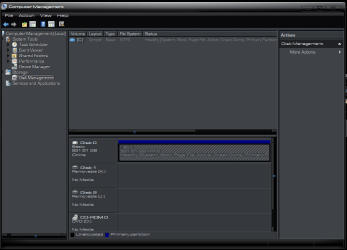
I think it's disk 2. It's marked as (c) and has Healthy( System, Boot, Active, crash Dump, Primary Partition.... written on it.
Computer Manufacturer/Model Number The Monolith. 3.1 OS Windows 7 Home Premium 64 bit CPU i7 [email protected] Motherboard Gigabyte Z77-D3H Memory 2x4GB Corsair Vegeance DDR3 Graphics Card(s) XFX GTX 260 Black Edition Sound Card none-through large stereo hi fi Monitor(s) Displays Croosover 27MDP LED IPS Dell 2408 WFP Screen Resolution 2560x1440 1920x1200 Hard Drives 1x Samsung 840Pro 128GB SSD PSU Corsair AX 850 Watt Case Cooler Master ACTS 840 Cooling Be Quiet! Dark Rock Pro Keyboard Enermax Aurora Mouse Logitech Ballmouse Internet Speed 20MBPS
R.I.P. August 13th 2014
SF Team
No I mean when you actually look at the HDDs can you tell (do you know) which one is which?
Computer Manufacturer/Model Number * BFK Customs * OS W 7 64-bit Ultimate CPU Intel Q9550 Yorkfield Motherboard ASUS P5Q Pro Memory 8GB Dominator 8500C5D Graphics Card(s) ATI : XFX 5870 Sound Card Realtek HD Audio 7-1 Monitor(s) Displays 1x 47" LCD HDMI & 3x 26" LCD HDMI Screen Resolution 1920x1080P & 1920x1200 Hard Drives 1x 80GB Intel X25-M G2 SSD : 1x 500GB & 1x 640GB WD Caviar Black(s) PSU Corsair 620HX Case Cooler Master RC-690 Cooling Tuniq Tower 120, 2x 140mm and 3x 120mm case fans Keyboard Microsoft 500 Mouse Razer Diamondback 3G Internet Speed 14 Mb/s Other Info 1x Koutech 3Gb/s SATA HDD Hot Swap Rack
Jack of all Trades
Guru
Gold Member
VIP
John, if i'm reading your disk management screen right then Disk 1 has linux on it. it's showing as active, which Linux does even though 7 can't read what it is. Weird that it's in NTFS but if it isn't an OS it shouldn't be Active
Computer type PC/Desktop Computer Manufacturer/Model Number Medion Erazer (note to self: insert model number) - with custom additions OS Windows 10 Pro x64 CPU Intel Core i5 7400 @ 3.00GHz Motherboard OEM supllied with PC Memory 8GB 2133Mhz DDR4 (OEM supplied) Graphics Card(s) Gygabyte Windforce GTX 1050Ti (Factory Overclocked) Sound Card Realtek Monitor(s) Displays Acer Al1980 + HKC Screen Resolution 1360*768(HKC) / 1280*1024(Acer) Hard Drives 1TB Toshiba PSU OEM supplied (no power rating on case) Case OEM Supplied Cooling Stock Keyboard Logitech Wireless Mouse Logitect Wireless Internet Speed 40Mb/s Down 10Mb/s Up Antivirus Defender Browser Firefox
New member
Guru
Gold Member
VIP
Thread Starter
Also, when it wouldn't boot this morning I disconnected the other 2 drives and it booted into Windows. I reconnected with the system running and it can now see them (obviously)
Computer Manufacturer/Model Number The Monolith. 3.1 OS Windows 7 Home Premium 64 bit CPU i7 [email protected] Motherboard Gigabyte Z77-D3H Memory 2x4GB Corsair Vegeance DDR3 Graphics Card(s) XFX GTX 260 Black Edition Sound Card none-through large stereo hi fi Monitor(s) Displays Croosover 27MDP LED IPS Dell 2408 WFP Screen Resolution 2560x1440 1920x1200 Hard Drives 1x Samsung 840Pro 128GB SSD PSU Corsair AX 850 Watt Case Cooler Master ACTS 840 Cooling Be Quiet! Dark Rock Pro Keyboard Enermax Aurora Mouse Logitech Ballmouse Internet Speed 20MBPS
Jack of all Trades
Guru
Gold Member
VIP
John, did you see my post above? what happens if you disconnect all but Disk 1?
Computer type PC/Desktop Computer Manufacturer/Model Number Medion Erazer (note to self: insert model number) - with custom additions OS Windows 10 Pro x64 CPU Intel Core i5 7400 @ 3.00GHz Motherboard OEM supllied with PC Memory 8GB 2133Mhz DDR4 (OEM supplied) Graphics Card(s) Gygabyte Windforce GTX 1050Ti (Factory Overclocked) Sound Card Realtek Monitor(s) Displays Acer Al1980 + HKC Screen Resolution 1360*768(HKC) / 1280*1024(Acer) Hard Drives 1TB Toshiba PSU OEM supplied (no power rating on case) Case OEM Supplied Cooling Stock Keyboard Logitech Wireless Mouse Logitect Wireless Internet Speed 40Mb/s Down 10Mb/s Up Antivirus Defender Browser Firefox
New member
Guru
Gold Member
VIP
Thread Starter
Hmmn. Hard to tell. It is NTFS and when I open it I can see my backup media files and docs. Not sure why it's active. Are you sure linux isn't on that 81GB partition on Disk 0?
Computer Manufacturer/Model Number The Monolith. 3.1 OS Windows 7 Home Premium 64 bit CPU i7 [email protected] Motherboard Gigabyte Z77-D3H Memory 2x4GB Corsair Vegeance DDR3 Graphics Card(s) XFX GTX 260 Black Edition Sound Card none-through large stereo hi fi Monitor(s) Displays Croosover 27MDP LED IPS Dell 2408 WFP Screen Resolution 2560x1440 1920x1200 Hard Drives 1x Samsung 840Pro 128GB SSD PSU Corsair AX 850 Watt Case Cooler Master ACTS 840 Cooling Be Quiet! Dark Rock Pro Keyboard Enermax Aurora Mouse Logitech Ballmouse Internet Speed 20MBPS
R.I.P. August 13th 2014
SF Team
When you actually look at the HDDs can you tell which one has Windows 7 on it?
Computer Manufacturer/Model Number * BFK Customs * OS W 7 64-bit Ultimate CPU Intel Q9550 Yorkfield Motherboard ASUS P5Q Pro Memory 8GB Dominator 8500C5D Graphics Card(s) ATI : XFX 5870 Sound Card Realtek HD Audio 7-1 Monitor(s) Displays 1x 47" LCD HDMI & 3x 26" LCD HDMI Screen Resolution 1920x1080P & 1920x1200 Hard Drives 1x 80GB Intel X25-M G2 SSD : 1x 500GB & 1x 640GB WD Caviar Black(s) PSU Corsair 620HX Case Cooler Master RC-690 Cooling Tuniq Tower 120, 2x 140mm and 3x 120mm case fans Keyboard Microsoft 500 Mouse Razer Diamondback 3G Internet Speed 14 Mb/s Other Info 1x Koutech 3Gb/s SATA HDD Hot Swap Rack
New member
Guru
Gold Member
VIP
Thread Starter
Physically I know that the uppermost disk in my case is the Windows disk. The only way I finally got it to boot this morning was by disconnecting the other 2.
Computer Manufacturer/Model Number The Monolith. 3.1 OS Windows 7 Home Premium 64 bit CPU i7 [email protected] Motherboard Gigabyte Z77-D3H Memory 2x4GB Corsair Vegeance DDR3 Graphics Card(s) XFX GTX 260 Black Edition Sound Card none-through large stereo hi fi Monitor(s) Displays Croosover 27MDP LED IPS Dell 2408 WFP Screen Resolution 2560x1440 1920x1200 Hard Drives 1x Samsung 840Pro 128GB SSD PSU Corsair AX 850 Watt Case Cooler Master ACTS 840 Cooling Be Quiet! Dark Rock Pro Keyboard Enermax Aurora Mouse Logitech Ballmouse Internet Speed 20MBPS
R.I.P. August 13th 2014
SF Team
Do you have a manual for the mobo that shows the #1 SATA port?
Computer Manufacturer/Model Number * BFK Customs * OS W 7 64-bit Ultimate CPU Intel Q9550 Yorkfield Motherboard ASUS P5Q Pro Memory 8GB Dominator 8500C5D Graphics Card(s) ATI : XFX 5870 Sound Card Realtek HD Audio 7-1 Monitor(s) Displays 1x 47" LCD HDMI & 3x 26" LCD HDMI Screen Resolution 1920x1080P & 1920x1200 Hard Drives 1x 80GB Intel X25-M G2 SSD : 1x 500GB & 1x 640GB WD Caviar Black(s) PSU Corsair 620HX Case Cooler Master RC-690 Cooling Tuniq Tower 120, 2x 140mm and 3x 120mm case fans Keyboard Microsoft 500 Mouse Razer Diamondback 3G Internet Speed 14 Mb/s Other Info 1x Koutech 3Gb/s SATA HDD Hot Swap Rack
Jack of all Trades
Guru
Gold Member
VIP
I'm going to step out for now, as I think I'mprobably confusing you. Fix the HDD problem first, then I'll weigh back in
Computer type PC/Desktop Computer Manufacturer/Model Number Medion Erazer (note to self: insert model number) - with custom additions OS Windows 10 Pro x64 CPU Intel Core i5 7400 @ 3.00GHz Motherboard OEM supllied with PC Memory 8GB 2133Mhz DDR4 (OEM supplied) Graphics Card(s) Gygabyte Windforce GTX 1050Ti (Factory Overclocked) Sound Card Realtek Monitor(s) Displays Acer Al1980 + HKC Screen Resolution 1360*768(HKC) / 1280*1024(Acer) Hard Drives 1TB Toshiba PSU OEM supplied (no power rating on case) Case OEM Supplied Cooling Stock Keyboard Logitech Wireless Mouse Logitect Wireless Internet Speed 40Mb/s Down 10Mb/s Up Antivirus Defender Browser Firefox
New member
Guru
Gold Member
VIP
Thread Starter
Hang on I have an pdf manual. You mean the actual physical port on the mobo.?
Computer Manufacturer/Model Number The Monolith. 3.1 OS Windows 7 Home Premium 64 bit CPU i7 [email protected] Motherboard Gigabyte Z77-D3H Memory 2x4GB Corsair Vegeance DDR3 Graphics Card(s) XFX GTX 260 Black Edition Sound Card none-through large stereo hi fi Monitor(s) Displays Croosover 27MDP LED IPS Dell 2408 WFP Screen Resolution 2560x1440 1920x1200 Hard Drives 1x Samsung 840Pro 128GB SSD PSU Corsair AX 850 Watt Case Cooler Master ACTS 840 Cooling Be Quiet! Dark Rock Pro Keyboard Enermax Aurora Mouse Logitech Ballmouse Internet Speed 20MBPS
New member
Guru
Gold Member
VIP
Thread Starter
Im assuming you have lost the ability to dual boot too?
Yup. That failed last night. As I said above it wouldn't boot so I took it off in easyBCD.
Computer Manufacturer/Model Number The Monolith. 3.1 OS Windows 7 Home Premium 64 bit CPU i7 [email protected] Motherboard Gigabyte Z77-D3H Memory 2x4GB Corsair Vegeance DDR3 Graphics Card(s) XFX GTX 260 Black Edition Sound Card none-through large stereo hi fi Monitor(s) Displays Croosover 27MDP LED IPS Dell 2408 WFP Screen Resolution 2560x1440 1920x1200 Hard Drives 1x Samsung 840Pro 128GB SSD PSU Corsair AX 850 Watt Case Cooler Master ACTS 840 Cooling Be Quiet! Dark Rock Pro Keyboard Enermax Aurora Mouse Logitech Ballmouse Internet Speed 20MBPS
R.I.P. August 13th 2014
SF Team
Hang on I have an pdf manual. You mean the actual physical port on the mobo.?
Yes connect the Windows 7 HDD to the #1 SATA port of the mobo and set it as the first boot device in the main PC BIOS.
Leave all the other HDDs disconnected for now.
Computer Manufacturer/Model Number * BFK Customs * OS W 7 64-bit Ultimate CPU Intel Q9550 Yorkfield Motherboard ASUS P5Q Pro Memory 8GB Dominator 8500C5D Graphics Card(s) ATI : XFX 5870 Sound Card Realtek HD Audio 7-1 Monitor(s) Displays 1x 47" LCD HDMI & 3x 26" LCD HDMI Screen Resolution 1920x1080P & 1920x1200 Hard Drives 1x 80GB Intel X25-M G2 SSD : 1x 500GB & 1x 640GB WD Caviar Black(s) PSU Corsair 620HX Case Cooler Master RC-690 Cooling Tuniq Tower 120, 2x 140mm and 3x 120mm case fans Keyboard Microsoft 500 Mouse Razer Diamondback 3G Internet Speed 14 Mb/s Other Info 1x Koutech 3Gb/s SATA HDD Hot Swap Rack
New member
Guru
Gold Member
VIP
Thread Starter
Here's a pic of the mobo layout. As I say I believe that the uppermost drive in the case is the W7 one. This morning I disconnected the other 2 and it finally booted.
mobolayout..PNG
55 KB
· Views: 8
Computer Manufacturer/Model Number The Monolith. 3.1 OS Windows 7 Home Premium 64 bit CPU i7 [email protected] Motherboard Gigabyte Z77-D3H Memory 2x4GB Corsair Vegeance DDR3 Graphics Card(s) XFX GTX 260 Black Edition Sound Card none-through large stereo hi fi Monitor(s) Displays Croosover 27MDP LED IPS Dell 2408 WFP Screen Resolution 2560x1440 1920x1200 Hard Drives 1x Samsung 840Pro 128GB SSD PSU Corsair AX 850 Watt Case Cooler Master ACTS 840 Cooling Be Quiet! Dark Rock Pro Keyboard Enermax Aurora Mouse Logitech Ballmouse Internet Speed 20MBPS
New member
Guru
Gold Member
VIP
Thread Starter
I'm not sure I can do that the BIOS is not really behaving itself.
Computer Manufacturer/Model Number The Monolith. 3.1 OS Windows 7 Home Premium 64 bit CPU i7 [email protected] Motherboard Gigabyte Z77-D3H Memory 2x4GB Corsair Vegeance DDR3 Graphics Card(s) XFX GTX 260 Black Edition Sound Card none-through large stereo hi fi Monitor(s) Displays Croosover 27MDP LED IPS Dell 2408 WFP Screen Resolution 2560x1440 1920x1200 Hard Drives 1x Samsung 840Pro 128GB SSD PSU Corsair AX 850 Watt Case Cooler Master ACTS 840 Cooling Be Quiet! Dark Rock Pro Keyboard Enermax Aurora Mouse Logitech Ballmouse Internet Speed 20MBPS
R.I.P. August 13th 2014
SF Team
I just sent you a PM, I have to go out for a while and will be back after bit.
Computer Manufacturer/Model Number * BFK Customs * OS W 7 64-bit Ultimate CPU Intel Q9550 Yorkfield Motherboard ASUS P5Q Pro Memory 8GB Dominator 8500C5D Graphics Card(s) ATI : XFX 5870 Sound Card Realtek HD Audio 7-1 Monitor(s) Displays 1x 47" LCD HDMI & 3x 26" LCD HDMI Screen Resolution 1920x1080P & 1920x1200 Hard Drives 1x 80GB Intel X25-M G2 SSD : 1x 500GB & 1x 640GB WD Caviar Black(s) PSU Corsair 620HX Case Cooler Master RC-690 Cooling Tuniq Tower 120, 2x 140mm and 3x 120mm case fans Keyboard Microsoft 500 Mouse Razer Diamondback 3G Internet Speed 14 Mb/s Other Info 1x Koutech 3Gb/s SATA HDD Hot Swap Rack
New member
Guru
Gold Member
VIP
Thread Starter
I'll try. Hopefully be back shortly.
Computer Manufacturer/Model Number The Monolith. 3.1 OS Windows 7 Home Premium 64 bit CPU i7 [email protected] Motherboard Gigabyte Z77-D3H Memory 2x4GB Corsair Vegeance DDR3 Graphics Card(s) XFX GTX 260 Black Edition Sound Card none-through large stereo hi fi Monitor(s) Displays Croosover 27MDP LED IPS Dell 2408 WFP Screen Resolution 2560x1440 1920x1200 Hard Drives 1x Samsung 840Pro 128GB SSD PSU Corsair AX 850 Watt Case Cooler Master ACTS 840 Cooling Be Quiet! Dark Rock Pro Keyboard Enermax Aurora Mouse Logitech Ballmouse Internet Speed 20MBPS
New member
Guru
Gold Member
VIP
Thread Starter
Ok. Thanks for your help
Computer Manufacturer/Model Number The Monolith. 3.1 OS Windows 7 Home Premium 64 bit CPU i7 [email protected] Motherboard Gigabyte Z77-D3H Memory 2x4GB Corsair Vegeance DDR3 Graphics Card(s) XFX GTX 260 Black Edition Sound Card none-through large stereo hi fi Monitor(s) Displays Croosover 27MDP LED IPS Dell 2408 WFP Screen Resolution 2560x1440 1920x1200 Hard Drives 1x Samsung 840Pro 128GB SSD PSU Corsair AX 850 Watt Case Cooler Master ACTS 840 Cooling Be Quiet! Dark Rock Pro Keyboard Enermax Aurora Mouse Logitech Ballmouse Internet Speed 20MBPS
New member
Guru
Gold Member
VIP
Thread Starter
Ok. I've now disconnected all my drives and then put the W7 drive in what should be sata port1.
It's not very clear which is 1 and which is 0 as they are on top of each other so it depends how you look at the diagram.
I notice it says disk 0. Does this mean I've got the wrong port?
Anyway, it has booted ok and I've left the other two drives unconnected as you suggest.
I notice that at boot, when the boot screen comes up it now only has Windows 7 (obviously) however if I try to choose this by pressing enter on the keyboard nothing happens. I have to wait. I'm sure pressing enter resulted in instant action previously.
I also now know which is the 500GB drive and the other 1TB drive.
I'll wait for you to get back before experimenting any further. I think it's me bumbling around that has caused this snafu.
Thanks to you both for your input, John
comman1.PNG
25.4 KB
· Views: 3
Last edited: May 12, 2011
Computer Manufacturer/Model Number The Monolith. 3.1 OS Windows 7 Home Premium 64 bit CPU i7 [email protected] Motherboard Gigabyte Z77-D3H Memory 2x4GB Corsair Vegeance DDR3 Graphics Card(s) XFX GTX 260 Black Edition Sound Card none-through large stereo hi fi Monitor(s) Displays Croosover 27MDP LED IPS Dell 2408 WFP Screen Resolution 2560x1440 1920x1200 Hard Drives 1x Samsung 840Pro 128GB SSD PSU Corsair AX 850 Watt Case Cooler Master ACTS 840 Cooling Be Quiet! Dark Rock Pro Keyboard Enermax Aurora Mouse Logitech Ballmouse Internet Speed 20MBPS