
You are using an out of date browser. It may not display this or other websites correctly.
You should upgrade or use an alternative browser.
You should upgrade or use an alternative browser.
W7 Network map tree with "?" between laptop and wireless router
- Thread starter IMycroft
- Start date

The question mark appears when you return from sleep if the NIC(s) are allowed to turn off to save power.
This can be disabled if desired.
This can be disabled if desired.
My Computer
At a glance
Windows 10 Pro x64, Windows 8.1 Pro x64, Wind...INTEL i9-7920X LGA 206664 GB (4 X 16 GB) G-Skill V Series DDR4 3200 ...EVGA GTX 1060 SC 3 GB
- Computer type
- PC/Desktop
- Computer Manufacturer/Model Number
- Custom Built
- OS
- Windows 10 Pro x64, Windows 8.1 Pro x64, Windows 7 Ultimate x64 SP1,
- CPU
- INTEL i9-7920X LGA 2066
- Motherboard
- Gigabyte X299-WU8 F3
- Memory
- 64 GB (4 X 16 GB) G-Skill V Series DDR4 3200 Quad Channel
- Graphics Card(s)
- EVGA GTX 1060 SC 3 GB
- Sound Card
- Realtek Onboard ALC1220
- Monitor(s) Displays
- 2 x Samsung S27E310
- Screen Resolution
- 1920x1080
- Hard Drives
- Samsung 2 x 970 EVO Plus 500 GB NVMe
1 x 6TB WD 6003FZBX SATA
1 x 6TB WD 60EFRX SATA
12 x 3TB WD 30EFRX SATA
- PSU
- Seasonic X-1050
- Case
- Thermaltake Armor+
- Cooling
- Corsair H80i V2 Liquid AOI Cooler
- Keyboard
- Logitech G510s
- Mouse
- Logitech MX Master 2S
- Internet Speed
- 200 Mb/s
- Antivirus
- ESET NOD32 13.1
- Browser
- EDGE (Dev, Canary, Beta), Chrome
- Other Info
- ASUS RT-AC68U router
Malwarebytes 4.0.4
Wow, that sounds plausible. But shouldn't it disappear after refreshing the screen the first time?The question mark appears when you return from sleep if the NIC(s) are allowed to turn off to save power.
This can be disabled if desired.
My Computer
At a glance
Windows 7 Ultimate x64
- OS
- Windows 7 Ultimate x64
You would think so but it doesn't seem to work that way.
My Computer
At a glance
Windows 10 Pro x64, Windows 8.1 Pro x64, Wind...INTEL i9-7920X LGA 206664 GB (4 X 16 GB) G-Skill V Series DDR4 3200 ...EVGA GTX 1060 SC 3 GB
- Computer type
- PC/Desktop
- Computer Manufacturer/Model Number
- Custom Built
- OS
- Windows 10 Pro x64, Windows 8.1 Pro x64, Windows 7 Ultimate x64 SP1,
- CPU
- INTEL i9-7920X LGA 2066
- Motherboard
- Gigabyte X299-WU8 F3
- Memory
- 64 GB (4 X 16 GB) G-Skill V Series DDR4 3200 Quad Channel
- Graphics Card(s)
- EVGA GTX 1060 SC 3 GB
- Sound Card
- Realtek Onboard ALC1220
- Monitor(s) Displays
- 2 x Samsung S27E310
- Screen Resolution
- 1920x1080
- Hard Drives
- Samsung 2 x 970 EVO Plus 500 GB NVMe
1 x 6TB WD 6003FZBX SATA
1 x 6TB WD 60EFRX SATA
12 x 3TB WD 30EFRX SATA
- PSU
- Seasonic X-1050
- Case
- Thermaltake Armor+
- Cooling
- Corsair H80i V2 Liquid AOI Cooler
- Keyboard
- Logitech G510s
- Mouse
- Logitech MX Master 2S
- Internet Speed
- 200 Mb/s
- Antivirus
- ESET NOD32 13.1
- Browser
- EDGE (Dev, Canary, Beta), Chrome
- Other Info
- ASUS RT-AC68U router
Malwarebytes 4.0.4

The question mark appears when you return from sleep if the NIC(s) are allowed to turn off to save power.
This can be disabled if desired.
The "all-knowing entity" has deigned to help us! This makes since. Since the first time I noticed the change was not too long after returning from sleep mode. Question: How do I disable? Do I have to disable sleep mode or does it have to do with NIC(s)?
My Computer
At a glance
Windows 7 Home Premium Service Pack 1 64-bitDual-Core Intel(R) Pentium(R) CPU P6200 @ 2.1...4.00 GB (3.68 GB usable)Intel HD Graphics
- Computer Manufacturer/Model Number
- ACER/Aspire 5733Z-4851
- OS
- Windows 7 Home Premium Service Pack 1 64-bit
- CPU
- Dual-Core Intel(R) Pentium(R) CPU P6200 @ 2.13 GHz 2.13 Ghz
- Memory
- 4.00 GB (3.68 GB usable)
- Graphics Card(s)
- Intel HD Graphics
- Sound Card
- Realtek High Definition Audio
- Hard Drives
- 500 GB HDD
- Mouse
- Logitech USB wireless mouse
- Internet Speed
- Link Speed 150 Mbps
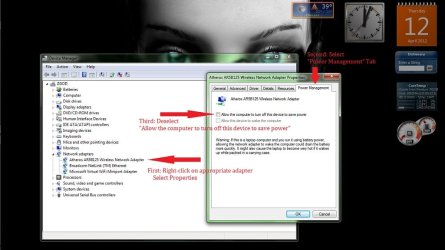
Yeah. I did a little groping when I read that post. I found, what I believe is, the correct location for disabling NIC(s) power save. Correct me if I'm wrong.
My Computer
At a glance
Windows 7 Home Premium Service Pack 1 64-bitDual-Core Intel(R) Pentium(R) CPU P6200 @ 2.1...4.00 GB (3.68 GB usable)Intel HD Graphics
- Computer Manufacturer/Model Number
- ACER/Aspire 5733Z-4851
- OS
- Windows 7 Home Premium Service Pack 1 64-bit
- CPU
- Dual-Core Intel(R) Pentium(R) CPU P6200 @ 2.13 GHz 2.13 Ghz
- Memory
- 4.00 GB (3.68 GB usable)
- Graphics Card(s)
- Intel HD Graphics
- Sound Card
- Realtek High Definition Audio
- Hard Drives
- 500 GB HDD
- Mouse
- Logitech USB wireless mouse
- Internet Speed
- Link Speed 150 Mbps
Yeah, you've got the right spot. So the checkbox was selected and now it's not, right? Looking forward to hearing whether or not this clears it up for you. Be sure and post results, okay?
My Computer
At a glance
Windows 7 Ultimate x64
- OS
- Windows 7 Ultimate x64
Yeah, the screen shot was after I "deselected" box. As for results, I cannot say for sure. I am still getting "Windows cannot discover any computer or device", in the "full map" view. I am hoping that the NIC will "refresh?", or something and after with the "power save" disabled, I won't have an issue anymore. Perhaps just time is needed now? or If anyone, you perhaps, might know how to get my network to "reset?" Please forgive any wrong terminology, self-taught.
My Computer
At a glance
Windows 7 Home Premium Service Pack 1 64-bitDual-Core Intel(R) Pentium(R) CPU P6200 @ 2.1...4.00 GB (3.68 GB usable)Intel HD Graphics
- Computer Manufacturer/Model Number
- ACER/Aspire 5733Z-4851
- OS
- Windows 7 Home Premium Service Pack 1 64-bit
- CPU
- Dual-Core Intel(R) Pentium(R) CPU P6200 @ 2.13 GHz 2.13 Ghz
- Memory
- 4.00 GB (3.68 GB usable)
- Graphics Card(s)
- Intel HD Graphics
- Sound Card
- Realtek High Definition Audio
- Hard Drives
- 500 GB HDD
- Mouse
- Logitech USB wireless mouse
- Internet Speed
- Link Speed 150 Mbps
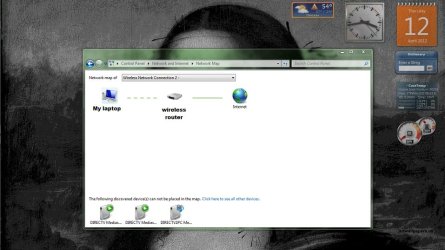
Okay, now I don't want you to get your hopes up, but I think I might have gotten it. This is what I did. Opened Network and went to "full map". I got the "Windows cannot discover any computer or device" message. I proceeded to restart my laptop. Ok, I don't know if this part matters, but I waited a couple minutes after it restarted and let the logon screen sit, giving laptop time to connect to my router. I usually logon immediately and have to wait for connections after logging on. Once again, I don't know if it matters, but it is what I did. I checked network again and still nothing. So I disconnected wireless connection, by clicking on signal meter in task bar. I then clicked connect on my router. Once the connection was made, I went to network and viewed "full map", and this is what I got.
I am not going to consider this solved until I allow my laptop to go to sleep and see if disabling NIC power save worked. Maybe even a couple sleep cycles. Here's hoping.
I am not going to consider this solved until I allow my laptop to go to sleep and see if disabling NIC power save worked. Maybe even a couple sleep cycles. Here's hoping.
My Computer
At a glance
Windows 7 Home Premium Service Pack 1 64-bitDual-Core Intel(R) Pentium(R) CPU P6200 @ 2.1...4.00 GB (3.68 GB usable)Intel HD Graphics
- Computer Manufacturer/Model Number
- ACER/Aspire 5733Z-4851
- OS
- Windows 7 Home Premium Service Pack 1 64-bit
- CPU
- Dual-Core Intel(R) Pentium(R) CPU P6200 @ 2.13 GHz 2.13 Ghz
- Memory
- 4.00 GB (3.68 GB usable)
- Graphics Card(s)
- Intel HD Graphics
- Sound Card
- Realtek High Definition Audio
- Hard Drives
- 500 GB HDD
- Mouse
- Logitech USB wireless mouse
- Internet Speed
- Link Speed 150 Mbps
Update after first sleep cycle
As to your question: did I have a valid connection. If I understand your meaning of "valid". Mouse over signal meter in task bar pop up window identified my router "ssid name" and "internet access". And, in simple network map saw connection between my laptop, router and internet. And, I was able to browse internet. So I did have "active" connection.
As for the update. I have my laptop set to sleep after 3 hours. My laptop was in sleep for rougly 6 hours. After waking laptop, my scheduled virus scan was running. I decided to wait until scan was complete before checking network map. I wanted to keep parameters as simple as possible. I wanted to make sure when I checked I didn't have any active programs running that might interfere. After scan was complete, about an hour. I opened network map, clicked on "full map" And received the following outcome.

If you notice the map is almost identical, the only difference is icon for my wireless router. In my last screen shot the router image is lay-flat design. In this screen shot the router is a more accurate image of my actual wireless router, standing model. If anything the network map has gotten even more accurate. Also the names for my laptop and router under images are also accurate. I removed them for my own paranoia's sake. :focus:
Prognosis: So Far So Good.
Okay, now I don't want you to get your hopes up, but I think I might have gotten it. This is what I did. Opened Network and went to "full map". I got the "Windows cannot discover any computer or device" message. I proceeded to restart my laptop. Ok, I don't know if this part matters, but I waited a couple minutes after it restarted and let the logon screen sit, giving laptop time to connect to my router. I usually logon immediately and have to wait for connections after logging on. Once again, I don't know if it matters, but it is what I did. I checked network again and still nothing. So I disconnected wireless connection, by clicking on signal meter in task bar. I then clicked connect on my router. Once the connection was made, I went to network and viewed "full map", and this is what I got.
View attachment 206925
I am not going to consider this solved until I allow my laptop to go to sleep and see if disabling NIC power save worked. Maybe even a couple sleep cycles. Here's hoping.
As to your question: did I have a valid connection. If I understand your meaning of "valid". Mouse over signal meter in task bar pop up window identified my router "ssid name" and "internet access". And, in simple network map saw connection between my laptop, router and internet. And, I was able to browse internet. So I did have "active" connection.
As for the update. I have my laptop set to sleep after 3 hours. My laptop was in sleep for rougly 6 hours. After waking laptop, my scheduled virus scan was running. I decided to wait until scan was complete before checking network map. I wanted to keep parameters as simple as possible. I wanted to make sure when I checked I didn't have any active programs running that might interfere. After scan was complete, about an hour. I opened network map, clicked on "full map" And received the following outcome.
If you notice the map is almost identical, the only difference is icon for my wireless router. In my last screen shot the router image is lay-flat design. In this screen shot the router is a more accurate image of my actual wireless router, standing model. If anything the network map has gotten even more accurate. Also the names for my laptop and router under images are also accurate. I removed them for my own paranoia's sake. :focus:
Prognosis: So Far So Good.
My Computer
At a glance
Windows 7 Home Premium Service Pack 1 64-bitDual-Core Intel(R) Pentium(R) CPU P6200 @ 2.1...4.00 GB (3.68 GB usable)Intel HD Graphics
- Computer Manufacturer/Model Number
- ACER/Aspire 5733Z-4851
- OS
- Windows 7 Home Premium Service Pack 1 64-bit
- CPU
- Dual-Core Intel(R) Pentium(R) CPU P6200 @ 2.13 GHz 2.13 Ghz
- Memory
- 4.00 GB (3.68 GB usable)
- Graphics Card(s)
- Intel HD Graphics
- Sound Card
- Realtek High Definition Audio
- Hard Drives
- 500 GB HDD
- Mouse
- Logitech USB wireless mouse
- Internet Speed
- Link Speed 150 Mbps
Looking good! Still have to see if the "?" appears after a few re-awakenings, right? Also, is the map redrawn accurately at each refresh (F5) of the screen?
My Computer
At a glance
Windows 7 Ultimate x64
- OS
- Windows 7 Ultimate x64
Update #2
To answer your question, is my map redrawn "accurately" at each refresh(F5), Yes. After I click refresh(F5) the map is "accurate", meaning there is no "?" and the connection is represented correctly, dashed green between laptop and router, solid green between router and internet. Only as you can see in the following screen shot, the router icon is changing.
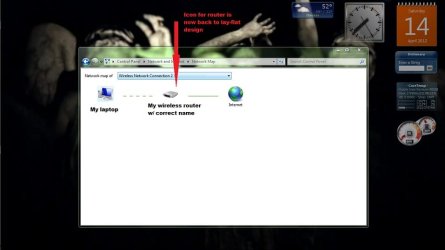
As for Update # 2, I stated before that I have my power setting set to put laptop to sleep after 3 hours. My laptop was in sleep mode for roughly 7 hours, totaling an estimated 10 hours of inactivity. When I woke laptop my internet connection was "disconnected" I clicked connect, connection was made with no problem. I proceeded to check network map. As you can see in screen shot, the overall map is working properly, only the icon for my router has changed once again. Initially, after I implemented NIC(s) power save disabling, the icon represented a lay-flat design router, after first sleep cycle, the icon represented a standing model. Now I am seeing a lay-flat design again. This seems a rather trivial issue. The overall function of the network map is still "accurate" and above all, the "?" is still not being seen. My only question is why my connection was "disconnected" when I woke laptop, perhaps this had nothing to do with laptop per se, perhaps my router itself disconnected while laptop was in sleep. I will keep an eye on the disconnection. This is the first time I can recall my internet connection "disconnected" on wake up. Will update after next sleep cycle.
One more thing: between sleep cycles, while using laptop, I sporadically check network map. So far, no issue with network map while using laptop.
Looking good! Still have to see if the "?" appears after a few re-awakenings, right? Also, is the map redrawn accurately at each refresh (F5) of the screen?
To answer your question, is my map redrawn "accurately" at each refresh(F5), Yes. After I click refresh(F5) the map is "accurate", meaning there is no "?" and the connection is represented correctly, dashed green between laptop and router, solid green between router and internet. Only as you can see in the following screen shot, the router icon is changing.
As for Update # 2, I stated before that I have my power setting set to put laptop to sleep after 3 hours. My laptop was in sleep mode for roughly 7 hours, totaling an estimated 10 hours of inactivity. When I woke laptop my internet connection was "disconnected" I clicked connect, connection was made with no problem. I proceeded to check network map. As you can see in screen shot, the overall map is working properly, only the icon for my router has changed once again. Initially, after I implemented NIC(s) power save disabling, the icon represented a lay-flat design router, after first sleep cycle, the icon represented a standing model. Now I am seeing a lay-flat design again. This seems a rather trivial issue. The overall function of the network map is still "accurate" and above all, the "?" is still not being seen. My only question is why my connection was "disconnected" when I woke laptop, perhaps this had nothing to do with laptop per se, perhaps my router itself disconnected while laptop was in sleep. I will keep an eye on the disconnection. This is the first time I can recall my internet connection "disconnected" on wake up. Will update after next sleep cycle.
One more thing: between sleep cycles, while using laptop, I sporadically check network map. So far, no issue with network map while using laptop.
My Computer
At a glance
Windows 7 Home Premium Service Pack 1 64-bitDual-Core Intel(R) Pentium(R) CPU P6200 @ 2.1...4.00 GB (3.68 GB usable)Intel HD Graphics
- Computer Manufacturer/Model Number
- ACER/Aspire 5733Z-4851
- OS
- Windows 7 Home Premium Service Pack 1 64-bit
- CPU
- Dual-Core Intel(R) Pentium(R) CPU P6200 @ 2.13 GHz 2.13 Ghz
- Memory
- 4.00 GB (3.68 GB usable)
- Graphics Card(s)
- Intel HD Graphics
- Sound Card
- Realtek High Definition Audio
- Hard Drives
- 500 GB HDD
- Mouse
- Logitech USB wireless mouse
- Internet Speed
- Link Speed 150 Mbps
Are you going to leave that power toggle disabled for a while? It would be interesting to see how many cycles you can go through without ever seeing the "?". Then toggle back for a while to see if it appears again...
My Computer
At a glance
Windows 7 Ultimate x64
- OS
- Windows 7 Ultimate x64
Yes, my connection is set to "connect automatically", which is another reason why I was perplexed. And as for leaving the power save disabled, I don't actually move my laptop very often, or even unplug it, I have power setting set for "high performance", so I don't see any reason in the near future to re-enable the power save of the NIC(s). When I did disable I did get a notification stating that not having power save on could affect battery life. But like I said I don't run on battery often. So, I would say I am gonna leave it disabled. Question is should I wait for the "?" then re-enable and see what happens, or wait a certain amount of time, and then re-enable, regardless of "?" reappearance, to see if "?" does reappears.
My Computer
At a glance
Windows 7 Home Premium Service Pack 1 64-bitDual-Core Intel(R) Pentium(R) CPU P6200 @ 2.1...4.00 GB (3.68 GB usable)Intel HD Graphics
- Computer Manufacturer/Model Number
- ACER/Aspire 5733Z-4851
- OS
- Windows 7 Home Premium Service Pack 1 64-bit
- CPU
- Dual-Core Intel(R) Pentium(R) CPU P6200 @ 2.13 GHz 2.13 Ghz
- Memory
- 4.00 GB (3.68 GB usable)
- Graphics Card(s)
- Intel HD Graphics
- Sound Card
- Realtek High Definition Audio
- Hard Drives
- 500 GB HDD
- Mouse
- Logitech USB wireless mouse
- Internet Speed
- Link Speed 150 Mbps
I'm pretty confident that your network disconnect-reconnect episode has nothing to do with the change you made to the power setting of the NIC, but I would kind of keep an eye on that. Hopefully just a one-time glitch.
If it was me, I would leave that power setting "as is" for enough cycles to make me fairly confident that the "?" issue is likely due to how the power setting is set. IOW, see that it never draws the "?" for enough cycles for you to conclude "well, based on how often I've seen it in the past, I should've seen it 3 or 4 times by now". Then I would change the power setting back to see if I can get it to draw the "?" again. And for added confidence I'd do it all over again.
If it was me, I would leave that power setting "as is" for enough cycles to make me fairly confident that the "?" issue is likely due to how the power setting is set. IOW, see that it never draws the "?" for enough cycles for you to conclude "well, based on how often I've seen it in the past, I should've seen it 3 or 4 times by now". Then I would change the power setting back to see if I can get it to draw the "?" again. And for added confidence I'd do it all over again.
My Computer
At a glance
Windows 7 Ultimate x64
- OS
- Windows 7 Ultimate x64
Update #3
Ok. Not completely happy after third sleep cycle. Laptop was in sleep for 9 hours w/ 3 hour power setting equaling 12 hours of inactivity. When I woke laptop, once again, my connection was "disconnected", I proceeded to connect, no issue. When I checked network map, I got the "Windows cannot discover any computer or device" message, refreshing(F5) did not remedy issue. I restarted my computer. My connection didn't "automatically" connect. I connected and checked network map. I saw the "Windows cannot discover any computer or device" message. I "disconnected" my connection by clicking on signal meter in task bar. I reconnected immediately with no problem. I then checked network map, once again. This time I got the correct map. My real issue is the whole disconnecting thing, when I go to reconnect the check box for "automatically connect" isn't an option. It's not there and I know that it was before. Strangely if I right click on my connection and choose "Properties" the option to "automatically connection" IS selected.
Ok. Not completely happy after third sleep cycle. Laptop was in sleep for 9 hours w/ 3 hour power setting equaling 12 hours of inactivity. When I woke laptop, once again, my connection was "disconnected", I proceeded to connect, no issue. When I checked network map, I got the "Windows cannot discover any computer or device" message, refreshing(F5) did not remedy issue. I restarted my computer. My connection didn't "automatically" connect. I connected and checked network map. I saw the "Windows cannot discover any computer or device" message. I "disconnected" my connection by clicking on signal meter in task bar. I reconnected immediately with no problem. I then checked network map, once again. This time I got the correct map. My real issue is the whole disconnecting thing, when I go to reconnect the check box for "automatically connect" isn't an option. It's not there and I know that it was before. Strangely if I right click on my connection and choose "Properties" the option to "automatically connection" IS selected.
My Computer
At a glance
Windows 7 Home Premium Service Pack 1 64-bitDual-Core Intel(R) Pentium(R) CPU P6200 @ 2.1...4.00 GB (3.68 GB usable)Intel HD Graphics
- Computer Manufacturer/Model Number
- ACER/Aspire 5733Z-4851
- OS
- Windows 7 Home Premium Service Pack 1 64-bit
- CPU
- Dual-Core Intel(R) Pentium(R) CPU P6200 @ 2.13 GHz 2.13 Ghz
- Memory
- 4.00 GB (3.68 GB usable)
- Graphics Card(s)
- Intel HD Graphics
- Sound Card
- Realtek High Definition Audio
- Hard Drives
- 500 GB HDD
- Mouse
- Logitech USB wireless mouse
- Internet Speed
- Link Speed 150 Mbps
Similar threads
- Replies
- 2
- Views
- 3K

- Replies
- 3
- Views
- 6K

- Replies
- 4
- Views
- 4K
- Replies
- 11
- Views
- 3K