W7 System Imaging

Keep in mind no matter which application you use to create your images store them on a seperate drive/partition that does NOT get de-fragged ...image files hate this.

Also most of the image apps...at least the paid ones have an image verifying tool built in.
This takes approx. the same amount of time to run as creation of the original image file but it should always be used prior to burning an image to CD/DVD.
 

My Computer My Computer

At a glance

Vista Ultimate X64/ Windows 7 Dual-bootQ66004G OCZ PC2 8500 PlatinumEVGA 8800GTS Vid Card
Computer Manufacturer/Model Number
Self-Built
OS
Vista Ultimate X64/ Windows 7 Dual-boot
CPU
Q6600
Motherboard
ASUS P5K
Memory
4G OCZ PC2 8500 Platinum
Graphics Card(s)
EVGA 8800GTS Vid Card
Hard Drives
500G Seagate SATA
200G Seagate SATA
100G WD Caviar SATA
80G WD Caviar IDE
PSU
OCZ Elite 800W PSU
Case
RaidMax Smilodon Case
ATI 11 is not supported on Windows 7, nor is ATI 2009, though it works very well except you can't mount an image, but you can browse it to get to any files or folders you want.

I just upgraded to ATI 2010 which is certified for Windows 7 and so far, everything works well.

I use Microsoft's SyncToy to do my data backups with and have it scheduled to run every 2 hours. Some data I backup to another internal hard drive, other data I backup to a drive on another computer. Gives me a nice, warm feeling:)
 

My Computer My Computer

At a glance

Windows 10 Pro X64Intel Quad Core i7-4770 @ 3.4Ghz16.0GB PC3-12800 DDR3 SDRAM 1600 MHzIntel Integrated HD Graphics
Computer type
PC/Desktop
Computer Manufacturer/Model Number
Lenovo IdeaCenter 450
OS
Windows 10 Pro X64
CPU
Intel Quad Core i7-4770 @ 3.4Ghz
Memory
16.0GB PC3-12800 DDR3 SDRAM 1600 MHz
Graphics Card(s)
Intel Integrated HD Graphics
Sound Card
Realtek HD Audio
Monitor(s) Displays
HP 22" LCD
Screen Resolution
1680 x 1050
Hard Drives
250GB Samsung EVO SATA-3 SSD
2TB Seagate ST2000DM001 SATA-2
1.5TB Seagate ST3150041AS SATA
Keyboard
Dell USB
Mouse
Lenovo USB
Internet Speed
Cable via Road Runner 3MB Upload, 30MB Download
Antivirus
Windows Defender, MBAM Pro, MBAE
Browser
Seamonkey
Other Info
UEFI/GPT
PLDS DVD-RW DH16AERSH
I use Microsoft's SyncToy to do my data backups with and have it scheduled to run every 2 hours. Some data I backup to another internal hard drive, other data I backup to a drive on another computer. Gives me a nice, warm feeling:)

How do you avoid SyncToy making another file or folder for synch'd files?

Is there now a setting to make it just update the remote file without having it back up the old one?
 
I have not seen SyncToy create a backup of existing files in the backup folder and I don't see any setting that controls it. I've been using it for about 2 weeks now, running every two hours.

I backup the entire C:\users folder and no backups that I can find, and that's a very active folder tree.
 

My Computer My Computer

At a glance

Windows 10 Pro X64Intel Quad Core i7-4770 @ 3.4Ghz16.0GB PC3-12800 DDR3 SDRAM 1600 MHzIntel Integrated HD Graphics
Computer type
PC/Desktop
Computer Manufacturer/Model Number
Lenovo IdeaCenter 450
OS
Windows 10 Pro X64
CPU
Intel Quad Core i7-4770 @ 3.4Ghz
Memory
16.0GB PC3-12800 DDR3 SDRAM 1600 MHz
Graphics Card(s)
Intel Integrated HD Graphics
Sound Card
Realtek HD Audio
Monitor(s) Displays
HP 22" LCD
Screen Resolution
1680 x 1050
Hard Drives
250GB Samsung EVO SATA-3 SSD
2TB Seagate ST2000DM001 SATA-2
1.5TB Seagate ST3150041AS SATA
Keyboard
Dell USB
Mouse
Lenovo USB
Internet Speed
Cable via Road Runner 3MB Upload, 30MB Download
Antivirus
Windows Defender, MBAM Pro, MBAE
Browser
Seamonkey
Other Info
UEFI/GPT
PLDS DVD-RW DH16AERSH
Did you get the addon Pack they were offering with the ATI 2010 update Ztruker? ?
 

My Computer My Computer

At a glance

Vista Ultimate X64/ Windows 7 Dual-bootQ66004G OCZ PC2 8500 PlatinumEVGA 8800GTS Vid Card
Computer Manufacturer/Model Number
Self-Built
OS
Vista Ultimate X64/ Windows 7 Dual-boot
CPU
Q6600
Motherboard
ASUS P5K
Memory
4G OCZ PC2 8500 Platinum
Graphics Card(s)
EVGA 8800GTS Vid Card
Hard Drives
500G Seagate SATA
200G Seagate SATA
100G WD Caviar SATA
80G WD Caviar IDE
PSU
OCZ Elite 800W PSU
Case
RaidMax Smilodon Case
I now have created three "backups" on external drive K:[298GB].
1. C Drive [saved]
2. C Drive [image backup]
3. Thunderbird Email [backup]

I created the images using Paragon. It works quite well, and is a bit easier and more accessible than Acronis [IMHO].
Email was backupped using Thunderbird Backup 2.9f.

What I don't understand, is that the saved C Drive on K: came in at 14.5GB; and the real C Drive presently takes up 41.7GB.
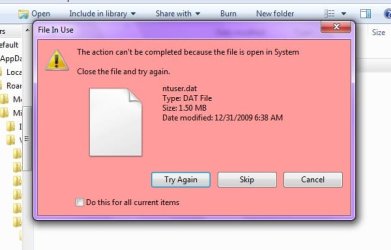
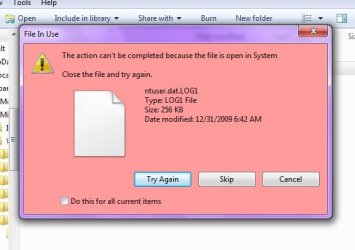
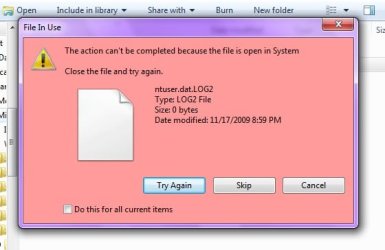
Also, during the save, a dozen or so files demanded 'permission' to move them. The only thing I could do was click skip, and move on.
Something just doesn't seem right, here.
 

My Computer My Computer

At a glance

Windows7 (Home Premium)AMD Athlon Dual Core 4400+ 2.30Ghz3.0GB (2.75GB usable)ATI Radeon X1200 Series
Computer Manufacturer/Model Number
ACER/AM3100-U3201A
OS
Windows7 (Home Premium)
CPU
AMD Athlon Dual Core 4400+ 2.30Ghz
Motherboard
AMD 690 G
Memory
3.0GB (2.75GB usable)
Graphics Card(s)
ATI Radeon X1200 Series
Sound Card
Audigy SE
Monitor(s) Displays
Liquid Video LCD
Hard Drives
C: (system) 298GB [277GB free]
D: (nonsystem) 232GB [213GB free]
J: MyBook 149GB [109GB free] external
K: MyBook 298GB [291GB free] external
PSU
120v AC ?
Case
?
Cooling
3 fans
Any particular reason you "saved" your entire C drive, as opposed to particular folders?

When you say the saved C drive is 14.5---did you create that by simply dragging and dropping (copying with the mouse)? Depending on what you "skipped" that may amount to a lot or a little.

The difference between 14 and 41 may be explained by slack space in the sectors copied--just a different way of measuring. Imagine you had 50 gallon jugs, each containing only 1 quart of water. You copy them. One method of measuring would say you have 50 gallons at the new location. The other method would say you had 50 quarts. That's just a guess. "Slack space" would represent the 3 quarts of empty space in each jug.

Your C drive contains Windows system files. They don't like to be moved around and it doesn't really accomplish anything--particularly C program files directory. Why copy that? Why copy C Windows directory?

If you want to make a copy of an entire partition, do it as an image.

But your "saved" stuff should be specific folders and specific folder trees--not entire partitions. Most people keep their "stuff" somewhere in C Users Theirusername and so would "save" only that folder--not the entire drive.

Even if you use some other folder structure, you should "save" particular folders, not entire partitions. Leave the partitions to images.
 

My Computer My Computer

At a glance

Windows 7 Home Premium SP1, 64-bitIntel Skylake i5-6600K, not overclocked8 GB HyperX DDR4-2666 (2 x 4 GB)none; graphics are integrated on CPU
Computer type
PC/Desktop
Computer Manufacturer/Model Number
Ignatz Special; 4 speed manual gearbox; factory air conditioning; one of one
OS
Windows 7 Home Premium SP1, 64-bit
CPU
Intel Skylake i5-6600K, not overclocked
Motherboard
AsRock Z170M Extreme 4, micro ATX
Memory
8 GB HyperX DDR4-2666 (2 x 4 GB)
Graphics Card(s)
none; graphics are integrated on CPU
Sound Card
onboard: Realtek ALC1150; external: USB Behringer UF0-202
Monitor(s) Displays
Dell S2340M 23 inch IPS
Screen Resolution
1600 x 900
Hard Drives
System: Crucial MX100 series SSD, 128 GB;
Data: Samsung Spinpoint 103SJ, 1 TB;
Backup: WD Caviar Green WD30EZRX-00D8PB0, 3 TB
PSU
Rosewill SilentNight 500 watt fanless, semi-modular
Case
Antec Solo II
Cooling
Noctua NH-U12S; Noctua F12 intake, Noctua S12A exhaust
Keyboard
Microsoft 200 6JH-00001 USB
Mouse
Dell or Microsoft optical wired; USB
Antivirus
Microsoft Security Essentials and Malwarebytes Premium
Browser
Pale Moon
Other Info
All fans PWM; speeds at idle: CPU circa 500 rpm; intake circa 600 rpm; exhaust circa 600 rpm; CPU temps 27 idle and 47 C load in a warm room (27 C/81 F) when running Intel Extreme Tuning Utility stress test.
Thanks gnatzatsonic for that comprehensive reply as to what one should precisely save from C:\

You answered your own question, in a way. I saved entire C:\ because I really don't know what's important or not to save. And then too, C:\ is so vast and daunting, I figured let's just save the whole deal. What can it hurt? I have the room. Looking all over C:\ and trying to decide should I save this, should I save that, and then worrying over whether I should have saved it, would just be so time consuming, plus the fact I don't really know much about a lot of mysterious-looking files [system files].

So, with this new info in hand, I'll delete the saved C:\ [on xtrnl K:] and pick out only personal stuff. I know where most of that is. And then save it to K:.

Once again, thanks for pointing me in the right direction.
 

My Computer My Computer

At a glance

Windows7 (Home Premium)AMD Athlon Dual Core 4400+ 2.30Ghz3.0GB (2.75GB usable)ATI Radeon X1200 Series
Computer Manufacturer/Model Number
ACER/AM3100-U3201A
OS
Windows7 (Home Premium)
CPU
AMD Athlon Dual Core 4400+ 2.30Ghz
Motherboard
AMD 690 G
Memory
3.0GB (2.75GB usable)
Graphics Card(s)
ATI Radeon X1200 Series
Sound Card
Audigy SE
Monitor(s) Displays
Liquid Video LCD
Hard Drives
C: (system) 298GB [277GB free]
D: (nonsystem) 232GB [213GB free]
J: MyBook 149GB [109GB free] external
K: MyBook 298GB [291GB free] external
PSU
120v AC ?
Case
?
Cooling
3 fans
Normally you're safe saving your and anyone else's User file.

In addition I would save C:windows/system32/drivers for all of your installed drivers in case any are later missing.
 
Thanks Greg,

I'll go back and save 'system 32 drivers'.

I just saved users/monsonman [all the personal stuff, now] - but I can put all of users there, too.

I know this is not on-topic, but for some reason, I am not getting any email alerts about W7Forums replies. I looked in my personal settings and I don't know where to go make sure the 'alert signal' is checked off or not.
In the beginning, I was getting those alerts.

Also: these files were rejected (just like many were in the full C:\ save); are they worth losing sleep over? I can't do anything about it anyway. Just annoying, that's all.


Attachments

  • unsaved file.jpg
    unsaved file.jpg
    26.9 KB · Views: 5
  • unsaved file1.jpg
    unsaved file1.jpg
    25.6 KB · Views: 4
  • unsaved file2.jpg
    unsaved file2.jpg
    24.3 KB · Views: 4

My Computer My Computer

At a glance

Windows7 (Home Premium)AMD Athlon Dual Core 4400+ 2.30Ghz3.0GB (2.75GB usable)ATI Radeon X1200 Series
Computer Manufacturer/Model Number
ACER/AM3100-U3201A
OS
Windows7 (Home Premium)
CPU
AMD Athlon Dual Core 4400+ 2.30Ghz
Motherboard
AMD 690 G
Memory
3.0GB (2.75GB usable)
Graphics Card(s)
ATI Radeon X1200 Series
Sound Card
Audigy SE
Monitor(s) Displays
Liquid Video LCD
Hard Drives
C: (system) 298GB [277GB free]
D: (nonsystem) 232GB [213GB free]
J: MyBook 149GB [109GB free] external
K: MyBook 298GB [291GB free] external
PSU
120v AC ?
Case
?
Cooling
3 fans
Back
Top