

Hi all
anybody got a webserver with IIS working yet on W7 X-64 and been able to connect to it from another machine on the same LAN.
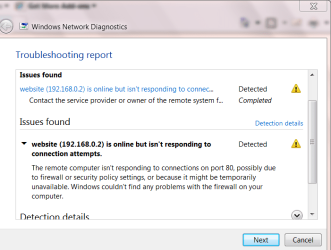
Enc screenshot of the problem
The server works fine if I'm on that machine (http://localhost)
If I'm downstairs in the conservatory with a laptop and want to connect to the server (http://local-ip) I just CAN'T connect anyhow.
Machine is pingable, and can see it on the network. Can access disks etc etc.
Just cant access the webserver. Client Laptop is running either W7 x-64 or Windows XP -- either OS won't connect.
I've also got a Linux server running apache on the same LAN -- Not a sausage of a problem --connects every time). (Different port so no conflict there). Also I can bring the Linux machine down when testing anyway just in case.
Why on earth is Windows Networking such a DOG.
(all firewalls are off while testing and port forwarding on the router is fine)
IIS server works fine on Windows XP -- but W7 -----!!!!
I like W7 - but I MUST get the web server working.
(A virtual XP machine running on W7 also works fine as the web server so I KNOW the problem has got to be IIS and W7 X-64)
To simplify matters I'm running the RC version (7100) for this test -- I did try later builds with the same problem.
Really greatful if anybody can solve this problem -- I should be able to access my own web server from within my LAN -- It's a bit useless if I have to go to the physical machine to do any work on it.
Thanks.
Cheers
jimbo
(Update -- IIS needed a fix on the Web server W7 machine -- install the LATEST version -- I think 7.5 otherwise gives probs)
http://forums.iis.net/t/1154955.aspx
Cheers
jimbo
anybody got a webserver with IIS working yet on W7 X-64 and been able to connect to it from another machine on the same LAN.
Enc screenshot of the problem
The server works fine if I'm on that machine (http://localhost)
If I'm downstairs in the conservatory with a laptop and want to connect to the server (http://local-ip) I just CAN'T connect anyhow.
Machine is pingable, and can see it on the network. Can access disks etc etc.
Just cant access the webserver. Client Laptop is running either W7 x-64 or Windows XP -- either OS won't connect.
I've also got a Linux server running apache on the same LAN -- Not a sausage of a problem --connects every time). (Different port so no conflict there). Also I can bring the Linux machine down when testing anyway just in case.
Why on earth is Windows Networking such a DOG.
(all firewalls are off while testing and port forwarding on the router is fine)
IIS server works fine on Windows XP -- but W7 -----!!!!
I like W7 - but I MUST get the web server working.
(A virtual XP machine running on W7 also works fine as the web server so I KNOW the problem has got to be IIS and W7 X-64)
To simplify matters I'm running the RC version (7100) for this test -- I did try later builds with the same problem.
Really greatful if anybody can solve this problem -- I should be able to access my own web server from within my LAN -- It's a bit useless if I have to go to the physical machine to do any work on it.
Thanks.
Cheers
jimbo
(Update -- IIS needed a fix on the Web server W7 machine -- install the LATEST version -- I think 7.5 otherwise gives probs)
http://forums.iis.net/t/1154955.aspx
Cheers
jimbo
Attachments
Last edited:
My Computer
At a glance
Linux CENTOS 7 / various Windows OS'es and se...Intel i7 Intel i58GB, 16GBOn Motherboard
- Computer type
- PC/Desktop
- Computer Manufacturer/Model Number
- Custom built, several laptops HP/ASUS
- OS
- Linux CENTOS 7 / various Windows OS'es and servers
- CPU
- Intel i7 Intel i5
- Memory
- 8GB, 16GB
- Graphics Card(s)
- On Motherboard
- Sound Card
- Realtek HD audio
- Monitor(s) Displays
- Apple Cinema display, Samsung LCD
- Screen Resolution
- 1920 X 1080
- Hard Drives
- 4 X 1TB SATA
- Mouse
- Toshiba wireless laser
- Internet Speed
- > 20MB up


