W8 Pre installed - Will i be able to Install W7 - Already have 5 Part

markhuges

New member
Local time
10:37 PM
Messages
5
I have W8 pre installed and would like to Dual Boot W7.

BUT Before all that, I have a problem,
Few years ago, i managed to Dual boot Vista and 7 and it worked great, but someone mentioned in another post you cant have more than 4 partitions. and things like Logical, primary and i got confused)

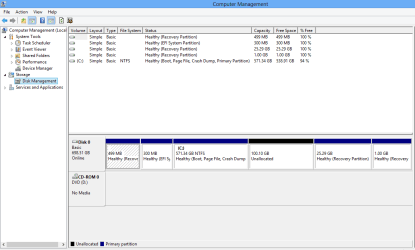
Please see the Image and advice me what to do. I really, dont want to delete the recovery partion, since the laptop is a few days old, what is the EFI partion? ( Also, from My computer, i can only see 1 partion the 571gb one)

WHY ON earth have ***** Samsung made 3 recovery partions? :( :( Am i stuck
Thank You very much :)
 

Attachments

  • Disk Partition.PNG
    Disk Partition.PNG
    18.2 KB · Views: 5

My Computer My Computer

At a glance

W7,W8,
Computer type
Laptop
OS
W7,W8,
1) Downgrade to Windows 7.
Downgrade Windows 8 to Windows 7
Warning you must have the UEFI/BIOS firmware setting in Step Three set.

Make sure you read the NOTE at Step three.

2) If Using a USB Pen drive on a PC with a UEFI BIOS.
USB Pen drive need to be formatted to FAT32 as in
UEFI Bootable USB Flash Drive - Create in Windows
Take note of Step 11 for Windows 7.
Also you will need to use a USB 2.0 port, as there are no USB 3.0 drivers in Windows 7.
 

My Computer My Computer

At a glance

ME/XP/Vista/Win7
OS
ME/XP/Vista/Win7
1) Downgrade to Windows 7.
Downgrade Windows 8 to Windows 7
Warning you must have the UEFI/BIOS firmware setting in Step Three set.

Make sure you read the NOTE at Step three.

2) If Using a USB Pen drive on a PC with a UEFI BIOS.
USB Pen drive need to be formatted to FAT32 as in
UEFI Bootable USB Flash Drive - Create in Windows
Take note of Step 11 for Windows 7.
Also you will need to use a USB 2.0 port, as there are no USB 3.0 drivers in Windows 7.

I dont want to Downgrade to W7, i want to dual boot it, But before i even think about that, What do i do with the 5 bloddy partions?
 

My Computer My Computer

At a glance

W7,W8,
Computer type
Laptop
OS
W7,W8,
1) Downgrade to Windows 7.
Click here::ar: Downgrade Windows 8 to Windows 7
Warning you must have the UEFI/BIOS firmware setting in Step Three set.

Make sure you read the NOTE at Step three.

2) If Using a USB Pen drive on a PC with a UEFI BIOS.
USB Pen drive need to be formatted to FAT32 as in
UEFI Bootable USB Flash Drive - Create in Windows
Take note of Step 11 for Windows 7.
Also you will need to use a USB 2.0 port, as there are no USB 3.0 drivers in Windows 7.

I dont want to Downgrade to W7, i want to dual boot it, But before i even think about that, What do i do with the 5 bloddy partions?

With UEFI & GPT you can have over 100 partitions all primary, use the 100gb partition for Windows 7.

You need to do Step 1 to 5, before installing Windows 7.
 

My Computer My Computer

At a glance

ME/XP/Vista/Win7
OS
ME/XP/Vista/Win7
1) Downgrade to Windows 7.
Click here::ar: Downgrade Windows 8 to Windows 7
Warni/COLOR] of Step 11 for Windows 7.
Also you will need to use a USB 2.0 port, as there are no USB 3.0 drivers in Windows 7.


I dont want to Downgrade to W7, i want to dual boot it, But before i even think about that, What do i do with the 5 bloddy partions?


With UEFI & GPT you can have over 100 partitions all primary, use the 100gb partition for Windows 7.

You need to do Step 1 to 5, before installing Windows 7.


Oh, WOW, Thank you for this :):):):)!!!!!! But I read someone and I then disabled UEFI Secure boot?

Thank You for your help! :) and advice


Edit: Let me get this right, So, If i do Step 1-5, and with this new UEFI AND GPT, i could Potentially, Have X partions, meaning i could if i want install Lots of various OS, 7 XP Ubuntu?

Thats sounds good,
Umm, Will read more about UEFI and GPT

Thank You :)
 

My Computer My Computer

At a glance

W7,W8,
Computer type
Laptop
OS
W7,W8,
Back
Top