Solved Wacom intuos pro not got device driver from windows update

egozi44

New member
Member
VIP
Local time
4:58 PM
Messages
207
Ok, so I got the Wacon Intuos pro I wanted for few years by now, turn out it got revisioned to a "better" model in 2017 (which I haven't thought was that big of a deal) and that wacom have history upon histories of bad driver support (and technical support),

So I tried to plug it to the computer (which ran on win7 SP1 OS) and aside from getting electricity to chrage the tablet I didn't got any popping bubble from window that tell me it install the device driver, I checked in windows updates, tried to check in the device manger, and nothing.

The new model doesn't come with wireless usb dongel like the 2015 model to cut some funds for the wacom production line, and instead have bluetooth support (will come back to it later),

So after installing wacom driver ofc (which didn't made windows to detect the device) I done some heavy research on Google and found many have this issue, I tried to restart the wacom service, install older version of the driver (can't go that much behind like the 2015 users cause after two downgrades the device don't seem to work with any other update beneath it),

I removed ofc the driver completely with each upgrade/downgrade (no folder registry or leftover files in system32 folder were left (I saw the user's thread in this site from 2015, following it didn't solved my issue)), I also tried to change USB ports and different cable but nothing.

And I talk with wacom support which was nice but clueless like Patrick from Spongebob,

They saw that I already did what they tell people to do (had to do it AGAIN to prove them...)
And even the log I sent them by their request showed that everything was alright in my machine,

I even tested it on another machine with win7 OS with SP1 and got the exact same result, the only thing left they told me to do (aside from going to my warranty or moving me to Microsoft support (talk about irresponsibly..)) was to install All of windows updates,
not any specific one but All,
Since I know what MS did to windows 7 with some of their updates since 2014+ I refused, I need to know the exact update to test it but the wacom support don't even seem to know how to launch the window update app so I didn't got any update number (I also checked online and saw one person with the same issue who claimed he did install all of the updates and nothing changed so don't blame me if I don't trust wacom tech support at this point..),

I was wondering if anyone here know what kind of update Microsoft released since 2014 which update the device detection? I had to install one update for the windows update app in 2016 in order for the client to keep working, but I didn't was forced to install another client update ever since (and some people saying that the last clients updates are shady), I did tried to install some updates that looks like they do something to the device manger but it didn't help.

So any idea what updates I can try or what I can do to solve it?


P.S. I tried the tablet with bluetooth dongel and it worked but still didn't installed driver for the device (so I can use it with the USB cable) and work a bit laggy so I rather use the cable if possible.
 

My Computer My Computer

At a glance

Windows 7 SP1 Ultimate x64 bitIntel I7 3770G.Skill Ares Quad Channel Low Profile 16 GB (...Asus GTX980 Ti 6GB STRIX-GTX980TI-DC3OC-6GD5-...
Computer type
PC/Desktop
Computer Manufacturer/Model Number
Self built custom
OS
Windows 7 SP1 Ultimate x64 bit
CPU
Intel I7 3770
Motherboard
Asus maximus v gene BIOS Version 1903
Memory
G.Skill Ares Quad Channel Low Profile 16 GB (4x4GB) DDR3
Graphics Card(s)
Asus GTX980 Ti 6GB STRIX-GTX980TI-DC3OC-6GD5-GAMING DirectCU
Monitor(s) Displays
AOC 24G2U/BK + DELL U2410 A010
Screen Resolution
1920x1080
Hard Drives
Samsung SSD 860 EVO 1TB


TOSHIBA MK1002TSKB 1TB 24/7, 7200 RPM, 64MB, SATA II


TOSHIBA MK1002TSKB 1TB 24/7, 7200 RPM, 64MB, SATA II
PSU
AcBel R88 1100W
Case
Corsair Carbide Series 500R White Mid-Tower Case
Cooling
ZALMAN CPU COOLER CNPS9900A LED + 2 more fans in the case
Keyboard
SteelSeries APEX 7
Mouse
SteelSeries Sensei 310
Ok, so I got the Wacon Intuos pro I wanted for few years by now, turn out it got revisioned to a "better" model in 2017 (which I haven't thought was that big of a deal) and that wacom have history upon histories of bad driver support (and technical support),

Hi, I've got the Wacom Intuos Pro (2017) but mine is running under Windows 10.

So I tried to plug it to the computer (which ran on win7 SP1 OS) and aside from getting electricity to chrage the tablet I didn't got any popping bubble from window that tell me it install the device driver, I checked in windows updates, tried to check in the device manger, and nothing.

Same happened under Windows 10, but that's not a problem. Connect the device to you PC via the supplied cable and make sure the unit is on - you'll see an orange dot (charging) and a white dot on the wheel. After that's if you get no prompt (as you stated) simply go here Wacom.com/start. From there follow the instructions. This YouTube video might help....


Once you follow those instructions, make sure your restart the PC.

I even tested it on another machine with win7 OS with SP1 and got the exact same result, the only thing left they told me to do (aside from going to my warranty or moving me to Microsoft support (talk about irresponsibly..)) was to install All of windows updates,

You issue is on Wacom, not Microsoft, and Wacom should NOT be sending you off to Microsoft. And I guarantee once you start talking to Microsoft on this issue, they are going to bounce you right back to Wacom.

I was wondering if anyone here know what kind of update Microsoft released since 2014 which update the device detection? I had to install one update for the windows update app in 2016 in order for the client to keep working, but I didn't was forced to install another client update ever since (and some people saying that the last clients updates are shady), I did tried to install some updates that looks like they do something to the device manger but it didn't help.

This is more a Wacom issue, and according to Wacom, Windows 7 is supported and there are drivers there for the tablet.

P.S. I tried the tablet with bluetooth dongel and it worked but still didn't installed driver for the device (so I can use it with the USB cable) and work a bit laggy so I rather use the cable if possible.

My reply in red. And for Bluetooth the work, your PC must support Bluetooth and have a Bluetooth adapter installed. And for the record, I also find Bluetooth a bit laggy as opposed to using the USB cable. That said, one you get your issues settled, perhaps Bluetooth will function a bit more smoothly.

Let me know.
 

My Computer My Computer

At a glance

Windows 10 ProIntel Core i7-4770K (3.5Ghz)32 gig Corsair Dominator Platinum (4x8Gig)Sapphire Tri-X R9 Fury
Computer type
PC/Desktop
Computer Manufacturer/Model Number
Custom built by me.
OS
Windows 10 Pro
CPU
Intel Core i7-4770K (3.5Ghz)
Motherboard
Gigabyte G1 Sniper 5 (F10 Bios)
Memory
32 gig Corsair Dominator Platinum (4x8Gig)
Graphics Card(s)
Sapphire Tri-X R9 Fury
Sound Card
Soundblaster ZXR
Monitor(s) Displays
NEC PA242W 24" LCD Monitor
Screen Resolution
1920 x 1200
Hard Drives
Primary - Samsung 850 Pro (512gig), Samsung 840 Pro (256gig), 2TB WD Caviar Black.
PSU
EVGA Supernova 1000 G2
Case
Cooler Master HAF X
Cooling
Corsair H100i with Corsair Air Series SP120 Quiet Fans
Keyboard
Logitech Wireless Wave
Mouse
Logitech Performance MX
Internet Speed
High Speed Cable
Antivirus
Norton Security
Browser
IE11
Other Info
Memory Timings - 1866MHz @ 9-9-9-27-1T @ 1.5 volts
Hi, I've got the Wacom Intuos Pro (2017) but mine is running under Windows 10.

Hi, yeah I noticed that on win10 most of the complaints are low (unsurprisingly)

Same happened under Windows 10, but that's not a problem. Connect the device to you PC via the supplied cable and make sure the unit is on - you'll see an orange dot (charging) and a white dot on the wheel. After that's if you get no prompt (as you stated) simply go here Wacom.com/start. From there follow the instructions. This YouTube video might help....

I thought that by saying that I installed the wacom driver it was obvious enough that I did these steps, but I probably should elaborated more, believe me that I tried nearly everything aside install every little update that is out there for win7.


You issue is on Wacom, not Microsoft, and Wacom should NOT be sending you off to Microsoft. And I guarantee once you start talking to Microsoft on this issue, they are going to bounce you right back to Wacom.

Yeah I'm aware of it, that what happens when you have bad support :/

I also aware the device is support win7 (I checked before buying and it write on the box with huge letters and win7 icon xP) and that the bluetooth need adapter (had to buy one just for that while older revision just came with wireless dongle out of the box -_-)

I think the issue is either an update that need to add support for tablet, or maybe a framware update (campnies ship their devices with low framware even if sometimes an updated is required in order to enable support for low OS) But I can't update it via bluetooth alone and don't have any machine with win10 around to check it...
 

My Computer My Computer

At a glance

Windows 7 SP1 Ultimate x64 bitIntel I7 3770G.Skill Ares Quad Channel Low Profile 16 GB (...Asus GTX980 Ti 6GB STRIX-GTX980TI-DC3OC-6GD5-...
Computer type
PC/Desktop
Computer Manufacturer/Model Number
Self built custom
OS
Windows 7 SP1 Ultimate x64 bit
CPU
Intel I7 3770
Motherboard
Asus maximus v gene BIOS Version 1903
Memory
G.Skill Ares Quad Channel Low Profile 16 GB (4x4GB) DDR3
Graphics Card(s)
Asus GTX980 Ti 6GB STRIX-GTX980TI-DC3OC-6GD5-GAMING DirectCU
Monitor(s) Displays
AOC 24G2U/BK + DELL U2410 A010
Screen Resolution
1920x1080
Hard Drives
Samsung SSD 860 EVO 1TB


TOSHIBA MK1002TSKB 1TB 24/7, 7200 RPM, 64MB, SATA II


TOSHIBA MK1002TSKB 1TB 24/7, 7200 RPM, 64MB, SATA II
PSU
AcBel R88 1100W
Case
Corsair Carbide Series 500R White Mid-Tower Case
Cooling
ZALMAN CPU COOLER CNPS9900A LED + 2 more fans in the case
Keyboard
SteelSeries APEX 7
Mouse
SteelSeries Sensei 310
Perhaps a silly question, but have you updated the Motherboard BIOS. Visit the motherboard manufacturers website, and check for updates there? There may have been a history with your motherboard USB detection.

If you want to check Microsoft Updates, you can download and run DISM++. Checking every update since 2014 could take a long time.

Had you also tried uninstalling present device driver, before installing new device driver? See My tablet was working for a while, then it stopped working. Now it moves like a mouse not a tablet. What do I do? (Intuos and Cintiq models, etc.)
 

My Computer My Computer

At a glance

Windows 7 x64, Vista x64, 8.1 smartphoneIntel E8400 65W 64-bitDDR2 2 x 2GB, 1GB x 2XFX Radeon HD5750
Computer type
PC/Desktop
OS
Windows 7 x64, Vista x64, 8.1 smartphone
CPU
Intel E8400 65W 64-bit
Motherboard
Gigabyte EP45-UD3LR
Memory
DDR2 2 x 2GB, 1GB x 2
Graphics Card(s)
XFX Radeon HD5750
Sound Card
AMD High Definition Audio; Realtek High Definition Audio
Monitor(s) Displays
iiyama prolite X2377HDS
Screen Resolution
1920 x 1080
Hard Drives
500GB 7200 rpm Seagate ST3500413AS 16MB, 500GB 5400 rpm Toshiba MQ02ABF050H 32MB, 200GB 7200 rpm Seagate ST3200820AS 8MB, 2TB 7200 rpm Western Digital WD20EZRX 64MB
PSU
Enermax Liberty Modular
Case
Antec P193 Midi Tower
Keyboard
Mionix ZIBAL 60
Mouse
Razer USB 2.0 Diamondback Mouse or Huion Graphics Tablet
Browser
Internet Explorer, Lunascape, Firefox, Opera, Avast Safezone
Well, I'm a bit mystified that tablet isn't installing as it clearly should. With that, I am of the firm belief this isn't a Windows 7 issue per se, but something else as the tablet is clearly support by Windows 7. That said, YES... do make sure you update the firmware as well. I should have stated that first!!!

Your firmware update does not require Bluetooth only, it CAN be done via USB cable. Trust me.

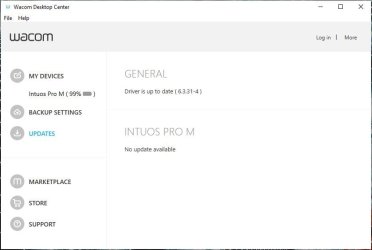
Anyway when you installed the software package you should have gotten the Wacom desktop Center app where your updates can also be found....

wacom properties.JPG
If there's a firmware update, it WILL be listed.

Let us know.
 

My Computer My Computer

At a glance

Windows 10 ProIntel Core i7-4770K (3.5Ghz)32 gig Corsair Dominator Platinum (4x8Gig)Sapphire Tri-X R9 Fury
Computer type
PC/Desktop
Computer Manufacturer/Model Number
Custom built by me.
OS
Windows 10 Pro
CPU
Intel Core i7-4770K (3.5Ghz)
Motherboard
Gigabyte G1 Sniper 5 (F10 Bios)
Memory
32 gig Corsair Dominator Platinum (4x8Gig)
Graphics Card(s)
Sapphire Tri-X R9 Fury
Sound Card
Soundblaster ZXR
Monitor(s) Displays
NEC PA242W 24" LCD Monitor
Screen Resolution
1920 x 1200
Hard Drives
Primary - Samsung 850 Pro (512gig), Samsung 840 Pro (256gig), 2TB WD Caviar Black.
PSU
EVGA Supernova 1000 G2
Case
Cooler Master HAF X
Cooling
Corsair H100i with Corsair Air Series SP120 Quiet Fans
Keyboard
Logitech Wireless Wave
Mouse
Logitech Performance MX
Internet Speed
High Speed Cable
Antivirus
Norton Security
Browser
IE11
Other Info
Memory Timings - 1866MHz @ 9-9-9-27-1T @ 1.5 volts
Perhaps a silly question, but have you updated the Motherboard BIOS. Visit the motherboard manufacturers website, and check for updates there? There may have been a history with your motherboard USB detection.

If you want to check Microsoft Updates, you can download and run DISM++. Checking every update since 2014 could take a long time.

Had you also tried uninstalling present device driver, before installing new device driver? See My tablet was working for a while, then it stopped working. Now it moves like a mouse not a tablet. What do I do? (Intuos and Cintiq models, etc.)

As one who actually has and uses the device, a BIOS update is NOT the issue here. And, yeah, I know I'm running Windows 10, and the OP, Windows 7, still.... NOT a BIOS issue.

Let's keep thing simple here, and move to the more extravagant later.

And for clarity, Windows 7 doesn't use "DISM" but instead the System Update Readiness Tool

Also - Fix Windows Update errors by using the DISM or System Update Readiness tool
 

My Computer My Computer

At a glance

Windows 10 ProIntel Core i7-4770K (3.5Ghz)32 gig Corsair Dominator Platinum (4x8Gig)Sapphire Tri-X R9 Fury
Computer type
PC/Desktop
Computer Manufacturer/Model Number
Custom built by me.
OS
Windows 10 Pro
CPU
Intel Core i7-4770K (3.5Ghz)
Motherboard
Gigabyte G1 Sniper 5 (F10 Bios)
Memory
32 gig Corsair Dominator Platinum (4x8Gig)
Graphics Card(s)
Sapphire Tri-X R9 Fury
Sound Card
Soundblaster ZXR
Monitor(s) Displays
NEC PA242W 24" LCD Monitor
Screen Resolution
1920 x 1200
Hard Drives
Primary - Samsung 850 Pro (512gig), Samsung 840 Pro (256gig), 2TB WD Caviar Black.
PSU
EVGA Supernova 1000 G2
Case
Cooler Master HAF X
Cooling
Corsair H100i with Corsair Air Series SP120 Quiet Fans
Keyboard
Logitech Wireless Wave
Mouse
Logitech Performance MX
Internet Speed
High Speed Cable
Antivirus
Norton Security
Browser
IE11
Other Info
Memory Timings - 1866MHz @ 9-9-9-27-1T @ 1.5 volts
Perhaps a silly question, but have you updated the Motherboard BIOS. Visit the motherboard manufacturers website, and check for updates there? There may have been a history with your motherboard USB detection.
Yup I did, last bios update was in 2013/09/16 so I don't expect new update to come since then but did it just to be sure xP


If you want to check Microsoft Updates, you can download and run DISM++. Checking every update since 2014 could take a long time.
Never heard of DISM++ what it does?, giving a quick look on their website it look like they made yet another tool that do various things in your system without asking you, need to check it though


I can't uninstall something that is not there to begin with :p
It not installed anything, and I didn't had any other drawing tablet previously, the bluetooth finally installed something but it was for the bluetooth alone, removing it didn't changed anything and that device not appear unless the bluetooth on (and I did many test with the cable only half month before buying that bluetooth adopter


Well, I'm a bit mystified that tablet isn't installing as it clearly should. With that, I am of the firm belief this isn't a Windows 7 issue per se, but something else as the tablet is clearly support by Windows 7. That said, YES... do make sure you update the firmware as well. I should have stated that first!!!

Your firmware update does not require Bluetooth only, it CAN be done via USB cable. Trust me.

Anyway when you installed the software package you should have gotten the Wacom desktop Center app where your updates can also be found....
I said I can't update it without the cable though :/
The tablet not being detect on the computer at all without the bluetooth so it don't let me update the frameware, and adding the cable while it detect it on bluetooth don't change a thing in the Wacom desktop Center :(
It just act as if the tablet is not connected by cable at all
 

My Computer My Computer

At a glance

Windows 7 SP1 Ultimate x64 bitIntel I7 3770G.Skill Ares Quad Channel Low Profile 16 GB (...Asus GTX980 Ti 6GB STRIX-GTX980TI-DC3OC-6GD5-...
Computer type
PC/Desktop
Computer Manufacturer/Model Number
Self built custom
OS
Windows 7 SP1 Ultimate x64 bit
CPU
Intel I7 3770
Motherboard
Asus maximus v gene BIOS Version 1903
Memory
G.Skill Ares Quad Channel Low Profile 16 GB (4x4GB) DDR3
Graphics Card(s)
Asus GTX980 Ti 6GB STRIX-GTX980TI-DC3OC-6GD5-GAMING DirectCU
Monitor(s) Displays
AOC 24G2U/BK + DELL U2410 A010
Screen Resolution
1920x1080
Hard Drives
Samsung SSD 860 EVO 1TB


TOSHIBA MK1002TSKB 1TB 24/7, 7200 RPM, 64MB, SATA II


TOSHIBA MK1002TSKB 1TB 24/7, 7200 RPM, 64MB, SATA II
PSU
AcBel R88 1100W
Case
Corsair Carbide Series 500R White Mid-Tower Case
Cooling
ZALMAN CPU COOLER CNPS9900A LED + 2 more fans in the case
Keyboard
SteelSeries APEX 7
Mouse
SteelSeries Sensei 310
I said I can't update it without the cable though :/

The tablet not being detect on the computer at all without the bluetooth so it don't let me update the frameware, and adding the cable while it detect it on bluetooth don't change a thing in the Wacom desktop Center :(
It just act as if the tablet is not connected by cable at all

What happened to the cable????

And I'm sorry, but it's really hard to understand what you're saying at times. With that you need to explain what's going on with the cable and why it can't be used????

Also.... "I also tried to change USB ports and different cable but nothing." - You need to use the cable that came with the device because the end of the cable connecting to the device is basically a Type-C cable, NOT a mini USB port. You need to use the cable shipped with the device!!!

I've read your first post a couple of times and see no mention of a USB cable.
 

My Computer My Computer

At a glance

Windows 10 ProIntel Core i7-4770K (3.5Ghz)32 gig Corsair Dominator Platinum (4x8Gig)Sapphire Tri-X R9 Fury
Computer type
PC/Desktop
Computer Manufacturer/Model Number
Custom built by me.
OS
Windows 10 Pro
CPU
Intel Core i7-4770K (3.5Ghz)
Motherboard
Gigabyte G1 Sniper 5 (F10 Bios)
Memory
32 gig Corsair Dominator Platinum (4x8Gig)
Graphics Card(s)
Sapphire Tri-X R9 Fury
Sound Card
Soundblaster ZXR
Monitor(s) Displays
NEC PA242W 24" LCD Monitor
Screen Resolution
1920 x 1200
Hard Drives
Primary - Samsung 850 Pro (512gig), Samsung 840 Pro (256gig), 2TB WD Caviar Black.
PSU
EVGA Supernova 1000 G2
Case
Cooler Master HAF X
Cooling
Corsair H100i with Corsair Air Series SP120 Quiet Fans
Keyboard
Logitech Wireless Wave
Mouse
Logitech Performance MX
Internet Speed
High Speed Cable
Antivirus
Norton Security
Browser
IE11
Other Info
Memory Timings - 1866MHz @ 9-9-9-27-1T @ 1.5 volts
What happened to the cable????

And I'm sorry, but it's really hard to understand what you're saying at times. With that you need to explain what's going on with the cable and why it can't be used????

I've read your first post a couple of times and see no mention of a USB cable.


I mean that the wacom center saying I can't update the device without the cable, the cable is there and was used, no one died or disappeared yet so don't worry xP:dinesh:

I also did mentioned about mt use cables in the first post:

I also tried to change USB ports and different cable but nothing.
 

My Computer My Computer

At a glance

Windows 7 SP1 Ultimate x64 bitIntel I7 3770G.Skill Ares Quad Channel Low Profile 16 GB (...Asus GTX980 Ti 6GB STRIX-GTX980TI-DC3OC-6GD5-...
Computer type
PC/Desktop
Computer Manufacturer/Model Number
Self built custom
OS
Windows 7 SP1 Ultimate x64 bit
CPU
Intel I7 3770
Motherboard
Asus maximus v gene BIOS Version 1903
Memory
G.Skill Ares Quad Channel Low Profile 16 GB (4x4GB) DDR3
Graphics Card(s)
Asus GTX980 Ti 6GB STRIX-GTX980TI-DC3OC-6GD5-GAMING DirectCU
Monitor(s) Displays
AOC 24G2U/BK + DELL U2410 A010
Screen Resolution
1920x1080
Hard Drives
Samsung SSD 860 EVO 1TB


TOSHIBA MK1002TSKB 1TB 24/7, 7200 RPM, 64MB, SATA II


TOSHIBA MK1002TSKB 1TB 24/7, 7200 RPM, 64MB, SATA II
PSU
AcBel R88 1100W
Case
Corsair Carbide Series 500R White Mid-Tower Case
Cooling
ZALMAN CPU COOLER CNPS9900A LED + 2 more fans in the case
Keyboard
SteelSeries APEX 7
Mouse
SteelSeries Sensei 310
Sorry I've no other suggestions good luck.

I mean that the wacom center saying I can't update the device without the cable, the cable is there and was used, no one died or disappeared yet so don't worrk xP

And you should re-read my post as I edited it.

Peace:)
 

My Computer My Computer

At a glance

Windows 10 ProIntel Core i7-4770K (3.5Ghz)32 gig Corsair Dominator Platinum (4x8Gig)Sapphire Tri-X R9 Fury
Computer type
PC/Desktop
Computer Manufacturer/Model Number
Custom built by me.
OS
Windows 10 Pro
CPU
Intel Core i7-4770K (3.5Ghz)
Motherboard
Gigabyte G1 Sniper 5 (F10 Bios)
Memory
32 gig Corsair Dominator Platinum (4x8Gig)
Graphics Card(s)
Sapphire Tri-X R9 Fury
Sound Card
Soundblaster ZXR
Monitor(s) Displays
NEC PA242W 24" LCD Monitor
Screen Resolution
1920 x 1200
Hard Drives
Primary - Samsung 850 Pro (512gig), Samsung 840 Pro (256gig), 2TB WD Caviar Black.
PSU
EVGA Supernova 1000 G2
Case
Cooler Master HAF X
Cooling
Corsair H100i with Corsair Air Series SP120 Quiet Fans
Keyboard
Logitech Wireless Wave
Mouse
Logitech Performance MX
Internet Speed
High Speed Cable
Antivirus
Norton Security
Browser
IE11
Other Info
Memory Timings - 1866MHz @ 9-9-9-27-1T @ 1.5 volts
Sorry I've no other suggestions good luck.

I mean that the wacom center saying I can't update the device without the cable, the cable is there and was used, no one died or disappeared yet so don't worrk xP

And you should re-read my post as I edited it.

Peace:)

Yup yup, I used it, I at some point tried other cable in case the one that came with the device may was faulty, but all gave me the same result

If I only I new what update may be able to make it work :/
Wish I also had some win10 device around so I can update the frameware Dx
 

My Computer My Computer

At a glance

Windows 7 SP1 Ultimate x64 bitIntel I7 3770G.Skill Ares Quad Channel Low Profile 16 GB (...Asus GTX980 Ti 6GB STRIX-GTX980TI-DC3OC-6GD5-...
Computer type
PC/Desktop
Computer Manufacturer/Model Number
Self built custom
OS
Windows 7 SP1 Ultimate x64 bit
CPU
Intel I7 3770
Motherboard
Asus maximus v gene BIOS Version 1903
Memory
G.Skill Ares Quad Channel Low Profile 16 GB (4x4GB) DDR3
Graphics Card(s)
Asus GTX980 Ti 6GB STRIX-GTX980TI-DC3OC-6GD5-GAMING DirectCU
Monitor(s) Displays
AOC 24G2U/BK + DELL U2410 A010
Screen Resolution
1920x1080
Hard Drives
Samsung SSD 860 EVO 1TB


TOSHIBA MK1002TSKB 1TB 24/7, 7200 RPM, 64MB, SATA II


TOSHIBA MK1002TSKB 1TB 24/7, 7200 RPM, 64MB, SATA II
PSU
AcBel R88 1100W
Case
Corsair Carbide Series 500R White Mid-Tower Case
Cooling
ZALMAN CPU COOLER CNPS9900A LED + 2 more fans in the case
Keyboard
SteelSeries APEX 7
Mouse
SteelSeries Sensei 310
Alright, after some tests I did on some Win8.1 machine (which also gave me the same issue)
I found out that the updates I needs were KB3138612 (not sure if this one is needed), KB3179573, maybe all of Microsoft .NET Framworks security updates (don't sure but I installed them anyway) together with some other random updates I installed for win7 that only fix some small random things that don't relate to the tablet.

I for the most part believe that update KB3179573 and maybe KB3138612 did the trick.

Let me pet myself as the first one who bothered to wrote which updates solved these cursed issue for him xP

(Also note that you need to remove the driver again anyway (cause wacom drivers are dump) and you need to connect your tablet before the installer (just like the site showed, I saying it here anyway cause the support team told me to do the opposite and only conncet it After the installer had finished), that all.


Edit also installed these:

kb3147071

kb2985461

kb3013531

kb2891804

kb2919469

kb2800095

kb2893519

kb2908783

kb3020370
 
Last edited:

My Computer My Computer

At a glance

Windows 7 SP1 Ultimate x64 bitIntel I7 3770G.Skill Ares Quad Channel Low Profile 16 GB (...Asus GTX980 Ti 6GB STRIX-GTX980TI-DC3OC-6GD5-...
Computer type
PC/Desktop
Computer Manufacturer/Model Number
Self built custom
OS
Windows 7 SP1 Ultimate x64 bit
CPU
Intel I7 3770
Motherboard
Asus maximus v gene BIOS Version 1903
Memory
G.Skill Ares Quad Channel Low Profile 16 GB (4x4GB) DDR3
Graphics Card(s)
Asus GTX980 Ti 6GB STRIX-GTX980TI-DC3OC-6GD5-GAMING DirectCU
Monitor(s) Displays
AOC 24G2U/BK + DELL U2410 A010
Screen Resolution
1920x1080
Hard Drives
Samsung SSD 860 EVO 1TB


TOSHIBA MK1002TSKB 1TB 24/7, 7200 RPM, 64MB, SATA II


TOSHIBA MK1002TSKB 1TB 24/7, 7200 RPM, 64MB, SATA II
PSU
AcBel R88 1100W
Case
Corsair Carbide Series 500R White Mid-Tower Case
Cooling
ZALMAN CPU COOLER CNPS9900A LED + 2 more fans in the case
Keyboard
SteelSeries APEX 7
Mouse
SteelSeries Sensei 310
Back
Top