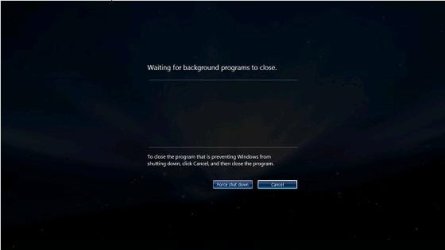
Waiting for background program to close

wekhine

New member
Local time
8:05 PM
Messages
2
Hi,

When i shutdown my notebook, sometime i saw that box ..
Waiting for background program to close..
But i didnt' see any services in below..
how can i solve it?
how can i see which service is running?
I want to know which service is running.

thanks.
wekhine
 

My Computer My Computer

OS
windows 7
Hi,

When i shutdown my notebook, sometime i saw that box ..
Waiting for background program to close..
But i didnt' see any services in below..
how can i solve it?
how can i see which service is running?
I want to know which service is running.

thanks.
wekhine

Hi, what box.:huh:
 

My Computer My Computer

Computer Manufacturer/Model Number
Self
OS
W7, Xp Pro
CPU
AMD Sempron 2600+
Motherboard
K8V-MX
Memory
1GB
Graphics Card(s)
Radeon HD3650
Sound Card
Soundmax
Monitor(s) Displays
17" HP CRT
Screen Resolution
1024x768
Hard Drives
1x WDC WD800BB
1x HDS728080
PSU
? 460W
Case
Coolermaster
Cooling
enough
Keyboard
M$S
Mouse
Optical
Internet Speed
1500kbs
Other Info
OLD!!! does the job i need.
Hi,

When i shutdown my notebook, sometime i saw that box ..
Waiting for background program to close..
But i didnt' see any services in below..
how can i solve it?
how can i see which service is running?
I want to know which service is running.

thanks.
wekhine

Hi, what box.:huh:

Hi, pls see attach..
 

Attachments

  • 1.JPG
    1.JPG
    7.9 KB · Views: 1,198

My Computer My Computer

OS
windows 7
I have experienced the same problem, and I just managed to fix it.

From my experience, it is caused by one or more not-well-designed background processes in your system, but I think everyone has different processes causing that program, so you have to find out what's the exact wrong process in your system. For me, it's a process called Grid service.

To check which process is wrong, I suggest you open task manager, switch to Processes tab, manually close a suspicious process and try to shutdown win 7. If your win 7 can shutdown correctly, then you know which process is wrong, otherwise, repeat this method by closing another suspicous process until you find out the reason.

Once you know which process is wrong, you may consider uninstalling a related program or disabling it from start-up to get rid of the problem.


Hi,

When i shutdown my notebook, sometime i saw that box ..
Waiting for background program to close..
But i didnt' see any services in below..
how can i solve it?
how can i see which service is running?
I want to know which service is running.

thanks.
wekhine
 

My Computer My Computer

OS
win 7
From my experience, it is caused by one or more not-well-designed background processes in your system, but I think everyone has different processes causing that program, so you have to find out what's the exact wrong process in your system. For me, it's a process called Grid service.

1) This is not a problem. It's actually a good thing because Windows is waiting for programs to shut down and disk buffers to be flushed to disk. If it didn't do that you'd be at nasty risk for data losses.

2) Some programs do take a while to close off... they have to save settings, close disk files, shut down network ports, release memory, etc. This too is perfectly normal behaviour.

Inside windows when you do a Shutdown every running program receives a WM_CLOSE message which initiates program shutdown. Right after that they receive a WM_POWER message telling them the system is about to shut down... if the program needs more time, it can delay answering the WM_POWER message and conduct it's business shutting down. When ALL programs have answered the WM_POWER message the system shuts off.

Really guys... this isn't something you should be worried about...
 

My Computer My Computer

Computer Manufacturer/Model Number
Homebrew
OS
XP Pro SP3 X86 / Win7 Pro X86
CPU
Amd 64 x2 4200 (2.4ghz)
Motherboard
Asus M2N-MX SE Plus
Memory
Kingston DDR2 800 2gb
Graphics Card(s)
Nvidia GF-8400
Sound Card
Realtek on Motherboard
Monitor(s) Displays
Acer x-193bw
Screen Resolution
1440 x 900
Hard Drives
Western Digital 500g
PSU
350watt In-Win
Case
In-Win
Cooling
Air
Keyboard
yes
Mouse
yes
Internet Speed
5mpbs
Other Info
Also ASRock ION 330 as HTPC (on XP).
Acer Aspire as GP netbook (on XP).
Not worried.

I know I'm not worried, but I am VERY annoyed that when I click Restart I am forced to click Force Restart, and then Yes EVERY TIME I restart my computer. (Three clicks every time for one action.)

Instead of weeding through my hundreds of processes, or waiting every time just to restart my PC because a program wants to hold up the restart. Does anyone know how to automatically "force a restart" with one click instead of three. Since I have to force a restart every time anyway..?
 

My Computer My Computer

Computer Manufacturer/Model Number
N/A
OS
Windows 7 Ultimate (build 7600)
CPU
2.70 gigahertz AMD Athlon 64 X2 Dual Core
Motherboard
ASUSTeK Computer INC. M4A78 PLUS Rev X.0x
Memory
3072 Megabytes Usable Installed Memory
Graphics Card(s)
ATI Radeon HD 4800 Series (2x)
Sound Card
ATI High Definition Audio Device (2x)
Monitor(s) Displays
VIZIO SV421XVT 41.9"
Hard Drives
c: (NTFS on drive 0) 134.11 GB 20.31 GB free
d: (NTFS on drive 0) 865.98 GB 174.38 GB free
e: (NTFS on drive 4) 1000.20 GB 165.30 GB free
f: (NTFS on drive 2) 250.06 GB 249.30 GB free
g: (NTFS on drive 3) 300.08 GB 183.60 GB free
h: (NTFS o
PSU
1000 watt
Case
Antec P90
Cooling
Air
Usually this box will pop up for me due to how slow my Firefox session takes to save to disk. If you have to force kill processes constantly, then that is an issue.

I suggest you look through Event Viewer to see what processes are holding up the shutdown process.
 

My Computer My Computer

OS
Windows 7
I read the entire thread to see that this problem is still not solved.

In those old good days with Windows XP, we used these kind of registry configuration for this:
Code:
Windows Registry Editor Version 5.00

[HKEY_LOCAL_MACHINE\SYSTEM\CurrentControlSet\Control\Session  Manager\Memory Management]
“ClearPageFileAtShutdown”=dword:00000001


 [HKEY_USERS\.DEFAULT\Control Panel\Desktop]
“AutoEndTasks”=”1″


 [HKEY_LOCAL_MACHINE\SYSTEM\CurrentControlSet\Control]
“WaitToKillServiceTimeout”=”10000″
If "ClearPageFileAtShutdown" is "dword:00000001", Windows clears page file at shutdown. This process takes too much time and is not so important. You can set it to "dword:00000000" if you want.


If you set "AutoEndTasks" to "1" that you computer forces any programs that doesn't shutdown after 10000 milliseconds.


I have three questions:

  1. Does this registry configuration apply to Windows 7 as well?
  2. Which processes the system force to terminate? The ones which does not respond to WM_POWER in 10000ms, or the ones which does not terminate after 10000ms after WM_POWER is sent?
  3. With the configuration above, is the page file cleared only during shutdown, or both during shutdown and restart?
 

My Computer My Computer

OS
Windows 7 Ultimate x64
CPU
Intel i5 750
Motherboard
Gigabyte P55A U3DR
Memory
2x2GB DDR3 Dual-kit
Graphics Card(s)
ATI Radeon HD4670
Sound Card
Onboard
Monitor(s) Displays
Samsung SyncMaster P2350
Hard Drives
Western Digital 1TB, 64MB cache, internal
Samsung Story 1.5TB, external
PSU
400W rated, 460W max
Case
CoolerMaster
Cooling
Air
1) This is not a problem. It's actually a good thing because Windows is waiting for programs to shut down and disk buffers to be flushed to disk. If it didn't do that you'd be at nasty risk for data losses.

2) Some programs do take a while to close off... they have to save settings, close disk files, shut down network ports, release memory, etc. This too is perfectly normal behaviour.

Really guys... this isn't something you should be worried about...

I just got this window, causing what I feel like is needless delay to the reboot process... and the program causing it? Windows Live Messenger. (I was not in any chats or using the software at that moment.) You'd think that Microsoft could cause its own software to get out of the way during a shutdown. A chat program should not require time to close files etc..1
 

My Computer My Computer

Computer Manufacturer/Model Number
Hazard0us Home-Built XXX-2
OS
Windows 7 RC
CPU
E2160
Motherboard
Gigabyte P35
Memory
2GB Patriot
Graphics Card(s)
GeForce 8800GTS 256MB
Sound Card
onboard HD Audio, M-Audio Delta Audiophile 2496
Monitor(s) Displays
Dell E248WFP
Hard Drives
WDC WD1200BB-00CAA1 (120GB)
Seagate ST3750640AS (750GB)
WDC WD740ADFS-00SLR5 (74GB Raptor)
PSU
OCZ 640W
Case
Lian-Li
Cooling
Intel stock
when i change my windows ......this notification will not anymore show
how do i prevent this im very annoyed becAUSE it always show when shutting down my widows...
 

My Computer My Computer

OS
windows 7 starter 32bit
 Anybody want the answer 6 years later? :rolleyes:

If you go to :

  
   HKLM\SYSTEM\CurrentControlSet\Control


 … there should be, in the right panel, the string value :


   WaitToKillServiceTimeout


 … with a value assigned to it which will be a multiple of 1  000. The value is in milliseconds, so '1  000' means 1 second, '12  000' means 12 seconds, etc. Lower it to something like '5  000' for 5 seconds and you'll be good to go.

You can also disable the feature entirely, such that you never see it at all, but I definitely do not recommend this. Still, for purposes of full disclosure (and because I despise people who take it upon themselves to try to save you from yourself), you can go to :
  

   HKEY_USERS\.DEFAULT\Control Panel\Desktop


 … and in the right panel create the string value :

  
   AutoEndTasks


 … with an assigned value of '1' and you'll be disabling it completely. But I definitely recommend using the first solution ( reducing the time to something inconsequential like '5  000') over the second.
 

My Computer My Computer

OS
Windows® 7 (64-bit)
CPU
intel® Core™ i5-4690 @ 3.50 GHz
Motherboard
GIGABYTE™ H97-D3H
Memory
8 GB DDR3
If you're shutting the system down, why are you sitting there and watching it? If it's a laptop, drop the screen and walk away. If it's a tower, kill the monitor and walk away. By not letting processes terminate in their own time frame your asking for trouble down the road.
 

My Computer My Computer

Computer type
PC/Desktop
Computer Manufacturer/Model Number
Custom Built By Me.
OS
Windows 10 Pro 64 bit
CPU
AMD FX 9590 8 Core Black Edition
Motherboard
MSI 990FXA GAMING (MS-7893)
Memory
Corsair Vengeance 16GB DDR3
Graphics Card(s)
AMD Radeon (TM) R9 380 Gaming Series
Sound Card
AMD High Definition
Monitor(s) Displays
Samsung 32" 60Hz 4ms Curved PLS LED
Screen Resolution
1920 X 1080
Hard Drives
C: 223 GB SSD = E: 465 GB HDD = F: 931 GB HDD = G: 149 GB HDD = H: 931 GB HDD
PSU
EVGA Supernova NEX750B 750W ATX EPS12V 80PLUS Bronze
Case
Cool Master
Cooling
Noctua NH-D15 Premium Cooler with 2x NF-A15 PWM 140mm Fan
Internet Speed
Fiber Optic: Download 332.7 Mbps / Upload 331.5 Mbps
Antivirus
Windows Defender
Browser
Slimjet (64bit)
I know I'm not worried, but I am VERY annoyed that when I click Restart I am forced to click Force Restart, and then Yes EVERY TIME I restart my computer. (Three clicks every time for one action.)

Instead of weeding through my hundreds of processes, or waiting every time just to restart my PC because a program wants to hold up the restart. Does anyone know how to automatically "force a restart" with one click instead of three. Since I have to force a restart every time anyway..?
heh, heh ... think about it, why are you doing a Restart? Think hard and I know you will discover why you are 'forced'. ;)
 

My Computer My Computer

Computer type
PC/Desktop
Computer Manufacturer/Model Number
HP (HP-P6212F)
OS
Microsoft Windows 7 Home Premium 64-bit 7601 Multiprocessor Free Service Pack 1
CPU
Pentium(R) Dual-Core CPU E5300 @ 2.60GHz
Motherboard
PEGATRON CORPORATION Benicia
Memory
6.00 GB
Graphics Card(s)
Intel(R) G33/G31 Express Chipset Family
Sound Card
Realtek High Definition Audio
Monitor(s) Displays
24'' HP WS LCD
Screen Resolution
1920 x 1080 x 32 bits (4294967296 colors) @ 60 Hz
Hard Drives
(1) ATA Hitachi HDT72106 SCSI Disk Device (2) Generic- Compact Flash USB Device (3) Generic- MS/MS-Pro USB Device (4) Generic- SD/MMC USB Device (5) Generic- SM/xD-Picture USB Device (6) Verbatim STORE N GO USB Device
Keyboard
Logitech G510s
Mouse
Logitech Trackball M570
Antivirus
Microsoft Security Essentials / Malwarebytes
Browser
IE / Firefox / Chrome
One can also look in msconfig/Startup and Non Microsoft Services and see what is running at boot.
Their will probable be many things that do not need to be running in the first place.

Take a look at this tutorial by Brink. (Method #3)

Startup Programs - Change - Windows 7 Help Forums


Jack
 

My Computer My Computer

Computer type
PC/Desktop
Computer Manufacturer/Model Number
Home made Desktop
OS
Windows 10 Pro. 64/ version 1709 Windows 7 Pro/64
CPU
Intel i7-6800K @ 4.3
Motherboard
ASUS X-99 Deluxe II
Memory
Corsair Platinum 16 gig @2400
Graphics Card(s)
EVGA GTX 1070 OC
Monitor(s) Displays
Asus 27" LED LCD/VE278Q
Screen Resolution
1920-1080 or 1280-720 HDMI
Hard Drives
INTEL SSD 730-240 Gb Sata 3.0/
PSU
EVGA Platium 1200W
Case
Phanteks Luxe Tempered Glass 8 fans/ one radiator
Cooling
XSPC/ Water Cooled CPU
Keyboard
Das 4 Professional
Mouse
Logitech M705/MX Anywhere 2-S
Internet Speed
100 mbits
Antivirus
Microsoft Security Essentials/ Malwarebytes Premium 3.0/ SAS
Browser
I.E. 11 default/Firefox/ ISP Time Warner Cable/Spectrum
Other Info
LG BluRay Burner/
Sound system-KLipsch-THX/
Icy Dock ssd Hot Swap bays.
...I am VERY annoyed that when I click Restart I am forced to click Force Restart, and then Yes EVERY TIME I restart my computer. (Three clicks every time for one action.)...
TrueCHoJiN: Let's backup, I think missed something. What happens if you do a Shutdown or a Restart and simply walk away? I think I read somewhere that constantly doing a Forced Restart after Forced Restart after Forced Restart -- that series of interruptions of what might be a normal though lengthy Restart [waiting for background programs to close] process might not be helpful in the long-run.
GuccizBud, I apologize for not earlier making it clear that I was responding to TrueCHoJiN's Restart situation, and not your Shutdown situation.
 
Last edited:

My Computer My Computer

Computer type
PC/Desktop
Computer Manufacturer/Model Number
Antec desktop; Acer Aspire laptops
OS
Windows 7 Professional 64-bit
CPU
Desktop i5; Acers i5 & i7
Memory
desktop 16GB; 1 Acer 8GB & 1 Acer 16GB
Hard Drives
1TB split into 2 equal partitions [OS and data] usable by RJS
Internet Speed
AT&T DSL
Browser
FF, GChrome, msIE
Other Info
Windows 7 Firewall, Emsisoft AM/AV, MSE [scan-only], SpywareBlaster, Ruiware/BillP combine
If you're shutting the system down, why are you sitting there and watching it? If it's a laptop, drop the screen and walk away. If it's a tower, kill the monitor and walk away. By not letting processes terminate in their own time frame your asking for trouble down the road.

:shock:
Right, because no one's EVER needed to reboot and continue working on the same system, everyone who has ever rebooted has immediately walked away. Good point, really well thought out. :sarc: 'Bye-eee.
 

My Computer My Computer

OS
Windows® 7 (64-bit)
CPU
intel® Core™ i5-4690 @ 3.50 GHz
Motherboard
GIGABYTE™ H97-D3H
Memory
8 GB DDR3
:shock:
Right, because no one's EVER needed to reboot and continue working on the same system, everyone who has ever rebooted has immediately walked away. Good point, really well thought out. :sarc: 'Bye-eee.
The op was regarding shutdown, not reboot.
 

My Computer My Computer

Computer type
PC/Desktop
Computer Manufacturer/Model Number
HP (HP-P6212F)
OS
Microsoft Windows 7 Home Premium 64-bit 7601 Multiprocessor Free Service Pack 1
CPU
Pentium(R) Dual-Core CPU E5300 @ 2.60GHz
Motherboard
PEGATRON CORPORATION Benicia
Memory
6.00 GB
Graphics Card(s)
Intel(R) G33/G31 Express Chipset Family
Sound Card
Realtek High Definition Audio
Monitor(s) Displays
24'' HP WS LCD
Screen Resolution
1920 x 1080 x 32 bits (4294967296 colors) @ 60 Hz
Hard Drives
(1) ATA Hitachi HDT72106 SCSI Disk Device (2) Generic- Compact Flash USB Device (3) Generic- MS/MS-Pro USB Device (4) Generic- SD/MMC USB Device (5) Generic- SM/xD-Picture USB Device (6) Verbatim STORE N GO USB Device
Keyboard
Logitech G510s
Mouse
Logitech Trackball M570
Antivirus
Microsoft Security Essentials / Malwarebytes
Browser
IE / Firefox / Chrome
:shock:
Right, because no one's EVER needed to reboot and continue working on the same system, everyone who has ever rebooted has immediately walked away. Good point, really well thought out. :sarc: 'Bye-eee.

I do believe my statement was "Shutting The System Down" Not "Rebooting" the system. Two entirely different scenarios. So my statement, If You care To Read It, is well thought out and correct.
 

My Computer My Computer

Computer type
PC/Desktop
Computer Manufacturer/Model Number
Custom Built By Me.
OS
Windows 10 Pro 64 bit
CPU
AMD FX 9590 8 Core Black Edition
Motherboard
MSI 990FXA GAMING (MS-7893)
Memory
Corsair Vengeance 16GB DDR3
Graphics Card(s)
AMD Radeon (TM) R9 380 Gaming Series
Sound Card
AMD High Definition
Monitor(s) Displays
Samsung 32" 60Hz 4ms Curved PLS LED
Screen Resolution
1920 X 1080
Hard Drives
C: 223 GB SSD = E: 465 GB HDD = F: 931 GB HDD = G: 149 GB HDD = H: 931 GB HDD
PSU
EVGA Supernova NEX750B 750W ATX EPS12V 80PLUS Bronze
Case
Cool Master
Cooling
Noctua NH-D15 Premium Cooler with 2x NF-A15 PWM 140mm Fan
Internet Speed
Fiber Optic: Download 332.7 Mbps / Upload 331.5 Mbps
Antivirus
Windows Defender
Browser
Slimjet (64bit)
I do believe my statement was "Shutting The System Down" Not "Rebooting" the system. Two entirely different scenarios. So my statement, If You care To Read It, is well thought out and correct.
yeah, yeah, no need to echo what I posted. relax man. ;)
 

My Computer My Computer

Computer type
PC/Desktop
Computer Manufacturer/Model Number
HP (HP-P6212F)
OS
Microsoft Windows 7 Home Premium 64-bit 7601 Multiprocessor Free Service Pack 1
CPU
Pentium(R) Dual-Core CPU E5300 @ 2.60GHz
Motherboard
PEGATRON CORPORATION Benicia
Memory
6.00 GB
Graphics Card(s)
Intel(R) G33/G31 Express Chipset Family
Sound Card
Realtek High Definition Audio
Monitor(s) Displays
24'' HP WS LCD
Screen Resolution
1920 x 1080 x 32 bits (4294967296 colors) @ 60 Hz
Hard Drives
(1) ATA Hitachi HDT72106 SCSI Disk Device (2) Generic- Compact Flash USB Device (3) Generic- MS/MS-Pro USB Device (4) Generic- SD/MMC USB Device (5) Generic- SM/xD-Picture USB Device (6) Verbatim STORE N GO USB Device
Keyboard
Logitech G510s
Mouse
Logitech Trackball M570
Antivirus
Microsoft Security Essentials / Malwarebytes
Browser
IE / Firefox / Chrome
yeah, yeah, no need to echo what I posted. relax man. ;)

Sorry! But I'm not echoing anything from you..... I was just responding to a post to me from GuccizBud. Nothing to do with you...
 

My Computer My Computer

Computer type
PC/Desktop
Computer Manufacturer/Model Number
Custom Built By Me.
OS
Windows 10 Pro 64 bit
CPU
AMD FX 9590 8 Core Black Edition
Motherboard
MSI 990FXA GAMING (MS-7893)
Memory
Corsair Vengeance 16GB DDR3
Graphics Card(s)
AMD Radeon (TM) R9 380 Gaming Series
Sound Card
AMD High Definition
Monitor(s) Displays
Samsung 32" 60Hz 4ms Curved PLS LED
Screen Resolution
1920 X 1080
Hard Drives
C: 223 GB SSD = E: 465 GB HDD = F: 931 GB HDD = G: 149 GB HDD = H: 931 GB HDD
PSU
EVGA Supernova NEX750B 750W ATX EPS12V 80PLUS Bronze
Case
Cool Master
Cooling
Noctua NH-D15 Premium Cooler with 2x NF-A15 PWM 140mm Fan
Internet Speed
Fiber Optic: Download 332.7 Mbps / Upload 331.5 Mbps
Antivirus
Windows Defender
Browser
Slimjet (64bit)
Back
Top