
Wake & Sleep on scheduler

blockie

New member
Member
VIP
Local time
12:36 PM
Messages
605
Location
in Assisted Care facility, Calif
I have a backup program that has its own scheduler. It does not wake the computer to perform the backup until I wake te computer in the morening. It is scheduled at 1:00 AM. Thats the why.
Now for the question:
Are there any commands I can schedule to wake the computer and stay awake and then another command that I can schedule to put the computer back to sleep?
 

My Computer

Computer type
Laptop
Computer Manufacturer/Model Number
Asus
OS
W7 Ultimate
CPU
2.2 bh Intel Core i3-2330M
Motherboard
Asustek Computer Inc. P53E 1.0
Memory
4MB
Graphics Card(s)
On Board
Sound Card
On Board
Monitor(s) Displays
On Board
Screen Resolution
1366 X 768
Hard Drives
ST9500423AS
ST2000DM USB Backup Drive External
I have a backup program that has its own scheduler. It does not wake the computer to perform the backup until I wake te computer in the morening. It is scheduled at 1:00 AM. Thats the why.
Now for the question:
Are there any commands I can schedule to wake the computer and stay awake and then another command that I can schedule to put the computer back to sleep?

I do not know if it could helps you, but in your Control Panel=>Power Plan settings=>Modify Parameters=> Advanced Tab....you can authorize kind of clock (Timer) to wake the computer.

It will go back to sleep normaly once task finished.
 

My Computer

Computer type
PC/Desktop
Computer Manufacturer/Model Number
Custom Build
OS
Windows 7 Professional SP1 - x64 [Non-UEFI Boot]
CPU
Ivy Bridge Core i5 3570K (Delidded)
Motherboard
Asus P8Z77-V LE PLUS
Memory
G.Skill "Ares" DDR3 PC3-12800 - 1600MHz (16Gb)
Graphics Card(s)
Asus Dual-RX480-O4G
Sound Card
Creative Sound Blaster Z w/5.1 sound system
Monitor(s) Displays
Asus IPS 23"
Screen Resolution
16/9
Hard Drives
Internal:
500Go Sata 6Gb/s (x2)
500Go Sata 3Gb/s (x2)
SSD 60Go Sata 6Gb/s
PSU
In Win C 900W Series 80+ Platinum
Case
Thermaltake Chaser A71
Cooling
Custom Water Cooling Loop
Keyboard
Cooler Master QuickFire XTi
Mouse
Razer Imperator 2012 (4G)
Antivirus
MSE
Browser
IE 11.0.xxx Rtm
Other Info
"Raid0" with Intel Smart Response Technology (HDD/SSD)
[/QUOTE]I do not know if it could helps you, but in your Control Panel=>Power Plan settings=>Modify Parameters=> Advanced Tab....you can authorize kind of clock (Timer) to wake the computer.[/QUOTE]


I can't find what you suggest. I m using W7 Ultimate.
Even used search and help. No luck.
 

My Computer

Computer type
Laptop
Computer Manufacturer/Model Number
Asus
OS
W7 Ultimate
CPU
2.2 bh Intel Core i3-2330M
Motherboard
Asustek Computer Inc. P53E 1.0
Memory
4MB
Graphics Card(s)
On Board
Sound Card
On Board
Monitor(s) Displays
On Board
Screen Resolution
1366 X 768
Hard Drives
ST9500423AS
ST2000DM USB Backup Drive External
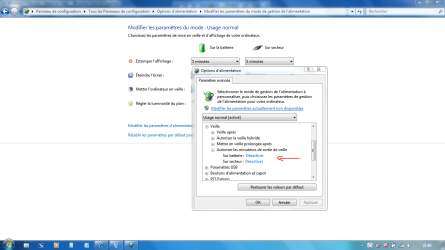
I do not know if it could helps you, but in your Control Panel=>Power Plan settings=>Modify Parameters=> Advanced Tab....you can authorize kind of clock (Timer) to wake the computer.[/QUOTE]


I can't find what you suggest. I m using W7 Ultimate.
Even used search and help. No luck.[/QUOTE]


Hope my screenshot could help! I'm off work till next Sunday
 

Attachments

  • Capture.PNG
    Capture.PNG
    57.3 KB · Views: 1,058

My Computer

Computer type
PC/Desktop
Computer Manufacturer/Model Number
Custom Build
OS
Windows 7 Professional SP1 - x64 [Non-UEFI Boot]
CPU
Ivy Bridge Core i5 3570K (Delidded)
Motherboard
Asus P8Z77-V LE PLUS
Memory
G.Skill "Ares" DDR3 PC3-12800 - 1600MHz (16Gb)
Graphics Card(s)
Asus Dual-RX480-O4G
Sound Card
Creative Sound Blaster Z w/5.1 sound system
Monitor(s) Displays
Asus IPS 23"
Screen Resolution
16/9
Hard Drives
Internal:
500Go Sata 6Gb/s (x2)
500Go Sata 3Gb/s (x2)
SSD 60Go Sata 6Gb/s
PSU
In Win C 900W Series 80+ Platinum
Case
Thermaltake Chaser A71
Cooling
Custom Water Cooling Loop
Keyboard
Cooler Master QuickFire XTi
Mouse
Razer Imperator 2012 (4G)
Antivirus
MSE
Browser
IE 11.0.xxx Rtm
Other Info
"Raid0" with Intel Smart Response Technology (HDD/SSD)
I do not know if it could helps you, but in your Control Panel=>Power Plan settings=>Modify Parameters=> Advanced Tab....you can authorize kind of clock (Timer) to wake the computer.


I can't find what you suggest. I m using W7 Ultimate.
Even used search and help. No luck.[/QUOTE]


Hope my screenshot could help! I'm off work till next Sunday[/QUOTE]

Thanks. Although I could not read the language, The screen shot pointed me in the correct direction. "Wake On Timer" is enabled, but where is the timer?
 

My Computer

Computer type
Laptop
Computer Manufacturer/Model Number
Asus
OS
W7 Ultimate
CPU
2.2 bh Intel Core i3-2330M
Motherboard
Asustek Computer Inc. P53E 1.0
Memory
4MB
Graphics Card(s)
On Board
Sound Card
On Board
Monitor(s) Displays
On Board
Screen Resolution
1366 X 768
Hard Drives
ST9500423AS
ST2000DM USB Backup Drive External
I do not know if it could helps you, but in your Control Panel=>Power Plan settings=>Modify Parameters=> Advanced Tab....you can authorize kind of clock (Timer) to wake the computer.


I can't find what you suggest. I m using W7 Ultimate.
Even used search and help. No luck.

Hope my screenshot could help! I'm off work till next Sunday[/QUOTE]

Thanks. Although I could not read the language, The screen shot pointed me in the correct direction. "Wake On Timer" is enabled, but where is the timer?[/QUOTE]

--------------------------------------------------------------------


Sir,

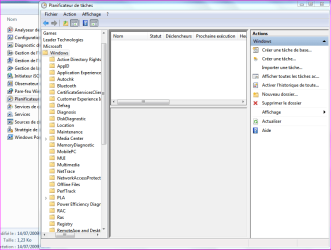
I do not know exactly where it is. But it is to prevent Windows 7 to wake when a task is scheduled, so to make it active will wake the computer when a task is scheduled....Windows 7 might have to be used to this task before it could trigger your backup management.

You can also create your own task (to make the computer wake at 1:00AM), in Control Panel=>Administration Tools=>Task Scheduler (i'm afraid you'll need someone in native language used, to point you correctly with proper screenshot):

http://www.sevenforums.com/tutorials/12444-task-scheduler-create-new-task.html
 

Attachments

  • Capture.PNG
    Capture.PNG
    33.8 KB · Views: 324

My Computer

Computer type
PC/Desktop
Computer Manufacturer/Model Number
Custom Build
OS
Windows 7 Professional SP1 - x64 [Non-UEFI Boot]
CPU
Ivy Bridge Core i5 3570K (Delidded)
Motherboard
Asus P8Z77-V LE PLUS
Memory
G.Skill "Ares" DDR3 PC3-12800 - 1600MHz (16Gb)
Graphics Card(s)
Asus Dual-RX480-O4G
Sound Card
Creative Sound Blaster Z w/5.1 sound system
Monitor(s) Displays
Asus IPS 23"
Screen Resolution
16/9
Hard Drives
Internal:
500Go Sata 6Gb/s (x2)
500Go Sata 3Gb/s (x2)
SSD 60Go Sata 6Gb/s
PSU
In Win C 900W Series 80+ Platinum
Case
Thermaltake Chaser A71
Cooling
Custom Water Cooling Loop
Keyboard
Cooler Master QuickFire XTi
Mouse
Razer Imperator 2012 (4G)
Antivirus
MSE
Browser
IE 11.0.xxx Rtm
Other Info
"Raid0" with Intel Smart Response Technology (HDD/SSD)
Back
Top