Wake Timers Disabled, Computer Wakes at 7:04:52 am Daily From Sleep?

Andrew Butler

New member
Local time
6:52 PM
Messages
9
Update: Disable Windows Media Center in the "Turn Windows Features On/Of Manager"
Fixed it! (Be sure to reboot when it asks)

Hello Everyone,

I'm new to these forums so please forgive if this is in the wrong place. I was unsure if this fell in another category, please feel free to move it.

Ok... Here's my issue, my laptop has started to randomly waking from sleep every morning at 7:04:52. I have walked the dirt path of Google searching for answers and have tried everything I could possibly find that
is even REMOTELY related to my problem.

Nothing on my Laptop has changed, and it has just started this problem. It's VERY annoying and I'm at my whits end trying to find out what's causing it.

Here's what I've tried/tweaked/confirmed:

- Confirmed that Wake Timers are Disabled - Fought with this on other various machines, first thing I checked.
- Ethernet Wake on LAN is Disabled (Laptop is only ever on WiFi Anyway)
- Wireless Adapter's "Allow Device to Wake this computer..." is also disabled and always has been.
- Windows Media Center's Update Service is disabled since I do not use WMC...
- Went into the Command Prompt and ran "powercfg -lastwake" and was told it was the "ACPI Lid" which is what I was also told in Event Viewer for each (event) occasion that this has happened.
- I've also checked to see if it was Windows Update, but it's settings have never changed and if it was WU it would wake up at 3 am instead...
- Checked to see what devices have the ability to wake the computer, and it was my mouse, keyboard and touchpad. Tried all of that, and nothing worked. It would still wake on it's own, If I awoke it from sleep, I had to push the power button. I turned them back to allow since they had no effect.

I know that it saying that the "Lid" is waking the computer is BS. If it was a bad Lid Switch it would be random. I can also Change the System Time to 7:02 am and put it to sleep and within 2-3 seconds of the 7:04:53 listed in the log it wakes up. WTF?

Anyone had this issue before, or have any other suggestions? Is there anyway to sort the Task Scheduler by time or by "Wake computer to perform..." without going through the entire thing manually?

I have tried SO many things to solve it that I more than likely have missed listing something, please ask if you have any questions.

Thanks in Advance. :)
 
Last edited:

My Computer My Computer

At a glance

Windows 7 Professional 64-Bit SP1Intel Core i5-3570K @3.40GHz & 3.80GHz Turbo8.00GB Dual - Channel DDR3 @ 665 MHzGeforce GTX 660 SE 2GB With Non Reference Dua...
Computer type
PC/Desktop
Computer Manufacturer/Model Number
Custom PC Rig
OS
Windows 7 Professional 64-Bit SP1
CPU
Intel Core i5-3570K @3.40GHz & 3.80GHz Turbo
Motherboard
Intel DZ77BH-55K
Memory
8.00GB Dual - Channel DDR3 @ 665 MHz
Graphics Card(s)
Geforce GTX 660 SE 2GB With Non Reference Dual Fan Cooler
Monitor(s) Displays
Acer 24" G246HYL & Acer 24" G246HL
Screen Resolution
1920x1080 Dual Monitors
Hard Drives
120 GB Samsung SSD 840 PRO Series
500 GB Western Digital WD50000AAKX Blue Drive
250 GB (Don't Remember Model #)
500 GB Seagate Laptop Drive
External 2TB Western Digital MyBook USB 3
PSU
Cooler Master 550W
Case
Cooler Master HAF-X Full Tower
Keyboard
Logitech K310 Washable Keyboard
Mouse
Logitech M570 Tracball
Internet Speed
54 Mbps Up, 14 Mbps Down
Antivirus
Microsoft Security Essentials, Malwarebytes Anti-Malware Pro
Browser
Google Chrome 64-Bit
Bump....

No one has any clue? Not even an Admin with over 100 views....?

I was hoping that SOMEONE had encountered this before and found a fix.
 

My Computer My Computer

At a glance

Windows 7 Professional 64-Bit SP1Intel Core i5-3570K @3.40GHz & 3.80GHz Turbo8.00GB Dual - Channel DDR3 @ 665 MHzGeforce GTX 660 SE 2GB With Non Reference Dua...
Computer type
PC/Desktop
Computer Manufacturer/Model Number
Custom PC Rig
OS
Windows 7 Professional 64-Bit SP1
CPU
Intel Core i5-3570K @3.40GHz & 3.80GHz Turbo
Motherboard
Intel DZ77BH-55K
Memory
8.00GB Dual - Channel DDR3 @ 665 MHz
Graphics Card(s)
Geforce GTX 660 SE 2GB With Non Reference Dual Fan Cooler
Monitor(s) Displays
Acer 24" G246HYL & Acer 24" G246HL
Screen Resolution
1920x1080 Dual Monitors
Hard Drives
120 GB Samsung SSD 840 PRO Series
500 GB Western Digital WD50000AAKX Blue Drive
250 GB (Don't Remember Model #)
500 GB Seagate Laptop Drive
External 2TB Western Digital MyBook USB 3
PSU
Cooler Master 550W
Case
Cooler Master HAF-X Full Tower
Keyboard
Logitech K310 Washable Keyboard
Mouse
Logitech M570 Tracball
Internet Speed
54 Mbps Up, 14 Mbps Down
Antivirus
Microsoft Security Essentials, Malwarebytes Anti-Malware Pro
Browser
Google Chrome 64-Bit
Anyone had this issue before, or have any other suggestions? Is there anyway to sort the Task Scheduler by time or by "Wake computer to perform..." without going through the entire thing manually?

In the Task Scheduler Summary / Task Status you can select Tasks that have started in the Last Hour.

Open Task Scheduler after the laptop wakes and see what tasks ran in the last hour.
 

My Computer My Computer

At a glance

Multi-Boot W7_Pro_x64 W8.1_Pro_x64 W10_Pro_x6...AMD Athlon II x4 6206GB GSkill DDR2 800AMD 4670 GPU + AMD 4200 IGP
Computer type
PC/Desktop
Computer Manufacturer/Model Number
home built
OS
Multi-Boot W7_Pro_x64 W8.1_Pro_x64 W10_Pro_x64 +Linux_VMs +Chromium_VM
CPU
AMD Athlon II x4 620
Motherboard
Gigabyte GA-MA785G-UD3H
Memory
6GB GSkill DDR2 800
Graphics Card(s)
AMD 4670 GPU + AMD 4200 IGP
Sound Card
on board Realtek ALC889A
Monitor(s) Displays
RCA 40" LCD TV, Insignia 32" LCD TV, HP 15" LCD monitor
Screen Resolution
1680 x 1050
Hard Drives
OCZ Vertex 3 120GB,
Samsung F3 1TB (3),
Several others - WD, Seagate, Hitachi, ...
PSU
Corsair 500 W
Case
Rosewill mid tower
Cooling
CM 90mm rifle
Keyboard
Gyration wireless, Logitech wireless, Dell USB wired
Mouse
Gyration wireless, Logitech wireless, V7 USB wired
Internet Speed
Spectrum - 100Mbps D / 10Mbps U
Antivirus
Avast, MBAM3, EMET, WinPatrol
Browser
Pale Moon, Firefox, IE
Other Info
2 multi-boot PC's
Mainly HTPC/Office/Gen purpose (no gaming).
Trendnet USB KVM.
LG DVD burner/Blue Ray Player.
Tray system for removable SATA backup drives.

Not currently OCd, under-volted.
I use Hybrid sleep, rarely re-boot or shutdown.

Hauppauge HD-PVR, Avermedia PCIe TV Tuner, Hauppauge PCI TV Tuner.
Thanks for the reply! I was SO frustrated that I guess I overlooked that option. I'll "simulate" a wake up by changing the system time.

I post what I find, so if others have this issue hopefully it'll solve their problem as well.

Thanks Again,

-Andrew B.
 

My Computer My Computer

At a glance

Windows 7 Professional 64-Bit SP1Intel Core i5-3570K @3.40GHz & 3.80GHz Turbo8.00GB Dual - Channel DDR3 @ 665 MHzGeforce GTX 660 SE 2GB With Non Reference Dua...
Computer type
PC/Desktop
Computer Manufacturer/Model Number
Custom PC Rig
OS
Windows 7 Professional 64-Bit SP1
CPU
Intel Core i5-3570K @3.40GHz & 3.80GHz Turbo
Motherboard
Intel DZ77BH-55K
Memory
8.00GB Dual - Channel DDR3 @ 665 MHz
Graphics Card(s)
Geforce GTX 660 SE 2GB With Non Reference Dual Fan Cooler
Monitor(s) Displays
Acer 24" G246HYL & Acer 24" G246HL
Screen Resolution
1920x1080 Dual Monitors
Hard Drives
120 GB Samsung SSD 840 PRO Series
500 GB Western Digital WD50000AAKX Blue Drive
250 GB (Don't Remember Model #)
500 GB Seagate Laptop Drive
External 2TB Western Digital MyBook USB 3
PSU
Cooler Master 550W
Case
Cooler Master HAF-X Full Tower
Keyboard
Logitech K310 Washable Keyboard
Mouse
Logitech M570 Tracball
Internet Speed
54 Mbps Up, 14 Mbps Down
Antivirus
Microsoft Security Essentials, Malwarebytes Anti-Malware Pro
Browser
Google Chrome 64-Bit
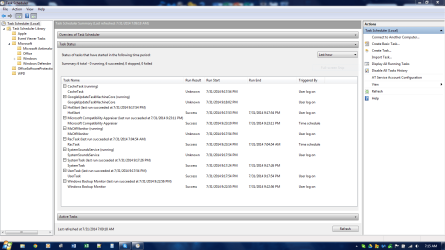
Well, this is what I found after I changed the System time to 7:02 am and waited for it to wake. And it woke at 7:04 just like it has been. All of these tasks seem to be accounted for and were running after I booted up the computer to do this test. I've looked up each one, and none have the ability to wake the computer. :/

Any other ideas...?

Capture.PNG
 

My Computer My Computer

At a glance

Windows 7 Professional 64-Bit SP1Intel Core i5-3570K @3.40GHz & 3.80GHz Turbo8.00GB Dual - Channel DDR3 @ 665 MHzGeforce GTX 660 SE 2GB With Non Reference Dua...
Computer type
PC/Desktop
Computer Manufacturer/Model Number
Custom PC Rig
OS
Windows 7 Professional 64-Bit SP1
CPU
Intel Core i5-3570K @3.40GHz & 3.80GHz Turbo
Motherboard
Intel DZ77BH-55K
Memory
8.00GB Dual - Channel DDR3 @ 665 MHz
Graphics Card(s)
Geforce GTX 660 SE 2GB With Non Reference Dual Fan Cooler
Monitor(s) Displays
Acer 24" G246HYL & Acer 24" G246HL
Screen Resolution
1920x1080 Dual Monitors
Hard Drives
120 GB Samsung SSD 840 PRO Series
500 GB Western Digital WD50000AAKX Blue Drive
250 GB (Don't Remember Model #)
500 GB Seagate Laptop Drive
External 2TB Western Digital MyBook USB 3
PSU
Cooler Master 550W
Case
Cooler Master HAF-X Full Tower
Keyboard
Logitech K310 Washable Keyboard
Mouse
Logitech M570 Tracball
Internet Speed
54 Mbps Up, 14 Mbps Down
Antivirus
Microsoft Security Essentials, Malwarebytes Anti-Malware Pro
Browser
Google Chrome 64-Bit
If you don't use WMC, then try turning it off in Windows Features. It might not be enough to disable the update service.
 

My Computer My Computer

At a glance

x64 (6.3.9600) Win8.1 Pro & soon dual boot x6...AMD A6-3420M APU with Radeon(tm) HD Graphics6.00 GBAMD Radeon(TM) HD 6520G
Computer type
Laptop
Computer Manufacturer/Model Number
HP Pavilion dv6-6c10us
OS
x64 (6.3.9600) Win8.1 Pro & soon dual boot x64 (6.1.7601) Win7_SP1 HomePrem
CPU
AMD A6-3420M APU with Radeon(tm) HD Graphics
Motherboard
Hewlett-Packard 1805
Memory
6.00 GB
Graphics Card(s)
AMD Radeon(TM) HD 6520G
Sound Card
(1) AMD High Definition Audio Device (2) IDT High Definiti
Monitor(s) Displays
HP W2072a 20" LCD (1600 x 900) @ 60 Hz
Screen Resolution
1366 x 768 x 32 bits (4294967296 colors) @ 60 Hz
Hard Drives
ST640LM0 00 HM641JI SATA Disk Device
Keyboard
Logitech k520 wireless KB
Mouse
Logitech m320 wireless mouse (bundled with KB)
Internet Speed
15/5 | 54 MB Wireless 'n'
Antivirus
Realtime: Defender or Avast | On-demand: Malwarebytes, ESET
Browser
IE 11 on Win8, IE 10 on win 7
Other Info
Media: [Gimp, Audacity, VLC] || Comm: [WEmail 2012, Skype] || Productivity: [OpenOffice,| Textpad] || Utils: [Sysinternals, cCleaner, Speccy, Defraggler]
If you don't use WMC, then try turning it off in Windows Features. It might not be enough to disable the update service.

Ok, I'll disable it and test again. We shall see...

Update:

Disabling Windows Media Center has fixed the issue. I cannot believe that it was THAT simple! Thanks man, you're Awesome! I'll remember this for future reference, and will now most likely disable it on future Windows installs. The fact that it's enabled by default is kinda silly, considering in the grand scheme few people actually use it.

I'd give you a high five if I could! This won't drive me NUTS anymore! :)

YEEEEESSSS!!!!!
 
Last edited:

My Computer My Computer

At a glance

Windows 7 Professional 64-Bit SP1Intel Core i5-3570K @3.40GHz & 3.80GHz Turbo8.00GB Dual - Channel DDR3 @ 665 MHzGeforce GTX 660 SE 2GB With Non Reference Dua...
Computer type
PC/Desktop
Computer Manufacturer/Model Number
Custom PC Rig
OS
Windows 7 Professional 64-Bit SP1
CPU
Intel Core i5-3570K @3.40GHz & 3.80GHz Turbo
Motherboard
Intel DZ77BH-55K
Memory
8.00GB Dual - Channel DDR3 @ 665 MHz
Graphics Card(s)
Geforce GTX 660 SE 2GB With Non Reference Dual Fan Cooler
Monitor(s) Displays
Acer 24" G246HYL & Acer 24" G246HL
Screen Resolution
1920x1080 Dual Monitors
Hard Drives
120 GB Samsung SSD 840 PRO Series
500 GB Western Digital WD50000AAKX Blue Drive
250 GB (Don't Remember Model #)
500 GB Seagate Laptop Drive
External 2TB Western Digital MyBook USB 3
PSU
Cooler Master 550W
Case
Cooler Master HAF-X Full Tower
Keyboard
Logitech K310 Washable Keyboard
Mouse
Logitech M570 Tracball
Internet Speed
54 Mbps Up, 14 Mbps Down
Antivirus
Microsoft Security Essentials, Malwarebytes Anti-Malware Pro
Browser
Google Chrome 64-Bit
Glad you got it sorted.
 

My Computer My Computer

At a glance

x64 (6.3.9600) Win8.1 Pro & soon dual boot x6...AMD A6-3420M APU with Radeon(tm) HD Graphics6.00 GBAMD Radeon(TM) HD 6520G
Computer type
Laptop
Computer Manufacturer/Model Number
HP Pavilion dv6-6c10us
OS
x64 (6.3.9600) Win8.1 Pro & soon dual boot x64 (6.1.7601) Win7_SP1 HomePrem
CPU
AMD A6-3420M APU with Radeon(tm) HD Graphics
Motherboard
Hewlett-Packard 1805
Memory
6.00 GB
Graphics Card(s)
AMD Radeon(TM) HD 6520G
Sound Card
(1) AMD High Definition Audio Device (2) IDT High Definiti
Monitor(s) Displays
HP W2072a 20" LCD (1600 x 900) @ 60 Hz
Screen Resolution
1366 x 768 x 32 bits (4294967296 colors) @ 60 Hz
Hard Drives
ST640LM0 00 HM641JI SATA Disk Device
Keyboard
Logitech k520 wireless KB
Mouse
Logitech m320 wireless mouse (bundled with KB)
Internet Speed
15/5 | 54 MB Wireless 'n'
Antivirus
Realtime: Defender or Avast | On-demand: Malwarebytes, ESET
Browser
IE 11 on Win8, IE 10 on win 7
Other Info
Media: [Gimp, Audacity, VLC] || Comm: [WEmail 2012, Skype] || Productivity: [OpenOffice,| Textpad] || Utils: [Sysinternals, cCleaner, Speccy, Defraggler]
Glad you got it sorted.

I may have spoken too soon. I could not get it to wake last night by changing the time and tricking it into waking up. I left it plugged in and asleep on my desk and when I came in here this morning it's awake.

And guess what? It awoke at 7:04:52 by the ACPI Lid. This makes ZERO sense. The Event Viewer still shows me the same information. What am I supposed to do? I simply DO NOT UNDERSTAND why it is waking up. There is NO reason for it to, it doesn't DO anything. It just SITS and idles...

Any other suggestions, this is making me NUTS!!!!!
 

My Computer My Computer

At a glance

Windows 7 Professional 64-Bit SP1Intel Core i5-3570K @3.40GHz & 3.80GHz Turbo8.00GB Dual - Channel DDR3 @ 665 MHzGeforce GTX 660 SE 2GB With Non Reference Dua...
Computer type
PC/Desktop
Computer Manufacturer/Model Number
Custom PC Rig
OS
Windows 7 Professional 64-Bit SP1
CPU
Intel Core i5-3570K @3.40GHz & 3.80GHz Turbo
Motherboard
Intel DZ77BH-55K
Memory
8.00GB Dual - Channel DDR3 @ 665 MHz
Graphics Card(s)
Geforce GTX 660 SE 2GB With Non Reference Dual Fan Cooler
Monitor(s) Displays
Acer 24" G246HYL & Acer 24" G246HL
Screen Resolution
1920x1080 Dual Monitors
Hard Drives
120 GB Samsung SSD 840 PRO Series
500 GB Western Digital WD50000AAKX Blue Drive
250 GB (Don't Remember Model #)
500 GB Seagate Laptop Drive
External 2TB Western Digital MyBook USB 3
PSU
Cooler Master 550W
Case
Cooler Master HAF-X Full Tower
Keyboard
Logitech K310 Washable Keyboard
Mouse
Logitech M570 Tracball
Internet Speed
54 Mbps Up, 14 Mbps Down
Antivirus
Microsoft Security Essentials, Malwarebytes Anti-Malware Pro
Browser
Google Chrome 64-Bit
Ok, step-by-step it is then

Note: Elevated Command Prompt is shorthand for:
Open an elevated Command Prompt
(Right click, run as administrator)​

Process of elimination, the difficulty will be testing it since the forced test gave false hope on WMC.

You don't have to wait a day between each, that's what I would do trouble shoot the issue so that I knew which one solved the issue. The choice is yours how you test the suggestions.

Also, there is no particular order, I wrote them as I thought of them. There's one more, but it's a registry hack and I prefer not to offer those until it's the only option left. It's not clear that it would solve the issue anyway.

Day0: Collect information
Day1: Disable hibernation: powercfg -h OFF

Day2: Disable devices from waking the machine
  • Elevated Command Prompt
    Powercfg -devicequery wake_armed > %USERPROFILE%\queryDevice.txt
  • For each device listed
    Powercfg -devicedisablewake device
    :note: Note: Keep the list, you might actually want some devices to wake the machine

Day3: Create a new Power Plan and make sure the Sleep settings > Allow wake timers are disabled for both DC & AC

Day4: MS Fixit: Power (ignore the battery notation)
Fix power consumption problems and extend the laptop battery life

Day5: Reset BIOS to defaults

Day6: Update BIOS and check other driver software:
https://downloadcenter.intel.com/SearchResult.aspx?lang=&ProductID=3441&ProdId=3441
Select Windows 7 (64 bit)
Sort by Date (newest)
Take this step slowly, one driver at a time. Windows Update should provide drivers n the optional updates offered, so going to the OEM is second choice.
:info: DZ77BH-55K Technical Product Specification

Day7: STEP ONE of http://www.sevenforums.com/tutorial...ation-conflicts-performing-clean-startup.html
Intel, Apple, Steam are all suspect, but don't limit disabling to those - follow the tutorial.

Day8: STEP TWO of http://www.sevenforums.com/tutorial...ation-conflicts-performing-clean-startup.html

Day9: In Device Manager
  • Uninstall ghost entires with drivecleanup Download V0.8.0 (WPDs): drivecleanup080.zip
  • expand all entries. Any APCI devices (batteries, Computer, System devices on my machine) - scan for hardware changes
    You can also Update Driver software (most likely none)
    - it's a long shot

Day10: ?????
 
Last edited:

My Computer My Computer

At a glance

x64 (6.3.9600) Win8.1 Pro & soon dual boot x6...AMD A6-3420M APU with Radeon(tm) HD Graphics6.00 GBAMD Radeon(TM) HD 6520G
Computer type
Laptop
Computer Manufacturer/Model Number
HP Pavilion dv6-6c10us
OS
x64 (6.3.9600) Win8.1 Pro & soon dual boot x64 (6.1.7601) Win7_SP1 HomePrem
CPU
AMD A6-3420M APU with Radeon(tm) HD Graphics
Motherboard
Hewlett-Packard 1805
Memory
6.00 GB
Graphics Card(s)
AMD Radeon(TM) HD 6520G
Sound Card
(1) AMD High Definition Audio Device (2) IDT High Definiti
Monitor(s) Displays
HP W2072a 20" LCD (1600 x 900) @ 60 Hz
Screen Resolution
1366 x 768 x 32 bits (4294967296 colors) @ 60 Hz
Hard Drives
ST640LM0 00 HM641JI SATA Disk Device
Keyboard
Logitech k520 wireless KB
Mouse
Logitech m320 wireless mouse (bundled with KB)
Internet Speed
15/5 | 54 MB Wireless 'n'
Antivirus
Realtime: Defender or Avast | On-demand: Malwarebytes, ESET
Browser
IE 11 on Win8, IE 10 on win 7
Other Info
Media: [Gimp, Audacity, VLC] || Comm: [WEmail 2012, Skype] || Productivity: [OpenOffice,| Textpad] || Utils: [Sysinternals, cCleaner, Speccy, Defraggler]
Could this be the fix...? I hope so. :D

Ok, step-by-step it is then

Note: Elevated Command Prompt is shorthand for:
Open an elevated Command Prompt
(Right click, run as administrator)​

Process of elimination, the difficulty will be testing it since the forced test gave false hope on WMC.

You don't have to wait a day between each, that's what I would do trouble shoot the issue so that I knew which one solved the issue. The choice is yours how you test the suggestions.

Also, there is no particular order, I wrote them as I thought of them. There's one more, but it's a registry hack and I prefer not to offer those until it's the only option left. It's not clear that it would solve the issue anyway.

Day0: Collect information
Day1: Disable hibernation: powercfg -h OFF

Day2: Disable devices from waking the machine
  • Elevated Command Prompt
    Powercfg -devicequery wake_armed > %USERPROFILE%\queryDevice.txt
  • For each device listed
    Powercfg -devicedisablewake device
    :note: Note: Keep the list, you might actually want some devices to wake the machine

Day3: Create a new Power Plan and make sure the Sleep settings > Allow wake timers are disabled for both DC & AC

Day4: MS Fixit: Power (ignore the battery notation)
Fix power consumption problems and extend the laptop battery life

Day5: Reset BIOS to defaults

Day6: Update BIOS and check other driver software:
https://downloadcenter.intel.com/SearchResult.aspx?lang=&ProductID=3441&ProdId=3441
Select Windows 7 (64 bit)
Sort by Date (newest)
Take this step slowly, one driver at a time. Windows Update should provide drivers n the optional updates offered, so going to the OEM is second choice.
:info: DZ77BH-55K Technical Product Specification

Day7: STEP ONE of http://www.sevenforums.com/tutorial...ation-conflicts-performing-clean-startup.html
Intel, Apple, Steam are all suspect, but don't limit disabling to those - follow the tutorial.

Day8: STEP TWO of http://www.sevenforums.com/tutorial...ation-conflicts-performing-clean-startup.html

Day9: In Device Manager
  • Uninstall ghost entires with drivecleanup Download V0.8.0 (WPDs): drivecleanup080.zip
  • expand all entries. Any APCI devices (batteries, Computer, System devices on my machine) - scan for hardware changes
    You can also Update Driver software (most likely none)
    - it's a long shot

Day10: ?????

Thanks for the suggestion(s). I had already updated everything on my laptop prior to this issue, and double checked after this started happening. Nothing was listed as being able to wake the computer besides my Touch-pad, Mouse, and Keyboard. I uninstalled the APCI Lid Driver and rebooted, rebooted again when it asked, and put it to sleep. This morning it was still asleep! :D


My Desktop that I built has only ever had this issue once, it was a wake timer set by the Samsung Magician. It would wake-up within 30 seconds of going to sleep. I never did quite understand the reasoning behind that. I removed it from start-up, and disabled wake timers. I've never had a power/wake-up issue as tricky as this before.

(I went ahead and disabled WMC on my Desktop as well since I don't use it.) :)

I won't tweak/change anything else and we'll see if it stays asleep tonight. Hopefully I've finally laid this zombie computer to rest. lol

Thanks Again,
-Andrew B.
 
Last edited:

My Computer My Computer

At a glance

Windows 7 Professional 64-Bit SP1Intel Core i5-3570K @3.40GHz & 3.80GHz Turbo8.00GB Dual - Channel DDR3 @ 665 MHzGeforce GTX 660 SE 2GB With Non Reference Dua...
Computer type
PC/Desktop
Computer Manufacturer/Model Number
Custom PC Rig
OS
Windows 7 Professional 64-Bit SP1
CPU
Intel Core i5-3570K @3.40GHz & 3.80GHz Turbo
Motherboard
Intel DZ77BH-55K
Memory
8.00GB Dual - Channel DDR3 @ 665 MHz
Graphics Card(s)
Geforce GTX 660 SE 2GB With Non Reference Dual Fan Cooler
Monitor(s) Displays
Acer 24" G246HYL & Acer 24" G246HL
Screen Resolution
1920x1080 Dual Monitors
Hard Drives
120 GB Samsung SSD 840 PRO Series
500 GB Western Digital WD50000AAKX Blue Drive
250 GB (Don't Remember Model #)
500 GB Seagate Laptop Drive
External 2TB Western Digital MyBook USB 3
PSU
Cooler Master 550W
Case
Cooler Master HAF-X Full Tower
Keyboard
Logitech K310 Washable Keyboard
Mouse
Logitech M570 Tracball
Internet Speed
54 Mbps Up, 14 Mbps Down
Antivirus
Microsoft Security Essentials, Malwarebytes Anti-Malware Pro
Browser
Google Chrome 64-Bit
Back
Top