Waking CPU out of sleep with wireless mouse.

bobo244

New member
Local time
6:24 AM
Messages
14
Hey, I just bought the Microsoft Wave wireless keyboard and mouse kit.

Problem is, that I connect my laptop to my external monitor and all other connections so that I can close it and file it under my desk.

I can put the computer to sleep, but can't seem to wake it up using the keyboard or mouse.

Any suggestions?
 

My Computer My Computer

At a glance

7
OS
7
Hello Bobo,

Welcome to Seven Forums.

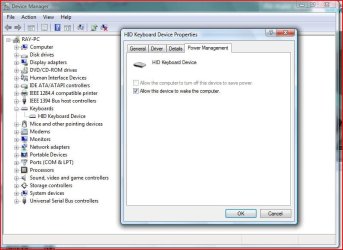
Go to device manager (Rt. click computer/manage). Expand Keyboards and double click your keyboard. On the Power Management Tab, make sure allow this device to wake.... is checked.

Hope this helps.

Gary
 

My Computer My Computer

At a glance

Vista Ult 64 bit Seven Ult RTM x64Intel Core2 Quad Q6600 2.40 gigahertzCrucial Ballistix 4x2GB PC2 6400NVIDIA GeForce 8600 GTS 256 MB
Computer Manufacturer/Model Number
Dell XPS420
OS
Vista Ult 64 bit Seven Ult RTM x64
CPU
Intel Core2 Quad Q6600 2.40 gigahertz
Memory
Crucial Ballistix 4x2GB PC2 6400
Graphics Card(s)
NVIDIA GeForce 8600 GTS 256 MB
Sound Card
Creative SB X-Fi audio
Monitor(s) Displays
HP w2207 + HPvs15
Screen Resolution
1680x1050 + 1024x768
Hard Drives
2-WD5000AAKS-500 GB
WD5000AAV-500 GB external
Keyboard
Microsoft Comfort Curve
Mouse
MX Revolution
Other Info
Wacom Intuos 2 Graphics Tablet
Experience Index=5.5
Hello Bobo,

Welcome to Seven Forums.

Go to device manager (Rt. click computer/manage). Expand Keyboards and double click your keyboard. On the Power Management Tab, make sure allow this device to wake.... is checked.

Hope this helps.

Gary

Thanks for the input Gary.

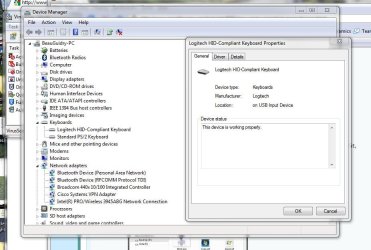
When I open device manager, I found my keyboard and opened up properties. However there was no Power Management Tab, only 'General', 'Driver', and 'Details' tabs.

What does this lead too?

Thanks again
 

My Computer My Computer

At a glance

7
OS
7
Sorry I also meant to include the mouse. Odd though. I have a wacom tablet with a mouse and it doesn't have pwr mgmt., but I haven't seen it on a normal mouse or keyboard. On my laptop, I do have to have the mouse in use to get the pwr. mgmt. tab. Would assume it is the same for a keyboard.
 

My Computer My Computer

At a glance

Vista Ult 64 bit Seven Ult RTM x64Intel Core2 Quad Q6600 2.40 gigahertzCrucial Ballistix 4x2GB PC2 6400NVIDIA GeForce 8600 GTS 256 MB
Computer Manufacturer/Model Number
Dell XPS420
OS
Vista Ult 64 bit Seven Ult RTM x64
CPU
Intel Core2 Quad Q6600 2.40 gigahertz
Memory
Crucial Ballistix 4x2GB PC2 6400
Graphics Card(s)
NVIDIA GeForce 8600 GTS 256 MB
Sound Card
Creative SB X-Fi audio
Monitor(s) Displays
HP w2207 + HPvs15
Screen Resolution
1680x1050 + 1024x768
Hard Drives
2-WD5000AAKS-500 GB
WD5000AAV-500 GB external
Keyboard
Microsoft Comfort Curve
Mouse
MX Revolution
Other Info
Wacom Intuos 2 Graphics Tablet
Experience Index=5.5
I am having the same issue as BoBo 244. I want the laptop to wake by using an external keyboard while the cover is closed. But when I go to the Device Manager/keyboards, there is no power managment tab there.

Has anyone figured this out yet?
 

My Computer My Computer

At a glance

Windows 7Intel Centrino4 GB ram, 360 GB HD
Computer Manufacturer/Model Number
Dell Vostro 1220
OS
Windows 7
CPU
Intel Centrino
Memory
4 GB ram, 360 GB HD
Same problem here

I, too, have the same problem. On my HP HDX18 laptop only the touchpad and keyboard have the power management tab to enable them to wake the computer.

My external Firefly keyboard, corded Kensington mouse and Logitech wireless mouse all lack the power management tab. I wrote Logitech about this and they said I needed newer ACPI/USB drivers. I installed the latest Intel chipset drivers that I know about.

HP told me that this is normal, power is shut off to the USB hubs. Which is silly. I have disenabled the selective suspend for the USB ports under Power Settings and in Device Manager went to each USB hub and unchecked "allow the computer to turn off power to this device", which may be what HP meant. I have the latest BIOS. But still no Power Management tab appears.

This was the same in Vista, BTW.

I did find the MCE Standby Tool here Slick Solutions - Home of the MCE Standby Tool (MST) , which a post said would fix the problem, but am afraid I am not technically competent enough to use it. However, I may eventually get brave and make a restore point and then try it. If anyone more of a techie than I tries it, please report back. And if it worked, step by step instructions for dummies would really be a help. I should note that it doesn't mention Windows 7 so that might cause a problem, even if it does work in Vista.

 

My Computer My Computer

At a glance

Vista Windows 7 each 64 bit Home Premium
Computer Manufacturer/Model Number
HP HDX18, HP DV7 Quad Edition to arrive soon
OS
Vista Windows 7 each 64 bit Home Premium
Monitor(s) Displays
Acer H233H External Monitor
Hard Drives
2 Hard Drives on both computers
Wrong thread!
 

My Computer My Computer

At a glance

Windows 7 Ultimate 32 bitIntel(R) Pentium(R) 4 CPU 3.00GHz2.50 GB RAMNVIDIA GeForce 7600 GS
Computer Manufacturer/Model Number
Home built
OS
Windows 7 Ultimate 32 bit
CPU
Intel(R) Pentium(R) 4 CPU 3.00GHz
Motherboard
ASUS P4P800-VM Motherboard Chipset: Intel 865G + ICH5
Memory
2.50 GB RAM
Graphics Card(s)
NVIDIA GeForce 7600 GS
Sound Card
SoundMax Integrated Digital Audio (Chip)
Monitor(s) Displays
ViewSonic VX 1962 wm
Screen Resolution
1680 X 1050
Hard Drives
Seagate Barracuda 7200.10 80 GB
ST380215A ATA Device 18.6 GB
Western Digital "My Book" external hard drive 750 GB
Cooling
Fan based
Keyboard
Microsoft Comfort Curve Keyboard 2000 v10 USB
Mouse
Logitec optic USB
Internet Speed
3.01 Mb/s download 0.64 Mb/s upload
Wrong thread? I don't think so... at least I understand what Oldroser means, as I'm having the same issue.

That is, I use my computer with an external keyboard & monitor, and want to be able to turn it on/wake it from sleep without opening the screen. Unfortunately, that's what I have to do every time: open the screen, press the power button, and then close it quickly. It seems like a very clunky work-around for something that should have been designed in 3 generations ago.

Come on Dell! With a little notebook like the Vostro 1220, don't you think lots of users are connecting external monitors and keyboards when at their desks? Of course they are!
 

My Computer My Computer

At a glance

Windows 7Intel Centrino4 GB ram, 360 GB HD
Computer Manufacturer/Model Number
Dell Vostro 1220
OS
Windows 7
CPU
Intel Centrino
Memory
4 GB ram, 360 GB HD
Back
Top