Solved Want side by side views of folders on taskbar

solidago

New member
Local time
2:59 PM
Messages
2
For convenience when using multiple folders, I would like to have the folders side by side on the taskbar, not one on top of the other.

How do I do that?

Thanks.
 

My Computer My Computer

At a glance

Windows 7 home, 64 bit
Computer type
PC/Desktop
Computer Manufacturer/Model Number
HP
OS
Windows 7 home, 64 bit
Browser
Firefox
Whoops!

Just figured it out. Click on the top folder in the stack and they will appear side by side..
 

My Computer My Computer

At a glance

Windows 7 home, 64 bit
Computer type
PC/Desktop
Computer Manufacturer/Model Number
HP
OS
Windows 7 home, 64 bit
Browser
Firefox
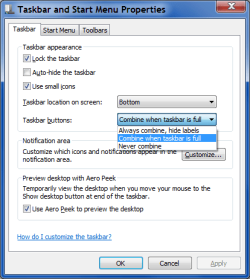
Taskbar and Start Menu Properties

Have you tried changing the "Taskbar and Start Menu Properties"?
TB Properties - CWTBIF.png
 

My Computer My Computer

At a glance

W7 Ultimate SP1, LM19.2 MATE, W10 Home 1703, ...AMD Phenom II x6 1100T, 3.3 GHz12GB DDR3 1333 G-Skill (4GB x 2), G-Skill (2G...NVIDIA GeForce GTX 660
Computer type
PC/Desktop
Computer Manufacturer/Model Number
n/a
OS
W7 Ultimate SP1, LM19.2 MATE, W10 Home 1703, W10 Pro 1703 VM, #All 64 bit
CPU
AMD Phenom II x6 1100T, 3.3 GHz
Motherboard
ASUS M4A88T-M/USB3 (AM3)
Memory
12GB DDR3 1333 G-Skill (4GB x 2), G-Skill (2GB x 2)
Graphics Card(s)
NVIDIA GeForce GTX 660
Sound Card
Realtek?
Monitor(s) Displays
Samsung S23B350
Screen Resolution
1920x1080
Hard Drives
WD Green 2TB (SATA), WD Green 3TB (SATA), WD Blue 4TB (SATA), WD Blue 6TB (SATA)
PSU
Cooler Master
Case
Antec GX300 Tower
Cooling
3x Antec TRICOOL 120mm Fans
Mouse
Wired Optical
Internet Speed
DSL
Antivirus
Avast
Browser
Pale Moon (64 bit)
Other Info
2018-12-27 Upgraded HDDs
2015-12-10 Upgraded case, graphics card, storage
2015-08-15 Upgraded motherboard & RAM
2015-07-15 Upgraded LM17.1 to LM17.2
Back
Top