Want to get into overclocking, don't know where to start.

It might be a while until i can re-apply the paste, but i will get onto resetting the OC Tuner feature thingy.
 

My Computer My Computer

At a glance

MS Windows 7 Home Premium 64-bit SP1Intel Core i7 3770K @ 3.50GHz8.00 GB Dual-Channel DDR3 @ 679MHzEVGA GeForce GTX 760 Graphic Card - 1085MHz C...
Computer type
PC/Desktop
Computer Manufacturer/Model Number
Custom Build
OS
MS Windows 7 Home Premium 64-bit SP1
CPU
Intel Core i7 3770K @ 3.50GHz
Motherboard
ASUSTeK COMPUTER INC. P8Z77-V LX (LGA1155)
Memory
8.00 GB Dual-Channel DDR3 @ 679MHz
Graphics Card(s)
EVGA GeForce GTX 760 Graphic Card - 1085MHz Core - 4GB GDDR5
Sound Card
Realtek High Definition Audio
Monitor(s) Displays
2 Acer and 1 Asus
Screen Resolution
1920x1080 and 1280x1024 ans 1280x800
Hard Drives
120GB Kingston HyperX SSD
1.8TB Western Digital
932GB Western Digital
PSU
750W Coolermaster
Case
Coolermaster 912
Cooling
3 Fans, an Extreme CoolerMaster CPU Heatsink
Keyboard
G110 Logitect Black USB Backlighting Keyboard
Mouse
Synaptics PS/2 Port TouchPad
Internet Speed
60MB p/s
Antivirus
Microsoft Security Essentials
Browser
Chrome
That's fine. We can work on proper overclocking with the setup you have now.
 

My Computer My Computer

At a glance

Windows 7 Professional 64bit SP1Intel Core i5-3570K @ 4.5GHzCorsair Vengeance 16GB (4x4) @1866MHz CL 9-9-...EVGA GTX 750 Ti FTW
Computer type
PC/Desktop
Computer Manufacturer/Model Number
Custom Built
OS
Windows 7 Professional 64bit SP1
CPU
Intel Core i5-3570K @ 4.5GHz
Motherboard
Asus Sabertooth Z77
Memory
Corsair Vengeance 16GB (4x4) @1866MHz CL 9-9-9-24 1T
Graphics Card(s)
EVGA GTX 750 Ti FTW
Sound Card
Onboard Audio
Monitor(s) Displays
Dell S2309W
Screen Resolution
1920x1080
Hard Drives
Samsung 830 128GB SSD - OS
(4) Seagate 5TB HDD
(1) Seagate 2TB HDD
PSU
Seasonic X750 80+ Gold Full Modular
Case
Antec Eleven Hundred Super Mid Tower
Cooling
Intel Liquid Cooler
Keyboard
Max Nighthawk X8 Mechanical keyboard
Mouse
Mionix Naos 7000
Internet Speed
50 Mbps Down / 10 Mbps Up
Antivirus
Microsoft Security Essentials/Malwarebytes Anti-Malware
Browser
Chrome/Firefox
Other Info
Klipsch ProMedia 2.1's
Asus RT-N66R Wireless Router
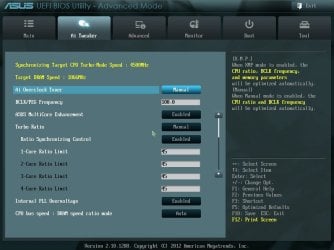
I tried finding a reset thing, but all there was, was a load optimized defaults so i did that, still doesn't look right though, here are the options i can do with the CPU

Menu name -Option1 -option2

AI overclock tuner -auto -manual -XMP
Asus multi core enhancement -enabled -disabled
Turbo ratio -auto -manual
Internal pll overvoltage -auto -manual -disabled
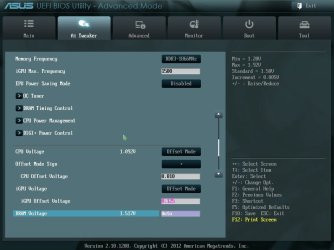
CPU bus speed DRAM speed ratio mode -auto -100:133 -100:100
Memory frequency -whole bunch of MHz numbers
Epu power saving mode -disabled -enabled
 

My Computer My Computer

At a glance

MS Windows 7 Home Premium 64-bit SP1Intel Core i7 3770K @ 3.50GHz8.00 GB Dual-Channel DDR3 @ 679MHzEVGA GeForce GTX 760 Graphic Card - 1085MHz C...
Computer type
PC/Desktop
Computer Manufacturer/Model Number
Custom Build
OS
MS Windows 7 Home Premium 64-bit SP1
CPU
Intel Core i7 3770K @ 3.50GHz
Motherboard
ASUSTeK COMPUTER INC. P8Z77-V LX (LGA1155)
Memory
8.00 GB Dual-Channel DDR3 @ 679MHz
Graphics Card(s)
EVGA GeForce GTX 760 Graphic Card - 1085MHz Core - 4GB GDDR5
Sound Card
Realtek High Definition Audio
Monitor(s) Displays
2 Acer and 1 Asus
Screen Resolution
1920x1080 and 1280x1024 ans 1280x800
Hard Drives
120GB Kingston HyperX SSD
1.8TB Western Digital
932GB Western Digital
PSU
750W Coolermaster
Case
Coolermaster 912
Cooling
3 Fans, an Extreme CoolerMaster CPU Heatsink
Keyboard
G110 Logitect Black USB Backlighting Keyboard
Mouse
Synaptics PS/2 Port TouchPad
Internet Speed
60MB p/s
Antivirus
Microsoft Security Essentials
Browser
Chrome
You want to load factory defaults, and exit SAVING changes. Then, to be on the safe side, figure out how to clear CMOS settings for your particular motherboard. The motherboard manual would tell you how to do that.
 

My Computer My Computer

At a glance

Windows 7 Professional 64bit SP1Intel Core i5-3570K @ 4.5GHzCorsair Vengeance 16GB (4x4) @1866MHz CL 9-9-...EVGA GTX 750 Ti FTW
Computer type
PC/Desktop
Computer Manufacturer/Model Number
Custom Built
OS
Windows 7 Professional 64bit SP1
CPU
Intel Core i5-3570K @ 4.5GHz
Motherboard
Asus Sabertooth Z77
Memory
Corsair Vengeance 16GB (4x4) @1866MHz CL 9-9-9-24 1T
Graphics Card(s)
EVGA GTX 750 Ti FTW
Sound Card
Onboard Audio
Monitor(s) Displays
Dell S2309W
Screen Resolution
1920x1080
Hard Drives
Samsung 830 128GB SSD - OS
(4) Seagate 5TB HDD
(1) Seagate 2TB HDD
PSU
Seasonic X750 80+ Gold Full Modular
Case
Antec Eleven Hundred Super Mid Tower
Cooling
Intel Liquid Cooler
Keyboard
Max Nighthawk X8 Mechanical keyboard
Mouse
Mionix Naos 7000
Internet Speed
50 Mbps Down / 10 Mbps Up
Antivirus
Microsoft Security Essentials/Malwarebytes Anti-Malware
Browser
Chrome/Firefox
Other Info
Klipsch ProMedia 2.1's
Asus RT-N66R Wireless Router
I tried finding a reset thing, but all there was, was a load optimized defaults so i did that, still doesn't look right though, here are the options i can do with the CPU

Menu name -Option1 -option2
AI overclock tuner -auto -manual -XMP
Asus multi core enhancement -enabled -disabled
Turbo ratio -auto -manual
Internal pll overvoltage -auto -manual -disabled
CPU bus speed DRAM speed ratio mode -auto -100:133 -100:100
Memory frequency -whole bunch of MHz numbers
Epu power saving mode -disabled -enabled

After loading optimized defaults, press F10 to save and exit.

Anyway, you can make these settings for now:

  • AI Overclock Tuner: Manual
  • Turbo Ratio: Manual
  • Internal PLL Overvoltage: Disabled
  • Memory Frequency: select what matches what your memory is rated for
  • EPU Power Saving Mode: Disabled

I don't know yet about ASUS Multi Core Enhancement or CPU Bus Speed DRAM Speed Ratio Mode.

Anyway, you should see some new options after changing some of these settings. ;)
 

My Computer My Computer

Computer type
PC/Desktop
Okay, when i reset it by the battery method, i get the same results as the one in the motherboard config
2ibybzs.jpg


So i switched it to what you said,
vdluft.jpg


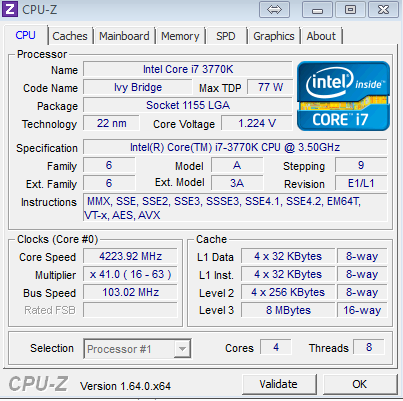
And now here is the details of the CPU (This is w/o the stress testing)
c0c10071f4bbfd1297d29ae6f91b5fa4.png
 

My Computer My Computer

At a glance

MS Windows 7 Home Premium 64-bit SP1Intel Core i7 3770K @ 3.50GHz8.00 GB Dual-Channel DDR3 @ 679MHzEVGA GeForce GTX 760 Graphic Card - 1085MHz C...
Computer type
PC/Desktop
Computer Manufacturer/Model Number
Custom Build
OS
MS Windows 7 Home Premium 64-bit SP1
CPU
Intel Core i7 3770K @ 3.50GHz
Motherboard
ASUSTeK COMPUTER INC. P8Z77-V LX (LGA1155)
Memory
8.00 GB Dual-Channel DDR3 @ 679MHz
Graphics Card(s)
EVGA GeForce GTX 760 Graphic Card - 1085MHz Core - 4GB GDDR5
Sound Card
Realtek High Definition Audio
Monitor(s) Displays
2 Acer and 1 Asus
Screen Resolution
1920x1080 and 1280x1024 ans 1280x800
Hard Drives
120GB Kingston HyperX SSD
1.8TB Western Digital
932GB Western Digital
PSU
750W Coolermaster
Case
Coolermaster 912
Cooling
3 Fans, an Extreme CoolerMaster CPU Heatsink
Keyboard
G110 Logitect Black USB Backlighting Keyboard
Mouse
Synaptics PS/2 Port TouchPad
Internet Speed
60MB p/s
Antivirus
Microsoft Security Essentials
Browser
Chrome
Oh. Uninstall AI Suite II because it may still be applying these settings. It's just like video card overclocking: it applies the settings once Windows starts the software during Windows startup.
 
Last edited:

My Computer My Computer

Computer type
PC/Desktop
Are you still using the OC Tuner feature? What did you do to get those results. And yes, uninstall AI Suite for sure.
 

My Computer My Computer

At a glance

Windows 7 Professional 64bit SP1Intel Core i5-3570K @ 4.5GHzCorsair Vengeance 16GB (4x4) @1866MHz CL 9-9-...EVGA GTX 750 Ti FTW
Computer type
PC/Desktop
Computer Manufacturer/Model Number
Custom Built
OS
Windows 7 Professional 64bit SP1
CPU
Intel Core i5-3570K @ 4.5GHz
Motherboard
Asus Sabertooth Z77
Memory
Corsair Vengeance 16GB (4x4) @1866MHz CL 9-9-9-24 1T
Graphics Card(s)
EVGA GTX 750 Ti FTW
Sound Card
Onboard Audio
Monitor(s) Displays
Dell S2309W
Screen Resolution
1920x1080
Hard Drives
Samsung 830 128GB SSD - OS
(4) Seagate 5TB HDD
(1) Seagate 2TB HDD
PSU
Seasonic X750 80+ Gold Full Modular
Case
Antec Eleven Hundred Super Mid Tower
Cooling
Intel Liquid Cooler
Keyboard
Max Nighthawk X8 Mechanical keyboard
Mouse
Mionix Naos 7000
Internet Speed
50 Mbps Down / 10 Mbps Up
Antivirus
Microsoft Security Essentials/Malwarebytes Anti-Malware
Browser
Chrome/Firefox
Other Info
Klipsch ProMedia 2.1's
Asus RT-N66R Wireless Router
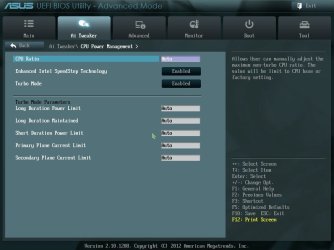
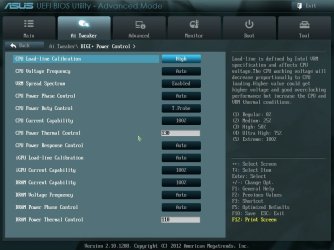
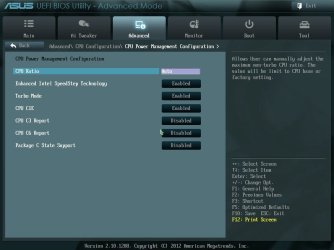
Here are screenshots of my Asus Sabertooth Z77 BIOS......some of the features will be the same, some you will not have, and you might have some I don't have. It should fundamentally be the same because your motherboard is an Asus Z77 board. You don't need to change your settings to what mine are, but it should give you an idea of what we are talking about. Instead of using the OC Tuner feature, which will OC your system automatically, you want to change the multiplier 1 notch at a time, save and reboot.....then test for stability and thermals. We have to get you back to factory defaults first. While you are in your BIOS, you can click on Exit and in the dialogue box, click on Load Optimized Defaults, save those settings and reboot. Let's try it again and see if we can get a clean slate.......your pc should NOT be overclocked at all after you load factory default settings.

Advanced Mode 1.jpgAdvanced Mode 2.jpgAdvanced Mode 3.jpg
Ai Tweaker - CPU Power Management.jpgAi Tweaker - DIGI+ Power Control.jpgAdvanced - CPU Configuration - CPU Power Management Configuration.jpg
 

My Computer My Computer

At a glance

Windows 7 Professional 64bit SP1Intel Core i5-3570K @ 4.5GHzCorsair Vengeance 16GB (4x4) @1866MHz CL 9-9-...EVGA GTX 750 Ti FTW
Computer type
PC/Desktop
Computer Manufacturer/Model Number
Custom Built
OS
Windows 7 Professional 64bit SP1
CPU
Intel Core i5-3570K @ 4.5GHz
Motherboard
Asus Sabertooth Z77
Memory
Corsair Vengeance 16GB (4x4) @1866MHz CL 9-9-9-24 1T
Graphics Card(s)
EVGA GTX 750 Ti FTW
Sound Card
Onboard Audio
Monitor(s) Displays
Dell S2309W
Screen Resolution
1920x1080
Hard Drives
Samsung 830 128GB SSD - OS
(4) Seagate 5TB HDD
(1) Seagate 2TB HDD
PSU
Seasonic X750 80+ Gold Full Modular
Case
Antec Eleven Hundred Super Mid Tower
Cooling
Intel Liquid Cooler
Keyboard
Max Nighthawk X8 Mechanical keyboard
Mouse
Mionix Naos 7000
Internet Speed
50 Mbps Down / 10 Mbps Up
Antivirus
Microsoft Security Essentials/Malwarebytes Anti-Malware
Browser
Chrome/Firefox
Other Info
Klipsch ProMedia 2.1's
Asus RT-N66R Wireless Router
Yes, there are F keys to load defaults, and exit & save, but I have fat fingered them a time or two(or thought I did) and freaked out......so I just usually use the mouse lol
 

My Computer My Computer

At a glance

Windows 7 Professional 64bit SP1Intel Core i5-3570K @ 4.5GHzCorsair Vengeance 16GB (4x4) @1866MHz CL 9-9-...EVGA GTX 750 Ti FTW
Computer type
PC/Desktop
Computer Manufacturer/Model Number
Custom Built
OS
Windows 7 Professional 64bit SP1
CPU
Intel Core i5-3570K @ 4.5GHz
Motherboard
Asus Sabertooth Z77
Memory
Corsair Vengeance 16GB (4x4) @1866MHz CL 9-9-9-24 1T
Graphics Card(s)
EVGA GTX 750 Ti FTW
Sound Card
Onboard Audio
Monitor(s) Displays
Dell S2309W
Screen Resolution
1920x1080
Hard Drives
Samsung 830 128GB SSD - OS
(4) Seagate 5TB HDD
(1) Seagate 2TB HDD
PSU
Seasonic X750 80+ Gold Full Modular
Case
Antec Eleven Hundred Super Mid Tower
Cooling
Intel Liquid Cooler
Keyboard
Max Nighthawk X8 Mechanical keyboard
Mouse
Mionix Naos 7000
Internet Speed
50 Mbps Down / 10 Mbps Up
Antivirus
Microsoft Security Essentials/Malwarebytes Anti-Malware
Browser
Chrome/Firefox
Other Info
Klipsch ProMedia 2.1's
Asus RT-N66R Wireless Router
Yes, there are F keys to load defaults, and exit & save, but I have fat fingered them a time or two(or thought I did) and freaked out......so I just usually use the mouse lol

hehehe I have some pretty fat fingers too. :) Sometimes I think they just have minds of their own!
 

My Computer My Computer

Computer type
PC/Desktop
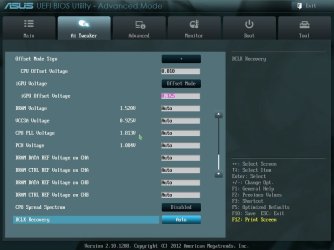
Okay, i have gotten the default bios settings back to normal, i think.
1zl66i0.jpg

douc0z.jpg

c88k8.jpg


Now here are specs
7832b0e0d122a91624cd77c72b9519ed.png
 

My Computer My Computer

At a glance

MS Windows 7 Home Premium 64-bit SP1Intel Core i7 3770K @ 3.50GHz8.00 GB Dual-Channel DDR3 @ 679MHzEVGA GeForce GTX 760 Graphic Card - 1085MHz C...
Computer type
PC/Desktop
Computer Manufacturer/Model Number
Custom Build
OS
MS Windows 7 Home Premium 64-bit SP1
CPU
Intel Core i7 3770K @ 3.50GHz
Motherboard
ASUSTeK COMPUTER INC. P8Z77-V LX (LGA1155)
Memory
8.00 GB Dual-Channel DDR3 @ 679MHz
Graphics Card(s)
EVGA GeForce GTX 760 Graphic Card - 1085MHz Core - 4GB GDDR5
Sound Card
Realtek High Definition Audio
Monitor(s) Displays
2 Acer and 1 Asus
Screen Resolution
1920x1080 and 1280x1024 ans 1280x800
Hard Drives
120GB Kingston HyperX SSD
1.8TB Western Digital
932GB Western Digital
PSU
750W Coolermaster
Case
Coolermaster 912
Cooling
3 Fans, an Extreme CoolerMaster CPU Heatsink
Keyboard
G110 Logitect Black USB Backlighting Keyboard
Mouse
Synaptics PS/2 Port TouchPad
Internet Speed
60MB p/s
Antivirus
Microsoft Security Essentials
Browser
Chrome
Based on your CPU-Z screenshot, I think you still have AI Suite II installed. I recommend uninstalling it because it is very likely resulting in what you're seeing in CPU-Z due to applying settings.

Also, you can take actual screenshots of the BIOS by pressing F12 while a USB flash drive is connected. The only thing you will have to do is you will have to re-save them as .PNG files in Microsoft Paint. Also, when you take screenshots in the BIOS, what you see is what you get. So be sure to scroll and take additional screenshots to capture everything.

Last but not least, Alt+Print Screen captures just the active Window. So when you take screenshots of things like CPU-Z, press Alt+Print Screen.
 

My Computer My Computer

Computer type
PC/Desktop
How do i uninstall this AI Suite II You speak of?
 

My Computer My Computer

At a glance

MS Windows 7 Home Premium 64-bit SP1Intel Core i7 3770K @ 3.50GHz8.00 GB Dual-Channel DDR3 @ 679MHzEVGA GeForce GTX 760 Graphic Card - 1085MHz C...
Computer type
PC/Desktop
Computer Manufacturer/Model Number
Custom Build
OS
MS Windows 7 Home Premium 64-bit SP1
CPU
Intel Core i7 3770K @ 3.50GHz
Motherboard
ASUSTeK COMPUTER INC. P8Z77-V LX (LGA1155)
Memory
8.00 GB Dual-Channel DDR3 @ 679MHz
Graphics Card(s)
EVGA GeForce GTX 760 Graphic Card - 1085MHz Core - 4GB GDDR5
Sound Card
Realtek High Definition Audio
Monitor(s) Displays
2 Acer and 1 Asus
Screen Resolution
1920x1080 and 1280x1024 ans 1280x800
Hard Drives
120GB Kingston HyperX SSD
1.8TB Western Digital
932GB Western Digital
PSU
750W Coolermaster
Case
Coolermaster 912
Cooling
3 Fans, an Extreme CoolerMaster CPU Heatsink
Keyboard
G110 Logitect Black USB Backlighting Keyboard
Mouse
Synaptics PS/2 Port TouchPad
Internet Speed
60MB p/s
Antivirus
Microsoft Security Essentials
Browser
Chrome
How do i uninstall this AI Suite II You speak of?

If it's actually installed, and it looks like it might be, go into the Programs and Features control panel and look for "AI Suite II'. Double-click it and then confirm that you do want to install it.

Then reboot and check CPU-Z again. If CPU-Z is still showing that it's overclocked (in the lower-left portion of CPU-Z's interface), then there may be something else we can do.
 

My Computer My Computer

Computer type
PC/Desktop
Its not there.
 

My Computer My Computer

At a glance

MS Windows 7 Home Premium 64-bit SP1Intel Core i7 3770K @ 3.50GHz8.00 GB Dual-Channel DDR3 @ 679MHzEVGA GeForce GTX 760 Graphic Card - 1085MHz C...
Computer type
PC/Desktop
Computer Manufacturer/Model Number
Custom Build
OS
MS Windows 7 Home Premium 64-bit SP1
CPU
Intel Core i7 3770K @ 3.50GHz
Motherboard
ASUSTeK COMPUTER INC. P8Z77-V LX (LGA1155)
Memory
8.00 GB Dual-Channel DDR3 @ 679MHz
Graphics Card(s)
EVGA GeForce GTX 760 Graphic Card - 1085MHz Core - 4GB GDDR5
Sound Card
Realtek High Definition Audio
Monitor(s) Displays
2 Acer and 1 Asus
Screen Resolution
1920x1080 and 1280x1024 ans 1280x800
Hard Drives
120GB Kingston HyperX SSD
1.8TB Western Digital
932GB Western Digital
PSU
750W Coolermaster
Case
Coolermaster 912
Cooling
3 Fans, an Extreme CoolerMaster CPU Heatsink
Keyboard
G110 Logitect Black USB Backlighting Keyboard
Mouse
Synaptics PS/2 Port TouchPad
Internet Speed
60MB p/s
Antivirus
Microsoft Security Essentials
Browser
Chrome
Do you have an "ASUS" folder in C:\Program Files (86) or even just C:\Program Files?
 

My Computer My Computer

Computer type
PC/Desktop
Nope
 

My Computer My Computer

At a glance

MS Windows 7 Home Premium 64-bit SP1Intel Core i7 3770K @ 3.50GHz8.00 GB Dual-Channel DDR3 @ 679MHzEVGA GeForce GTX 760 Graphic Card - 1085MHz C...
Computer type
PC/Desktop
Computer Manufacturer/Model Number
Custom Build
OS
MS Windows 7 Home Premium 64-bit SP1
CPU
Intel Core i7 3770K @ 3.50GHz
Motherboard
ASUSTeK COMPUTER INC. P8Z77-V LX (LGA1155)
Memory
8.00 GB Dual-Channel DDR3 @ 679MHz
Graphics Card(s)
EVGA GeForce GTX 760 Graphic Card - 1085MHz Core - 4GB GDDR5
Sound Card
Realtek High Definition Audio
Monitor(s) Displays
2 Acer and 1 Asus
Screen Resolution
1920x1080 and 1280x1024 ans 1280x800
Hard Drives
120GB Kingston HyperX SSD
1.8TB Western Digital
932GB Western Digital
PSU
750W Coolermaster
Case
Coolermaster 912
Cooling
3 Fans, an Extreme CoolerMaster CPU Heatsink
Keyboard
G110 Logitect Black USB Backlighting Keyboard
Mouse
Synaptics PS/2 Port TouchPad
Internet Speed
60MB p/s
Antivirus
Microsoft Security Essentials
Browser
Chrome
Back
Top