Want to get into overclocking, don't know where to start.

My Computer My Computer

At a glance

MS Windows 7 Home Premium 64-bit SP1Intel Core i7 3770K @ 3.50GHz8.00 GB Dual-Channel DDR3 @ 679MHzEVGA GeForce GTX 760 Graphic Card - 1085MHz C...
Computer type
PC/Desktop
Computer Manufacturer/Model Number
Custom Build
OS
MS Windows 7 Home Premium 64-bit SP1
CPU
Intel Core i7 3770K @ 3.50GHz
Motherboard
ASUSTeK COMPUTER INC. P8Z77-V LX (LGA1155)
Memory
8.00 GB Dual-Channel DDR3 @ 679MHz
Graphics Card(s)
EVGA GeForce GTX 760 Graphic Card - 1085MHz Core - 4GB GDDR5
Sound Card
Realtek High Definition Audio
Monitor(s) Displays
2 Acer and 1 Asus
Screen Resolution
1920x1080 and 1280x1024 ans 1280x800
Hard Drives
120GB Kingston HyperX SSD
1.8TB Western Digital
932GB Western Digital
PSU
750W Coolermaster
Case
Coolermaster 912
Cooling
3 Fans, an Extreme CoolerMaster CPU Heatsink
Keyboard
G110 Logitect Black USB Backlighting Keyboard
Mouse
Synaptics PS/2 Port TouchPad
Internet Speed
60MB p/s
Antivirus
Microsoft Security Essentials
Browser
Chrome
Have you ever used "OC Tuner" in the BIOS?

No, i havent. But im a fast learner.

Well, I'm trying to find out why CPU-Z is reporting this:


Core Speed: 4223.89 MHz

Multiplier: x 41.0

Bus Speed: 103.02 MHz


With your current settings in the BIOS, the multiplier shouldn't be that high and the bus speed should be at 100.0 MHz. Do you have any CPU overclocking software installed at all?
 

My Computer My Computer

Computer type
PC/Desktop
Have you ever used "OC Tuner" in the BIOS?

No, i havent. But im a fast learner.

Well, I'm trying to find out why CPU-Z is reporting this:


Core Speed: 4223.89 MHz

Multiplier: x 41.0

Bus Speed: 103.02 MHz


The multiplier shouldn't be that high and the bus speed should be at 100.0 MHz. Do you have any CPU overclocking software installed at all?


No, here is a full list of the programs i have installed. If that helps.
fb742989e3888364d52a812f1d8234bd.png

baec1203daee4e065e76a1de5450b177.png

8b8ae6ff04d8ba345caebcef66e58ab8.png

c12c6171785089cc5b585a7e0d1b3485.png
 

My Computer My Computer

At a glance

MS Windows 7 Home Premium 64-bit SP1Intel Core i7 3770K @ 3.50GHz8.00 GB Dual-Channel DDR3 @ 679MHzEVGA GeForce GTX 760 Graphic Card - 1085MHz C...
Computer type
PC/Desktop
Computer Manufacturer/Model Number
Custom Build
OS
MS Windows 7 Home Premium 64-bit SP1
CPU
Intel Core i7 3770K @ 3.50GHz
Motherboard
ASUSTeK COMPUTER INC. P8Z77-V LX (LGA1155)
Memory
8.00 GB Dual-Channel DDR3 @ 679MHz
Graphics Card(s)
EVGA GeForce GTX 760 Graphic Card - 1085MHz Core - 4GB GDDR5
Sound Card
Realtek High Definition Audio
Monitor(s) Displays
2 Acer and 1 Asus
Screen Resolution
1920x1080 and 1280x1024 ans 1280x800
Hard Drives
120GB Kingston HyperX SSD
1.8TB Western Digital
932GB Western Digital
PSU
750W Coolermaster
Case
Coolermaster 912
Cooling
3 Fans, an Extreme CoolerMaster CPU Heatsink
Keyboard
G110 Logitect Black USB Backlighting Keyboard
Mouse
Synaptics PS/2 Port TouchPad
Internet Speed
60MB p/s
Antivirus
Microsoft Security Essentials
Browser
Chrome
I think i just found something, half of the time the core speed is around 1648.22 and the multiplier is x16, then it goes right back up to the one around 4000 in a minute, when im not even doing anything.
8a0e27dce3e8ad15e15b0498cc2e678b.png

7d929b93ab83b3ce3e0c92d1456fff28.png
 

My Computer My Computer

At a glance

MS Windows 7 Home Premium 64-bit SP1Intel Core i7 3770K @ 3.50GHz8.00 GB Dual-Channel DDR3 @ 679MHzEVGA GeForce GTX 760 Graphic Card - 1085MHz C...
Computer type
PC/Desktop
Computer Manufacturer/Model Number
Custom Build
OS
MS Windows 7 Home Premium 64-bit SP1
CPU
Intel Core i7 3770K @ 3.50GHz
Motherboard
ASUSTeK COMPUTER INC. P8Z77-V LX (LGA1155)
Memory
8.00 GB Dual-Channel DDR3 @ 679MHz
Graphics Card(s)
EVGA GeForce GTX 760 Graphic Card - 1085MHz Core - 4GB GDDR5
Sound Card
Realtek High Definition Audio
Monitor(s) Displays
2 Acer and 1 Asus
Screen Resolution
1920x1080 and 1280x1024 ans 1280x800
Hard Drives
120GB Kingston HyperX SSD
1.8TB Western Digital
932GB Western Digital
PSU
750W Coolermaster
Case
Coolermaster 912
Cooling
3 Fans, an Extreme CoolerMaster CPU Heatsink
Keyboard
G110 Logitect Black USB Backlighting Keyboard
Mouse
Synaptics PS/2 Port TouchPad
Internet Speed
60MB p/s
Antivirus
Microsoft Security Essentials
Browser
Chrome

My Computer My Computer

At a glance

MS Windows 7 Home Premium 64-bit SP1Intel Core i7 3770K @ 3.50GHz8.00 GB Dual-Channel DDR3 @ 679MHzEVGA GeForce GTX 760 Graphic Card - 1085MHz C...
Computer type
PC/Desktop
Computer Manufacturer/Model Number
Custom Build
OS
MS Windows 7 Home Premium 64-bit SP1
CPU
Intel Core i7 3770K @ 3.50GHz
Motherboard
ASUSTeK COMPUTER INC. P8Z77-V LX (LGA1155)
Memory
8.00 GB Dual-Channel DDR3 @ 679MHz
Graphics Card(s)
EVGA GeForce GTX 760 Graphic Card - 1085MHz Core - 4GB GDDR5
Sound Card
Realtek High Definition Audio
Monitor(s) Displays
2 Acer and 1 Asus
Screen Resolution
1920x1080 and 1280x1024 ans 1280x800
Hard Drives
120GB Kingston HyperX SSD
1.8TB Western Digital
932GB Western Digital
PSU
750W Coolermaster
Case
Coolermaster 912
Cooling
3 Fans, an Extreme CoolerMaster CPU Heatsink
Keyboard
G110 Logitect Black USB Backlighting Keyboard
Mouse
Synaptics PS/2 Port TouchPad
Internet Speed
60MB p/s
Antivirus
Microsoft Security Essentials
Browser
Chrome
Wow. No overclocking software installed.

Did you build your computer, or did someone else build it?


Edit: At stock, the multiplier shouldn't go above x 39.0 and the Bus Speed (which is the "BCLK") shouldn't go above 100.0 MHz. It shouldn't change at all really, except for very tiny fluctuations which you'll always see. So, it looks overclocked to me.
 

My Computer My Computer

Computer type
PC/Desktop
Wow. No overclocking software installed.

Did you build your computer, or did someone else build it?

Me and my father built it. Also read the two post up above yours, maybe there is something in that?
 

My Computer My Computer

At a glance

MS Windows 7 Home Premium 64-bit SP1Intel Core i7 3770K @ 3.50GHz8.00 GB Dual-Channel DDR3 @ 679MHzEVGA GeForce GTX 760 Graphic Card - 1085MHz C...
Computer type
PC/Desktop
Computer Manufacturer/Model Number
Custom Build
OS
MS Windows 7 Home Premium 64-bit SP1
CPU
Intel Core i7 3770K @ 3.50GHz
Motherboard
ASUSTeK COMPUTER INC. P8Z77-V LX (LGA1155)
Memory
8.00 GB Dual-Channel DDR3 @ 679MHz
Graphics Card(s)
EVGA GeForce GTX 760 Graphic Card - 1085MHz Core - 4GB GDDR5
Sound Card
Realtek High Definition Audio
Monitor(s) Displays
2 Acer and 1 Asus
Screen Resolution
1920x1080 and 1280x1024 ans 1280x800
Hard Drives
120GB Kingston HyperX SSD
1.8TB Western Digital
932GB Western Digital
PSU
750W Coolermaster
Case
Coolermaster 912
Cooling
3 Fans, an Extreme CoolerMaster CPU Heatsink
Keyboard
G110 Logitect Black USB Backlighting Keyboard
Mouse
Synaptics PS/2 Port TouchPad
Internet Speed
60MB p/s
Antivirus
Microsoft Security Essentials
Browser
Chrome
Wow. No overclocking software installed.

Did you build your computer, or did someone else build it?

Me and my father built it. Also read the two post up above yours, maybe there is something in that?
Well at stock, the multiplier shouldn't go above x 39.0 and the Bus Speed (which is the "BCLK") shouldn't go above 100.0 MHz. It shouldn't change at all really, except for very tiny fluctuations which you'll always see. So, it looks overclocked to me.

Do you know if he attempted to overclock this for you at all?
 

My Computer My Computer

Computer type
PC/Desktop
Wow. No overclocking software installed.

Did you build your computer, or did someone else build it?

Me and my father built it. Also read the two post up above yours, maybe there is something in that?
Well at stock, the multiplier shouldn't go above x 39.0 and the Bus Speed (which is the "BCLK") shouldn't go above 100.0 MHz. It shouldn't change at all really, except for very tiny fluctuations which you'll always see. So, it looks overclocked to me.

Do you know if he attempted to overclock this for you at all?

I am 100% sure he didnt.
 

My Computer My Computer

At a glance

MS Windows 7 Home Premium 64-bit SP1Intel Core i7 3770K @ 3.50GHz8.00 GB Dual-Channel DDR3 @ 679MHzEVGA GeForce GTX 760 Graphic Card - 1085MHz C...
Computer type
PC/Desktop
Computer Manufacturer/Model Number
Custom Build
OS
MS Windows 7 Home Premium 64-bit SP1
CPU
Intel Core i7 3770K @ 3.50GHz
Motherboard
ASUSTeK COMPUTER INC. P8Z77-V LX (LGA1155)
Memory
8.00 GB Dual-Channel DDR3 @ 679MHz
Graphics Card(s)
EVGA GeForce GTX 760 Graphic Card - 1085MHz Core - 4GB GDDR5
Sound Card
Realtek High Definition Audio
Monitor(s) Displays
2 Acer and 1 Asus
Screen Resolution
1920x1080 and 1280x1024 ans 1280x800
Hard Drives
120GB Kingston HyperX SSD
1.8TB Western Digital
932GB Western Digital
PSU
750W Coolermaster
Case
Coolermaster 912
Cooling
3 Fans, an Extreme CoolerMaster CPU Heatsink
Keyboard
G110 Logitect Black USB Backlighting Keyboard
Mouse
Synaptics PS/2 Port TouchPad
Internet Speed
60MB p/s
Antivirus
Microsoft Security Essentials
Browser
Chrome
Me and my father built it. Also read the two post up above yours, maybe there is something in that?
Well at stock, the multiplier shouldn't go above x 39.0 and the Bus Speed (which is the "BCLK") shouldn't go above 100.0 MHz. It shouldn't change at all really, except for very tiny fluctuations which you'll always see. So, it looks overclocked to me.

Do you know if he attempted to overclock this for you at all?

I am 100% sure he didnt.

Weird.

When you changed the settings in the BIOS the last time, you definitely saved before exiting? I just find it weird that it's overclocked a little bit already.
 

My Computer My Computer

Computer type
PC/Desktop
Well at stock, the multiplier shouldn't go above x 39.0 and the Bus Speed (which is the "BCLK") shouldn't go above 100.0 MHz. It shouldn't change at all really, except for very tiny fluctuations which you'll always see. So, it looks overclocked to me.

Do you know if he attempted to overclock this for you at all?

I am 100% sure he didnt.

Weird.

When you changed the settings in the BIOS the last time, you definitely saved before exiting? I just find it weird that it's overclocked a little bit already.

Yes i definatly saved, i will go through the bios again and look for anything else, but is it normal for my proccesser core speed to go from 1648MHz straight up to 4223MHz, same with the bus speed in a blink of an eye?
 

My Computer My Computer

At a glance

MS Windows 7 Home Premium 64-bit SP1Intel Core i7 3770K @ 3.50GHz8.00 GB Dual-Channel DDR3 @ 679MHzEVGA GeForce GTX 760 Graphic Card - 1085MHz C...
Computer type
PC/Desktop
Computer Manufacturer/Model Number
Custom Build
OS
MS Windows 7 Home Premium 64-bit SP1
CPU
Intel Core i7 3770K @ 3.50GHz
Motherboard
ASUSTeK COMPUTER INC. P8Z77-V LX (LGA1155)
Memory
8.00 GB Dual-Channel DDR3 @ 679MHz
Graphics Card(s)
EVGA GeForce GTX 760 Graphic Card - 1085MHz Core - 4GB GDDR5
Sound Card
Realtek High Definition Audio
Monitor(s) Displays
2 Acer and 1 Asus
Screen Resolution
1920x1080 and 1280x1024 ans 1280x800
Hard Drives
120GB Kingston HyperX SSD
1.8TB Western Digital
932GB Western Digital
PSU
750W Coolermaster
Case
Coolermaster 912
Cooling
3 Fans, an Extreme CoolerMaster CPU Heatsink
Keyboard
G110 Logitect Black USB Backlighting Keyboard
Mouse
Synaptics PS/2 Port TouchPad
Internet Speed
60MB p/s
Antivirus
Microsoft Security Essentials
Browser
Chrome
I am 100% sure he didnt.

Weird.

When you changed the settings in the BIOS the last time, you definitely saved before exiting? I just find it weird that it's overclocked a little bit already.

Yes i definatly saved, i will go through the bios again and look for anything else, but is it normal for my proccesser core speed to go from 1648MHz straight up to 4223MHz, same with the bus speed in a blink of an eye?

When under load at stock, it's supposed to dynamically adjust between 3.5 GHz and 3.9 GHz and the BCLK (the "Bus Speed") is supposed to stay at about 100.0 MHz. This is why it looks a little overclocked to me and so I'm confused. When it's idling, it's supposed to be at 1.6 GHz (Bus Speed at 100.0 MHz, multiplier at x 16.0).
 

My Computer My Computer

Computer type
PC/Desktop
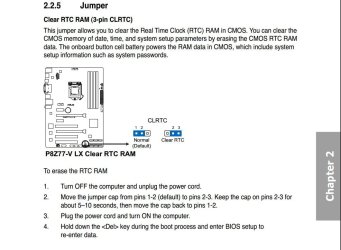
No, you want a variable CPU frequency, that is not the problem. The problem is, after resetting your BIOS to factory defaults, you SHOULD have a base clock of 100MHz, and a CPU frequency of either 1600MHz or whatever it spools up to.....4223MHz is exactly what you come up with by using some auto overclocking feature......it shouldn't read that. I want you to reboot and go back into your BIOS, load factory defaults again, and make sure you save settings when you exit(if you are unsure about either of those steps, please say so...I need to know that this was done correctly). Allow it to reboot, and then when you are able, Shutdown your PC completely. When it is shut down, unplug the power supplies power cord and hold the Power On button until you don't see any LED lights lit up on the motherboard. Ok, the following is VERY important, you can't rush this and just dig in there or you may damage something. I have attached a page directly from your motherboard's manual that shows you how to clear the CMOS settings. After you have everything powered down, you want to pull the little plastic jumper from the first two pins, and carefully replace it over pins 2 and 3. I found it is best to use a long set of tweezers to do this, just being careful you don't slip and poke the motherboard. After you place it on pins 2 and 3, leave it there for 10-15 seconds and then put it back where it was originally. Plug the power cable back in, and flip the switch on the back of the PSU(if you flipped it prior) and power on your system. Press the Delete key to get back into your BIOS, and once again load factory defaults and save and exit. Restart and let it load Windows, and let us know what CPU-Z says.

Clear CMOS Instructions.JPG
 

My Computer My Computer

At a glance

Windows 7 Professional 64bit SP1Intel Core i5-3570K @ 4.5GHzCorsair Vengeance 16GB (4x4) @1866MHz CL 9-9-...EVGA GTX 750 Ti FTW
Computer type
PC/Desktop
Computer Manufacturer/Model Number
Custom Built
OS
Windows 7 Professional 64bit SP1
CPU
Intel Core i5-3570K @ 4.5GHz
Motherboard
Asus Sabertooth Z77
Memory
Corsair Vengeance 16GB (4x4) @1866MHz CL 9-9-9-24 1T
Graphics Card(s)
EVGA GTX 750 Ti FTW
Sound Card
Onboard Audio
Monitor(s) Displays
Dell S2309W
Screen Resolution
1920x1080
Hard Drives
Samsung 830 128GB SSD - OS
(4) Seagate 5TB HDD
(1) Seagate 2TB HDD
PSU
Seasonic X750 80+ Gold Full Modular
Case
Antec Eleven Hundred Super Mid Tower
Cooling
Intel Liquid Cooler
Keyboard
Max Nighthawk X8 Mechanical keyboard
Mouse
Mionix Naos 7000
Internet Speed
50 Mbps Down / 10 Mbps Up
Antivirus
Microsoft Security Essentials/Malwarebytes Anti-Malware
Browser
Chrome/Firefox
Other Info
Klipsch ProMedia 2.1's
Asus RT-N66R Wireless Router
Yes, it is suppose to change depending on the load on the CPU. We are saying that it is showing it is Overclocked still. Go through the process above and that should fix it. If you have ANY questions about it, ask before you start, please.
 

My Computer My Computer

At a glance

Windows 7 Professional 64bit SP1Intel Core i5-3570K @ 4.5GHzCorsair Vengeance 16GB (4x4) @1866MHz CL 9-9-...EVGA GTX 750 Ti FTW
Computer type
PC/Desktop
Computer Manufacturer/Model Number
Custom Built
OS
Windows 7 Professional 64bit SP1
CPU
Intel Core i5-3570K @ 4.5GHz
Motherboard
Asus Sabertooth Z77
Memory
Corsair Vengeance 16GB (4x4) @1866MHz CL 9-9-9-24 1T
Graphics Card(s)
EVGA GTX 750 Ti FTW
Sound Card
Onboard Audio
Monitor(s) Displays
Dell S2309W
Screen Resolution
1920x1080
Hard Drives
Samsung 830 128GB SSD - OS
(4) Seagate 5TB HDD
(1) Seagate 2TB HDD
PSU
Seasonic X750 80+ Gold Full Modular
Case
Antec Eleven Hundred Super Mid Tower
Cooling
Intel Liquid Cooler
Keyboard
Max Nighthawk X8 Mechanical keyboard
Mouse
Mionix Naos 7000
Internet Speed
50 Mbps Down / 10 Mbps Up
Antivirus
Microsoft Security Essentials/Malwarebytes Anti-Malware
Browser
Chrome/Firefox
Other Info
Klipsch ProMedia 2.1's
Asus RT-N66R Wireless Router
I read your post brady, and i will do that if it is still wrong. I played around with some more settings in the Bios, and i got the bus speed down from 103 to 100.
22edac0d75ecfef1240cda7dfa063688.png
 

My Computer My Computer

At a glance

MS Windows 7 Home Premium 64-bit SP1Intel Core i7 3770K @ 3.50GHz8.00 GB Dual-Channel DDR3 @ 679MHzEVGA GeForce GTX 760 Graphic Card - 1085MHz C...
Computer type
PC/Desktop
Computer Manufacturer/Model Number
Custom Build
OS
MS Windows 7 Home Premium 64-bit SP1
CPU
Intel Core i7 3770K @ 3.50GHz
Motherboard
ASUSTeK COMPUTER INC. P8Z77-V LX (LGA1155)
Memory
8.00 GB Dual-Channel DDR3 @ 679MHz
Graphics Card(s)
EVGA GeForce GTX 760 Graphic Card - 1085MHz Core - 4GB GDDR5
Sound Card
Realtek High Definition Audio
Monitor(s) Displays
2 Acer and 1 Asus
Screen Resolution
1920x1080 and 1280x1024 ans 1280x800
Hard Drives
120GB Kingston HyperX SSD
1.8TB Western Digital
932GB Western Digital
PSU
750W Coolermaster
Case
Coolermaster 912
Cooling
3 Fans, an Extreme CoolerMaster CPU Heatsink
Keyboard
G110 Logitect Black USB Backlighting Keyboard
Mouse
Synaptics PS/2 Port TouchPad
Internet Speed
60MB p/s
Antivirus
Microsoft Security Essentials
Browser
Chrome
Just to add, I personally recommend turning the PSU off before unplugging the PSU's power cable. Give it about 5-7 seconds after turning the PSU off before unplugging the cable.
 

My Computer My Computer

Computer type
PC/Desktop
Yeah, in my attempt to get the process down, I forgot to say turn it off.......Thanks:)
 

My Computer My Computer

At a glance

Windows 7 Professional 64bit SP1Intel Core i5-3570K @ 4.5GHzCorsair Vengeance 16GB (4x4) @1866MHz CL 9-9-...EVGA GTX 750 Ti FTW
Computer type
PC/Desktop
Computer Manufacturer/Model Number
Custom Built
OS
Windows 7 Professional 64bit SP1
CPU
Intel Core i5-3570K @ 4.5GHz
Motherboard
Asus Sabertooth Z77
Memory
Corsair Vengeance 16GB (4x4) @1866MHz CL 9-9-9-24 1T
Graphics Card(s)
EVGA GTX 750 Ti FTW
Sound Card
Onboard Audio
Monitor(s) Displays
Dell S2309W
Screen Resolution
1920x1080
Hard Drives
Samsung 830 128GB SSD - OS
(4) Seagate 5TB HDD
(1) Seagate 2TB HDD
PSU
Seasonic X750 80+ Gold Full Modular
Case
Antec Eleven Hundred Super Mid Tower
Cooling
Intel Liquid Cooler
Keyboard
Max Nighthawk X8 Mechanical keyboard
Mouse
Mionix Naos 7000
Internet Speed
50 Mbps Down / 10 Mbps Up
Antivirus
Microsoft Security Essentials/Malwarebytes Anti-Malware
Browser
Chrome/Firefox
Other Info
Klipsch ProMedia 2.1's
Asus RT-N66R Wireless Router
Oh, wait a minute.

  1. Change Ai Overclock Tuner to Auto
  2. Change Turbo Ratio to Auto
If this doesn't work, then there's one more thing in the BIOS that I want to change, but I don't know if it will work for this yet.
 

My Computer My Computer

Computer type
PC/Desktop
No, you want a variable CPU frequency, that is not the problem. The problem is, after resetting your BIOS to factory defaults, you SHOULD have a base clock of 100MHz, and a CPU frequency of either 1600MHz or whatever it spools up to.....4223MHz is exactly what you come up with by using some auto overclocking feature......


Is this correct then?
 

My Computer My Computer

At a glance

MS Windows 7 Home Premium 64-bit SP1Intel Core i7 3770K @ 3.50GHz8.00 GB Dual-Channel DDR3 @ 679MHzEVGA GeForce GTX 760 Graphic Card - 1085MHz C...
Computer type
PC/Desktop
Computer Manufacturer/Model Number
Custom Build
OS
MS Windows 7 Home Premium 64-bit SP1
CPU
Intel Core i7 3770K @ 3.50GHz
Motherboard
ASUSTeK COMPUTER INC. P8Z77-V LX (LGA1155)
Memory
8.00 GB Dual-Channel DDR3 @ 679MHz
Graphics Card(s)
EVGA GeForce GTX 760 Graphic Card - 1085MHz Core - 4GB GDDR5
Sound Card
Realtek High Definition Audio
Monitor(s) Displays
2 Acer and 1 Asus
Screen Resolution
1920x1080 and 1280x1024 ans 1280x800
Hard Drives
120GB Kingston HyperX SSD
1.8TB Western Digital
932GB Western Digital
PSU
750W Coolermaster
Case
Coolermaster 912
Cooling
3 Fans, an Extreme CoolerMaster CPU Heatsink
Keyboard
G110 Logitect Black USB Backlighting Keyboard
Mouse
Synaptics PS/2 Port TouchPad
Internet Speed
60MB p/s
Antivirus
Microsoft Security Essentials
Browser
Chrome
No, you want a variable CPU frequency, that is not the problem. The problem is, after resetting your BIOS to factory defaults, you SHOULD have a base clock of 100MHz, and a CPU frequency of either 1600MHz or whatever it spools up to.....4223MHz is exactly what you come up with by using some auto overclocking feature......
Is this correct then?

It should never show anything higher than this:

Core Speed: 3900.00 MHz
Multiplier: x 39.0
Bus Speed: 100.00 MHz

Very tiny fluctuations are normal.

Anyway, I'm about to begin eating some potato chips because it's the last part of my dinner. So, I'll be a bit handicapped for a while here. My responses may seem a little slower.
 

My Computer My Computer

Computer type
PC/Desktop
Back
Top