Want to remove XP from my Windows 7 Dual Boot...running into problems.

Suarez

New member
Local time
9:47 PM
Messages
11
Hi,

I followed this guide.

How to Completely Remove a Windows XP Partition From a Dual Boot With Windows 7 | eHow.com

When I got to the part where I had to make partition 2 'active' it said:

"the specified partition type is not valid for this operation"

Windows then failed to boot. So I repaired and it worked, but my XP partition is still there.

Here are my discs:

S93J1Zg.jpg


What should I do? Thank you!
 

My Computer My Computer

At a glance

Windows 7 X64
OS
Windows 7 X64
The thing is...I cannot set my Windows 7 partition as 'active' - which is basically one of the 1st steps in that guide. It is greyed out in windows and of course, as mentioned above, it failed in the repair console too.
 

My Computer My Computer

At a glance

Windows 7 X64
OS
Windows 7 X64
Hmmm...I guess it is because my Windows 7 install is on a 'logical' drive, that is why I cannot easily convert it to active.

So...if I was to make a backup of just the Windows 7 drive in Acronis or something....could I then format the entire HDD then reinstall just the Windows 7 image?

Would that work? What software is best?

Thank you.
 

My Computer My Computer

At a glance

Windows 7 X64
OS
Windows 7 X64
You'll need to convert C to Primary first which is easy using our favorite tool here: How to set partition as Primary or Logical.

Then mark it Active: How to Set Active/Inactive partition -Partition Wizard Video Help.

Then from the booted Win7 DVD or System Repair Disk run Startup Repair - Run up to 3 Separate Times until Win7 boots and holds the System Active Boot flags.

Finally you can delete XP partition and recover its space into C if you want, so that Win7 benefits from having the better placement on left hand side of the HD: Partition Wizard Resize Partition - Video Help.
 
Thank you, I will give this a go now.
 

My Computer My Computer

At a glance

Windows 7 X64
OS
Windows 7 X64
Thank you gregrocker, this worked perfectly.

Windows XP now gone. Shows up as unallocated space.

Slightly confused about the last part though.

I now have 100GB unallocated space before my Windows 7 partition.

If I want to move my Windows 7 partition to the left, how do I do this? Or indeed, I would rather just merge them. The video doesn't seem to quite cover it.

Thanks again.
 

My Computer My Computer

At a glance

Windows 7 X64
OS
Windows 7 X64
Thank you gregrocker, this worked perfectly.

Windows XP now gone. Shows up as unallocated space.

Slightly confused about the last part though.

I now have 100GB unallocated space before my Windows 7 partition.

If I want to move my Windows 7 partition to the left, how do I do this? Or indeed, I would rather just merge them. The video doesn't seem to quite cover it.

Thanks again.

Edit: Is it that I have to reduce the unallocated space to a bare minimum, then add the bulk of it to the Windows 7 partition? So I will always have a little bit of space to the left before the Windows 7 partition?

-sorry, double post-
 

My Computer My Computer

At a glance

Windows 7 X64
OS
Windows 7 X64
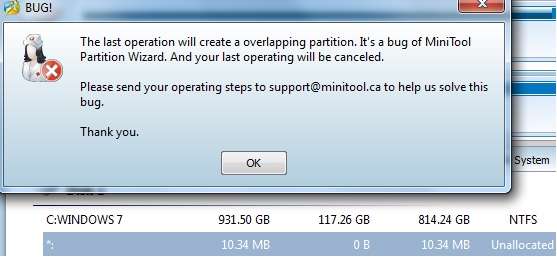
That's what I get when I try it:

Xp3Vg3i.jpg
 

My Computer My Computer

At a glance

Windows 7 X64
OS
Windows 7 X64
Thanks.

Works with the boot CD.

All sorted now. Moved to the left.

It did indeed leave 30mb unallocated space at the beginning of the drive.
 

My Computer My Computer

At a glance

Windows 7 X64
OS
Windows 7 X64
Hmmm...I guess it is because my Windows 7 install is on a 'logical' drive, that is why I cannot easily convert it to active.

So...if I was to make a backup of just the Windows 7 drive in Acronis or something....could I then format the entire HDD then reinstall just the Windows 7 image?

Would that work? What software is best?

Thank you.

The 1st thing theog told you to do was, the partition MUST BE MADE PRIMARY.

Glad you got it working. :)
 

My Computer My Computer

At a glance

Windows 10 Pro x64Intel Core i7 6700KGSkill TridentZ RGB 16GB 3600 16-16-16-36EVGA GTX 980 Ti SC x2
Computer type
PC/Desktop
Computer Manufacturer/Model Number
Skylake Special #666
OS
Windows 10 Pro x64
CPU
Intel Core i7 6700K
Motherboard
Asus Sabertooth Z170 Mark 1
Memory
GSkill TridentZ RGB 16GB 3600 16-16-16-36
Graphics Card(s)
EVGA GTX 980 Ti SC x2
Sound Card
Realtek High Definition
Monitor(s) Displays
AOC G2460PG
Screen Resolution
1920 x 1080 144Hz
Hard Drives
Samsung 860 Pro 256GB, Seagate Barracuda 4TB x2
PSU
EVGA 1000 P2, EVGA White Custom Braided Cables
Case
Corsair Vengeance C70 Gunmetal Black
Cooling
Corsair H100i v2, Corsair ML120 x2, Thermal Grizzly Kryonaut
Keyboard
Logitech G910 Orion Spectrum
Mouse
Logitech G700s
Internet Speed
Verizon Fios Quantum Gateway 75/75
Antivirus
Windows Defender, Malwarebytes Free 3.8.3
Browser
Chrome
Other Info
Corsair SP120 x4, LG Blu-ray Drive, Durabrand HT-395 100 Watt Dolby Digital Amp, Corsair H2100 Wireless 7.1 Headset
Back
Top