Solved Want to replace RAM modules

dorian hawkmoon

New member
Member
VIP
Local time
10:33 AM
Messages
398
I'm having BSOD issues for some time now and want to replace my existing RAM modules - RAM summary given in attachment down below. 8GB will do fine. Can you help me find the best replacement(s?) ? 4x2 or 1 8GB and which one(s). I will buy from from this site:-
DDR3 Memory
 

Attachments

My Computer

Computer type
PC/Desktop
Computer Manufacturer/Model Number
Self built
OS
Windows 10 Pro (x64)
CPU
AMD RYZEN 7 1700+Stock Wraith Spire
Motherboard
ASUS PRIME B350M-A
Memory
Corsair 8GB (1 x 8 GB) DDR4 Vengeance LPX 2400Mhz
Graphics Card(s)
SAPPHIRE RX 470 4GB (Platinum Edition)
Monitor(s) Displays
BenQ VZ2250H
Screen Resolution
1920x1080
Hard Drives
120GB Samsung 750 Evo (OS/Programs)+1TB ST Firecuda (Games/Creative Applications)+1TB WD Green (Storage)
PSU
Antec VP650PM
Case
Coolermaster K380 Mid-Tower
Cooling
Side:Antec F19 120mm+Rear:Tt ISGC Fan12
Keyboard
Logitech K200
Mouse
Dragonwar Ele-G9 Thor
Internet Speed
Slow by 21st Century Standards :(
Antivirus
Bitdefender Internet Security and MBAM
Browser
Firefox
Other Info
Creative Inspire T3130
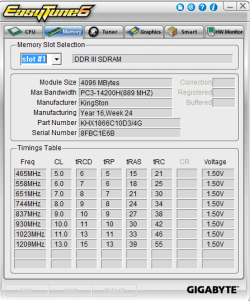
You now appear to have 2 sticks of Corsair PC3-10600 (1333); DDR 3, 4 gb per stick; 1.5 volts; unbuffered. Should be 240 pin.

I've never heard of some of those brands at the link you supplied.

I downloaded the qualified memory list for you motherboard from here:

GIGABYTE - Motherboard - Socket AM3+ - GA-78LMT-USB3 (rev. 4.1)

Your board supports dual channel DDR3.

Every stick on the list is 8 GB. No 4 GB sticks are listed.

Normally, your best move would be to get two 4 GB sticks and run them in dual channel mode--but no 4 GB sticks are on the list.

So, you can get a single 8 GB stick that is on the list or take a small chance and get two 4 GB sticks that are not on the list. If you get a single 8 GB stick, it will run in single channel and you will suffer a very small performance hit.

Which to do is kinda your choice.

Using strictly those from the vendor you linked:

http://mdcomputers.in/products/memo...value-4gb-ddr3-1600fsb-cmv4gx3m1a1600c11.html

above is a single 4 gb stick of CORSAIR RAM VALUE 4GB DDR3 1600FSB CMV4GX3M1A1600C11; it's 1.5 volts.

I'd be pretty sure 2 of these would work to give you 8 GB total in dual channel mode.

http://mdcomputers.in/products/memo...value-8gb-ddr3-1600fsb-cmv8gx3m1a1600c11.html

above is a single 8 gb stick of CORSAIR RAM VALUE 8GB DDR3 1600FSB CMV8GX3M1A1600C11


I don't think either of those exact model numbers are on the qualified list.

You can download the qualified list yourself and look to see if some of the other Corsair or GSkill or Crucial modules at your link are on the list.

There is some chance that modules not on list won't work, but the list is fairly brief and you may not be able to find an exact match at your vendor.
 

My Computer

Computer type
PC/Desktop
Computer Manufacturer/Model Number
Ignatz Special; 4 speed manual gearbox; factory air conditioning; one of one
OS
Windows 7 Home Premium SP1, 64-bit
CPU
Intel Skylake i5-6600K, not overclocked
Motherboard
AsRock Z170M Extreme 4, micro ATX
Memory
8 GB HyperX DDR4-2666 (2 x 4 GB)
Graphics Card(s)
none; graphics are integrated on CPU
Sound Card
onboard: Realtek ALC1150; external: USB Behringer UF0-202
Monitor(s) Displays
Dell S2340M 23 inch IPS
Screen Resolution
1600 x 900
Hard Drives
System: Crucial MX100 series SSD, 128 GB;
Data: Samsung Spinpoint 103SJ, 1 TB;
Backup: WD Caviar Green WD30EZRX-00D8PB0, 3 TB
PSU
Rosewill SilentNight 500 watt fanless, semi-modular
Case
Antec Solo II
Cooling
Noctua NH-U12S; Noctua F12 intake, Noctua S12A exhaust
Keyboard
Microsoft 200 6JH-00001 USB
Mouse
Dell or Microsoft optical wired; USB
Antivirus
Microsoft Security Essentials and Malwarebytes Premium
Browser
Pale Moon
Other Info
All fans PWM; speeds at idle: CPU circa 500 rpm; intake circa 600 rpm; exhaust circa 600 rpm; CPU temps 27 idle and 47 C load in a warm room (27 C/81 F) when running Intel Extreme Tuning Utility stress test.
Following up on ignatzatsonic's excellent advice, I would highly recommend you purchase the sticks from the same manufacturer that your presently working sticks are from. Experience of mine and others have proven: just because Y and Z says so, does not automatically mean Y and Z are exactly the same internal architecture as X - the manufacturer of the present sticks.
 

My Computer

Computer type
PC/Desktop
Computer Manufacturer/Model Number
Antec desktop; Acer Aspire laptops
OS
Windows 7 Professional 64-bit
CPU
Desktop i5; Acers i5 & i7
Memory
desktop 16GB; 1 Acer 8GB & 1 Acer 16GB
Hard Drives
1TB split into 2 equal partitions [OS and data] usable by RJS
Internet Speed
AT&T DSL
Browser
FF, GChrome, msIE
Other Info
Windows 7 Firewall, Emsisoft AM/AV, MSE [scan-only], SpywareBlaster, Ruiware/BillP combine
Okay. yes, none of the RAM on the list are on GIGABYTE's list. If I want to try those below - according to my Mobo's specs (going by their specs on site, which may not count for anything as you've pointed out) do you think it's a calculated risk?

AVEXIR DESKTOP RAM CORE SERIES – 4GB DDR3 1600MHZ (AVD3U16001104G-1CW) BLUE

Buy G.SKILL DESKTOP RAM AEGIS 4GB (1 x 4GB) DDR3 1600MHZ (F3-1600C11S-4GIS) - Best Price in India, Kolkata - Lowest Price in Online on mdcomputers.in

or from another local vendor: https://www.vedantcomputers.com/ram/vengeance-lpx-8gb-1x8-ddr4-2400mhz-c16-memory-kit-red?filter=52%2C53%2C67

I'll probably buy the modules you've suggested...even then just want to know, you know?:geek:

Thank you so much for helping the noob. Much appreciate it.
 
Last edited:

My Computer

Computer type
PC/Desktop
Computer Manufacturer/Model Number
Self built
OS
Windows 10 Pro (x64)
CPU
AMD RYZEN 7 1700+Stock Wraith Spire
Motherboard
ASUS PRIME B350M-A
Memory
Corsair 8GB (1 x 8 GB) DDR4 Vengeance LPX 2400Mhz
Graphics Card(s)
SAPPHIRE RX 470 4GB (Platinum Edition)
Monitor(s) Displays
BenQ VZ2250H
Screen Resolution
1920x1080
Hard Drives
120GB Samsung 750 Evo (OS/Programs)+1TB ST Firecuda (Games/Creative Applications)+1TB WD Green (Storage)
PSU
Antec VP650PM
Case
Coolermaster K380 Mid-Tower
Cooling
Side:Antec F19 120mm+Rear:Tt ISGC Fan12
Keyboard
Logitech K200
Mouse
Dragonwar Ele-G9 Thor
Internet Speed
Slow by 21st Century Standards :(
Antivirus
Bitdefender Internet Security and MBAM
Browser
Firefox
Other Info
Creative Inspire T3130
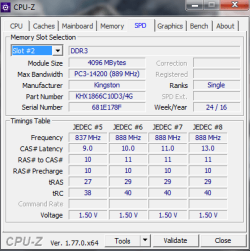
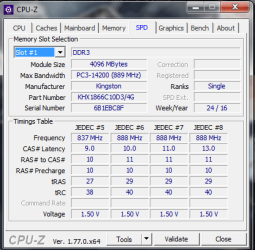
Before you buy new memory, unplug the cable form the power supply, wait 1/2 minute to discharge capacitors, remove memories and clean (memory and slot) with a contact cleaner. Set memory performance to normal, not turbo or alike. From the Ram log, the memories has a little timing difference that can cause problems on dual channel. You can try to manual increase the times for stability. If you're going to buy new memory, I would buy 2x4G (for dual channel) DDR2 1600 (PC12800), I use GSkill and like it.
 

My Computers

System One System Two

  • Computer type
    PC/Desktop
    Computer Manufacturer/Model Number
    custom build
    OS
    Windows 7 HP 64
    CPU
    i5 6600K - 800MHz to 4200MHz
    Motherboard
    GA-Z170-HD3P
    Memory
    4+4G GSkill DDR4 3000
    Graphics Card(s)
    IG - Intel 530
    Monitor(s) Displays
    Samsung 226BW
    Screen Resolution
    1680x1050
    Hard Drives
    (1) -1 SM951 – 128GB M.2 AHCI PCIe SSD drive for Windows 7 and Lubuntu
    (2) -1 WD SATA 3 - 1T for Data
    (3) -1 WD SATA 3 - 1T for backup
    PSU
    Thermaltake 450W TR2 gold
    Keyboard
    Old and good Chicony mechanical keyboard
    Mouse
    Logitech mX performance - 9 buttons (had to disable some)
    Internet Speed
    500Mb/s
    Browser
    Firefox 64
    Other Info
    TinyWall firewall
  • Computer type
    Laptop
    System Manufacturer/Model Number
    Asus Q550LF
    OS
    Windows 7 Pro
    CPU
    i7-4500U 800MHz to 3.0GHz
    Motherboard
    Asus Q550LF
    Memory
    (4+4)G DDR3 1600
    Graphics Card(s)
    IG intel 4400 + NVIDIA GeForce GT 745M
    Sound Card
    Realtek
    Monitor(s) Displays
    LG Display LP156WF4-SPH1
    Screen Resolution
    1920 x 1080
    Hard Drives
    BX500 120G SSD for Windows and programs +
    1T HDD for data
    Internet Speed
    500 Mb/s
    Browser
    Firefox
    Other Info
    TinyWall firewall
I have no hardware knowledge about RAM, I was simply passing on what an onsite tech told me some years ago. :)
 

My Computer

Computer type
PC/Desktop
Computer Manufacturer/Model Number
Antec desktop; Acer Aspire laptops
OS
Windows 7 Professional 64-bit
CPU
Desktop i5; Acers i5 & i7
Memory
desktop 16GB; 1 Acer 8GB & 1 Acer 16GB
Hard Drives
1TB split into 2 equal partitions [OS and data] usable by RJS
Internet Speed
AT&T DSL
Browser
FF, GChrome, msIE
Other Info
Windows 7 Firewall, Emsisoft AM/AV, MSE [scan-only], SpywareBlaster, Ruiware/BillP combine
Okay friends. I'll keep all the information in mind while I shop for the RAM. Let you know.
 

My Computer

Computer type
PC/Desktop
Computer Manufacturer/Model Number
Self built
OS
Windows 10 Pro (x64)
CPU
AMD RYZEN 7 1700+Stock Wraith Spire
Motherboard
ASUS PRIME B350M-A
Memory
Corsair 8GB (1 x 8 GB) DDR4 Vengeance LPX 2400Mhz
Graphics Card(s)
SAPPHIRE RX 470 4GB (Platinum Edition)
Monitor(s) Displays
BenQ VZ2250H
Screen Resolution
1920x1080
Hard Drives
120GB Samsung 750 Evo (OS/Programs)+1TB ST Firecuda (Games/Creative Applications)+1TB WD Green (Storage)
PSU
Antec VP650PM
Case
Coolermaster K380 Mid-Tower
Cooling
Side:Antec F19 120mm+Rear:Tt ISGC Fan12
Keyboard
Logitech K200
Mouse
Dragonwar Ele-G9 Thor
Internet Speed
Slow by 21st Century Standards :(
Antivirus
Bitdefender Internet Security and MBAM
Browser
Firefox
Other Info
Creative Inspire T3130
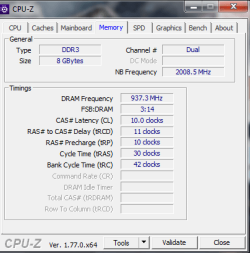
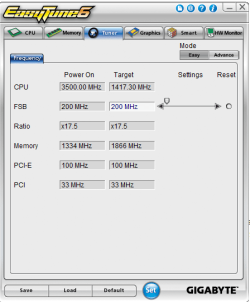
Ok so, they didn't have the Corsair value models. So I bought HyperX pair of same RAM. Giving details (including Log) below. Please tell me if it's 'system Ok', so I can mark the thread solved.
 

Attachments

  • New1.png
    New1.png
    12.5 KB · Views: 34
  • New2.png
    New2.png
    13.5 KB · Views: 34
  • New3.png
    New3.png
    16.8 KB · Views: 34
  • ram.LOG
    ram.LOG
    7.1 KB · Views: 5
  • 1.png
    1.png
    32.4 KB · Views: 26
  • 2.png
    2.png
    26.5 KB · Views: 26
  • AIDA.png
    AIDA.png
    29.5 KB · Views: 4
Last edited:

My Computer

Computer type
PC/Desktop
Computer Manufacturer/Model Number
Self built
OS
Windows 10 Pro (x64)
CPU
AMD RYZEN 7 1700+Stock Wraith Spire
Motherboard
ASUS PRIME B350M-A
Memory
Corsair 8GB (1 x 8 GB) DDR4 Vengeance LPX 2400Mhz
Graphics Card(s)
SAPPHIRE RX 470 4GB (Platinum Edition)
Monitor(s) Displays
BenQ VZ2250H
Screen Resolution
1920x1080
Hard Drives
120GB Samsung 750 Evo (OS/Programs)+1TB ST Firecuda (Games/Creative Applications)+1TB WD Green (Storage)
PSU
Antec VP650PM
Case
Coolermaster K380 Mid-Tower
Cooling
Side:Antec F19 120mm+Rear:Tt ISGC Fan12
Keyboard
Logitech K200
Mouse
Dragonwar Ele-G9 Thor
Internet Speed
Slow by 21st Century Standards :(
Antivirus
Bitdefender Internet Security and MBAM
Browser
Firefox
Other Info
Creative Inspire T3130
Much better memory than the previous Corsair.
 

My Computers

System One System Two

  • Computer type
    PC/Desktop
    Computer Manufacturer/Model Number
    custom build
    OS
    Windows 7 HP 64
    CPU
    i5 6600K - 800MHz to 4200MHz
    Motherboard
    GA-Z170-HD3P
    Memory
    4+4G GSkill DDR4 3000
    Graphics Card(s)
    IG - Intel 530
    Monitor(s) Displays
    Samsung 226BW
    Screen Resolution
    1680x1050
    Hard Drives
    (1) -1 SM951 – 128GB M.2 AHCI PCIe SSD drive for Windows 7 and Lubuntu
    (2) -1 WD SATA 3 - 1T for Data
    (3) -1 WD SATA 3 - 1T for backup
    PSU
    Thermaltake 450W TR2 gold
    Keyboard
    Old and good Chicony mechanical keyboard
    Mouse
    Logitech mX performance - 9 buttons (had to disable some)
    Internet Speed
    500Mb/s
    Browser
    Firefox 64
    Other Info
    TinyWall firewall
  • Computer type
    Laptop
    System Manufacturer/Model Number
    Asus Q550LF
    OS
    Windows 7 Pro
    CPU
    i7-4500U 800MHz to 3.0GHz
    Motherboard
    Asus Q550LF
    Memory
    (4+4)G DDR3 1600
    Graphics Card(s)
    IG intel 4400 + NVIDIA GeForce GT 745M
    Sound Card
    Realtek
    Monitor(s) Displays
    LG Display LP156WF4-SPH1
    Screen Resolution
    1920 x 1080
    Hard Drives
    BX500 120G SSD for Windows and programs +
    1T HDD for data
    Internet Speed
    500 Mb/s
    Browser
    Firefox
    Other Info
    TinyWall firewall
Ok. Thanks! By the way, Maximum Supported Memory Clock: 933.3 MHz and Current Memory Clock: 937.4 MHz differs on these two. I didn't overclock or anything...at all , my motherboard automatically did that. Is this stable/normal?
 

My Computer

Computer type
PC/Desktop
Computer Manufacturer/Model Number
Self built
OS
Windows 10 Pro (x64)
CPU
AMD RYZEN 7 1700+Stock Wraith Spire
Motherboard
ASUS PRIME B350M-A
Memory
Corsair 8GB (1 x 8 GB) DDR4 Vengeance LPX 2400Mhz
Graphics Card(s)
SAPPHIRE RX 470 4GB (Platinum Edition)
Monitor(s) Displays
BenQ VZ2250H
Screen Resolution
1920x1080
Hard Drives
120GB Samsung 750 Evo (OS/Programs)+1TB ST Firecuda (Games/Creative Applications)+1TB WD Green (Storage)
PSU
Antec VP650PM
Case
Coolermaster K380 Mid-Tower
Cooling
Side:Antec F19 120mm+Rear:Tt ISGC Fan12
Keyboard
Logitech K200
Mouse
Dragonwar Ele-G9 Thor
Internet Speed
Slow by 21st Century Standards :(
Antivirus
Bitdefender Internet Security and MBAM
Browser
Firefox
Other Info
Creative Inspire T3130
Consider how much memory you need. If all you do is browse the internet or use office then you likely don't need any more ram than 2 gb. If that is the case then 8 gb is a lot of wasted ram when 4 gb would suite you just fine. If you are a heavy gamer, run virtual machines, or run memory intensive applications then you might need 8 gb. You can always check current consumption in task manager under the performance section. I bring this up because I don't like seeing people waste money on ram they don't need after all 8 gb or higher is no faster than 4 gb for those that only need 2. Now the point about dual channel is valid. 2x4 would give you better performance on a dual channel computer than an 8 gb stick.

Also I see that you are using slots 1 & 2. Usually dual channel requires slots 1 & 3 or 2 & 4. Check you motherboard's documentation.
 

My Computers

System One System Two

I game quite a lot, and do some video editing also. My motherboard has two black and two gray slots: 1 black then,1 grey- and then 1 black, 1 grey. I installed it in no.1 (black) then no.3 (next black) slot. Cpuz shows dual. But I'm no expert, you guys can check log and screens to tell me if I did it as it should be for Dual channel..
 

My Computer

Computer type
PC/Desktop
Computer Manufacturer/Model Number
Self built
OS
Windows 10 Pro (x64)
CPU
AMD RYZEN 7 1700+Stock Wraith Spire
Motherboard
ASUS PRIME B350M-A
Memory
Corsair 8GB (1 x 8 GB) DDR4 Vengeance LPX 2400Mhz
Graphics Card(s)
SAPPHIRE RX 470 4GB (Platinum Edition)
Monitor(s) Displays
BenQ VZ2250H
Screen Resolution
1920x1080
Hard Drives
120GB Samsung 750 Evo (OS/Programs)+1TB ST Firecuda (Games/Creative Applications)+1TB WD Green (Storage)
PSU
Antec VP650PM
Case
Coolermaster K380 Mid-Tower
Cooling
Side:Antec F19 120mm+Rear:Tt ISGC Fan12
Keyboard
Logitech K200
Mouse
Dragonwar Ele-G9 Thor
Internet Speed
Slow by 21st Century Standards :(
Antivirus
Bitdefender Internet Security and MBAM
Browser
Firefox
Other Info
Creative Inspire T3130
I just checked the manual and that is the correct configuration. That is probably why they colored the slots that way. It either needs to be 1 & 3 or 2 & 4.
 

My Computers

System One System Two

Ok, thank you for the confirmation. My only question now is if my present config with my mobo is (default, I did no overclocking) stable enough theoretically at least. The PC booted up/posted OK from the first boot after installation.
 
Last edited:

My Computer

Computer type
PC/Desktop
Computer Manufacturer/Model Number
Self built
OS
Windows 10 Pro (x64)
CPU
AMD RYZEN 7 1700+Stock Wraith Spire
Motherboard
ASUS PRIME B350M-A
Memory
Corsair 8GB (1 x 8 GB) DDR4 Vengeance LPX 2400Mhz
Graphics Card(s)
SAPPHIRE RX 470 4GB (Platinum Edition)
Monitor(s) Displays
BenQ VZ2250H
Screen Resolution
1920x1080
Hard Drives
120GB Samsung 750 Evo (OS/Programs)+1TB ST Firecuda (Games/Creative Applications)+1TB WD Green (Storage)
PSU
Antec VP650PM
Case
Coolermaster K380 Mid-Tower
Cooling
Side:Antec F19 120mm+Rear:Tt ISGC Fan12
Keyboard
Logitech K200
Mouse
Dragonwar Ele-G9 Thor
Internet Speed
Slow by 21st Century Standards :(
Antivirus
Bitdefender Internet Security and MBAM
Browser
Firefox
Other Info
Creative Inspire T3130
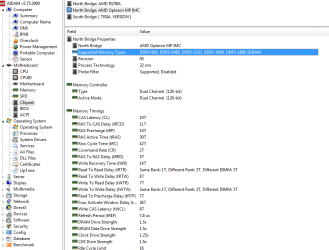
On second post, Ignatzatsonic has mentioned that your MB is GA-78LMT-USB3. From the spec sheet the maximum memory frequency is 1600. As you're running at 1866, for me it's a surprise.
 

My Computers

System One System Two

  • Computer type
    PC/Desktop
    Computer Manufacturer/Model Number
    custom build
    OS
    Windows 7 HP 64
    CPU
    i5 6600K - 800MHz to 4200MHz
    Motherboard
    GA-Z170-HD3P
    Memory
    4+4G GSkill DDR4 3000
    Graphics Card(s)
    IG - Intel 530
    Monitor(s) Displays
    Samsung 226BW
    Screen Resolution
    1680x1050
    Hard Drives
    (1) -1 SM951 – 128GB M.2 AHCI PCIe SSD drive for Windows 7 and Lubuntu
    (2) -1 WD SATA 3 - 1T for Data
    (3) -1 WD SATA 3 - 1T for backup
    PSU
    Thermaltake 450W TR2 gold
    Keyboard
    Old and good Chicony mechanical keyboard
    Mouse
    Logitech mX performance - 9 buttons (had to disable some)
    Internet Speed
    500Mb/s
    Browser
    Firefox 64
    Other Info
    TinyWall firewall
  • Computer type
    Laptop
    System Manufacturer/Model Number
    Asus Q550LF
    OS
    Windows 7 Pro
    CPU
    i7-4500U 800MHz to 3.0GHz
    Motherboard
    Asus Q550LF
    Memory
    (4+4)G DDR3 1600
    Graphics Card(s)
    IG intel 4400 + NVIDIA GeForce GT 745M
    Sound Card
    Realtek
    Monitor(s) Displays
    LG Display LP156WF4-SPH1
    Screen Resolution
    1920 x 1080
    Hard Drives
    BX500 120G SSD for Windows and programs +
    1T HDD for data
    Internet Speed
    500 Mb/s
    Browser
    Firefox
    Other Info
    TinyWall firewall
Explain the mystery to me, anybody?

It's a surprise for me too! When the vendor told me if the ram didnt run Ok he'll take it back and replace it with some other RAM within two days :shock: The Pc seems ok so far...the DRAM voltage is 1.488 according to hwmonitor.

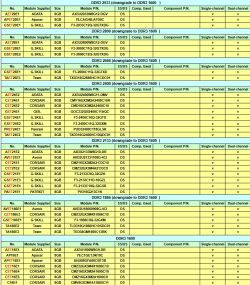
I found this on the spec sheet of my version 5.0 (does it explain this? I mean the list is not complete by any means. But it does show RAM running downgrade to 1600...The technical side of RAM compatibility I don't fully comprehend yet):-
 

Attachments

  • Support.png
    Support.png
    43.5 KB · Views: 0

My Computer

Computer type
PC/Desktop
Computer Manufacturer/Model Number
Self built
OS
Windows 10 Pro (x64)
CPU
AMD RYZEN 7 1700+Stock Wraith Spire
Motherboard
ASUS PRIME B350M-A
Memory
Corsair 8GB (1 x 8 GB) DDR4 Vengeance LPX 2400Mhz
Graphics Card(s)
SAPPHIRE RX 470 4GB (Platinum Edition)
Monitor(s) Displays
BenQ VZ2250H
Screen Resolution
1920x1080
Hard Drives
120GB Samsung 750 Evo (OS/Programs)+1TB ST Firecuda (Games/Creative Applications)+1TB WD Green (Storage)
PSU
Antec VP650PM
Case
Coolermaster K380 Mid-Tower
Cooling
Side:Antec F19 120mm+Rear:Tt ISGC Fan12
Keyboard
Logitech K200
Mouse
Dragonwar Ele-G9 Thor
Internet Speed
Slow by 21st Century Standards :(
Antivirus
Bitdefender Internet Security and MBAM
Browser
Firefox
Other Info
Creative Inspire T3130
On post #8, AIDA says that DDR3 1866 is supported by North Bridge. What really maters is that you get a stable system.
 

My Computers

System One System Two

  • Computer type
    PC/Desktop
    Computer Manufacturer/Model Number
    custom build
    OS
    Windows 7 HP 64
    CPU
    i5 6600K - 800MHz to 4200MHz
    Motherboard
    GA-Z170-HD3P
    Memory
    4+4G GSkill DDR4 3000
    Graphics Card(s)
    IG - Intel 530
    Monitor(s) Displays
    Samsung 226BW
    Screen Resolution
    1680x1050
    Hard Drives
    (1) -1 SM951 – 128GB M.2 AHCI PCIe SSD drive for Windows 7 and Lubuntu
    (2) -1 WD SATA 3 - 1T for Data
    (3) -1 WD SATA 3 - 1T for backup
    PSU
    Thermaltake 450W TR2 gold
    Keyboard
    Old and good Chicony mechanical keyboard
    Mouse
    Logitech mX performance - 9 buttons (had to disable some)
    Internet Speed
    500Mb/s
    Browser
    Firefox 64
    Other Info
    TinyWall firewall
  • Computer type
    Laptop
    System Manufacturer/Model Number
    Asus Q550LF
    OS
    Windows 7 Pro
    CPU
    i7-4500U 800MHz to 3.0GHz
    Motherboard
    Asus Q550LF
    Memory
    (4+4)G DDR3 1600
    Graphics Card(s)
    IG intel 4400 + NVIDIA GeForce GT 745M
    Sound Card
    Realtek
    Monitor(s) Displays
    LG Display LP156WF4-SPH1
    Screen Resolution
    1920 x 1080
    Hard Drives
    BX500 120G SSD for Windows and programs +
    1T HDD for data
    Internet Speed
    500 Mb/s
    Browser
    Firefox
    Other Info
    TinyWall firewall
Yes. I want a stable system. Just that. Hope to buy a better motherboard sometime in the future that'd let me utilize the RAM fully, keeping the other components. Let's see.
 

My Computer

Computer type
PC/Desktop
Computer Manufacturer/Model Number
Self built
OS
Windows 10 Pro (x64)
CPU
AMD RYZEN 7 1700+Stock Wraith Spire
Motherboard
ASUS PRIME B350M-A
Memory
Corsair 8GB (1 x 8 GB) DDR4 Vengeance LPX 2400Mhz
Graphics Card(s)
SAPPHIRE RX 470 4GB (Platinum Edition)
Monitor(s) Displays
BenQ VZ2250H
Screen Resolution
1920x1080
Hard Drives
120GB Samsung 750 Evo (OS/Programs)+1TB ST Firecuda (Games/Creative Applications)+1TB WD Green (Storage)
PSU
Antec VP650PM
Case
Coolermaster K380 Mid-Tower
Cooling
Side:Antec F19 120mm+Rear:Tt ISGC Fan12
Keyboard
Logitech K200
Mouse
Dragonwar Ele-G9 Thor
Internet Speed
Slow by 21st Century Standards :(
Antivirus
Bitdefender Internet Security and MBAM
Browser
Firefox
Other Info
Creative Inspire T3130
Yes. I want a stable system. Just that. Hope to buy a better motherboard sometime in the future that'd let me utilize the RAM fully, keeping the other components. Let's see.

As your memory is DDR2 1866 and it's running at 1866 you are already have it at max performance.
 

My Computers

System One System Two

  • Computer type
    PC/Desktop
    Computer Manufacturer/Model Number
    custom build
    OS
    Windows 7 HP 64
    CPU
    i5 6600K - 800MHz to 4200MHz
    Motherboard
    GA-Z170-HD3P
    Memory
    4+4G GSkill DDR4 3000
    Graphics Card(s)
    IG - Intel 530
    Monitor(s) Displays
    Samsung 226BW
    Screen Resolution
    1680x1050
    Hard Drives
    (1) -1 SM951 – 128GB M.2 AHCI PCIe SSD drive for Windows 7 and Lubuntu
    (2) -1 WD SATA 3 - 1T for Data
    (3) -1 WD SATA 3 - 1T for backup
    PSU
    Thermaltake 450W TR2 gold
    Keyboard
    Old and good Chicony mechanical keyboard
    Mouse
    Logitech mX performance - 9 buttons (had to disable some)
    Internet Speed
    500Mb/s
    Browser
    Firefox 64
    Other Info
    TinyWall firewall
  • Computer type
    Laptop
    System Manufacturer/Model Number
    Asus Q550LF
    OS
    Windows 7 Pro
    CPU
    i7-4500U 800MHz to 3.0GHz
    Motherboard
    Asus Q550LF
    Memory
    (4+4)G DDR3 1600
    Graphics Card(s)
    IG intel 4400 + NVIDIA GeForce GT 745M
    Sound Card
    Realtek
    Monitor(s) Displays
    LG Display LP156WF4-SPH1
    Screen Resolution
    1920 x 1080
    Hard Drives
    BX500 120G SSD for Windows and programs +
    1T HDD for data
    Internet Speed
    500 Mb/s
    Browser
    Firefox
    Other Info
    TinyWall firewall
:o I thought it was down-clocked automatically to match the motherboard's default (advertised) speed.
 

My Computer

Computer type
PC/Desktop
Computer Manufacturer/Model Number
Self built
OS
Windows 10 Pro (x64)
CPU
AMD RYZEN 7 1700+Stock Wraith Spire
Motherboard
ASUS PRIME B350M-A
Memory
Corsair 8GB (1 x 8 GB) DDR4 Vengeance LPX 2400Mhz
Graphics Card(s)
SAPPHIRE RX 470 4GB (Platinum Edition)
Monitor(s) Displays
BenQ VZ2250H
Screen Resolution
1920x1080
Hard Drives
120GB Samsung 750 Evo (OS/Programs)+1TB ST Firecuda (Games/Creative Applications)+1TB WD Green (Storage)
PSU
Antec VP650PM
Case
Coolermaster K380 Mid-Tower
Cooling
Side:Antec F19 120mm+Rear:Tt ISGC Fan12
Keyboard
Logitech K200
Mouse
Dragonwar Ele-G9 Thor
Internet Speed
Slow by 21st Century Standards :(
Antivirus
Bitdefender Internet Security and MBAM
Browser
Firefox
Other Info
Creative Inspire T3130
Back
Top