Want to replace Microsoft Anna

dvdgremlin

New member
Local time
11:05 PM
Messages
4
I know windows 8 has various voices and I would like to replace the windows 7 Microsoft Anna voice with an English (UK) voice.

Is this possible please ? Where would I get other voices from ?

I'm new here. If this is in the wrong area then sorry please move it to the correct forum area.

many thanks
 

My Computer

Computer type
PC/Desktop
Computer Manufacturer/Model Number
Lenovo
OS
windows 7 64 bit
Antivirus
Kasperski
Browser
Pale Moon
Last edited:

My Computer

Computer type
Laptop
Computer Manufacturer/Model Number
Lenovo
OS
Windows 7 - Home Edition - Build 7601x8086
Memory
Samsung DDR3 4GB
Graphics Card(s)
Intergrated
Sound Card
Intergrated
Screen Resolution
1400 x 1050
Hard Drives
80GB HDD 2.5
PSU
20V adapter
Case
Piece of plastic
Cooling
Copper heatsink
Keyboard
Intergrated PS2
Mouse
TouchPad
Antivirus
Commodo
Browser
K-Melon
thanks, unfortunately I have windows 7 64 bit and that only works on 32 . thanks for looking tho :)
 

My Computer

Computer type
PC/Desktop
Computer Manufacturer/Model Number
Lenovo
OS
windows 7 64 bit
Antivirus
Kasperski
Browser
Pale Moon
Try the work around Chris mentions. Seemed weird to me at first then I collerated the response to other pages:

Type “C:\Windows\SysWOW64\Speech\SpeechUX\sapi.cpl” (without quotes) into the search box in the Start menu or Run command and press Enter now if you install voices: Free Text to Speech Natural Voices | Text To Speech Software with Free Natural Voices - Zero2000.com they will show up in this window only as it runs in 32 bit. Why its in the 64 bit folder I don't know.

If you tab to the Voice Selection combo box, and if you have any 32 bit text to speech voices installed, they should be listed in this combo box.

Simply select the text to speech voice you wish to set as your default system voice, along with any other changes you wish to make, and press the OK button when done.
 

My Computer

Computer type
Laptop
Computer Manufacturer/Model Number
Lenovo
OS
Windows 7 - Home Edition - Build 7601x8086
Memory
Samsung DDR3 4GB
Graphics Card(s)
Intergrated
Sound Card
Intergrated
Screen Resolution
1400 x 1050
Hard Drives
80GB HDD 2.5
PSU
20V adapter
Case
Piece of plastic
Cooling
Copper heatsink
Keyboard
Intergrated PS2
Mouse
TouchPad
Antivirus
Commodo
Browser
K-Melon
that doesn't work

as I said. they do not show up even tho they have been installed on windows 64. so there is no option to use it. thanks.
 

My Computer

Computer type
PC/Desktop
Computer Manufacturer/Model Number
Lenovo
OS
windows 7 64 bit
Antivirus
Kasperski
Browser
Pale Moon
Replace MS Anna?

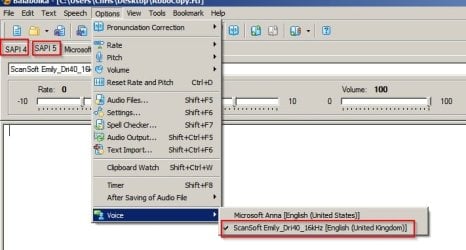
Well instead of replacing it - would you consider using alternative TTS software and adding additional voices that you can use instead of Anna? (If you use the TTS software instead of Narrator).

Balabolka.jpg
 

My Computer

Computer type
Laptop
Computer Manufacturer/Model Number
ASUS
OS
Microsoft Windows 7 Home Premium 64-bit 7601 Multiprocessor Free Service Pack 1
CPU
AMD C-60 APU with Radeon(tm) HD Graphics
Motherboard
ASUSTeK COMPUTER INC. X501U
Memory
4.00 GB
Graphics Card(s)
AMD Radeon HD 6290 Graphics
Sound Card
(1) AMD High Definition Audio Device (2) Realtek High Defi
Screen Resolution
1366 x 768 x 32 bits (4294967296 colors) @ 60 Hz
Hard Drives
Hitachi HTS545050A7E380 SATA Disk Device
Antivirus
Comodo CIS & FW, SecureAplus App Whitelisting, Threatfire
Browser
Cyberfox 64bit, Opera 64bit, Airfox
Other Info
Spy-The-Spy, HitmanPro.Alert, Norton Connect Safe, MJRegWatcher, BitDefender TrafficLight, Voodoo Shield, Zemana AntiMalware
hi, This came up as I'm using some software that uses the standard MS facility and I hate the US robot voice of Anna. Ideally I would change it for a more human type voice with an English accent rather than american. so thanks for the suggestion but that's not so practical.
 

My Computer

Computer type
PC/Desktop
Computer Manufacturer/Model Number
Lenovo
OS
windows 7 64 bit
Antivirus
Kasperski
Browser
Pale Moon
Back
Top