Want zip folder to attach as single file;

mrlewp

New member
Local time
7:39 PM
Messages
9
On my XP machine , I can select multiple files , right-click and "send to"....."compressed zip" folder. I then was able to attach that zipped folder exactly the same as a single file , using Yahoo email. (I've yet to set up a Verizon email account using Windows Live email. Dont like Windows Live, nor Windows Vista, nor
Windows 7. XP is so easy to manage, and Outlook was simple)

Using the exact same process, only now on my Windows 7 PC, I create the zipped folder containing a batch of picture files. However, I cant attach that folder as a single file in Yahoo email. I know there's other email programs out there, and I could
set up Windows Live email and probably attach multiple files all at once, just as I could with XP and Outlook. BUT........... why cant I do that with Win 7 ??
Or how do I , using W7 or another 3rd party zip app.?
 

My Computer My Computer

At a glance

windows 7AMD Turion X2 64 bit RM-75DDR2 4GNVIDIA GeForce 8200M G
Computer Manufacturer/Model Number
hp G60 445 DX Notebook
OS
windows 7
CPU
AMD Turion X2 64 bit RM-75
Motherboard
Nvidia GeForce 8200M
Memory
DDR2 4G
Graphics Card(s)
NVIDIA GeForce 8200M G
Sound Card
Conexant HD SmartAudio 221 / Nvidia HD Audio
Hard Drives
Internal Sata 300G
USB Seagate 250G
I'm afraid I don't really understand the problem
I just send a few pics to the zipped folder and it created just that a zipped folder with pics
Opened one of my Gmail accounts and sent it successfully to another one of my accounts.
All I can think of, that your mail provider has some kind of size limitation in place and the zip folder you created was too large.

If you're looking for a different ZIP application I would recommend 7zip.
you just mark the files/pictures, right click and go to 7zip/compress and email
and you're well on your way

-DG
 

My Computer My Computer

At a glance

Windows 7 Ultimate x86DualCore AMD Athlon 64 X2, 2600 MHz 5200+Samsung 2GB DDR2Onboard NVIDIA GeForce 6150SE nForce 430
Computer Manufacturer/Model Number
HP m8000n
OS
Windows 7 Ultimate x86
CPU
DualCore AMD Athlon 64 X2, 2600 MHz 5200+
Motherboard
Asus M2N68-LA (Narra)
Memory
Samsung 2GB DDR2
Graphics Card(s)
Onboard NVIDIA GeForce 6150SE nForce 430
Sound Card
Onboard nVIDIA nForce 6100-430 (MCP61P)
Monitor(s) Displays
Westinghouse 19" LED
Screen Resolution
1280x1024
Hard Drives
SATA II Seagate Barracuda 500GB
USB II WD Elements 500GB
USB II WD My Book 1TB
USB II WD My Book 2TB
PSU
Stock (HP)
Case
Stock (HP)
Cooling
Stock
Keyboard
Logitech Classic KB 200
Mouse
Standard HP opticle USB mouse
On my XP machine , I can select multiple files , right-click and "send to"....."compressed zip" folder. I then was able to attach that zipped folder exactly the same as a single file , using Yahoo email. (I've yet to set up a Verizon email account using Windows Live email. Dont like Windows Live, nor Windows Vista, nor
Windows 7. XP is so easy to manage, and Outlook was simple)

Using the exact same process, only now on my Windows 7 PC, I create the zipped folder containing a batch of picture files. However, I cant attach that folder as a single file in Yahoo email. I know there's other email programs out there, and I could
set up Windows Live email and probably attach multiple files all at once, just as I could with XP and Outlook. BUT........... why cant I do that with Win 7 ??
Or how do I , using W7 or another 3rd party zip app.?

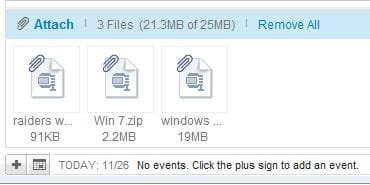
I'm not sure why it won't work for you, I just zipped up some wallpapers and attached them in an email on my Yahoo mail. there's a limit of 25mb as you can see in my screenshot here.
 

Attachments

  • Capture.JPG
    Capture.JPG
    17.6 KB · Views: 5

My Computer My Computer

At a glance

Win 10 Pro x64Intel I5-2500K @3.3GHz16GB G.Skill Ripjaws X (4x4GB)EVGA GeForce 750 Ti SC 2GB
Computer type
PC/Desktop
Computer Manufacturer/Model Number
Self Built
OS
Win 10 Pro x64
CPU
Intel I5-2500K @3.3GHz
Motherboard
Asrock P67 Extreme4
Memory
16GB G.Skill Ripjaws X (4x4GB)
Graphics Card(s)
EVGA GeForce 750 Ti SC 2GB
Sound Card
ASUS Xonar DG 5.1 Channels 24-bit 96KHz PCI Interface Sound
Monitor(s) Displays
auria eq2367
Screen Resolution
1920 x 1080
Hard Drives
250GB Samsung 850 EVO SSD
1TB WD Blue
1TB Hitachi
PSU
SeaSonic X 650W 80 Plus Gold
Case
Corsair Obsidian 750D
Cooling
Corsair H60, Three 140mm case fans
Keyboard
Logitech Wireless Keyboard K520
Mouse
Logitech Wireless Mouse M310
Internet Speed
Wave Broadband ~ 100 dn 5 up
Antivirus
Windows Defender, Malwarebytes Premium
Browser
Edge, IE11, Chrome
Other Info
Laptop specs: HP g7-1365dx /
CPU: AMD A6-3420M APU with Radeon(tm) HD Graphics /
RAM: Crucial 8Gb (2x4Gb) /
SSD: Crucial M4-CT128M4SSD2 ATA Device/ FW 000F /
GFX: AMD Radeon HD 6520G /
OS: Windows 10 Pro x64
Gmail may work the same as my Outlook did with WinXP. I could select multiple files all in one action, and attach them all , as individual files! So I didnt need to try the zipped folder method. I was pleased to find that
it worked on my XP PC , then not so pleased that it didnt on Win7.
File size was under 4mb - not a problem. I zipped some .jpg files, by right-clicking and choosing "send to".....compressed folder. Just as I did on the XP pc. But , whereas Derekimo managed to attach a zipped folder using Yahoo , I cant attach one if it will not appear in the "file" selected (?whatever) box of the "choose file to upload" window << after selecting "ATTACH" when composing email using Yahoo.
No other way to say it. I've already tried a free zip program , and was able to do the attachment of the "zip" folder (file) that it created............just as I was able to do on my XP pc, using Windows integrated zipper.
Just another annoyance, when others say they can, but you (I) cant...........nothing new, right?
 

My Computer My Computer

At a glance

windows 7AMD Turion X2 64 bit RM-75DDR2 4GNVIDIA GeForce 8200M G
Computer Manufacturer/Model Number
hp G60 445 DX Notebook
OS
windows 7
CPU
AMD Turion X2 64 bit RM-75
Motherboard
Nvidia GeForce 8200M
Memory
DDR2 4G
Graphics Card(s)
NVIDIA GeForce 8200M G
Sound Card
Conexant HD SmartAudio 221 / Nvidia HD Audio
Hard Drives
Internal Sata 300G
USB Seagate 250G
Gmail may work the same as my Outlook did with WinXP. I could select multiple files all in one action, and attach them all , as individual files! So I didnt need to try the zipped folder method. I was pleased to find that
it worked on my XP PC , then not so pleased that it didnt on Win7.
File size was under 4mb - not a problem. I zipped some .jpg files, by right-clicking and choosing "send to".....compressed folder. Just as I did on the XP pc. But , whereas Derekimo managed to attach a zipped folder using Yahoo , I cant attach one if it will not appear in the "file" selected (?whatever) box of the "choose file to upload" window << after selecting "ATTACH" when composing email using Yahoo.
No other way to say it. I've already tried a free zip program , and was able to do the attachment of the "zip" folder (file) that it created............just as I was able to do on my XP pc, using Windows integrated zipper.
Just another annoyance, when others say they can, but you (I) cant...........nothing new, right?

Try adding this Install BrowserPlus™ when I set up my yahoo mail it was suggested as an enhancement to simplify attaching files in emails.
Other than that, I'm sorry I can't figure why yours won't work so that's the limit on my annoyance's. ;)
 

My Computer My Computer

At a glance

Win 10 Pro x64Intel I5-2500K @3.3GHz16GB G.Skill Ripjaws X (4x4GB)EVGA GeForce 750 Ti SC 2GB
Computer type
PC/Desktop
Computer Manufacturer/Model Number
Self Built
OS
Win 10 Pro x64
CPU
Intel I5-2500K @3.3GHz
Motherboard
Asrock P67 Extreme4
Memory
16GB G.Skill Ripjaws X (4x4GB)
Graphics Card(s)
EVGA GeForce 750 Ti SC 2GB
Sound Card
ASUS Xonar DG 5.1 Channels 24-bit 96KHz PCI Interface Sound
Monitor(s) Displays
auria eq2367
Screen Resolution
1920 x 1080
Hard Drives
250GB Samsung 850 EVO SSD
1TB WD Blue
1TB Hitachi
PSU
SeaSonic X 650W 80 Plus Gold
Case
Corsair Obsidian 750D
Cooling
Corsair H60, Three 140mm case fans
Keyboard
Logitech Wireless Keyboard K520
Mouse
Logitech Wireless Mouse M310
Internet Speed
Wave Broadband ~ 100 dn 5 up
Antivirus
Windows Defender, Malwarebytes Premium
Browser
Edge, IE11, Chrome
Other Info
Laptop specs: HP g7-1365dx /
CPU: AMD A6-3420M APU with Radeon(tm) HD Graphics /
RAM: Crucial 8Gb (2x4Gb) /
SSD: Crucial M4-CT128M4SSD2 ATA Device/ FW 000F /
GFX: AMD Radeon HD 6520G /
OS: Windows 10 Pro x64
Granted there is a plethora of different configurations possible but still it doesn't make sense that simple stuff like this works for one but not for someone else. What I noticed was, that se7en used a strange name for the created zip folder (in my case it was 6f3b9869d8cdddc233003c7a89718357.zip). How about you simply rename that construct to something shorter, something what makes more sense. Perhaps then you'll find it in the Attachment box.

-DG
 

My Computer My Computer

At a glance

Windows 7 Ultimate x86DualCore AMD Athlon 64 X2, 2600 MHz 5200+Samsung 2GB DDR2Onboard NVIDIA GeForce 6150SE nForce 430
Computer Manufacturer/Model Number
HP m8000n
OS
Windows 7 Ultimate x86
CPU
DualCore AMD Athlon 64 X2, 2600 MHz 5200+
Motherboard
Asus M2N68-LA (Narra)
Memory
Samsung 2GB DDR2
Graphics Card(s)
Onboard NVIDIA GeForce 6150SE nForce 430
Sound Card
Onboard nVIDIA nForce 6100-430 (MCP61P)
Monitor(s) Displays
Westinghouse 19" LED
Screen Resolution
1280x1024
Hard Drives
SATA II Seagate Barracuda 500GB
USB II WD Elements 500GB
USB II WD My Book 1TB
USB II WD My Book 2TB
PSU
Stock (HP)
Case
Stock (HP)
Cooling
Stock
Keyboard
Logitech Classic KB 200
Mouse
Standard HP opticle USB mouse
Update. Tried exact same operation the next day and it works fine, just like on my XP pc. Hate to say, but it's possible I got stuck in this certain mode and never left it ; that would be, what I've since found ... you cant select as an attachment - the zip folder in the left side of an explorer window ( folder tree?) , probably since it is seen as a folder. But, in the right window , which displays both files AND folders , I can select that very same zipped folder, after selecting it's parent folder to open and be viewed on the right. ( a "duhh" moment ? )
I usually try and test all possible options, but that night....guess not. Sorry to waste everyone's time.
 

My Computer My Computer

At a glance

windows 7AMD Turion X2 64 bit RM-75DDR2 4GNVIDIA GeForce 8200M G
Computer Manufacturer/Model Number
hp G60 445 DX Notebook
OS
windows 7
CPU
AMD Turion X2 64 bit RM-75
Motherboard
Nvidia GeForce 8200M
Memory
DDR2 4G
Graphics Card(s)
NVIDIA GeForce 8200M G
Sound Card
Conexant HD SmartAudio 221 / Nvidia HD Audio
Hard Drives
Internal Sata 300G
USB Seagate 250G
Update. Tried exact same operation the next day and it works fine, just like on my XP pc. Hate to say, but it's possible I got stuck in this certain mode and never left it ; that would be, what I've since found ... you cant select as an attachment - the zip folder in the left side of an explorer window ( folder tree?) , probably since it is seen as a folder. But, in the right window , which displays both files AND folders , I can select that very same zipped folder, after selecting it's parent folder to open and be viewed on the right. ( a "duhh" moment ? )
I usually try and test all possible options, but that night....guess not. Sorry to waste everyone's time.

Glad you got it sorted out, Thanks for posting back.
 

My Computer My Computer

At a glance

Win 10 Pro x64Intel I5-2500K @3.3GHz16GB G.Skill Ripjaws X (4x4GB)EVGA GeForce 750 Ti SC 2GB
Computer type
PC/Desktop
Computer Manufacturer/Model Number
Self Built
OS
Win 10 Pro x64
CPU
Intel I5-2500K @3.3GHz
Motherboard
Asrock P67 Extreme4
Memory
16GB G.Skill Ripjaws X (4x4GB)
Graphics Card(s)
EVGA GeForce 750 Ti SC 2GB
Sound Card
ASUS Xonar DG 5.1 Channels 24-bit 96KHz PCI Interface Sound
Monitor(s) Displays
auria eq2367
Screen Resolution
1920 x 1080
Hard Drives
250GB Samsung 850 EVO SSD
1TB WD Blue
1TB Hitachi
PSU
SeaSonic X 650W 80 Plus Gold
Case
Corsair Obsidian 750D
Cooling
Corsair H60, Three 140mm case fans
Keyboard
Logitech Wireless Keyboard K520
Mouse
Logitech Wireless Mouse M310
Internet Speed
Wave Broadband ~ 100 dn 5 up
Antivirus
Windows Defender, Malwarebytes Premium
Browser
Edge, IE11, Chrome
Other Info
Laptop specs: HP g7-1365dx /
CPU: AMD A6-3420M APU with Radeon(tm) HD Graphics /
RAM: Crucial 8Gb (2x4Gb) /
SSD: Crucial M4-CT128M4SSD2 ATA Device/ FW 000F /
GFX: AMD Radeon HD 6520G /
OS: Windows 10 Pro x64
Back
Top