Solved WaterCooling Plan (No AIO)

So...

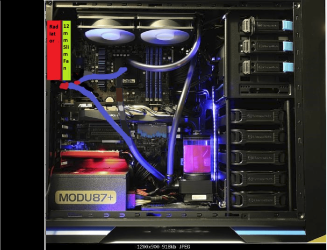
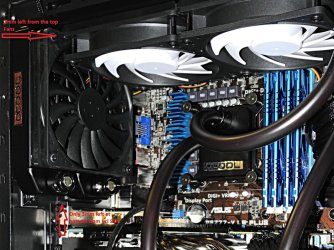
Installed today my custom water cooling loop! :)

So far no probs and everything is working fine, no leaks were found.

I've use 7mm "Shroud & Decoupling" for the 120mm Fans onto the 30mm Radiator to have more of Airflow, and two others 140mm fans on Top of the case, hidden, are on extraction.

DDC Pump is PWM and plug onto CPU_FAN and have to be tuned a little with the Asus Fan XPert+

Its getting late and i'm working tomorrow all day, so i will keep you in touch soon with Temps.

Attached two pics, one when i was filling the Res Tank and the other when installed.

I haven't yet fix the Res Tank onto the Hard Drives cage and it will be about two centimeters higher than on pic.

Also the tubing (10/13mm) will be tighten a little closer to each over , those are brand new so might need time to bend at their places.

I'll post a new pic and share Temps soon.

Cheers!

Looks awesome NoN, very nice mate!

Thanks Paul...that's pretty basic but its first one custom!!

Well it may be basic but it certainly looks great. Very clean looking and neat.
 

My Computer My Computer

OS
Windows 7 Professional 64 bit
My Computer My Computer

Computer type
PC/Desktop
Computer Manufacturer/Model Number
Custom Build
OS
Windows 7 Professional SP1 - x64 [Non-UEFI Boot]
CPU
Ivy Bridge Core i5 3570K (Delidded)
Motherboard
Asus P8Z77-V LE PLUS
Memory
G.Skill "Ares" DDR3 PC3-12800 - 1600MHz (16Gb)
Graphics Card(s)
Asus Dual-RX480-O4G
Sound Card
Creative Sound Blaster Z w/5.1 sound system
Monitor(s) Displays
Asus IPS 23"
Screen Resolution
16/9
Hard Drives
Internal:
500Go Sata 6Gb/s (x2)
500Go Sata 3Gb/s (x2)
SSD 60Go Sata 6Gb/s
PSU
In Win C 900W Series 80+ Platinum
Case
Thermaltake Chaser A71
Cooling
Custom Water Cooling Loop
Keyboard
Cooler Master QuickFire XTi
Mouse
Razer Imperator 2012 (4G)
Antivirus
MSE
Browser
IE 11.0.xxx Rtm
Other Info
"Raid0" with Intel Smart Response Technology (HDD/SSD)
Non you have a neat and clean built. It doesn't have to look cluttered and complicated to work properly.
The most complicated part of building a water cool system is choose the parts and where to install them.

**Verify that the water coming out of the pump is going in the inlet side of the cpu water block.
 

My Computer My Computer

Computer type
PC/Desktop
Computer Manufacturer/Model Number
Home made Desktop
OS
Windows 10 Pro. 64/ version 1709 Windows 7 Pro/64
CPU
Intel i7-6800K @ 4.3
Motherboard
ASUS X-99 Deluxe II
Memory
Corsair Platinum 16 gig @2400
Graphics Card(s)
EVGA GTX 1070 OC
Monitor(s) Displays
Asus 27" LED LCD/VE278Q
Screen Resolution
1920-1080 or 1280-720 HDMI
Hard Drives
INTEL SSD 730-240 Gb Sata 3.0/
PSU
EVGA Platium 1200W
Case
Phanteks Luxe Tempered Glass 8 fans/ one radiator
Cooling
XSPC/ Water Cooled CPU
Keyboard
Das 4 Professional
Mouse
Logitech M705/MX Anywhere 2-S
Internet Speed
100 mbits
Antivirus
Microsoft Security Essentials/ Malwarebytes Premium 3.0/ SAS
Browser
I.E. 11 default/Firefox/ ISP Time Warner Cable/Spectrum
Other Info
LG BluRay Burner/
Sound system-KLipsch-THX/
Icy Dock ssd Hot Swap bays.
Non you have a neat and clean built. It doesn't have to look cluttered and complicated to work properly.
The most complicated part of building a water cool system is choose the parts and where to install them.

**Verify that the water coming out of the pump is going in the inlet side of the cpu water block.

When i was filling the Res Tank i could saw that direction of the coolant in the tubing with all those bubbles.... I haven't a flow sensor but when i look into the Res Tank through its Acryl Glass i can see the coolant makes vagues but its discrete as i have an anti-bubbles inside.

i frightened myself once when i turned off the PSU during filling because it had a security when turn off twice, the third time it won't start after few minutes...thought it was the pump!!!:confused:

Well, happy Water Cooling adventure so far which makes me not regret at all an Aircooler!

Thanks for your inputs, guys!
 
Last edited:

My Computer My Computer

Computer type
PC/Desktop
Computer Manufacturer/Model Number
Custom Build
OS
Windows 7 Professional SP1 - x64 [Non-UEFI Boot]
CPU
Ivy Bridge Core i5 3570K (Delidded)
Motherboard
Asus P8Z77-V LE PLUS
Memory
G.Skill "Ares" DDR3 PC3-12800 - 1600MHz (16Gb)
Graphics Card(s)
Asus Dual-RX480-O4G
Sound Card
Creative Sound Blaster Z w/5.1 sound system
Monitor(s) Displays
Asus IPS 23"
Screen Resolution
16/9
Hard Drives
Internal:
500Go Sata 6Gb/s (x2)
500Go Sata 3Gb/s (x2)
SSD 60Go Sata 6Gb/s
PSU
In Win C 900W Series 80+ Platinum
Case
Thermaltake Chaser A71
Cooling
Custom Water Cooling Loop
Keyboard
Cooler Master QuickFire XTi
Mouse
Razer Imperator 2012 (4G)
Antivirus
MSE
Browser
IE 11.0.xxx Rtm
Other Info
"Raid0" with Intel Smart Response Technology (HDD/SSD)
looks pretty sweet!

FYI, with an H80i, 3770k @ 1.224V @ 4.5GHz, i got temps of 77C on IBT on hottest core.
 

My Computer My Computer

Computer type
PC/Desktop
Computer Manufacturer/Model Number
Weekend Warrior Rig
OS
Windows 10 Pro
CPU
Intel i7-3770K 4.4GHz
Motherboard
ASUS P8Z77-V Pro
Memory
8GB G.SKILL Ripjaws 1866 MHz
Graphics Card(s)
EVGA GTX 980 Classified
Monitor(s) Displays
Asus VH238H 23" 2ms
Screen Resolution
1920x1080
Hard Drives
Intel 330 120GB SSD /
WD Blue 1TB /
WD Black 500GB
PSU
Corsair CX750M
Case
NZXT H440
Cooling
Corsair H80i- CPU / Corsair H90- GPU
Keyboard
Logitech K360 LE
Mouse
Logitech G500
Antivirus
Avast
Browser
Chrome
Other Info
1200W 2.1 Surround Sound Audio
looks pretty sweet!

FYI, with an H80i, 3770k @ 1.224V @ 4.5GHz, i got temps of 77C on IBT on hottest core.

Hi N00ber! Thanks for having let me know your Temps. I might raise to @4.5GHz just to compare with yours, soon.


PS:
Looks I could have done better if i was using plain distilled water w/silver coil but as its my first setup i didn't wanted to mess it around, so took a "ready to use" solution!
 

My Computer My Computer

Computer type
PC/Desktop
Computer Manufacturer/Model Number
Custom Build
OS
Windows 7 Professional SP1 - x64 [Non-UEFI Boot]
CPU
Ivy Bridge Core i5 3570K (Delidded)
Motherboard
Asus P8Z77-V LE PLUS
Memory
G.Skill "Ares" DDR3 PC3-12800 - 1600MHz (16Gb)
Graphics Card(s)
Asus Dual-RX480-O4G
Sound Card
Creative Sound Blaster Z w/5.1 sound system
Monitor(s) Displays
Asus IPS 23"
Screen Resolution
16/9
Hard Drives
Internal:
500Go Sata 6Gb/s (x2)
500Go Sata 3Gb/s (x2)
SSD 60Go Sata 6Gb/s
PSU
In Win C 900W Series 80+ Platinum
Case
Thermaltake Chaser A71
Cooling
Custom Water Cooling Loop
Keyboard
Cooler Master QuickFire XTi
Mouse
Razer Imperator 2012 (4G)
Antivirus
MSE
Browser
IE 11.0.xxx Rtm
Other Info
"Raid0" with Intel Smart Response Technology (HDD/SSD)
Very nice for your 1st attempt NoN, Very Nice indeed ;)
 

My Computer My Computer

Computer type
PC/Desktop
Computer Manufacturer/Model Number
Skylake Special #666
OS
Windows 10 Pro x64
CPU
Intel Core i7 6700K
Motherboard
Asus Sabertooth Z170 Mark 1
Memory
GSkill TridentZ RGB 16GB 3600 16-16-16-36
Graphics Card(s)
EVGA GTX 980 Ti SC x2
Sound Card
Realtek High Definition
Monitor(s) Displays
AOC G2460PG
Screen Resolution
1920 x 1080 144Hz
Hard Drives
Samsung 860 Pro 256GB, Seagate Barracuda 4TB x2
PSU
EVGA 1000 P2, EVGA White Custom Braided Cables
Case
Corsair Vengeance C70 Gunmetal Black
Cooling
Corsair H100i v2, Corsair ML120 x2, Thermal Grizzly Kryonaut
Keyboard
Logitech G910 Orion Spectrum
Mouse
Logitech G700s
Internet Speed
Verizon Fios Quantum Gateway 75/75
Antivirus
Windows Defender, Malwarebytes Free 3.8.3
Browser
Chrome
Other Info
Corsair SP120 x4, LG Blu-ray Drive, Durabrand HT-395 100 Watt Dolby Digital Amp, Corsair H2100 Wireless 7.1 Headset
looks pretty sweet!

FYI, with an H80i, 3770k @ 1.224V @ 4.5GHz, i got temps of 77C on IBT on hottest core.

Hi N00ber! Thanks for having let me know your Temps. I might raise to @4.5GHz just to compare with yours, soon.


PS:
Looks I could have done better if i was using plain distilled water w/silver coil but as its my first setup i didn't wanted to mess it around, so took a "ready to use" solution!

don't blame you.... it looks clean and awesome! I like it!


out of curiosity, how much did all that cost you in the end? I was thinking about doing a water cool project
 

My Computer My Computer

Computer type
PC/Desktop
Computer Manufacturer/Model Number
Weekend Warrior Rig
OS
Windows 10 Pro
CPU
Intel i7-3770K 4.4GHz
Motherboard
ASUS P8Z77-V Pro
Memory
8GB G.SKILL Ripjaws 1866 MHz
Graphics Card(s)
EVGA GTX 980 Classified
Monitor(s) Displays
Asus VH238H 23" 2ms
Screen Resolution
1920x1080
Hard Drives
Intel 330 120GB SSD /
WD Blue 1TB /
WD Black 500GB
PSU
Corsair CX750M
Case
NZXT H440
Cooling
Corsair H80i- CPU / Corsair H90- GPU
Keyboard
Logitech K360 LE
Mouse
Logitech G500
Antivirus
Avast
Browser
Chrome
Other Info
1200W 2.1 Surround Sound Audio
Very nice for your 1st attempt NoN, Very Nice indeed ;)

Thank you! :D

looks pretty sweet!

FYI, with an H80i, 3770k @ 1.224V @ 4.5GHz, i got temps of 77C on IBT on hottest core.

Hi N00ber! Thanks for having let me know your Temps. I might raise to @4.5GHz just to compare with yours, soon.


PS:
Looks I could have done better if i was using plain distilled water w/silver coil but as its my first setup i didn't wanted to mess it around, so took a "ready to use" solution!

don't blame you.... it looks clean and awesome! I like it!


out of curiosity, how much did all that cost you in the end? I was thinking about doing a water cool project

Not as much as those Kits showed on link of the first page....but what did cost me are the shipping/delivery fees as it was not shipped by regular postage. Also some fees are to apply due to separate warranties.

That's indeed kicking back your bum when you take different parts and not all retailers have the ones you want to have.:rolleyes:

I didn't wanted to take one of those ready Kit and after, regret some of the parts provided inside those and buy new ones...which will have surely let me with spare parts!! I did play the game and no regrets

So if you ever want to build your own try as much as possible to take in one time at the same retailer!!;)

PS:
Those kits are quite on the market for a while now and price have slightly decrease, plus summertime sales make them more affordable.
 

My Computer My Computer

Computer type
PC/Desktop
Computer Manufacturer/Model Number
Custom Build
OS
Windows 7 Professional SP1 - x64 [Non-UEFI Boot]
CPU
Ivy Bridge Core i5 3570K (Delidded)
Motherboard
Asus P8Z77-V LE PLUS
Memory
G.Skill "Ares" DDR3 PC3-12800 - 1600MHz (16Gb)
Graphics Card(s)
Asus Dual-RX480-O4G
Sound Card
Creative Sound Blaster Z w/5.1 sound system
Monitor(s) Displays
Asus IPS 23"
Screen Resolution
16/9
Hard Drives
Internal:
500Go Sata 6Gb/s (x2)
500Go Sata 3Gb/s (x2)
SSD 60Go Sata 6Gb/s
PSU
In Win C 900W Series 80+ Platinum
Case
Thermaltake Chaser A71
Cooling
Custom Water Cooling Loop
Keyboard
Cooler Master QuickFire XTi
Mouse
Razer Imperator 2012 (4G)
Antivirus
MSE
Browser
IE 11.0.xxx Rtm
Other Info
"Raid0" with Intel Smart Response Technology (HDD/SSD)
Some of the kits are actually pretty good. You may need to buy some extra fittings to make it like you want it, but you can get into a custom loop, pretty reasonable.

Non, the drain can be made any way you want it to. Look at the Bitspower T fittings. They are not really that big, and you can do it with a valve like you showed, but I did it with a short tube I could hide with a female quick disconnect on the end. Then you can take a length of tubing and put the male end on it and put it in a box somewhere. If you ever want to drain it, put the extra hose in a bucket and connect the quick disconnects. There are quite a few ways to do it, and some look pretty nice.
 

My Computers My Computers

System One System Two

  • Computer type
    PC/Desktop
    Computer Manufacturer/Model Number
    ALWAYS UNDER CONSTRUCTION
    OS
    Windows 11 Pro
    CPU
    Ryzen 9 5900X
    Motherboard
    Asus X570 Crosshair Viii Hero
    Memory
    32GB G Skill DDR4-3600
    Graphics Card(s)
    EVGA RTX 3080 FTW 3 Ultra
    Sound Card
    On Board/Sennheiser PC37X Headset
    Monitor(s) Displays
    3 X Asus 27"
    Screen Resolution
    2560x1440
    Hard Drives
    2 X 1 TB NVME drives
    PSU
    EVGA 850
    Case
    Phanteks Eclipse P400A
    Cooling
    EVGA 280 AIO
    Keyboard
    Logitech G510s/ Logitech G13
    Mouse
    Logitech G502
    Internet Speed
    24/1
    Antivirus
    ESET/MBAM Pro/SAS Pro
    Browser
    Chrome/ Firefox/ Edge
  • Computer type
    Laptop
    System Manufacturer/Model Number
    Dell 16 Plus
    OS
    Windows 11 Pro
    CPU
    Intel Ultra 9 288V
    Memory
    32 GB LPDDR5X 8533
    Monitor(s) Displays
    16" Mini-LED HDR600 Touch 90 Hz
    Screen Resolution
    2560X1600
    Hard Drives
    1 TB NVME
Some of the kits are actually pretty good. You may need to buy some extra fittings to make it like you want it, but you can get into a custom loop, pretty reasonable.

Non, the drain can be made any way you want it to. Look at the Bitspower T fittings. They are not really that big, and you can do it with a valve like you showed, but I did it with a short tube I could hide with a female quick disconnect on the end. Then you can take a length of tubing and put the male end on it and put it in a box somewhere. If you ever want to drain it, put the extra hose in a bucket and connect the quick disconnects. There are quite a few ways to do it, and some look pretty nice.

Thanks for the tip!
I think the koolance i showed is the most practical one because it include the compression fitting at each end which makes it compact. Its just its silver colored only...i can spray paint in black carefully, maybe.

Also since my Res Tank is at bottom i can move from its place and under a bucket i can unmount one of the compression fitting to drain. I will do that if i can find a discrete way to hide a valve.:)
 

My Computer My Computer

Computer type
PC/Desktop
Computer Manufacturer/Model Number
Custom Build
OS
Windows 7 Professional SP1 - x64 [Non-UEFI Boot]
CPU
Ivy Bridge Core i5 3570K (Delidded)
Motherboard
Asus P8Z77-V LE PLUS
Memory
G.Skill "Ares" DDR3 PC3-12800 - 1600MHz (16Gb)
Graphics Card(s)
Asus Dual-RX480-O4G
Sound Card
Creative Sound Blaster Z w/5.1 sound system
Monitor(s) Displays
Asus IPS 23"
Screen Resolution
16/9
Hard Drives
Internal:
500Go Sata 6Gb/s (x2)
500Go Sata 3Gb/s (x2)
SSD 60Go Sata 6Gb/s
PSU
In Win C 900W Series 80+ Platinum
Case
Thermaltake Chaser A71
Cooling
Custom Water Cooling Loop
Keyboard
Cooler Master QuickFire XTi
Mouse
Razer Imperator 2012 (4G)
Antivirus
MSE
Browser
IE 11.0.xxx Rtm
Other Info
"Raid0" with Intel Smart Response Technology (HDD/SSD)
I finally decided to mount another 120mm Radiator (30mm thick) on the rear exhaust because it will be a watercooling loop i will kept for long, so i do prefer invest now while all parts are fresh.

The surface to cool will be like a 360 Radiator, not too bad for an internal solution and that PC case model!

I found i've got only 55mm to place it and very strangely Thermaltake for the Chaser A71 line have make the 120mm screwholes too close to the first PCI slot of the case, therefore they are providing in their bundle an adapter to the consumer which should be used with their Water 2.0 & 3.0 Performer and the Pro ones.

Problem is the Thermaltake fan adapter 5mm thick!! :shock:

So, took a Scythe Slip Stream 120mm x 120mm x 12mm running 2000 Rpm w/3pin fan that i can use with a spare Fan header of my bay Fan Controller. Added it again 7mm shroud decoupling for airflow (if its fit ok, in that case i have spare 120mm x 2mm dampers).

It will be a total of 54mm thickness, one millimeter spare!! :huh:

BTW, it will learn me how to drain that all thing!

I will mount the same compression fittings black mate straight ones at bottom of the Rad, fan pushing. I'm not cooling GPU as it has only three month old and this loop is now entirely dedicated to CPU cooling.

Oh well...I realize my dream...it had been too long i'm watching Case Mod Gallery with those water cooled rigs, i had to go forward that, "One Life to Live" as it says!
 

Attachments

  • Capture.PNG
    Capture.PNG
    27.1 KB · Views: 38
  • Picture.PNG
    Picture.PNG
    324.5 KB · Views: 1

My Computer My Computer

Computer type
PC/Desktop
Computer Manufacturer/Model Number
Custom Build
OS
Windows 7 Professional SP1 - x64 [Non-UEFI Boot]
CPU
Ivy Bridge Core i5 3570K (Delidded)
Motherboard
Asus P8Z77-V LE PLUS
Memory
G.Skill "Ares" DDR3 PC3-12800 - 1600MHz (16Gb)
Graphics Card(s)
Asus Dual-RX480-O4G
Sound Card
Creative Sound Blaster Z w/5.1 sound system
Monitor(s) Displays
Asus IPS 23"
Screen Resolution
16/9
Hard Drives
Internal:
500Go Sata 6Gb/s (x2)
500Go Sata 3Gb/s (x2)
SSD 60Go Sata 6Gb/s
PSU
In Win C 900W Series 80+ Platinum
Case
Thermaltake Chaser A71
Cooling
Custom Water Cooling Loop
Keyboard
Cooler Master QuickFire XTi
Mouse
Razer Imperator 2012 (4G)
Antivirus
MSE
Browser
IE 11.0.xxx Rtm
Other Info
"Raid0" with Intel Smart Response Technology (HDD/SSD)
Got the 120mm radiator yesterday and i'm expecting next week the other parts i ordered to arrive.

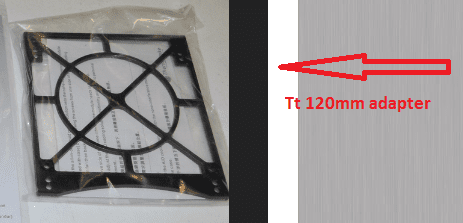
Meanwhile, for those who could have interest in such install, i shot the radiator with the Thermaltake adapter on it.

The four holes at each diagonal are for the mount onto the PC case and the others (x8) with a little carving for screws not interfering the PC mount. You can then set the height of the radiator within the four ones for PC mount. Its so because of the first PC Case PCI slot could touch the bottom of the Rad, so you have that clearance now.

Thermaltake could have made the Case higher, though! Guess they did had some restriction policy on that one and the adapter was the alternate solution.

PS: You can also use the adapter the same method if you've got a Push/Pull over the Rad.
The attached image is upside down for my setting, it will be plugs at bottom.
 

Attachments

  • DSCN1628.JPG
    DSCN1628.JPG
    152.1 KB · Views: 1
Last edited:

My Computer My Computer

Computer type
PC/Desktop
Computer Manufacturer/Model Number
Custom Build
OS
Windows 7 Professional SP1 - x64 [Non-UEFI Boot]
CPU
Ivy Bridge Core i5 3570K (Delidded)
Motherboard
Asus P8Z77-V LE PLUS
Memory
G.Skill "Ares" DDR3 PC3-12800 - 1600MHz (16Gb)
Graphics Card(s)
Asus Dual-RX480-O4G
Sound Card
Creative Sound Blaster Z w/5.1 sound system
Monitor(s) Displays
Asus IPS 23"
Screen Resolution
16/9
Hard Drives
Internal:
500Go Sata 6Gb/s (x2)
500Go Sata 3Gb/s (x2)
SSD 60Go Sata 6Gb/s
PSU
In Win C 900W Series 80+ Platinum
Case
Thermaltake Chaser A71
Cooling
Custom Water Cooling Loop
Keyboard
Cooler Master QuickFire XTi
Mouse
Razer Imperator 2012 (4G)
Antivirus
MSE
Browser
IE 11.0.xxx Rtm
Other Info
"Raid0" with Intel Smart Response Technology (HDD/SSD)
I'm updating a little this thread between few hours of sleep and my small contract daylight work...i will have a rest soon, it is for my goodness anyway! :rolleyes:

So received the Scythe Slip Stream Fan 120mm x 12mm thick and mounted it over the 7mm Shroud & Decoupling onto the Radiator 120.

Everything went as i expected when i ordered the parts, only 2mm were left after mounted the radiator on its place including the Thermaltake adapter (showed above) near the top radiator 240 and is left 3mm at bottom near the PC case Pci Slot. Had no issue to place it but is very tight measured! Otherwise its impossible to place the Radiator 120 without Adapter or Spacers...

Was doubting a little when ordering...:huh::party:

I just hope now the 12mm thickness of the fan will provide enough static pressure and that added Radiator 120 won't break the flow too much.

I will Drain and make the Tubing soon as tomorrow or Thursday evening as i'm waiting for a Sensor Temps to hide somewhere along the tubing. Didn't went for a Drain Valve, though!

The pump actually runs Half of its speed with an idle Temp of 32°c (delta room is around 21°C today). Looks no need to push it max as it goes self heated by its rotation...I found an average of 2300Rpm is enough to let time the liquid to cool (saw same advices either). I Ran it full speed near an hour but it didn't lower the temp at all!!
 

Attachments

  • RSCN1647.jpg
    RSCN1647.jpg
    182.4 KB · Views: 1

My Computer My Computer

Computer type
PC/Desktop
Computer Manufacturer/Model Number
Custom Build
OS
Windows 7 Professional SP1 - x64 [Non-UEFI Boot]
CPU
Ivy Bridge Core i5 3570K (Delidded)
Motherboard
Asus P8Z77-V LE PLUS
Memory
G.Skill "Ares" DDR3 PC3-12800 - 1600MHz (16Gb)
Graphics Card(s)
Asus Dual-RX480-O4G
Sound Card
Creative Sound Blaster Z w/5.1 sound system
Monitor(s) Displays
Asus IPS 23"
Screen Resolution
16/9
Hard Drives
Internal:
500Go Sata 6Gb/s (x2)
500Go Sata 3Gb/s (x2)
SSD 60Go Sata 6Gb/s
PSU
In Win C 900W Series 80+ Platinum
Case
Thermaltake Chaser A71
Cooling
Custom Water Cooling Loop
Keyboard
Cooler Master QuickFire XTi
Mouse
Razer Imperator 2012 (4G)
Antivirus
MSE
Browser
IE 11.0.xxx Rtm
Other Info
"Raid0" with Intel Smart Response Technology (HDD/SSD)
Non please be advised.
The hook is set.
Water cooling is addictive. Much like modular power supplies and SSD's are addictive.
Once you start building your own computer systems and then going to water cooling you know your hooked forever.
 

My Computer My Computer

Computer type
PC/Desktop
Computer Manufacturer/Model Number
Home made Desktop
OS
Windows 10 Pro. 64/ version 1709 Windows 7 Pro/64
CPU
Intel i7-6800K @ 4.3
Motherboard
ASUS X-99 Deluxe II
Memory
Corsair Platinum 16 gig @2400
Graphics Card(s)
EVGA GTX 1070 OC
Monitor(s) Displays
Asus 27" LED LCD/VE278Q
Screen Resolution
1920-1080 or 1280-720 HDMI
Hard Drives
INTEL SSD 730-240 Gb Sata 3.0/
PSU
EVGA Platium 1200W
Case
Phanteks Luxe Tempered Glass 8 fans/ one radiator
Cooling
XSPC/ Water Cooled CPU
Keyboard
Das 4 Professional
Mouse
Logitech M705/MX Anywhere 2-S
Internet Speed
100 mbits
Antivirus
Microsoft Security Essentials/ Malwarebytes Premium 3.0/ SAS
Browser
I.E. 11 default/Firefox/ ISP Time Warner Cable/Spectrum
Other Info
LG BluRay Burner/
Sound system-KLipsch-THX/
Icy Dock ssd Hot Swap bays.
Non please be advised.
The hook is set.
Water cooling is addictive. Much like modular power supplies and SSD's are addictive.
Once you start building your own computer systems and then going to water cooling you know your hooked forever.

Yeah...i noticed that! :D

But i will be quickly limited in my loop!

My graphics R9 270x does not have a proper full waterblock for example, and let me with the only option to cool the GPU Processor, also the 240 Rad (30mm thick) does go over the Ram sticks about two centimeters...etc! Also the lack of space now!

But i fairly happy of myself, i've done the best i can for the CPU Cooling.
 

My Computer My Computer

Computer type
PC/Desktop
Computer Manufacturer/Model Number
Custom Build
OS
Windows 7 Professional SP1 - x64 [Non-UEFI Boot]
CPU
Ivy Bridge Core i5 3570K (Delidded)
Motherboard
Asus P8Z77-V LE PLUS
Memory
G.Skill "Ares" DDR3 PC3-12800 - 1600MHz (16Gb)
Graphics Card(s)
Asus Dual-RX480-O4G
Sound Card
Creative Sound Blaster Z w/5.1 sound system
Monitor(s) Displays
Asus IPS 23"
Screen Resolution
16/9
Hard Drives
Internal:
500Go Sata 6Gb/s (x2)
500Go Sata 3Gb/s (x2)
SSD 60Go Sata 6Gb/s
PSU
In Win C 900W Series 80+ Platinum
Case
Thermaltake Chaser A71
Cooling
Custom Water Cooling Loop
Keyboard
Cooler Master QuickFire XTi
Mouse
Razer Imperator 2012 (4G)
Antivirus
MSE
Browser
IE 11.0.xxx Rtm
Other Info
"Raid0" with Intel Smart Response Technology (HDD/SSD)
Don't feel bad NoN, I have Trident X Ram and I put a 60mm thick rad in push/pull. I had to take the heat spreaders off the ram to get the board in. Now, knowing that Push/Pull only makes about a 3C difference, I have no idea why I did that. Probably for the same reason I put 2 X 360mm rads in to just cool the CPU. Just because I could, I guess. The same reason I do a lot of things, like have 8 SSDs. I hope to make it 10 soon.
 

My Computers My Computers

System One System Two

  • Computer type
    PC/Desktop
    Computer Manufacturer/Model Number
    ALWAYS UNDER CONSTRUCTION
    OS
    Windows 11 Pro
    CPU
    Ryzen 9 5900X
    Motherboard
    Asus X570 Crosshair Viii Hero
    Memory
    32GB G Skill DDR4-3600
    Graphics Card(s)
    EVGA RTX 3080 FTW 3 Ultra
    Sound Card
    On Board/Sennheiser PC37X Headset
    Monitor(s) Displays
    3 X Asus 27"
    Screen Resolution
    2560x1440
    Hard Drives
    2 X 1 TB NVME drives
    PSU
    EVGA 850
    Case
    Phanteks Eclipse P400A
    Cooling
    EVGA 280 AIO
    Keyboard
    Logitech G510s/ Logitech G13
    Mouse
    Logitech G502
    Internet Speed
    24/1
    Antivirus
    ESET/MBAM Pro/SAS Pro
    Browser
    Chrome/ Firefox/ Edge
  • Computer type
    Laptop
    System Manufacturer/Model Number
    Dell 16 Plus
    OS
    Windows 11 Pro
    CPU
    Intel Ultra 9 288V
    Memory
    32 GB LPDDR5X 8533
    Monitor(s) Displays
    16" Mini-LED HDR600 Touch 90 Hz
    Screen Resolution
    2560X1600
    Hard Drives
    1 TB NVME
Don't feel bad NoN, I have Trident X Ram and I put a 60mm thick rad in push/pull. I had to take the heat spreaders off the ram to get the board in. Now, knowing that Push/Pull only makes about a 3C difference, I have no idea why I did that. Probably for the same reason I put 2 X 360mm rads in to just cool the CPU. Just because I could, I guess. The same reason I do a lot of things, like have 8 SSDs. I hope to make it 10 soon.

Well, my 240 Radiator mounted with fans makes only a total of 62mm measurment...Glad i took low profil Ram sticks!!!

As for the Push/Pull i've got two 140mm hidden on top (you can see those in my rig album) helping evacuate the hot air. But those are not 4pin Pwm so i've to care when pushing the cpu to manually regulate them.

Yes i had the joy and fun going on, pushing me over the water loop solutions!:p
 

My Computer My Computer

Computer type
PC/Desktop
Computer Manufacturer/Model Number
Custom Build
OS
Windows 7 Professional SP1 - x64 [Non-UEFI Boot]
CPU
Ivy Bridge Core i5 3570K (Delidded)
Motherboard
Asus P8Z77-V LE PLUS
Memory
G.Skill "Ares" DDR3 PC3-12800 - 1600MHz (16Gb)
Graphics Card(s)
Asus Dual-RX480-O4G
Sound Card
Creative Sound Blaster Z w/5.1 sound system
Monitor(s) Displays
Asus IPS 23"
Screen Resolution
16/9
Hard Drives
Internal:
500Go Sata 6Gb/s (x2)
500Go Sata 3Gb/s (x2)
SSD 60Go Sata 6Gb/s
PSU
In Win C 900W Series 80+ Platinum
Case
Thermaltake Chaser A71
Cooling
Custom Water Cooling Loop
Keyboard
Cooler Master QuickFire XTi
Mouse
Razer Imperator 2012 (4G)
Antivirus
MSE
Browser
IE 11.0.xxx Rtm
Other Info
"Raid0" with Intel Smart Response Technology (HDD/SSD)
Buy a fan controller. I have 2 now, but am planning on getting 1 good one. 16 fans need something!
 

My Computers My Computers

System One System Two

  • Computer type
    PC/Desktop
    Computer Manufacturer/Model Number
    ALWAYS UNDER CONSTRUCTION
    OS
    Windows 11 Pro
    CPU
    Ryzen 9 5900X
    Motherboard
    Asus X570 Crosshair Viii Hero
    Memory
    32GB G Skill DDR4-3600
    Graphics Card(s)
    EVGA RTX 3080 FTW 3 Ultra
    Sound Card
    On Board/Sennheiser PC37X Headset
    Monitor(s) Displays
    3 X Asus 27"
    Screen Resolution
    2560x1440
    Hard Drives
    2 X 1 TB NVME drives
    PSU
    EVGA 850
    Case
    Phanteks Eclipse P400A
    Cooling
    EVGA 280 AIO
    Keyboard
    Logitech G510s/ Logitech G13
    Mouse
    Logitech G502
    Internet Speed
    24/1
    Antivirus
    ESET/MBAM Pro/SAS Pro
    Browser
    Chrome/ Firefox/ Edge
  • Computer type
    Laptop
    System Manufacturer/Model Number
    Dell 16 Plus
    OS
    Windows 11 Pro
    CPU
    Intel Ultra 9 288V
    Memory
    32 GB LPDDR5X 8533
    Monitor(s) Displays
    16" Mini-LED HDR600 Touch 90 Hz
    Screen Resolution
    2560X1600
    Hard Drives
    1 TB NVME
Buy a fan controller. I have 2 now, but am planning on getting 1 good one. 16 fans need something!

Got a six channels (30w) one ( it cares of the two 140mm top fans), plus the 4 Pwm onboard ones...Can't go over a nine Fans setup for that case, though! :D
 

My Computer My Computer

Computer type
PC/Desktop
Computer Manufacturer/Model Number
Custom Build
OS
Windows 7 Professional SP1 - x64 [Non-UEFI Boot]
CPU
Ivy Bridge Core i5 3570K (Delidded)
Motherboard
Asus P8Z77-V LE PLUS
Memory
G.Skill "Ares" DDR3 PC3-12800 - 1600MHz (16Gb)
Graphics Card(s)
Asus Dual-RX480-O4G
Sound Card
Creative Sound Blaster Z w/5.1 sound system
Monitor(s) Displays
Asus IPS 23"
Screen Resolution
16/9
Hard Drives
Internal:
500Go Sata 6Gb/s (x2)
500Go Sata 3Gb/s (x2)
SSD 60Go Sata 6Gb/s
PSU
In Win C 900W Series 80+ Platinum
Case
Thermaltake Chaser A71
Cooling
Custom Water Cooling Loop
Keyboard
Cooler Master QuickFire XTi
Mouse
Razer Imperator 2012 (4G)
Antivirus
MSE
Browser
IE 11.0.xxx Rtm
Other Info
"Raid0" with Intel Smart Response Technology (HDD/SSD)
Back
Top