Solved Waterfox update Profile deleted

Bernardus

New member
Member
VIP
Local time
2:54 AM
Messages
282
Almost any time now Waterfox installs an "update" it has the annoying habit to create a new barebone profile-folder or user-profile, leaving you with nothing. No cookies, no passwords, no favorite websites, no extensions, no bookmarks, no customised background or theme etc.
It also corrupts or resets your whole settings and changes your homepage into waterfox.

As soon as the update has been carried out, to your surprise it starts up with the menu "will you import settings from other browsers". No, because I have made different choices. That leaves you with frustrations.
I loved to work with Waterfox, but lately I changed to Opera because of these annoying problems.

Trough Firefox information sources it was possible to find the "hidden" Profile-folder, it is wise to copy this whole folder to a safe location outside your OS.
When that naked version of Waterfox appears, you can't even find a profile manager to choose another or previous profile?
So every time I had to delete the new profile-folder, or change the name, or to exchange the whole content of it with the backed-up one.

Is there an option to stop this kind of hijacking? I have disabled the "automatic update".
I know there is something like Febe, but it wasn't very helpful, since all extensions are deleted after an update which seems to be an "upgrade" or fresh install.
Also Febe didn't copy everything and so it couldn't restore all settings.
 

My Computer

Computer type
PC/Desktop
OS
Microsoft Windows 7 Ultimate 64-bits 7601 Multiprocessor Free Service Pack 1
CPU
Intel(R) Core(TM)2 Duo CPU E8400 @ 3.00GHz
Motherboard
ASRock G41MH/USB3.
Memory
8,00 GB
Graphics Card(s)
(1) Intel(R) G41 Express Chipset (2) Intel(R) G41 Express
Sound Card
(1) VIA High Definition Audio (2) Intel(R) High Definition
Monitor(s) Displays
S24B350 Samsung
Screen Resolution
1920 x 1080 x 32 bits (4294967296 colors) @ 60 Hz
Hard Drives
(1) ST31000528AS ATA Device (2) Generic- Compact Flash USB Device (3) Generic- MS/MS-Pro USB Device (4) Generic- SD/MMC USB Device (5) Generic- SM/xD-Picture USB Device
Antivirus
ZoneAlarm Free Antivirus + Firewall version: 12.0.104.000 Vs
Suggest: Switch to Cyberfox or PaleMoon.

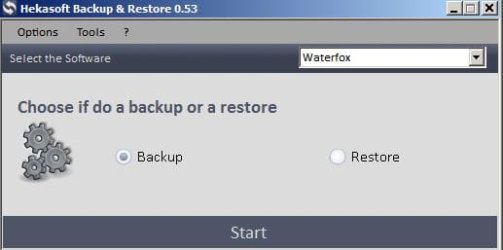
If you want to backup Waterfox use:

Hekasoft Backup & Restore Download (Softpedia download)

Warning: Do not attempt to download from the manufactures site as the "Lite" version has been removed and the only version available there is bundled with adware.

The Softpedia download is the clean "Lite" version.

I use it to backup Cyberfox (FF variant) and a few other browsers.

Screenshots:

Hekasoft Backup & Restore 1.jpg

Full ist of apps that it can backup:

Hekasoft Backup & Restore.jpg

Alternatively copy your Profiles folder and Profiles.ini file before applying updates - to a folder on your desktop.

See the post here by member FerchogtX

http://www.sevenforums.com/browsers-mail/392148-look-what-i-just-found-firefox-2.html#post3221493

After update open your old profile alongside your new one and copy what you need. You may need to open some files with your text editor to copy details across.
 
Last edited:

My Computer

Computer type
Laptop
Computer Manufacturer/Model Number
ASUS
OS
Microsoft Windows 7 Home Premium 64-bit 7601 Multiprocessor Free Service Pack 1
CPU
AMD C-60 APU with Radeon(tm) HD Graphics
Motherboard
ASUSTeK COMPUTER INC. X501U
Memory
4.00 GB
Graphics Card(s)
AMD Radeon HD 6290 Graphics
Sound Card
(1) AMD High Definition Audio Device (2) Realtek High Defi
Screen Resolution
1366 x 768 x 32 bits (4294967296 colors) @ 60 Hz
Hard Drives
Hitachi HTS545050A7E380 SATA Disk Device
Antivirus
Comodo CIS & FW, SecureAplus App Whitelisting, Threatfire
Browser
Cyberfox 64bit, Opera 64bit, Airfox
Other Info
Spy-The-Spy, HitmanPro.Alert, Norton Connect Safe, MJRegWatcher, BitDefender TrafficLight, Voodoo Shield, Zemana AntiMalware
Thank you for your reply, I'll have to sort that out.
In my case I decided to backup my whole profile-folder somewhere. (some 130 MB)
Could also use Acronis backup to do so. Since that can restore specific files.

You get no warning when an upgrade has taken place, or before it is carried out.
So it's secretly or hidden done after a cold start or while Waterfox is idle or not in use.
Strange, since normally Waterfox always warned about it and restored the settings or addons for as much compatible with the update. However the update is an upgrade or clean fresh version or something has changed in their policy.
I wonder why they always create a new profile? (The old ones are still sitting next to it in hidden folders).
Perhaps to install a new version and leave the old data for the ones clever enough to find it.
Creating a lot of rubbish on your drive. I had even four files which means about 500 MB redundant data.

With regards
 

My Computer

Computer type
PC/Desktop
OS
Microsoft Windows 7 Ultimate 64-bits 7601 Multiprocessor Free Service Pack 1
CPU
Intel(R) Core(TM)2 Duo CPU E8400 @ 3.00GHz
Motherboard
ASRock G41MH/USB3.
Memory
8,00 GB
Graphics Card(s)
(1) Intel(R) G41 Express Chipset (2) Intel(R) G41 Express
Sound Card
(1) VIA High Definition Audio (2) Intel(R) High Definition
Monitor(s) Displays
S24B350 Samsung
Screen Resolution
1920 x 1080 x 32 bits (4294967296 colors) @ 60 Hz
Hard Drives
(1) ST31000528AS ATA Device (2) Generic- Compact Flash USB Device (3) Generic- MS/MS-Pro USB Device (4) Generic- SD/MMC USB Device (5) Generic- SM/xD-Picture USB Device
Antivirus
ZoneAlarm Free Antivirus + Firewall version: 12.0.104.000 Vs
Personally I use Cyberfox 64bit (installed) and Firefox 32bit (Portable)

I've used Waterfox in the past but don't like waiting for (in some cases) weeks before security critical updates are released by the Waterfox developer.

I've seen problems with profiles usually when a major upgrade is released rather then upgrades that deal with minor changes.

I always backup profiles before running a manual update check.
 

My Computer

Computer type
Laptop
Computer Manufacturer/Model Number
ASUS
OS
Microsoft Windows 7 Home Premium 64-bit 7601 Multiprocessor Free Service Pack 1
CPU
AMD C-60 APU with Radeon(tm) HD Graphics
Motherboard
ASUSTeK COMPUTER INC. X501U
Memory
4.00 GB
Graphics Card(s)
AMD Radeon HD 6290 Graphics
Sound Card
(1) AMD High Definition Audio Device (2) Realtek High Defi
Screen Resolution
1366 x 768 x 32 bits (4294967296 colors) @ 60 Hz
Hard Drives
Hitachi HTS545050A7E380 SATA Disk Device
Antivirus
Comodo CIS & FW, SecureAplus App Whitelisting, Threatfire
Browser
Cyberfox 64bit, Opera 64bit, Airfox
Other Info
Spy-The-Spy, HitmanPro.Alert, Norton Connect Safe, MJRegWatcher, BitDefender TrafficLight, Voodoo Shield, Zemana AntiMalware
I've seen problems with profiles usually when a major upgrade is released rather then upgrades that deal with minor changes.

I'm going to try that Cyberfox 64bit too and yes.
I agree to backup profiles before any update takes place or after important personal changes.
Pity they changed their policy, so ignorant.

Hekasoft runs smooth, although I have to stop Chrome.exe *32 (?? 64 bits OS) in taskmanager, because Chrome.exe *32 seems to start up with Windows and runs in the background and Hekasoft can't catchup with it while running?
 

My Computer

Computer type
PC/Desktop
OS
Microsoft Windows 7 Ultimate 64-bits 7601 Multiprocessor Free Service Pack 1
CPU
Intel(R) Core(TM)2 Duo CPU E8400 @ 3.00GHz
Motherboard
ASRock G41MH/USB3.
Memory
8,00 GB
Graphics Card(s)
(1) Intel(R) G41 Express Chipset (2) Intel(R) G41 Express
Sound Card
(1) VIA High Definition Audio (2) Intel(R) High Definition
Monitor(s) Displays
S24B350 Samsung
Screen Resolution
1920 x 1080 x 32 bits (4294967296 colors) @ 60 Hz
Hard Drives
(1) ST31000528AS ATA Device (2) Generic- Compact Flash USB Device (3) Generic- MS/MS-Pro USB Device (4) Generic- SD/MMC USB Device (5) Generic- SM/xD-Picture USB Device
Antivirus
ZoneAlarm Free Antivirus + Firewall version: 12.0.104.000 Vs

RE: Chrome. Personally I don't use it as I prefer SRWare Iron but I don't even use it much.

Maybe try looking at running processes after you switch your computer on. If you don't see any Chrome processes listed - backup Chrome at that time.

RE: Cyberfox. There's a portable version available if you just want to test it. It uses it's own profile so doesn't mess with Firefox/ Waterfox.

As for updates - I've found it better to just download the new version of Cyberfox and install straight over the top of the old version. When you do it like that you get the choice of either installing over the top or performing a "fresh install"

Cyberfox Install.jpg

A fresh install wipes the old profile!
 
Last edited:

My Computer

Computer type
Laptop
Computer Manufacturer/Model Number
ASUS
OS
Microsoft Windows 7 Home Premium 64-bit 7601 Multiprocessor Free Service Pack 1
CPU
AMD C-60 APU with Radeon(tm) HD Graphics
Motherboard
ASUSTeK COMPUTER INC. X501U
Memory
4.00 GB
Graphics Card(s)
AMD Radeon HD 6290 Graphics
Sound Card
(1) AMD High Definition Audio Device (2) Realtek High Defi
Screen Resolution
1366 x 768 x 32 bits (4294967296 colors) @ 60 Hz
Hard Drives
Hitachi HTS545050A7E380 SATA Disk Device
Antivirus
Comodo CIS & FW, SecureAplus App Whitelisting, Threatfire
Browser
Cyberfox 64bit, Opera 64bit, Airfox
Other Info
Spy-The-Spy, HitmanPro.Alert, Norton Connect Safe, MJRegWatcher, BitDefender TrafficLight, Voodoo Shield, Zemana AntiMalware
Just for the record, if you want to keep your cookies and browsing history for another profile, don't clear your browsing history and cookies before copying/doing a backup of places.sqlite. To keep your cookies, just copy cookies.sqlite, but don't clear them before copying (if you clear them, the file renders useless until you start browsing and loging in to sites again). Places.sqlite not only holds your bookmarks and organization for them, but also, your browsing history, as long as you don't clear it.

If your profile is corrupted somehow, it's your best bet to oly copy the files I suggest, as they normally don't get corrupted, and in the case they do, you can manually recover information from them (mainly prefs/user.js, as the others are more likely never prone to corruption)

Also, as Callender says, I recomend Cyberfox, it's fast, steady and it's really FF compatible (Waterfox is trying some nasty stuff with profiles lately, while ol' reliable profile manager is still accesible in Cyberfox, just like FF does)... or in case you wanna try, FF has now a 64 bit flavour, and Electrolisys works even better with it (unless you got incompatibe extensions, Electrolisys is now enabled in FF46 and beyond)

The last point... try to periodically do backups of your profiles, sometimes browsers do strange things (althoug FF has become more stable through releases) that can only be fixed with a fresh profile, just with settings and important things restored. Or, just for manateinance (I just wipe my profile and do a new one with settings, bookmarks and passwords restored every 2 major releases)
 

My Computer

Computer type
PC/Desktop
Computer Manufacturer/Model Number
Assembled Desktop PC
OS
Microsoft Windows 7 Home Premium SP1 64-bit Build 7600
CPU
AMD Athlon 64 X2 5200+ Dual Core CPU @ 2.7 Ghz (Brisbane)
Motherboard
PCChips A13G+ v3.0
Memory
2x2 GB DDR2 PC-5300 (667 Mhz) Kingston ValueRAM
Graphics Card(s)
XFX ATI Radeon HD 4350 GPU (512 MB + 512 MB HM)
Sound Card
Realtek High Definition Audio Driver ALC660 @ MCP61S
Monitor(s) Displays
HP S2031 20" LED HD Widescreen Display Monitor
Screen Resolution
1600 x 900 px
Hard Drives
Maxtor Diamond Max 10 (160 GB, 7200 RPM, SATA-II Hard Disk)
Western Digital Scorpion Blue (250 GB, 5400 RPM, SATA-II External Hard Disk - Personal Data)
Toshiba MQ01ABD050 (500 GB, 5400 RPM, SATA-II External Hard Disk - Software & ISOs)
PSU
Pixxo Transformer 850W 80+ Certification PSU
Case
Compaq 5BW353 Case
Cooling
Many solutions, see other info...
Keyboard
Green Leaf (Mitzu) Standard Keyboard
Mouse
Microsoft USB Lasser Pointing Device
Internet Speed
10 MB
Antivirus
Avast Antivirus Free
Browser
Firefox, Chrome, Internet Explorer
Other Info
Windows Experience Index Result: 3.8 of 7.9.

Cooling solutions:
- AVC @ 2000/5000 RPM Copper Heatpipes (For Athlon 64 X2 6000+ CPU used in an Athlon 64 X2 5200+)
- Rear Fan 80 mm @ 2700 RPM for heat extraction
- Manhatan Chipset Cooler @ 4700/7200 RPM (For nVidia Chipset in MoBo)
- Foxconn @ 2500 RPM (Old Pentium III heatsink fan) in XFX ATI Radeon HD 4350
Thanks for the suggestions.
It's possible with CC (Cookie Clean) to choose which cookies you like to keep.
So it wipes only those you want to get rid of, including history and TMP or junk etc.
Good to hear there is a 64 bits version available of FF.

I have been using SRW Iron for a while, but support was very poor or almost non existent.
Also they didn't support some applications.
Never got my account or postings approved and I dropped it for that reason.
Didn't see any advantage in it, except perhaps some privacy-rules.

I don't like Google or IE browsers, because of their wel known agressive spying and adds policy.
But some searchmachines like Duck Duck or Startpage are more private (I Hope?)
 

My Computer

Computer type
PC/Desktop
OS
Microsoft Windows 7 Ultimate 64-bits 7601 Multiprocessor Free Service Pack 1
CPU
Intel(R) Core(TM)2 Duo CPU E8400 @ 3.00GHz
Motherboard
ASRock G41MH/USB3.
Memory
8,00 GB
Graphics Card(s)
(1) Intel(R) G41 Express Chipset (2) Intel(R) G41 Express
Sound Card
(1) VIA High Definition Audio (2) Intel(R) High Definition
Monitor(s) Displays
S24B350 Samsung
Screen Resolution
1920 x 1080 x 32 bits (4294967296 colors) @ 60 Hz
Hard Drives
(1) ST31000528AS ATA Device (2) Generic- Compact Flash USB Device (3) Generic- MS/MS-Pro USB Device (4) Generic- SD/MMC USB Device (5) Generic- SM/xD-Picture USB Device
Antivirus
ZoneAlarm Free Antivirus + Firewall version: 12.0.104.000 Vs
I'm using magic actions on you tube, the very best add-on with a switch for cinema mode and dark background HTML etc.
However can't find it in the Cyberfox list?
I wonder if most Firefox add-ons could also be used on Cyberfox? But how?
 

My Computer

Computer type
PC/Desktop
OS
Microsoft Windows 7 Ultimate 64-bits 7601 Multiprocessor Free Service Pack 1
CPU
Intel(R) Core(TM)2 Duo CPU E8400 @ 3.00GHz
Motherboard
ASRock G41MH/USB3.
Memory
8,00 GB
Graphics Card(s)
(1) Intel(R) G41 Express Chipset (2) Intel(R) G41 Express
Sound Card
(1) VIA High Definition Audio (2) Intel(R) High Definition
Monitor(s) Displays
S24B350 Samsung
Screen Resolution
1920 x 1080 x 32 bits (4294967296 colors) @ 60 Hz
Hard Drives
(1) ST31000528AS ATA Device (2) Generic- Compact Flash USB Device (3) Generic- MS/MS-Pro USB Device (4) Generic- SD/MMC USB Device (5) Generic- SM/xD-Picture USB Device
Antivirus
ZoneAlarm Free Antivirus + Firewall version: 12.0.104.000 Vs
Got it, Cyberfox is extremely fast.
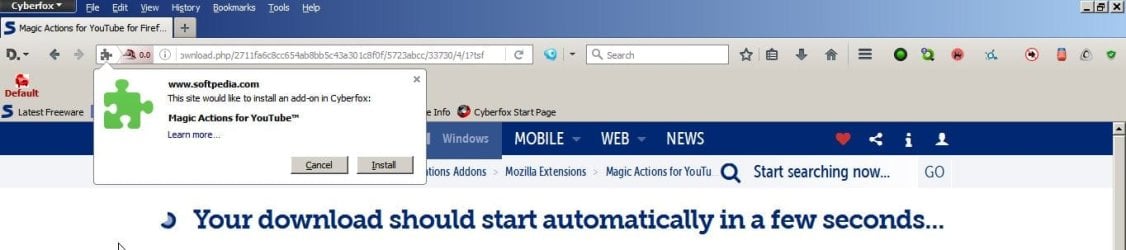
It wasn't listed in the Cyberfox addons, but looking in FF add-ons and install it, in cyberfox it was prevented but you may ingnore that. It's working perfect.,
 

My Computer

Computer type
PC/Desktop
OS
Microsoft Windows 7 Ultimate 64-bits 7601 Multiprocessor Free Service Pack 1
CPU
Intel(R) Core(TM)2 Duo CPU E8400 @ 3.00GHz
Motherboard
ASRock G41MH/USB3.
Memory
8,00 GB
Graphics Card(s)
(1) Intel(R) G41 Express Chipset (2) Intel(R) G41 Express
Sound Card
(1) VIA High Definition Audio (2) Intel(R) High Definition
Monitor(s) Displays
S24B350 Samsung
Screen Resolution
1920 x 1080 x 32 bits (4294967296 colors) @ 60 Hz
Hard Drives
(1) ST31000528AS ATA Device (2) Generic- Compact Flash USB Device (3) Generic- MS/MS-Pro USB Device (4) Generic- SD/MMC USB Device (5) Generic- SM/xD-Picture USB Device
Antivirus
ZoneAlarm Free Antivirus + Firewall version: 12.0.104.000 Vs

My Computer

Computer type
PC/Desktop
Computer Manufacturer/Model Number
Assembled Desktop PC
OS
Microsoft Windows 7 Home Premium SP1 64-bit Build 7600
CPU
AMD Athlon 64 X2 5200+ Dual Core CPU @ 2.7 Ghz (Brisbane)
Motherboard
PCChips A13G+ v3.0
Memory
2x2 GB DDR2 PC-5300 (667 Mhz) Kingston ValueRAM
Graphics Card(s)
XFX ATI Radeon HD 4350 GPU (512 MB + 512 MB HM)
Sound Card
Realtek High Definition Audio Driver ALC660 @ MCP61S
Monitor(s) Displays
HP S2031 20" LED HD Widescreen Display Monitor
Screen Resolution
1600 x 900 px
Hard Drives
Maxtor Diamond Max 10 (160 GB, 7200 RPM, SATA-II Hard Disk)
Western Digital Scorpion Blue (250 GB, 5400 RPM, SATA-II External Hard Disk - Personal Data)
Toshiba MQ01ABD050 (500 GB, 5400 RPM, SATA-II External Hard Disk - Software & ISOs)
PSU
Pixxo Transformer 850W 80+ Certification PSU
Case
Compaq 5BW353 Case
Cooling
Many solutions, see other info...
Keyboard
Green Leaf (Mitzu) Standard Keyboard
Mouse
Microsoft USB Lasser Pointing Device
Internet Speed
10 MB
Antivirus
Avast Antivirus Free
Browser
Firefox, Chrome, Internet Explorer
Other Info
Windows Experience Index Result: 3.8 of 7.9.

Cooling solutions:
- AVC @ 2000/5000 RPM Copper Heatpipes (For Athlon 64 X2 6000+ CPU used in an Athlon 64 X2 5200+)
- Rear Fan 80 mm @ 2700 RPM for heat extraction
- Manhatan Chipset Cooler @ 4700/7200 RPM (For nVidia Chipset in MoBo)
- Foxconn @ 2500 RPM (Old Pentium III heatsink fan) in XFX ATI Radeon HD 4350
Got it, Cyberfox is extremely fast.
It wasn't listed in the Cyberfox addons, but looking in FF add-ons and install it, in cyberfox it was prevented but you may ingnore that. It's working perfect.,

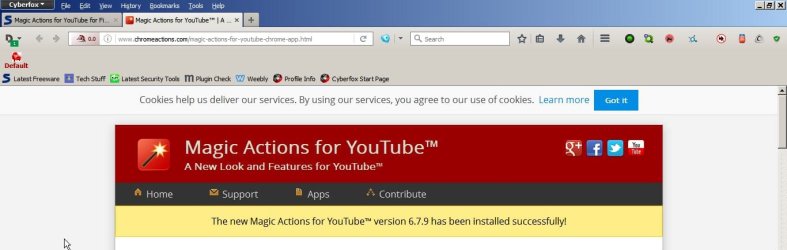
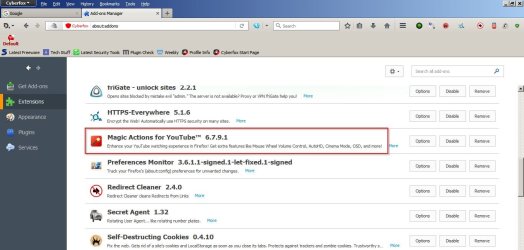
Sorry for the late answer. I see you've sorted it. Typically you just find the Firefox add on and install it. The only ones that don't work are those that haven't been updated to work with the latest verions of FF/ Cybefox.

Magic Actions for YouTube for Firefox download - Cyberfox.jpg

Magic Actions for YouTube Installed - Cyberfox.jpg

Add-ons Manager - Cyberfox.jpg

You might notice that Cyberfox can be customised to look different if you like.
 

My Computer

Computer type
Laptop
Computer Manufacturer/Model Number
ASUS
OS
Microsoft Windows 7 Home Premium 64-bit 7601 Multiprocessor Free Service Pack 1
CPU
AMD C-60 APU with Radeon(tm) HD Graphics
Motherboard
ASUSTeK COMPUTER INC. X501U
Memory
4.00 GB
Graphics Card(s)
AMD Radeon HD 6290 Graphics
Sound Card
(1) AMD High Definition Audio Device (2) Realtek High Defi
Screen Resolution
1366 x 768 x 32 bits (4294967296 colors) @ 60 Hz
Hard Drives
Hitachi HTS545050A7E380 SATA Disk Device
Antivirus
Comodo CIS & FW, SecureAplus App Whitelisting, Threatfire
Browser
Cyberfox 64bit, Opera 64bit, Airfox
Other Info
Spy-The-Spy, HitmanPro.Alert, Norton Connect Safe, MJRegWatcher, BitDefender TrafficLight, Voodoo Shield, Zemana AntiMalware
I never opted for a clean install of Waterfox.
Yet it deleted my profile again with an update.
After which I decided to leave Waterfox and entirely removed it.

I'm very happy with Cyberfox, which also had an update at about the same time, leaving all settings and addons intact.
I could even use the beloved template. After the automatic restart all was running well.

So thank you for all your help.
 

My Computer

Computer type
PC/Desktop
OS
Microsoft Windows 7 Ultimate 64-bits 7601 Multiprocessor Free Service Pack 1
CPU
Intel(R) Core(TM)2 Duo CPU E8400 @ 3.00GHz
Motherboard
ASRock G41MH/USB3.
Memory
8,00 GB
Graphics Card(s)
(1) Intel(R) G41 Express Chipset (2) Intel(R) G41 Express
Sound Card
(1) VIA High Definition Audio (2) Intel(R) High Definition
Monitor(s) Displays
S24B350 Samsung
Screen Resolution
1920 x 1080 x 32 bits (4294967296 colors) @ 60 Hz
Hard Drives
(1) ST31000528AS ATA Device (2) Generic- Compact Flash USB Device (3) Generic- MS/MS-Pro USB Device (4) Generic- SD/MMC USB Device (5) Generic- SM/xD-Picture USB Device
Antivirus
ZoneAlarm Free Antivirus + Firewall version: 12.0.104.000 Vs
It's still best to backup Cyberfox profile before an update - just in case!

:)
 

My Computer

Computer type
Laptop
Computer Manufacturer/Model Number
ASUS
OS
Microsoft Windows 7 Home Premium 64-bit 7601 Multiprocessor Free Service Pack 1
CPU
AMD C-60 APU with Radeon(tm) HD Graphics
Motherboard
ASUSTeK COMPUTER INC. X501U
Memory
4.00 GB
Graphics Card(s)
AMD Radeon HD 6290 Graphics
Sound Card
(1) AMD High Definition Audio Device (2) Realtek High Defi
Screen Resolution
1366 x 768 x 32 bits (4294967296 colors) @ 60 Hz
Hard Drives
Hitachi HTS545050A7E380 SATA Disk Device
Antivirus
Comodo CIS & FW, SecureAplus App Whitelisting, Threatfire
Browser
Cyberfox 64bit, Opera 64bit, Airfox
Other Info
Spy-The-Spy, HitmanPro.Alert, Norton Connect Safe, MJRegWatcher, BitDefender TrafficLight, Voodoo Shield, Zemana AntiMalware
I will surely do so Calender periodical.
Thanks again
 

My Computer

Computer type
PC/Desktop
OS
Microsoft Windows 7 Ultimate 64-bits 7601 Multiprocessor Free Service Pack 1
CPU
Intel(R) Core(TM)2 Duo CPU E8400 @ 3.00GHz
Motherboard
ASRock G41MH/USB3.
Memory
8,00 GB
Graphics Card(s)
(1) Intel(R) G41 Express Chipset (2) Intel(R) G41 Express
Sound Card
(1) VIA High Definition Audio (2) Intel(R) High Definition
Monitor(s) Displays
S24B350 Samsung
Screen Resolution
1920 x 1080 x 32 bits (4294967296 colors) @ 60 Hz
Hard Drives
(1) ST31000528AS ATA Device (2) Generic- Compact Flash USB Device (3) Generic- MS/MS-Pro USB Device (4) Generic- SD/MMC USB Device (5) Generic- SM/xD-Picture USB Device
Antivirus
ZoneAlarm Free Antivirus + Firewall version: 12.0.104.000 Vs
RE: Cyberfox profile backup. Instead of Hekasoft Backup you can also use FEBE as it works fine with Cyberfox. Just tested on 64bit version of Cyberfox.

Method of installation:

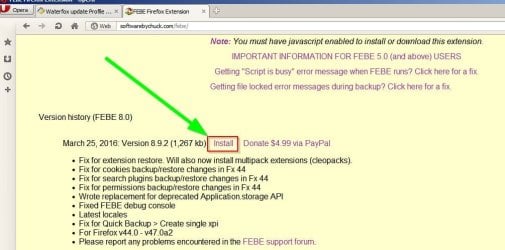
Instead of searching via "manage add ons" visit the FEBE developer's website and download the .xpi file.

FEBE Firefox Extension

FEBE Firefox Extension.jpg

Save the file and install it via Cyberfox> Tools> Add Ons.

Click the "Gear" icon and choose "install addon from file" - browse to the downloaded file and open it.

Once installed configure FEBE.

Tools> FEBE> FEBE Options.

Once configured - run a backup.

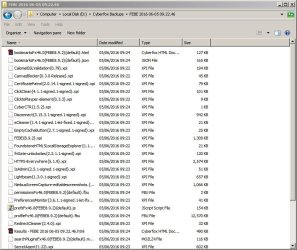
Here's my backup:

FEBE.jpg
 

My Computer

Computer type
Laptop
Computer Manufacturer/Model Number
ASUS
OS
Microsoft Windows 7 Home Premium 64-bit 7601 Multiprocessor Free Service Pack 1
CPU
AMD C-60 APU with Radeon(tm) HD Graphics
Motherboard
ASUSTeK COMPUTER INC. X501U
Memory
4.00 GB
Graphics Card(s)
AMD Radeon HD 6290 Graphics
Sound Card
(1) AMD High Definition Audio Device (2) Realtek High Defi
Screen Resolution
1366 x 768 x 32 bits (4294967296 colors) @ 60 Hz
Hard Drives
Hitachi HTS545050A7E380 SATA Disk Device
Antivirus
Comodo CIS & FW, SecureAplus App Whitelisting, Threatfire
Browser
Cyberfox 64bit, Opera 64bit, Airfox
Other Info
Spy-The-Spy, HitmanPro.Alert, Norton Connect Safe, MJRegWatcher, BitDefender TrafficLight, Voodoo Shield, Zemana AntiMalware
Thanks again Calender.
Cyberfox is running very well and became the standard browser.
No more problems with profiles deleted.
But just in case I'll back up.
 

My Computer

Computer type
PC/Desktop
OS
Microsoft Windows 7 Ultimate 64-bits 7601 Multiprocessor Free Service Pack 1
CPU
Intel(R) Core(TM)2 Duo CPU E8400 @ 3.00GHz
Motherboard
ASRock G41MH/USB3.
Memory
8,00 GB
Graphics Card(s)
(1) Intel(R) G41 Express Chipset (2) Intel(R) G41 Express
Sound Card
(1) VIA High Definition Audio (2) Intel(R) High Definition
Monitor(s) Displays
S24B350 Samsung
Screen Resolution
1920 x 1080 x 32 bits (4294967296 colors) @ 60 Hz
Hard Drives
(1) ST31000528AS ATA Device (2) Generic- Compact Flash USB Device (3) Generic- MS/MS-Pro USB Device (4) Generic- SD/MMC USB Device (5) Generic- SM/xD-Picture USB Device
Antivirus
ZoneAlarm Free Antivirus + Firewall version: 12.0.104.000 Vs
Just one thing about Cyberfox, as it also was under Firefox.
If I have a webpage with lots of pictures, scrolling goes badly, hampering, lagging.
Google Chrome for instance does it much more smoothly on these pages.
I already disabled pixel scrolling and a scroll time set to 1000 in about:config.
Especially in youtube history scrolling is horrible, staggering, or just not what it should be.
Smooth scrolling is an add-on, but even that won't solve the problem.
My PC is fast enough to scroll smoothly.

Anyone any Idea?
 

My Computer

Computer type
PC/Desktop
OS
Microsoft Windows 7 Ultimate 64-bits 7601 Multiprocessor Free Service Pack 1
CPU
Intel(R) Core(TM)2 Duo CPU E8400 @ 3.00GHz
Motherboard
ASRock G41MH/USB3.
Memory
8,00 GB
Graphics Card(s)
(1) Intel(R) G41 Express Chipset (2) Intel(R) G41 Express
Sound Card
(1) VIA High Definition Audio (2) Intel(R) High Definition
Monitor(s) Displays
S24B350 Samsung
Screen Resolution
1920 x 1080 x 32 bits (4294967296 colors) @ 60 Hz
Hard Drives
(1) ST31000528AS ATA Device (2) Generic- Compact Flash USB Device (3) Generic- MS/MS-Pro USB Device (4) Generic- SD/MMC USB Device (5) Generic- SM/xD-Picture USB Device
Antivirus
ZoneAlarm Free Antivirus + Firewall version: 12.0.104.000 Vs
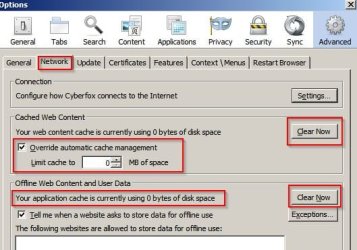
RE: Scrolling in Cyberfox. I don't have any issues. Here's my settings:

Options 1.jpg

You can try checking / unchecking "Disable hardware acceleration"

Options 2.jpg

Also check what your default search engine is and disable/ remove any search engines that you don't need/ use from the list.

Configure preferences for your default search engine. There's usually a settings button/ icon/ option on the search provider's home page and prefenences are stored in a cookie that should be excluded from deletion by any cookie cleaner type applications.

If you've still got a problem ask in the Cyberfox forum. Typically you get a response within 24 hours and good advice.

RE: New releases. Check here before installing:

Cyberfox Announcement's - 8pecxstudios Support Forums

See here for an example of an important announcement:

Critical! cyberfox 46.0.2 installer - 8pecxstudios Support Forums
 

My Computer

Computer type
Laptop
Computer Manufacturer/Model Number
ASUS
OS
Microsoft Windows 7 Home Premium 64-bit 7601 Multiprocessor Free Service Pack 1
CPU
AMD C-60 APU with Radeon(tm) HD Graphics
Motherboard
ASUSTeK COMPUTER INC. X501U
Memory
4.00 GB
Graphics Card(s)
AMD Radeon HD 6290 Graphics
Sound Card
(1) AMD High Definition Audio Device (2) Realtek High Defi
Screen Resolution
1366 x 768 x 32 bits (4294967296 colors) @ 60 Hz
Hard Drives
Hitachi HTS545050A7E380 SATA Disk Device
Antivirus
Comodo CIS & FW, SecureAplus App Whitelisting, Threatfire
Browser
Cyberfox 64bit, Opera 64bit, Airfox
Other Info
Spy-The-Spy, HitmanPro.Alert, Norton Connect Safe, MJRegWatcher, BitDefender TrafficLight, Voodoo Shield, Zemana AntiMalware
Just one thing about Cyberfox, as it also was under Firefox.
If I have a webpage with lots of pictures, scrolling goes badly, hampering, lagging.
Google Chrome for instance does it much more smoothly on these pages.
I already disabled pixel scrolling and a scroll time set to 1000 in about:config.
Especially in youtube history scrolling is horrible, staggering, or just not what it should be.
Smooth scrolling is an add-on, but even that won't solve the problem.
My PC is fast enough to scroll smoothly.

Anyone any Idea?

Mhhh... check if you have hardware acceleration enabled in about:support page., it's supposed to show Direct 3D 1/1 OMTC, if you do (as I suppose it should), try this settings in about:config:

Code:
browser.tabs.remote.autostart (set it to true)
browser.tabs.remote.force-enable (add this as a boolean, set it to true)
layers.async-pan-zoom.enabled (set this to true)
layers.offmainthreadcomposition.testing.enabled (set this to true)

Then, restart Firefox, it should go faster when scrolling.

But, warning, this are experimental settings that enable Electrolysis (partial multithreading) in Firefox, if this happen to cause crashes or instability in Firefox, set all this to default. Also is recomended to do a backup before atempting this settings. This also works with Cyberfox (as it's based of Firefox and also holds Electrolisys support).

Personally, I set this configurations, and I experience smooth browsing, scrolling and no crashes. You can always try.
 

My Computer

Computer type
PC/Desktop
Computer Manufacturer/Model Number
Assembled Desktop PC
OS
Microsoft Windows 7 Home Premium SP1 64-bit Build 7600
CPU
AMD Athlon 64 X2 5200+ Dual Core CPU @ 2.7 Ghz (Brisbane)
Motherboard
PCChips A13G+ v3.0
Memory
2x2 GB DDR2 PC-5300 (667 Mhz) Kingston ValueRAM
Graphics Card(s)
XFX ATI Radeon HD 4350 GPU (512 MB + 512 MB HM)
Sound Card
Realtek High Definition Audio Driver ALC660 @ MCP61S
Monitor(s) Displays
HP S2031 20" LED HD Widescreen Display Monitor
Screen Resolution
1600 x 900 px
Hard Drives
Maxtor Diamond Max 10 (160 GB, 7200 RPM, SATA-II Hard Disk)
Western Digital Scorpion Blue (250 GB, 5400 RPM, SATA-II External Hard Disk - Personal Data)
Toshiba MQ01ABD050 (500 GB, 5400 RPM, SATA-II External Hard Disk - Software & ISOs)
PSU
Pixxo Transformer 850W 80+ Certification PSU
Case
Compaq 5BW353 Case
Cooling
Many solutions, see other info...
Keyboard
Green Leaf (Mitzu) Standard Keyboard
Mouse
Microsoft USB Lasser Pointing Device
Internet Speed
10 MB
Antivirus
Avast Antivirus Free
Browser
Firefox, Chrome, Internet Explorer
Other Info
Windows Experience Index Result: 3.8 of 7.9.

Cooling solutions:
- AVC @ 2000/5000 RPM Copper Heatpipes (For Athlon 64 X2 6000+ CPU used in an Athlon 64 X2 5200+)
- Rear Fan 80 mm @ 2700 RPM for heat extraction
- Manhatan Chipset Cooler @ 4700/7200 RPM (For nVidia Chipset in MoBo)
- Foxconn @ 2500 RPM (Old Pentium III heatsink fan) in XFX ATI Radeon HD 4350
Back
Top