Solved WD drive, (C5) Current Pending Sector

Satirelol

New member
Local time
9:12 AM
Messages
24
Hi. Today I downloaded the new nvidia driver and tried to install it. At the end of the installation, I BSOD'd into code 24. According to bluescreenview, it was related to ntfs.sys. I always download from this drive and then install onto my SSD.

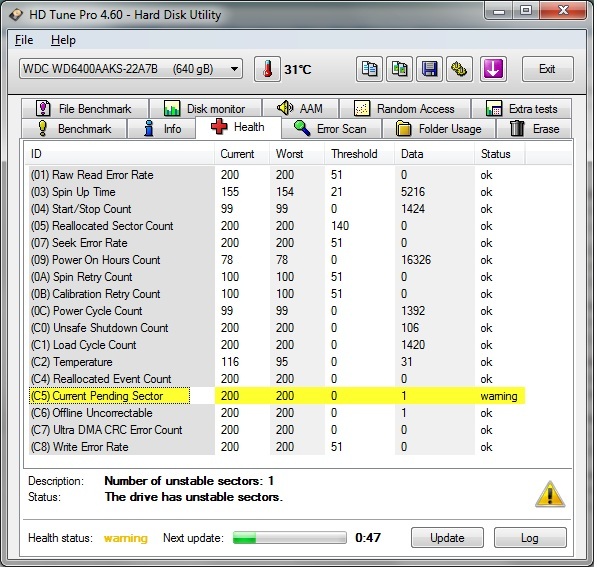
So I went and loaded up HD Tune. SSD is fine, HDD has an error.
G2Nne.jpg


I've had that drive for about 3 years now, do I have to throw it away or can I still somehow recover it (so it's useable).

Can I just go to disk management and Full format it, would that fix the bad sectors or at least block the computer from writing/reading to bad sectors in the future?
 

My Computer My Computer

OS
Windows Ultimate x64
CPU
i5 760
Motherboard
gigabyte p55a-ud3
Memory
2x4gb gskill
Graphics Card(s)
msi gtx 460 hawk
Monitor(s) Displays
LG 1920 x 1080
Hard Drives
120GB Vertex 2E
1TB Samsung
640GB WD
PSU
OCZ SX2 600W
Case
HAF 912
Cooling
Noctua NH-D14
Keyboard
Ducky Shine

My Computer My Computer

Computer type
PC/Desktop
Computer Manufacturer/Model Number
Home Built
OS
Win 7 Ultimate-64 Bit, Vista Home Premium-32 Bit, LinuxMint 17, Qiana 64 Bit
CPU
Intel Core i7 950 Bloomfield Extreme Quadcore 3.06GHz
Motherboard
ASUS Sabertooth X58 LGA 1366 socket
Memory
12 GIGS Corsair Dominator-GT DDR3 PC3-15000 (1866MHz) Triple
Graphics Card(s)
Single Nvidia Powered EVGA GeForce GTX 460 1024Mbs DDR5 memo
Sound Card
Creative Soundblaster X-FI Titanium Fatality Pro Series 7.1
Monitor(s) Displays
Dual AOC 23" LCD- LED Backlit 5MS response-DCR 30,000:1 cont
Screen Resolution
1920 X 1080 resolution
Hard Drives
C:\ Hitachi 1 Terabyte- Serial ATA 300 @ 7200rpm

E:\ Hitachi 320 GB- Serial ATA @ 7200 rpm

F:\ Hitachi 320 GB- Serial ATA @ 7200rpm
PSU
Corsair Modular Pro Series AX 850 80 Plus Gold certified PSU
Case
CoolerMaster Haf X 942 Full Tower with Mod Lighting
Cooling
CoolerMaster V-8 180 Watt CPU/Heatsink Cooler
Keyboard
Logitech MX 3200 lazer wireless board and mouse
Internet Speed
Fairpoint DSL 15MB per second download/ 2MB upload
Other Info
1 230mm case fan Front
3 200mm case fans, sidetop and rear all with Green Led Mod lights

Double Cooler Fans over the 12Gigs of Corsair DDR3 ram

Wicked powerful Machine! :>)
Ok I just ran chdsk on both of the partitions of that hard drive by going to properties, error checking and ticked both boxes. Both times a box came up saying no errors were found.

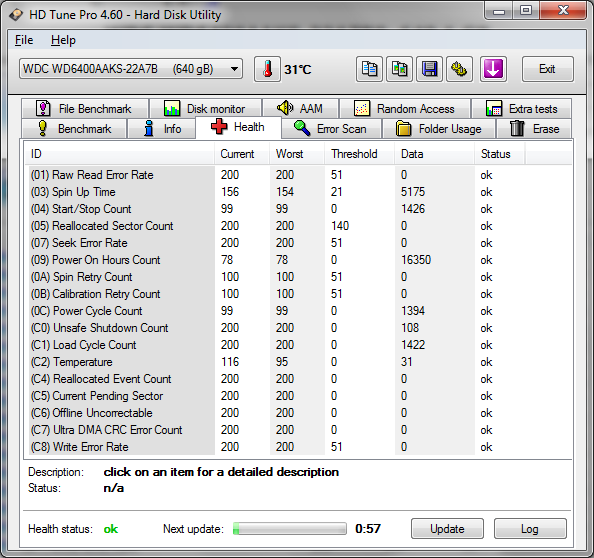
What I'm seeing on HD Tune hasn't changed though, so I'm guessing it hasn't fixed anything.
Code:
Chkdsk was executed in read/write mode.  

Checking file system on E:
Volume dismounted.  All opened handles to this volume are now invalid.
Volume label is WD.

CHKDSK is verifying files (stage 1 of 5)...
  149760 file records processed.                                          File verification completed.
  7 large file records processed.                                      0 bad file records processed.                                        0 EA records processed.                                              0 reparse records processed.                                       CHKDSK is verifying indexes (stage 2 of 5)...
  174050 index entries processed.                                         Index verification completed.


CHKDSK is verifying security descriptors (stage 3 of 5)...
  149760 file SDs/SIDs processed.                                         Cleaning up 11 unused index entries from index $SII of file 0x9.
Cleaning up 11 unused index entries from index $SDH of file 0x9.
Cleaning up 11 unused security descriptors.
Security descriptor verification completed.
  12145 data files processed.                                            CHKDSK is verifying file data (stage 4 of 5)...
  149744 files processed.                                                 File data verification completed.
CHKDSK is verifying free space (stage 5 of 5)...
  43177391 free clusters processed.                                         Free space verification is complete.
Windows has checked the file system and found no problems.

 307480575 KB total disk space.
 134486632 KB in 136269 files.
     59252 KB in 12147 indexes.
    225123 KB in use by the system.
     65536 KB occupied by the log file.
 172709568 KB available on disk.

      4096 bytes in each allocation unit.
  76870143 total allocation units on disk.
  43177392 allocation units available on disk.

Code:
Chkdsk was executed in read/write mode.  

Checking file system on F:
Volume dismounted.  All opened handles to this volume are now invalid.
Volume label is WD2.

CHKDSK is verifying files (stage 1 of 5)...
  105984 file records processed.                                          File verification completed.
  100 large file records processed.                                      0 bad file records processed.                                        0 EA records processed.                                              0 reparse records processed.                                       CHKDSK is verifying indexes (stage 2 of 5)...
  116808 index entries processed.                                         Index verification completed.


CHKDSK is verifying security descriptors (stage 3 of 5)...
  105984 file SDs/SIDs processed.                                         Cleaning up 158 unused index entries from index $SII of file 0x9.
Cleaning up 158 unused index entries from index $SDH of file 0x9.
Cleaning up 158 unused security descriptors.
Security descriptor verification completed.
  5413 data files processed.                                            CHKDSK is verifying Usn Journal...
  332963560 USN bytes processed.                                             Usn Journal verification completed.
CHKDSK is verifying file data (stage 4 of 5)...
  105968 files processed.                                                 File data verification completed.
CHKDSK is verifying free space (stage 5 of 5)...
  23623157 free clusters processed.                                         Free space verification is complete.
Windows has checked the file system and found no problems.

 307313663 KB total disk space.
 212307568 KB in 21689 files.
      6596 KB in 5414 indexes.
    506867 KB in use by the system.
     65536 KB occupied by the log file.
  94492632 KB available on disk.

      4096 bytes in each allocation unit.
  76828415 total allocation units on disk.
  23623158 allocation units available on disk.
 
Last edited:

My Computer My Computer

OS
Windows Ultimate x64
CPU
i5 760
Motherboard
gigabyte p55a-ud3
Memory
2x4gb gskill
Graphics Card(s)
msi gtx 460 hawk
Monitor(s) Displays
LG 1920 x 1080
Hard Drives
120GB Vertex 2E
1TB Samsung
640GB WD
PSU
OCZ SX2 600W
Case
HAF 912
Cooling
Noctua NH-D14
Keyboard
Ducky Shine

My Computer My Computer

Computer type
PC/Desktop
Computer Manufacturer/Model Number
Home Built Desktop By DataTech
OS
Windows 7 Ultimate X64 SP1
CPU
Intel i5-2550K, Differing ~4.4-4.8GHz No built in GPU
Motherboard
ASUS P8Z68-V PRO/GEN3
Memory
16GB G.Skill Sniper 1866MHz @ 2133MHz 2x8GB
Graphics Card(s)
ASUS GTX650TIB-DC2OC-2GD5, (650TI Boost)
Sound Card
Onboard Realtek 5-1
Monitor(s) Displays
Samsung P2570HD
Screen Resolution
1920x1080
Hard Drives
Samsung 840 Pro 256GB SSD for OS, 500GB Seagate Constellation (Enterprise drive) for Data
PSU
Corsair HX650W
Case
Inwin Dragon Rider
Cooling
Hyper 212 EVO w/two Noctua fans, push-pull, @1300 RPM
Keyboard
E-Z Eyes, bright yellow keys with large characters
Mouse
steelseries SENSEI Laser Pro Gaming
Internet Speed
48-51Mbs Mbs down, 11 Mbs up Xfinity Cable
Antivirus
Norton Internet Security 2013
Browser
IE 10, Opera, Pale Moon if needed
Other Info
4 case fans, LG BluRay-RE, ASUS DVD-RW, Mr. Fusion power supply, 1.21 gigawatts.
What's so special about Samsung's tool? Thinking of giving SpinRite a try.
Also, anyone know if doing a full format will take care of the bad sectors for future uses?
 

My Computer My Computer

OS
Windows Ultimate x64
CPU
i5 760
Motherboard
gigabyte p55a-ud3
Memory
2x4gb gskill
Graphics Card(s)
msi gtx 460 hawk
Monitor(s) Displays
LG 1920 x 1080
Hard Drives
120GB Vertex 2E
1TB Samsung
640GB WD
PSU
OCZ SX2 600W
Case
HAF 912
Cooling
Noctua NH-D14
Keyboard
Ducky Shine
Well, you have a Samsung listed in your specs, the utility is for Samsung drives. IT could repair the drive to let you recover data?
A format won't fix a bad sector, you need it to be re-allocated, which is what a repair tool attempts to do.
Sorry, your snip has a WD drive listed, there are also WD tools listed in the same link.;)
 

My Computer My Computer

Computer type
PC/Desktop
Computer Manufacturer/Model Number
Home Built Desktop By DataTech
OS
Windows 7 Ultimate X64 SP1
CPU
Intel i5-2550K, Differing ~4.4-4.8GHz No built in GPU
Motherboard
ASUS P8Z68-V PRO/GEN3
Memory
16GB G.Skill Sniper 1866MHz @ 2133MHz 2x8GB
Graphics Card(s)
ASUS GTX650TIB-DC2OC-2GD5, (650TI Boost)
Sound Card
Onboard Realtek 5-1
Monitor(s) Displays
Samsung P2570HD
Screen Resolution
1920x1080
Hard Drives
Samsung 840 Pro 256GB SSD for OS, 500GB Seagate Constellation (Enterprise drive) for Data
PSU
Corsair HX650W
Case
Inwin Dragon Rider
Cooling
Hyper 212 EVO w/two Noctua fans, push-pull, @1300 RPM
Keyboard
E-Z Eyes, bright yellow keys with large characters
Mouse
steelseries SENSEI Laser Pro Gaming
Internet Speed
48-51Mbs Mbs down, 11 Mbs up Xfinity Cable
Antivirus
Norton Internet Security 2013
Browser
IE 10, Opera, Pale Moon if needed
Other Info
4 case fans, LG BluRay-RE, ASUS DVD-RW, Mr. Fusion power supply, 1.21 gigawatts.
I thought full formats scanned for bad sectors and attempted to fix them, otherwise there would be no difference between a full and quick format.
 

My Computer My Computer

OS
Windows Ultimate x64
CPU
i5 760
Motherboard
gigabyte p55a-ud3
Memory
2x4gb gskill
Graphics Card(s)
msi gtx 460 hawk
Monitor(s) Displays
LG 1920 x 1080
Hard Drives
120GB Vertex 2E
1TB Samsung
640GB WD
PSU
OCZ SX2 600W
Case
HAF 912
Cooling
Noctua NH-D14
Keyboard
Ducky Shine
I ran SeaTools, said it found errors that can't be correctable because I was using the wrong manufacturer's software. Booted, yellow warning still there.

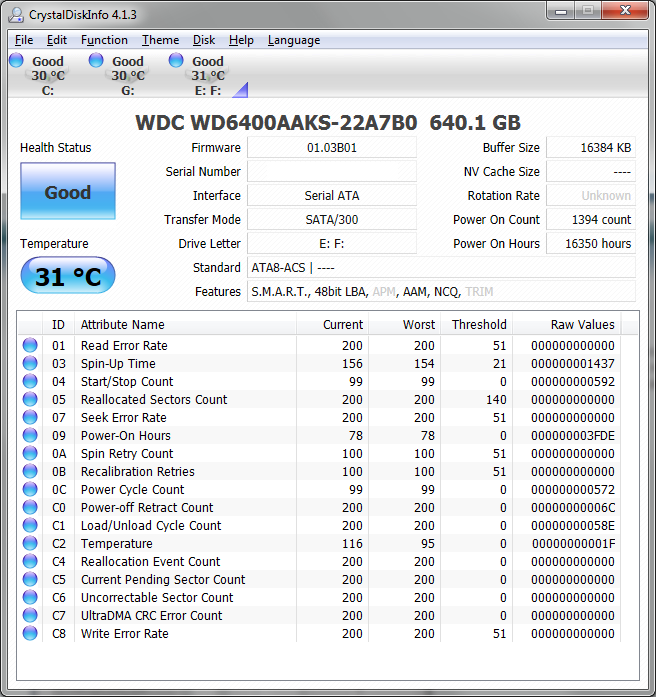
So I tried DLG Diagnostic (Western Digital) 5.19, ran the extended test, said it found no errors this time. Don't know if that means it fixed them while it was testing. So then I booted, opened HD tune, no more yellow warning. Downloaded Crystal Mark Info, health status says Good and there's no warnings or errors at all.

OeMrc.png


B8hQm.png


Nothing in Reallocated Sector Count though, is that fine?


My Computer My Computer

OS
Windows Ultimate x64
CPU
i5 760
Motherboard
gigabyte p55a-ud3
Memory
2x4gb gskill
Graphics Card(s)
msi gtx 460 hawk
Monitor(s) Displays
LG 1920 x 1080
Hard Drives
120GB Vertex 2E
1TB Samsung
640GB WD
PSU
OCZ SX2 600W
Case
HAF 912
Cooling
Noctua NH-D14
Keyboard
Ducky Shine
That looks good. As an additional test run SeaTools again to see if it still shows any errors, just as an indicator. SeaTools can't do repairs unless you have a Seagate drive in the mix somewhere. Anyway it looks like the drive isn't bad. All HDDs have spare and unused sectors to which bad sectors are written to to fix them.
 

My Computer My Computer

Computer type
PC/Desktop
Computer Manufacturer/Model Number
Home Built Desktop By DataTech
OS
Windows 7 Ultimate X64 SP1
CPU
Intel i5-2550K, Differing ~4.4-4.8GHz No built in GPU
Motherboard
ASUS P8Z68-V PRO/GEN3
Memory
16GB G.Skill Sniper 1866MHz @ 2133MHz 2x8GB
Graphics Card(s)
ASUS GTX650TIB-DC2OC-2GD5, (650TI Boost)
Sound Card
Onboard Realtek 5-1
Monitor(s) Displays
Samsung P2570HD
Screen Resolution
1920x1080
Hard Drives
Samsung 840 Pro 256GB SSD for OS, 500GB Seagate Constellation (Enterprise drive) for Data
PSU
Corsair HX650W
Case
Inwin Dragon Rider
Cooling
Hyper 212 EVO w/two Noctua fans, push-pull, @1300 RPM
Keyboard
E-Z Eyes, bright yellow keys with large characters
Mouse
steelseries SENSEI Laser Pro Gaming
Internet Speed
48-51Mbs Mbs down, 11 Mbs up Xfinity Cable
Antivirus
Norton Internet Security 2013
Browser
IE 10, Opera, Pale Moon if needed
Other Info
4 case fans, LG BluRay-RE, ASUS DVD-RW, Mr. Fusion power supply, 1.21 gigawatts.
Back
Top