Solved WD external hard drive not initialized.

PBancroft

New member
Local time
6:57 PM
Messages
7
Hi, thanks for trying to help me with this.

I recently moved and had my external hard drive disconnected and in storage for several months. It is a Western Digital model# WD500H1U-00. It has a separate power supply. There is a blue light on the front that is illuminated all the time, except when I connect the HD, then it will flash. When I got unpacked I hooked it up to my desk top and the computer would not access it. I then tried to install it on my laptop with no success. Since then I purchased a USB cord, with no luck.

This hard drive has a LOT of irreplaceable information on it. Formatting it is not an option.

Kevin at SpywareHammer.com was helping me with some other stuff and suggested I:

Regarding the ext HD, try this please:

1) Control panel===>administrative tools===>computer management===>Disk management

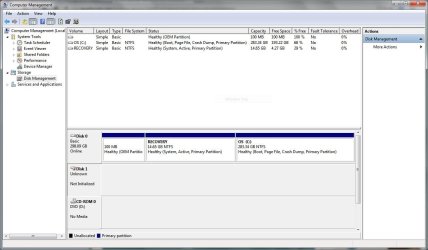
2) You'll Should see a list of Disks, Is Disk 1 listed with no partition letter assigned? if so continue

3) Right mouse click into the disk field, select Change drive letter and paths ===> choose a letter from the drop down, select OK. the HD should now be available.


No luck here either. When I right click on the disk field nothing happens. When I right click on the title block(?) I get: Initialize Disk (faded), Offline, Properties and, Help.

Kevin suggested I have you guys take a look at it.

Here are a couple of screen shots.

View attachment 316989

View attachment 316990
 
Last edited:

My Computer

Computer type
Laptop
Computer Manufacturer/Model Number
Dell Inspiron
OS
Windows 7 Home Premium 64-bit
CPU
Intel(R) Pentium(R) CPU P6000 @ 1.87GHz
Motherboard
Dell Inc. 08VFX1
Memory
3.00 GB
Graphics Card(s)
Intel(R) HD Graphics
Sound Card
(1) Intel(R) Display Audio (2) Realtek High Definition Aud
Hard Drives
WD External hard drive
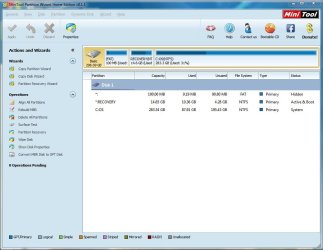
I also downloaded "MiniTool Partition Wizard Home Edition". That program did not recognize the HD.
 

My Computer

Computer type
Laptop
Computer Manufacturer/Model Number
Dell Inspiron
OS
Windows 7 Home Premium 64-bit
CPU
Intel(R) Pentium(R) CPU P6000 @ 1.87GHz
Motherboard
Dell Inc. 08VFX1
Memory
3.00 GB
Graphics Card(s)
Intel(R) HD Graphics
Sound Card
(1) Intel(R) Display Audio (2) Realtek High Definition Aud
Hard Drives
WD External hard drive
Hi PBancroft,

Welcome to SevenForums.

The links appear broken. Please upload again.
 

My Computer

OS
Windows 7 Home Premium 32 bit
Sorry, not sure what happened there, but I got them to work. Any ideas?

Capture.JPG

Capture2.JPG
 
Last edited:

My Computer

Computer type
Laptop
Computer Manufacturer/Model Number
Dell Inspiron
OS
Windows 7 Home Premium 64-bit
CPU
Intel(R) Pentium(R) CPU P6000 @ 1.87GHz
Motherboard
Dell Inc. 08VFX1
Memory
3.00 GB
Graphics Card(s)
Intel(R) HD Graphics
Sound Card
(1) Intel(R) Display Audio (2) Realtek High Definition Aud
Hard Drives
WD External hard drive
Bump. Any ideas? I have seen threads about removing the hard drive from the case and running it through an adapter. Is that what I am going to have to do? Any advice would be greatly appreciated.
 

My Computer

Computer type
Laptop
Computer Manufacturer/Model Number
Dell Inspiron
OS
Windows 7 Home Premium 64-bit
CPU
Intel(R) Pentium(R) CPU P6000 @ 1.87GHz
Motherboard
Dell Inc. 08VFX1
Memory
3.00 GB
Graphics Card(s)
Intel(R) HD Graphics
Sound Card
(1) Intel(R) Display Audio (2) Realtek High Definition Aud
Hard Drives
WD External hard drive
Unknown.... not initialised ..... no indication of capacity. The prognosis is bad indeed.

Your drive could have been physically damaged during the transit. That is my first thought. In such a case no software can retrieve your data and you may have to seek a professional data Recovery Service.

Anyway, first check your WD with Western Digital Datalifeguard Diagnostic for Windows WD Support / Downloads / SATA & SAS / WD VelociRaptor

( Do check the WD Support page for your particular WD model and confirm the same version applies to it.)

Run the short test and if it fails, the Long Test with repair option and see whether there is any hope of reviving it "as it is".

Please report the test results.

You may also run MiniTools Partition Wizard Home Edition v 8.1.1. Free download Magic Partition Manager Software, partition magic alternative, free partition magic, partition magic Windows 7 and server partition software - Partition Wizard Online

If Partition Wizard shows your drive as a BAD Disk , then you may have no other option but to take the HDD out and see whether it works when hooked as a second internal drive in a desktop.

That is all the best you can do, IMO

EDIT: Before doing any of these, just click on the "Populate " tab on the WD Properties Window (your second screenshot) and see whether it does some magic.
 

My Computer

OS
Windows 7 Home Premium 32 bit
Hi jumanji, thanks for helping with this. I agree it does not look good, but I thought it was worth a shot.

Populate failed in the WD properties field.

Here is the result of the Velociraptor test.


Test Option: QUICK TEST Model Number: WD Unit Serial Number:
Firmware Number: 1.65 Capacity: 0.00 GB SMART Status: Not Available Test Result: PASS Test Time: 09:38:17, May 11, 2014
Test Option: EXTENDED TEST Model Number: WD Unit Serial Number:
Firmware Number: 1.65 Capacity: 0.00 GB SMART Status: Not Available Test Result: FAIL Test Error Code: 08-Unable to repair bad sectors. Test Time: 10:08:07, May 11, 2014


The partition wizard did not even recognize the external hard drive.

minitool.JPG

So it looks like its toast.
Do you have any recommendations on where to proceed? Directions how to remove the hard drive and get it hooked up so I can recover the info?

I really appreciate your help.

Thanks, Pete.
 
Last edited:

My Computer

Computer type
Laptop
Computer Manufacturer/Model Number
Dell Inspiron
OS
Windows 7 Home Premium 64-bit
CPU
Intel(R) Pentium(R) CPU P6000 @ 1.87GHz
Motherboard
Dell Inc. 08VFX1
Memory
3.00 GB
Graphics Card(s)
Intel(R) HD Graphics
Sound Card
(1) Intel(R) Display Audio (2) Realtek High Definition Aud
Hard Drives
WD External hard drive
If it is unrepairable bad sectors which the diagnostics found, there is simply no point in taking out the drive and hooking it up as a second drive. You will get the same result. Instead you can talk to Tech support of WD/ the vendor and explore getting a replacement if the drive is still under warranty/extended vendor guarantee.( Or even otherwise to find what WD Tech support says.)

(OK, even in the first post you said PW did not find the drive. That had escaped my mind.)

If there had been a deluge of bad sectors spread all over the platters, even if you try to recover data by any means, what all you will get - if at all you get something - will be corrupted and useless files.

Wait to see if other experts here suggest that you should still go ahead and try data recovery based on their perceptions and personal experience.

Here is a similar thread just hours back: http://www.sevenforums.com/hardware...-not-initialized-no-disc-size-disk-manag.html
 

My Computer

OS
Windows 7 Home Premium 32 bit
Thanks jumanji. I really appreciate your help. I doubt it, but hopefully someone else will see this and have a miracle solution.
 

My Computer

Computer type
Laptop
Computer Manufacturer/Model Number
Dell Inspiron
OS
Windows 7 Home Premium 64-bit
CPU
Intel(R) Pentium(R) CPU P6000 @ 1.87GHz
Motherboard
Dell Inc. 08VFX1
Memory
3.00 GB
Graphics Card(s)
Intel(R) HD Graphics
Sound Card
(1) Intel(R) Display Audio (2) Realtek High Definition Aud
Hard Drives
WD External hard drive
If the disk can be detected in BIOS and in Disk Management then you can try to use this Partition Find and Mount tool.
 

My Computer

Computer type
PC/Desktop
Computer Manufacturer/Model Number
Hewlett-Packard
OS
Windows 7 Ultimate x64
CPU
Intel Core i5-2410M
Motherboard
Hewlett-Packard 1651
Memory
2 x 4 GB ELPIDA 667Mhz 1.5V
Graphics Card(s)
Radeon (TM) HD 7650M
Hard Drives
750GB WD7500BPVT
If the disk can be detected in BIOS and in Disk Management then you can try to use this Partition Find and Mount tool.

Tried all three scans. No go.

I think were done here. The lesson learned here is multiple back ups.

Thanks for the help jumanji and Frozwire, I really appreciate it.

Pete.
 

My Computer

Computer type
Laptop
Computer Manufacturer/Model Number
Dell Inspiron
OS
Windows 7 Home Premium 64-bit
CPU
Intel(R) Pentium(R) CPU P6000 @ 1.87GHz
Motherboard
Dell Inc. 08VFX1
Memory
3.00 GB
Graphics Card(s)
Intel(R) HD Graphics
Sound Card
(1) Intel(R) Display Audio (2) Realtek High Definition Aud
Hard Drives
WD External hard drive
Back
Top