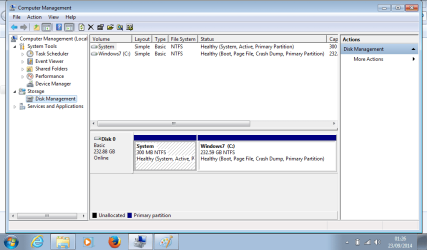
New ssd drive showing unallocated space

hazel123

New member
Power User
VIP
Local time
2:02 AM
Messages
403
Location
Uk
Hello. Our little boy has a Fizzbook Spin running Windows 7 Home Premium. The 32GB ssd drive failed and I have replaced it with a 250GB 2.5" Sata drive (that I had planned to use to upgrade my laptop!). Installation of the drive went well, and although the old drive had failed before I had chance to clone it, the Fizzbook has a good back-up program that lets you make a bootable usb image, and that worked a treat, just reloaded the image and all fine. Only problem is, instead of showing 250GB Drive C only shows 30GB (there only is Drive C by the way). I just checked in Disk Management and there is 203.07 unallocated space. Maybe I should have formatted and partitioned the drive before reinstalling - I didn't, because the Fizzbook has no dvd drive.

So my question is - am I going to have to start from scratch, format the drive and reinstall again (and do 6 months worth of Windows updates again!), or can I just partition the unallocated space? Thanks.
 

My Computer My Computer

Computer type
Laptop
Computer Manufacturer/Model Number
Sony Vaio VPCCW2S1E
OS
W7 HP 64 bit
CPU
Core i3 1st gen
Memory
8gb
Graphics Card(s)
Nvidia 330M
Internet Speed
8 mbps
Browser
Firefox
Sorted - I extended the C partition and now all seems ok.
 

My Computer My Computer

Computer type
Laptop
Computer Manufacturer/Model Number
Sony Vaio VPCCW2S1E
OS
W7 HP 64 bit
CPU
Core i3 1st gen
Memory
8gb
Graphics Card(s)
Nvidia 330M
Internet Speed
8 mbps
Browser
Firefox
You can resize the partition so you don't need to reinstall. You can use the free Partition Wizard bootable USB flash drive. [URL="http://www.partitionwizard.com/bootable-flash-drive.html"]Boot partition manager from USB Flash disk directly to manage disk partition - Partition Wizard Bootable Flash Drive.[/URL] [B]I was replying and just saw your last post.[/B] Glad you got it sorted. You still may want to get a PW bootable USB flash drive, just in case you ever need it someday ... Many people like storing Data on a different partition such as [D]. That allows restoring the [C] drive without losing any User Data... That's your choice, but now might be the best time to consider it ???
 

My Computer My Computer

Computer type
PC/Desktop
Computer Manufacturer/Model Number
home built
OS
Multi-Boot W7_Pro_x64 W8.1_Pro_x64 W10_Pro_x64 +Linux_VMs +Chromium_VM
CPU
AMD Athlon II x4 620
Motherboard
Gigabyte GA-MA785G-UD3H
Memory
6GB GSkill DDR2 800
Graphics Card(s)
AMD 4670 GPU + AMD 4200 IGP
Sound Card
on board Realtek ALC889A
Monitor(s) Displays
RCA 40" LCD TV, Insignia 32" LCD TV, HP 15" LCD monitor
Screen Resolution
1680 x 1050
Hard Drives
OCZ Vertex 3 120GB,
Samsung F3 1TB (3),
Several others - WD, Seagate, Hitachi, ...
PSU
Corsair 500 W
Case
Rosewill mid tower
Cooling
CM 90mm rifle
Keyboard
Gyration wireless, Logitech wireless, Dell USB wired
Mouse
Gyration wireless, Logitech wireless, V7 USB wired
Internet Speed
Spectrum - 100Mbps D / 10Mbps U
Antivirus
Avast, MBAM3, EMET, WinPatrol
Browser
Pale Moon, Firefox, IE
Other Info
2 multi-boot PC's
Mainly HTPC/Office/Gen purpose (no gaming).
Trendnet USB KVM.
LG DVD burner/Blue Ray Player.
Tray system for removable SATA backup drives.

Not currently OCd, under-volted.
I use Hybrid sleep, rarely re-boot or shutdown.

Hauppauge HD-PVR, Avermedia PCIe TV Tuner, Hauppauge PCI TV Tuner.
Thanks very much! What is a PW bootable flash drive please? I have always used the Windows 7 disk to format new drives before installing, but couldn't due to no dvd drive. Is the PW bootable flash a way of doing that? I have now got a bootable image of the updated system with expanded partition, so that's a start! The drive was a pig to change - meant taking out the keyboard which is tight fitting to be 'splashproof' and now have a slightly bent keyboard in one corner with a couple of gouges in it!
 

My Computer My Computer

Computer type
Laptop
Computer Manufacturer/Model Number
Sony Vaio VPCCW2S1E
OS
W7 HP 64 bit
CPU
Core i3 1st gen
Memory
8gb
Graphics Card(s)
Nvidia 330M
Internet Speed
8 mbps
Browser
Firefox
It's so you can boot up with a bootable flash stick and make partition changes without having to boot Windows and make changes to the disk/partitions Windows is on while Windows is running.

You said you don't have a DVD drive, so you could use a bootable flash stick instead.
The link explains how to make the bootable Partition Wizard flash stick.

I don't like to modify the "OS" Disk Structure while Windows is booted, and some things can't be changed because of unmovable files, etc.

I had a problem once modifying the disk with the OS from within the OS.
It was a pita and a lot of work to recover everything.

For example:
If you decide you do want to resize (shrink) the partition now so you can create a [D] data partition, I would use bootable PW. I think it's safer, and you might not be able to resize the way you want in Windows Disk Management because of unmovable files (while the OS is running). hth, David
 

My Computer My Computer

Computer type
PC/Desktop
Computer Manufacturer/Model Number
home built
OS
Multi-Boot W7_Pro_x64 W8.1_Pro_x64 W10_Pro_x64 +Linux_VMs +Chromium_VM
CPU
AMD Athlon II x4 620
Motherboard
Gigabyte GA-MA785G-UD3H
Memory
6GB GSkill DDR2 800
Graphics Card(s)
AMD 4670 GPU + AMD 4200 IGP
Sound Card
on board Realtek ALC889A
Monitor(s) Displays
RCA 40" LCD TV, Insignia 32" LCD TV, HP 15" LCD monitor
Screen Resolution
1680 x 1050
Hard Drives
OCZ Vertex 3 120GB,
Samsung F3 1TB (3),
Several others - WD, Seagate, Hitachi, ...
PSU
Corsair 500 W
Case
Rosewill mid tower
Cooling
CM 90mm rifle
Keyboard
Gyration wireless, Logitech wireless, Dell USB wired
Mouse
Gyration wireless, Logitech wireless, V7 USB wired
Internet Speed
Spectrum - 100Mbps D / 10Mbps U
Antivirus
Avast, MBAM3, EMET, WinPatrol
Browser
Pale Moon, Firefox, IE
Other Info
2 multi-boot PC's
Mainly HTPC/Office/Gen purpose (no gaming).
Trendnet USB KVM.
LG DVD burner/Blue Ray Player.
Tray system for removable SATA backup drives.

Not currently OCd, under-volted.
I use Hybrid sleep, rarely re-boot or shutdown.

Hauppauge HD-PVR, Avermedia PCIe TV Tuner, Hauppauge PCI TV Tuner.
Thanks very much. I was a bit nervous about resizing the C drive within windows, but it was just to expand to use the unused space. Do you think that would be ok?
 

My Computer My Computer

Computer type
Laptop
Computer Manufacturer/Model Number
Sony Vaio VPCCW2S1E
OS
W7 HP 64 bit
CPU
Core i3 1st gen
Memory
8gb
Graphics Card(s)
Nvidia 330M
Internet Speed
8 mbps
Browser
Firefox
Yes, if you've done it and didn't get any errors you're good to go.
Expanding is probably less problematic than shrinking, as no files should need to be moved.
 

My Computer My Computer

Computer type
PC/Desktop
Computer Manufacturer/Model Number
home built
OS
Multi-Boot W7_Pro_x64 W8.1_Pro_x64 W10_Pro_x64 +Linux_VMs +Chromium_VM
CPU
AMD Athlon II x4 620
Motherboard
Gigabyte GA-MA785G-UD3H
Memory
6GB GSkill DDR2 800
Graphics Card(s)
AMD 4670 GPU + AMD 4200 IGP
Sound Card
on board Realtek ALC889A
Monitor(s) Displays
RCA 40" LCD TV, Insignia 32" LCD TV, HP 15" LCD monitor
Screen Resolution
1680 x 1050
Hard Drives
OCZ Vertex 3 120GB,
Samsung F3 1TB (3),
Several others - WD, Seagate, Hitachi, ...
PSU
Corsair 500 W
Case
Rosewill mid tower
Cooling
CM 90mm rifle
Keyboard
Gyration wireless, Logitech wireless, Dell USB wired
Mouse
Gyration wireless, Logitech wireless, V7 USB wired
Internet Speed
Spectrum - 100Mbps D / 10Mbps U
Antivirus
Avast, MBAM3, EMET, WinPatrol
Browser
Pale Moon, Firefox, IE
Other Info
2 multi-boot PC's
Mainly HTPC/Office/Gen purpose (no gaming).
Trendnet USB KVM.
LG DVD burner/Blue Ray Player.
Tray system for removable SATA backup drives.

Not currently OCd, under-volted.
I use Hybrid sleep, rarely re-boot or shutdown.

Hauppauge HD-PVR, Avermedia PCIe TV Tuner, Hauppauge PCI TV Tuner.
Thanks for your help. As it is just 6 year-old's netbook I will just keep my finger's crossed as have a back-up image now, but will certainly try and sort out the bootable flash stick you mention, in case I need it for my own computer!
 

My Computer My Computer

Computer type
Laptop
Computer Manufacturer/Model Number
Sony Vaio VPCCW2S1E
OS
W7 HP 64 bit
CPU
Core i3 1st gen
Memory
8gb
Graphics Card(s)
Nvidia 330M
Internet Speed
8 mbps
Browser
Firefox
If you had a 32gb SSD then that is normally a chip on and MSATA hard drive intended to speed its function by providing SSD caching and boot files speed. This is explained in http://www.sevenforums.com/tutorials/306285-install-windows-msata-ssd-drive.html

Many of these function using Intel Rapid Storage Technology which is explained and shown how to disable it and set to AHCI for normal install in http://www.sevenforums.com/tutorials/307529-install-windows-system-msata-isrt.html.

When you say you replaced the SSD, how was this done?

Did you enter BIOS setup to adjust the SATA controller to AHCI to remove the 32gb correctly and allow install to the HDD, as shown in the above tutorials? This should also show the 32gb as a separate drive, since using IRST it is RAIDed and become part of the HD.
 
I'm afraid I just unplugged the ?msata and plugged in a 2.5" sata ssd. There is a lot of Intel software on it - I believe it is also called an Intel Classmate - they were made for schools. The speed seems about the same as before - I thought there was something I might need to do in bios but was just glad to have it working!
 

My Computer My Computer

Computer type
Laptop
Computer Manufacturer/Model Number
Sony Vaio VPCCW2S1E
OS
W7 HP 64 bit
CPU
Core i3 1st gen
Memory
8gb
Graphics Card(s)
Nvidia 330M
Internet Speed
8 mbps
Browser
Firefox
Reboot into BIOS setup to see what the SATA controller setting is. If its IRST then it still is RAIDed and won't function correctly. It will need to be reinstalled in ACHI mode per a normal http://www.sevenforums.com/tutorials/219487-clean-reinstall-factory-oem-windows-7-a.html#post1839164 unless someone with more IRST knowledge knows better.

IRST merges the tiny SSD chip with the larger HD to make them effectively the same drive (RAID), while directing the paging file and boot files to the SSD to supposedly speed up the drive. Everyone who visits us (several a week) tells us that this does not mean any noticeable speed increase. We've even helped some reinstall the OS to the 32gb chip to enjoy the true speed of an SSD. They mostly end up buying an SSD.
 
Hi and thank you. I'll go into bios tomorrow and check it out. I can't do a clean install - it's a Zoostorm Fizzbook spin which comes with all kinds of software that isn't available except from your system image and the drivers aren't available - support is virtually non-existant. The software runs the touch screen, pen input and screen rotation. I do have manufacturer recovery discs though, which have the original Windows 7 Starter and all the software and drivers on. I did an online upgrade to Windows 7 home premium because Starter was so glitchy with all the added software. It was running great until the ssd drive failed!
 

My Computer My Computer

Computer type
Laptop
Computer Manufacturer/Model Number
Sony Vaio VPCCW2S1E
OS
W7 HP 64 bit
CPU
Core i3 1st gen
Memory
8gb
Graphics Card(s)
Nvidia 330M
Internet Speed
8 mbps
Browser
Firefox
Will do. Worst bit was working out how to get the hard drive out - the computer has a rugged casing and seemed totally sealed! Googled and googled - seems like no-one has ever changed a hard drive in one of these - Instruction manual is online and says next to nothing - certainly nothing practical. I was about to give up and chuck the computer in the bin - but there is nothing else really that fits the bill for that age group - a tablet isn't a computer and we wanted our little boy to learn how to use a computer and how to type as well as play games - plus it has good educational software and is supposed to be drop proof and water 'resistant'. So water resistant there are no panels for the hard drive. So I started by taking all the screws out of the back (I have taken netbooks apart before but not this particular one. Took out every screw I could find - but still couldn't get the case open. So put it all back together again. Tried one last search with Zoostorm in instead of Fizzbook Spin and found an overseas article from someone who had changed a drive in a similar machine - take the keyboard off, it said. So I did - now why didn't the manual tell you that to access the hard drive and the memory you had to take the keyboard off! So it was easy after that. Will post from it tomorrow so I can do the screenshots. Actually I wish they still made them - I'd quite like one myself. The only other online info I found about them was from a site called Edugeek - the netbooks were bought in bulk by schools and came with classroom management software (which I removed). It's basically a netbook that turns into a tablet so has programs on that I don't understand.
 

My Computer My Computer

Computer type
Laptop
Computer Manufacturer/Model Number
Sony Vaio VPCCW2S1E
OS
W7 HP 64 bit
CPU
Core i3 1st gen
Memory
8gb
Graphics Card(s)
Nvidia 330M
Internet Speed
8 mbps
Browser
Firefox
Nice work! :geek:

Did you try the Recov disks? Same size SSD?

Be sure to preserve the image. And record the Prod key from COA sticker, put it with Premium key.
 
Bios set up:

Under 'Intel Power Saving Features' - iFFS Support disabled. C-States Enabled

Under 'Quick Boot' - Quick Boot disabled. Bios Level USB Enabled. UEFI Boot Disabled. Legacy Boot enabled. PXE Boot Support enabled.

Under 'IDE Configuration' - SATA Device enabled. SATA Controller Mode AHCI. Device 0 (Port 0) Samsung SSD 84 - 250G. Device 1 (Port 1) Not Installed.

Card Reader Boot Support enabled.
 

My Computer My Computer

Computer type
Laptop
Computer Manufacturer/Model Number
Sony Vaio VPCCW2S1E
OS
W7 HP 64 bit
CPU
Core i3 1st gen
Memory
8gb
Graphics Card(s)
Nvidia 330M
Internet Speed
8 mbps
Browser
Firefox
Instead of using Windows to make system image, it has an Intel System Recovery Tool which enables you to make a bootable usb drive, then saves an image onto it. I did this after it was set up how we wanted originally, and used this bootable usb to put the image onto the new drive. I maybe should have used the recovery discs, but it was such a pain to set up in the first place, had to remove so much software and set up hand-writing recognition and install loads of programs and do all the Windows updates, plus I'd have had to re-do the Home Premium download - so tried the image back up straight onto the new ssd drive and amazingly it worked. Except then found it was only showing 30GB instead of 250GB, but sorted that earlier by expanding C Drive. What came out was one of those ssd drives that looks like a large memory stick. But this was set inside a large space for a 2.5" drive with the same connectors for both, so put in a 2.5" SATA ssd - the Samsung one mentioned above in bios. I had actually forked out for this to upgrade my laptop but thought this machine needed the ssd more. So replaced 30GB with 250GB. These machines came in two versions - one with a 30GB SSD and one with a 320GB hard drive, so I guess that is why there was space for a full sized hard drive. Only thing is - it's a bit heavier now! And keyboard has some flex at the corners after being removed. We can live with that.
 

My Computer My Computer

Computer type
Laptop
Computer Manufacturer/Model Number
Sony Vaio VPCCW2S1E
OS
W7 HP 64 bit
CPU
Core i3 1st gen
Memory
8gb
Graphics Card(s)
Nvidia 330M
Internet Speed
8 mbps
Browser
Firefox
Good you avoided UEFI crap because it apparently was Legscy from factory.

SATA is already optimal AHCI setting. No IRST choice to confirm the net book even has it?

What made you think it had only a 30gb drive? It likely had to be MSATA to be that small and unlikely the OS with all those programs would fit. What is the image size?

I have never seen a 30 gb SSD that wasn't MSATA raided with IRST. But maybe its a first.
 
Good point about putting the keys together - will do. Here's the disk management screenshot.
 

Attachments

  • Disk Management.png
    Disk Management.png
    28.6 KB · Views: 0

My Computer My Computer

Computer type
Laptop
Computer Manufacturer/Model Number
Sony Vaio VPCCW2S1E
OS
W7 HP 64 bit
CPU
Core i3 1st gen
Memory
8gb
Graphics Card(s)
Nvidia 330M
Internet Speed
8 mbps
Browser
Firefox
It was a 32GB. Had about 8GB free. The image I made yesterday was about 18GB I seem to remember, but had removed old Windows updates before doing the image. I thought it would have used up most of the 32GB too. Apart from Windows and all the Intel software it just had Firefox, Adobe Reader and Flash, Angry birds and two Nessy learning programs on. Maybe the image had some compression or something.
 

My Computer My Computer

Computer type
Laptop
Computer Manufacturer/Model Number
Sony Vaio VPCCW2S1E
OS
W7 HP 64 bit
CPU
Core i3 1st gen
Memory
8gb
Graphics Card(s)
Nvidia 330M
Internet Speed
8 mbps
Browser
Firefox
Back
Top