WD external HDD cannot be accessed, system not responding.

redus1990

New member
Local time
6:27 AM
Messages
4
Hello everyone.
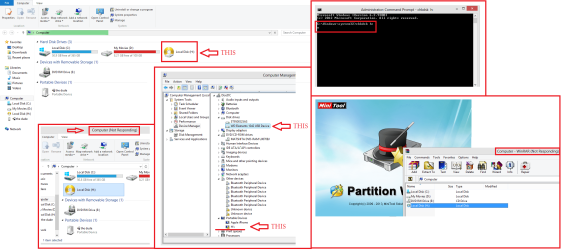
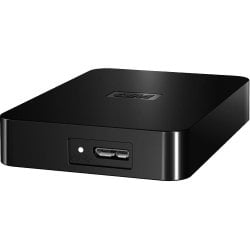
I have a WD portable external HDD about 2-3 years now. Haden't any problem till now. Yesterday i plugged in my HDD to my laptop and it worked as always. Then i extracted a rar file but couldn't wait and i force closed the extraction. After that my every action in the HDD was slower, copying, cutting... I tried to extract the same rar again but because of the very slow speed i again force close from task manager the winrar process. The next time i plugged in the HDD it wasn't recognized like before, it was shown like a local disk. Any attempt to access it is useless, system not responding. Even tried from various program to access it but same result. Device manager same result. HDD's light is on and it looks like is writing all the time. Also i can't perform a chkdsk from within windows because nothing happens. I always safe remove it. Someone told me should open the case and try another connection like SATA or something, i don't really know... I tried many of the solution written in the forum but no result....
Any help would be greatly appreciated! Thank you.
probl.png
wd1.jpg
 

My Computer

Computer type
Laptop
Computer Manufacturer/Model Number
Fujitsu Lifebook
OS
Windows 8 Pro x64
CPU
Intel, core i3 M370, 2.4 ghz,
Memory
4 GB
Graphics Card(s)
Ati radeon 6530M
Hard Drives
500 GB
Antivirus
Eset Smart Security 4
Browser
Mozilla Firefox, Chrome
Thank you [URL="http://www.sevenforums.com/members/mightymirowd.html"]MightyMiroWD[/URL] for your replay.
I've tried the diagnostic tool before and also the chkdsk from safe mode with command prompt but nothing. Any of the apps i tried freezes. It seems weird to me the fact that the last time it worked, after the force close of extraction, the speed of writing and reading in HDD were much much slower. Has a HDD any calibration of speening speed? Maybe it runs very slow now or maybe its stuck in the last action taken...
I haven't try to connect it in another pc... But is there any possibility to work with another pc?
 

My Computer

Computer type
Laptop
Computer Manufacturer/Model Number
Fujitsu Lifebook
OS
Windows 8 Pro x64
CPU
Intel, core i3 M370, 2.4 ghz,
Memory
4 GB
Graphics Card(s)
Ati radeon 6530M
Hard Drives
500 GB
Antivirus
Eset Smart Security 4
Browser
Mozilla Firefox, Chrome
Hey guys something weird happened. I had the HDD plugged in and i had forget that i had run the diagnostic tool. After a while the test result appeared like a miracle... Everything, from the light to the icon of the HDD went to normanl. I can't explain it... But the speed of copy, move etj is reduced to kb/s. I dont understand why this happened. Is there a possibility that the usb cable is damaged and the information can't get through to fast?

11112.png
 

My Computer

Computer type
Laptop
Computer Manufacturer/Model Number
Fujitsu Lifebook
OS
Windows 8 Pro x64
CPU
Intel, core i3 M370, 2.4 ghz,
Memory
4 GB
Graphics Card(s)
Ati radeon 6530M
Hard Drives
500 GB
Antivirus
Eset Smart Security 4
Browser
Mozilla Firefox, Chrome
The flimsy micro B USB 3 connector is not a good design. The large part of the connector corresponds to USB 2 and the small USB 3. Over time USB 3 connectivity can become intermittent and you can fall back to USB 2 even in a USB 3 port. I've seen this on the same sort of WD elements drive as well as WD MyBook essentials. A change of cable may help.

Edit: This situation should still drop you down to USB 2 speeds.
 
Last edited:

My Computer

Computer type
PC/Desktop
Computer Manufacturer/Model Number
Own build
OS
Windows 7x64 Home Premium SP1
CPU
Intel i7 2600k
Motherboard
ASUS P8Z68 Deluxe
Memory
G.Skill Ripjaws (DDR3-1600) 2x4GB
Graphics Card(s)
Nvidia GeForce GTS 450; Intel HD Graphics 3000(GT2+)
Monitor(s) Displays
Dell Ultrasharp IPS panel U2311H, Samsung SyncMaster P2350
Screen Resolution
1920x1080
Hard Drives
Samsung 850 Pro SSD 256GB, Samsung SSD 840 120GB, Seagates 1TB Barracuda ST31000528AS x2
PSU
Seasonic M12II 520W
Case
Lian Li Lancool PC-K60
Cooling
Case: 1x120mm, 3x140mm CPU: Hyper 212+
Keyboard
Logitech MK520 (wireless)
Mouse
Logitech MK520
Internet Speed
6-7 Mbps
Antivirus
Norton Security Premium, Malwarebytes on 2 (MSE on 3rd PC)
Browser
FireFox
Other Info
Audio: Logitech Z523 2.1
I would suggest to try a different cable and if possible on a different USB port as well. :)
 

My Computer

Computer type
PC/Desktop
OS
Windows 7
Last edited:

My Computer

Computer type
Laptop
Computer Manufacturer/Model Number
Fujitsu Lifebook
OS
Windows 8 Pro x64
CPU
Intel, core i3 M370, 2.4 ghz,
Memory
4 GB
Graphics Card(s)
Ati radeon 6530M
Hard Drives
500 GB
Antivirus
Eset Smart Security 4
Browser
Mozilla Firefox, Chrome
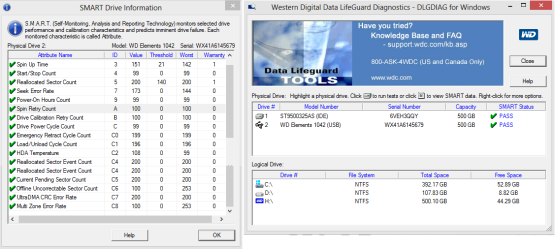
Unfortunately, these results suggest that the drive is developing bad sectors and it is going to fail at some point.

My advise would be to save the resulting from Data Life Guard, back-up the information you have on it, and try to RMA the external if it's still under warranty. Here's the link where you do that:
http://support.wdc.com/warranty/index.asp?wdc_lang=en

Hope everything turns out fine.
 

My Computer

Computer type
PC/Desktop
OS
Windows 7
I'd try another cable but also backup data as a high priority.
 

My Computer

Computer type
PC/Desktop
Computer Manufacturer/Model Number
Own build
OS
Windows 7x64 Home Premium SP1
CPU
Intel i7 2600k
Motherboard
ASUS P8Z68 Deluxe
Memory
G.Skill Ripjaws (DDR3-1600) 2x4GB
Graphics Card(s)
Nvidia GeForce GTS 450; Intel HD Graphics 3000(GT2+)
Monitor(s) Displays
Dell Ultrasharp IPS panel U2311H, Samsung SyncMaster P2350
Screen Resolution
1920x1080
Hard Drives
Samsung 850 Pro SSD 256GB, Samsung SSD 840 120GB, Seagates 1TB Barracuda ST31000528AS x2
PSU
Seasonic M12II 520W
Case
Lian Li Lancool PC-K60
Cooling
Case: 1x120mm, 3x140mm CPU: Hyper 212+
Keyboard
Logitech MK520 (wireless)
Mouse
Logitech MK520
Internet Speed
6-7 Mbps
Antivirus
Norton Security Premium, Malwarebytes on 2 (MSE on 3rd PC)
Browser
FireFox
Other Info
Audio: Logitech Z523 2.1
Back
Top