
WD Internal Hard Drive (Partitioned) showing 'Directory Corrupted'

Welsh

New member
Local time
4:31 PM
Messages
39
HI Ladies and Gents,

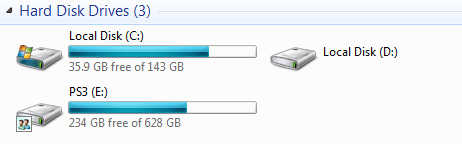
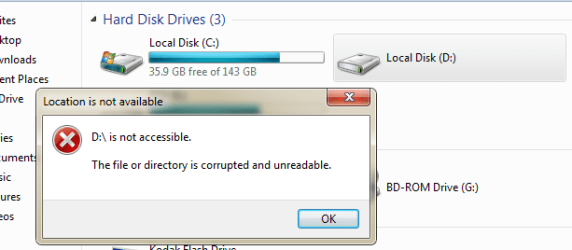
I have had this issue with the WD Internal HD and it seems its on its way out. I have taken some screen shots below to help you see the problem, but it is basically saying 'Directory Corrupted or unreadable'.

I have A LOT of information (personal/ work) on there that I really would like to keep - is that even possible?

Please please help a brother out here :(

c: is the main PC HD and the 2 others (D: & E: are both WD Internal HD)
1.PNG

This is the error I get on trying to access d:
1.1.PNG

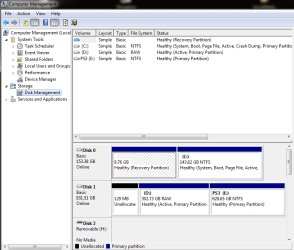
Disk Management shows it there, but no error?
2.PNG
 

My Computer My Computer

At a glance

Windows 7 Professional 64bitIntel(R) Core(TM) i3-4130 CPU @ 3.40GHz8GB Kingston Hyper-X
Computer type
PC/Desktop
OS
Windows 7 Professional 64bit
CPU
Intel(R) Core(TM) i3-4130 CPU @ 3.40GHz
Motherboard
Asus H81M-Plus
Memory
8GB Kingston Hyper-X
Hard Drives
WD Blue 1 TB
Have you tried checking the wiring to that HDD? Perhaps something is loose, maybe the wire is damaged, does it make any weird sounds like grinding, clicking, whirring or something that doesn't sound right?

Before giving up always check to make sure that it's not something else that is causing the problem such as wiring :)

It is being detected so at least there's that, it may be salvageable enough for you to get your stuff off it.
 

My Computer My Computer

At a glance

Windows 7AMD6Gig DDR3
Computer type
PC/Desktop
Computer Manufacturer/Model Number
Asus
OS
Windows 7
CPU
AMD
Motherboard
M5A78L-M USB3
Memory
6Gig DDR3
Hard Drives
2 SATA
I will check the wiring now, it doesnt appear to be making any noises out of the ordinary whatsoever...
 

My Computer My Computer

At a glance

Windows 7 Professional 64bitIntel(R) Core(TM) i3-4130 CPU @ 3.40GHz8GB Kingston Hyper-X
Computer type
PC/Desktop
OS
Windows 7 Professional 64bit
CPU
Intel(R) Core(TM) i3-4130 CPU @ 3.40GHz
Motherboard
Asus H81M-Plus
Memory
8GB Kingston Hyper-X
Hard Drives
WD Blue 1 TB
Well that's a good sign for a start but there could be underlying issues if the wiring isn't at fault. Has it received any knocks or bangs to it that you know of?

You could also try right clicking the drive, going to "Properties> Tools> Error Checking" and run that to see if it can detect and possibly fix any errors. You could also maybe defrag it but that can take a very long time.
 

My Computer My Computer

At a glance

Windows 7AMD6Gig DDR3
Computer type
PC/Desktop
Computer Manufacturer/Model Number
Asus
OS
Windows 7
CPU
AMD
Motherboard
M5A78L-M USB3
Memory
6Gig DDR3
Hard Drives
2 SATA
Thanks CC, I have checked the wiring and everything looks normal there. The fact it is picking up one part of the partition is confusing me?

it hasnt had any knocks or bumps, its sat on the floor. I have tried dooring the Error Checking and it come back with a message 'This disk check could not be performed because Windows can't access the disk'.

puzzling me now! :(
 

My Computer My Computer

At a glance

Windows 7 Professional 64bitIntel(R) Core(TM) i3-4130 CPU @ 3.40GHz8GB Kingston Hyper-X
Computer type
PC/Desktop
OS
Windows 7 Professional 64bit
CPU
Intel(R) Core(TM) i3-4130 CPU @ 3.40GHz
Motherboard
Asus H81M-Plus
Memory
8GB Kingston Hyper-X
Hard Drives
WD Blue 1 TB
Thanks CC, I have checked the wiring and everything looks normal there. The fact it is picking up one part of the partition is confusing me?

it hasnt had any knocks or bumps, its sat on the floor. I have tried dooring the Error Checking and it come back with a message 'This disk check could not be performed because Windows can't access the disk'.

puzzling me now! :(

I assume by the pictures that you have tried changing the drive letter?
 

My Computer My Computer

At a glance

Windows 7AMD6Gig DDR3
Computer type
PC/Desktop
Computer Manufacturer/Model Number
Asus
OS
Windows 7
CPU
AMD
Motherboard
M5A78L-M USB3
Memory
6Gig DDR3
Hard Drives
2 SATA
Yes I have tried but didnt allow me. In the screen shot it shows the D: as RAW rather than NTFS and also mention 'Active;?
 

My Computer My Computer

At a glance

Windows 7 Professional 64bitIntel(R) Core(TM) i3-4130 CPU @ 3.40GHz8GB Kingston Hyper-X
Computer type
PC/Desktop
OS
Windows 7 Professional 64bit
CPU
Intel(R) Core(TM) i3-4130 CPU @ 3.40GHz
Motherboard
Asus H81M-Plus
Memory
8GB Kingston Hyper-X
Hard Drives
WD Blue 1 TB
Well "RAW" means that the partition has been lost... It may be possible to recover the data using this:
TestDisk - CGSecurity

And here's a video tutorial demonstrating how to use it:
https://www.youtube.com/watch?v=jhWbSM-630E

I know it's not much but yeh there's no harm in trying and I'm certainly not telling you that you HAVE to do it as that wouldn't be my place to do so.

You may wish to wait for more replies rather than take the advice of one person alone.
 

My Computer My Computer

At a glance

Windows 7AMD6Gig DDR3
Computer type
PC/Desktop
Computer Manufacturer/Model Number
Asus
OS
Windows 7
CPU
AMD
Motherboard
M5A78L-M USB3
Memory
6Gig DDR3
Hard Drives
2 SATA
Thanks again CC, I will download and try it, nothing to lose - well hopefully! :D
 

My Computer My Computer

At a glance

Windows 7 Professional 64bitIntel(R) Core(TM) i3-4130 CPU @ 3.40GHz8GB Kingston Hyper-X
Computer type
PC/Desktop
OS
Windows 7 Professional 64bit
CPU
Intel(R) Core(TM) i3-4130 CPU @ 3.40GHz
Motherboard
Asus H81M-Plus
Memory
8GB Kingston Hyper-X
Hard Drives
WD Blue 1 TB
Thanks again CC, I will download and try it, nothing to lose - well hopefully! :D


Okay let me know how it goes and please follow the tutorial so that you don't get lost lol. I believe that data recovery can take a few hours though so be warned xD
 

My Computer My Computer

At a glance

Windows 7AMD6Gig DDR3
Computer type
PC/Desktop
Computer Manufacturer/Model Number
Asus
OS
Windows 7
CPU
AMD
Motherboard
M5A78L-M USB3
Memory
6Gig DDR3
Hard Drives
2 SATA
will let you know. it's downloaded, so YouTube Tut first. I have to pop out for a few hours so may be able to leave it run, will update here when I am back...
 

My Computer My Computer

At a glance

Windows 7 Professional 64bitIntel(R) Core(TM) i3-4130 CPU @ 3.40GHz8GB Kingston Hyper-X
Computer type
PC/Desktop
OS
Windows 7 Professional 64bit
CPU
Intel(R) Core(TM) i3-4130 CPU @ 3.40GHz
Motherboard
Asus H81M-Plus
Memory
8GB Kingston Hyper-X
Hard Drives
WD Blue 1 TB
Good idea :)
 

My Computer My Computer

At a glance

Windows 7AMD6Gig DDR3
Computer type
PC/Desktop
Computer Manufacturer/Model Number
Asus
OS
Windows 7
CPU
AMD
Motherboard
M5A78L-M USB3
Memory
6Gig DDR3
Hard Drives
2 SATA
Well I have let it run and it has recovered a lot of the files, which will take some sorting, but at least I have them, it stopped as my c: go less capacity i think?

Will have to clear stuff around and do it again to be sure.

Once that is done can i go about formatting the partition and starting again? I think I will buy a new HD and transfer the stuff across, without partitions! :(
 

My Computer My Computer

At a glance

Windows 7 Professional 64bitIntel(R) Core(TM) i3-4130 CPU @ 3.40GHz8GB Kingston Hyper-X
Computer type
PC/Desktop
OS
Windows 7 Professional 64bit
CPU
Intel(R) Core(TM) i3-4130 CPU @ 3.40GHz
Motherboard
Asus H81M-Plus
Memory
8GB Kingston Hyper-X
Hard Drives
WD Blue 1 TB
Also, is there a way of fixing this without having to recover, as I am sure something similar happened before and we got it working again :(
 

My Computer My Computer

At a glance

Windows 7 Professional 64bitIntel(R) Core(TM) i3-4130 CPU @ 3.40GHz8GB Kingston Hyper-X
Computer type
PC/Desktop
OS
Windows 7 Professional 64bit
CPU
Intel(R) Core(TM) i3-4130 CPU @ 3.40GHz
Motherboard
Asus H81M-Plus
Memory
8GB Kingston Hyper-X
Hard Drives
WD Blue 1 TB
You probably could do that yes but hey at least you were able to retrieve your stuff right? But yeh it may have something to do with your C: drive not having enough space.

There are ways to free up space and possibly even folders that contain things you don't even need or know even exist... I use software called GetFolderSize:
GetFoldersize - Free windows folder size analyzer

You merely right click on the hard drive or folder and choose "GetFolderSize" and it will tell you what folders/files are taking up the most space.

What do you mean by "having to recover?"
 

My Computer My Computer

At a glance

Windows 7AMD6Gig DDR3
Computer type
PC/Desktop
Computer Manufacturer/Model Number
Asus
OS
Windows 7
CPU
AMD
Motherboard
M5A78L-M USB3
Memory
6Gig DDR3
Hard Drives
2 SATA
I run the recovery and have the folders with the files from the drive that is not recognised, but I would like not to have to sort through hundreds of files to decipher what is what,... Is there a way of just making the drive active or at least fixed?
 

My Computer My Computer

At a glance

Windows 7 Professional 64bitIntel(R) Core(TM) i3-4130 CPU @ 3.40GHz8GB Kingston Hyper-X
Computer type
PC/Desktop
OS
Windows 7 Professional 64bit
CPU
Intel(R) Core(TM) i3-4130 CPU @ 3.40GHz
Motherboard
Asus H81M-Plus
Memory
8GB Kingston Hyper-X
Hard Drives
WD Blue 1 TB
Is there a way of just making the drive active or at least fixed?

If you mean the original drive, sorry, no. I've been through this several times with drives that suddenly showed up as "raw" and was only able to retrieve a few of the files. The drive is basically useless at this point.
 

My Computer My Computer

At a glance

Win7 Pro 32-bit, Win8 Pro 32-bitAMD Phenom II X6 1090T4GB ddr3 1300AMD HD 4290 onboard
Computer type
PC/Desktop
Computer Manufacturer/Model Number
Custom
OS
Win7 Pro 32-bit, Win8 Pro 32-bit
CPU
AMD Phenom II X6 1090T
Motherboard
Gigabyte
Memory
4GB ddr3 1300
Graphics Card(s)
AMD HD 4290 onboard
Sound Card
Builtin Realtek HD Audio
Monitor(s) Displays
Samsung 24" widescreen, LG 23" widescreen
Screen Resolution
1920x1200/1920x1080
Hard Drives
Kingston 256GB SSD
Keyboard
Logitech Illuminated Keyboard
Mouse
Logitech M705 wireless mouse
Antivirus
Norton Av 2013
Browser
IE v10
No I doubt that you can... Sometimes HDD's just crap out and it's a terrible thing but you have to deal with it. The amount of stuff I've lost in the past because a HDD has died -.-
 

My Computer My Computer

At a glance

Windows 7AMD6Gig DDR3
Computer type
PC/Desktop
Computer Manufacturer/Model Number
Asus
OS
Windows 7
CPU
AMD
Motherboard
M5A78L-M USB3
Memory
6Gig DDR3
Hard Drives
2 SATA
Back
Top