WD My Book Not initialized / Unallocated

It was too good to be true. My transfers from my external hard drive keeps failing. It keeps showing an error which you can find on the print screen I have attached. Those files shouldn't be corrupted or anything. They haven't been touched or opened since their original transfer months ago.

Even the transfers that worked early this morning, they can't be copied anymore so this tells me there's an issue other than with the disk itself.
 

Attachments

  • Untitled14.jpg
    Untitled14.jpg
    8.1 KB · Views: 24

My Computer My Computer

At a glance

Windows 10 Pro X64Intel Core i7-2670QM @ 2.20GHz16 GB
Computer type
PC/Desktop
Computer Manufacturer/Model Number
Dell
OS
Windows 10 Pro X64
CPU
Intel Core i7-2670QM @ 2.20GHz
Memory
16 GB
Browser
Chrome
Anyway go ahead with Getdataback Simple again and see whether you can see all the files intact before buying it.

(Ignore these observations if you had already bought Getdataback or using a pirated version - anything is possible. :D)

( I also think with MBR written back, Testdisk should see your drive. If it does one should only select Intel/PC partition ( Not EFI/GPT) with this specific 3TB external and then go to Geometry and change the Sector size from 512 to 4096 for it to read the data from the drive.

I had no choice to choose either NTFS or FAT.

Please tell me the steps in order to do this:

( I also think with MBR written back, Testdisk should see your drive. If it does one should only select Intel/PC partition ( Not EFI/GPT) with this specific 3TB external and then go to Geometry and change the Sector size from 512 to 4096 for it to read the data from the drive.
 

My Computer My Computer

At a glance

Windows 10 Pro X64Intel Core i7-2670QM @ 2.20GHz16 GB
Computer type
PC/Desktop
Computer Manufacturer/Model Number
Dell
OS
Windows 10 Pro X64
CPU
Intel Core i7-2670QM @ 2.20GHz
Memory
16 GB
Browser
Chrome
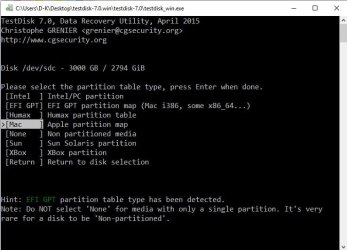
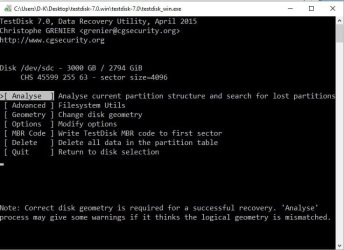
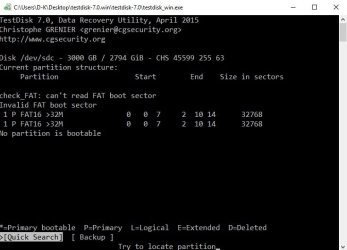
UPDATE: Found out on my own. I didn't have TestDisk. Now I do. Here are the print screens. Sector size was already at 4096.
 

Attachments

  • Untitled15.jpg
    Untitled15.jpg
    55.7 KB · Views: 0
  • Untitled16.jpg
    Untitled16.jpg
    45.4 KB · Views: 0
  • Untitled17.jpg
    Untitled17.jpg
    44.6 KB · Views: 0
  • Untitled18.jpg
    Untitled18.jpg
    29.5 KB · Views: 0

My Computer My Computer

At a glance

Windows 10 Pro X64Intel Core i7-2670QM @ 2.20GHz16 GB
Computer type
PC/Desktop
Computer Manufacturer/Model Number
Dell
OS
Windows 10 Pro X64
CPU
Intel Core i7-2670QM @ 2.20GHz
Memory
16 GB
Browser
Chrome
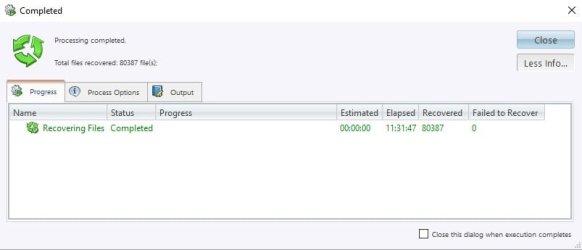
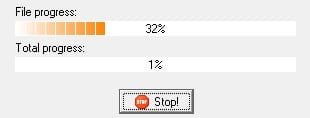
Through Active Data Studio, we have a happy ending. Completed the transfer of the Windows folder. Now doing some few other folders. If GetBackData keeps giving me errors, I will try this software to get back my external hard drive.

EDIT: I forgot that Active Data Studio does detect my external hard drive but won't let me access it since it is labeled 'damaged'.
 

Attachments

  • Completed Windows folder transfer.jpg
    Completed Windows folder transfer.jpg
    17.3 KB · Views: 0

My Computer My Computer

At a glance

Windows 10 Pro X64Intel Core i7-2670QM @ 2.20GHz16 GB
Computer type
PC/Desktop
Computer Manufacturer/Model Number
Dell
OS
Windows 10 Pro X64
CPU
Intel Core i7-2670QM @ 2.20GHz
Memory
16 GB
Browser
Chrome
You are going wrong with TestDisk. Now do not keep doing too many things at the same time. Especially TestDisk. Keep it for the final assault if you can't recover data with whatever else you are trying.( My recommendation is only GetDataback Simple. You are trying other things at your own risk.)

(Don't play with TestDisk if you don't know what you are doing. It can prove dangerous. You have already done all wrong steps, inspite of the general hints given "If it does one should only select Intel/PC partition ( Not EFI/GPT) with this specific 3TB external and then go to Geometry and change the Sector size from 512 to 4096 for it to read the data from the drive." You selected Mac (instead of Intel/PC partition) and then Analyse instead of Geometry.Further down if you give a wrong command you will ruin all data and make your drive unrecoverable.)
 
Last edited:

My Computer My Computer

At a glance

Windows 7 Home Premium 32 bit
OS
Windows 7 Home Premium 32 bit

My Computer My Computer

At a glance

Windows 10 Pro 64-bitIntel Core i7 5600U @ 2.60GHz Broadwell-U 14n...8.00GB Dual-Channel DDR3 @ 798MHz (11-11-11-28)Intel HD Graphics 5500
Computer type
Laptop
Computer Manufacturer/Model Number
Lenovo ThinkPad X1 Carbon
OS
Windows 10 Pro 64-bit
CPU
Intel Core i7 5600U @ 2.60GHz Broadwell-U 14nm Technology
Motherboard
LENOVO 20BTS0Y500 (U3E1)
Memory
8.00GB Dual-Channel DDR3 @ 798MHz (11-11-11-28)
Graphics Card(s)
Intel HD Graphics 5500
Sound Card
Speaker/HP (Realtek High Definition Audio)
Monitor(s) Displays
Generic PnP Monitor on Intel HD Graphics 5500
Screen Resolution
1920 x 1080 x 32 bits per pixel
Hard Drives
SAMSUNG MZHPV256HDGL-000L1 (256 GB SSD)
Keyboard
Standard PS/2 Keyboard
Mouse
Logitech G102 Prodigy Gaming Mouse
Internet Speed
10 Mbps
Antivirus
Comodo Firewall 11.0.0.6606
Browser
Google Chrome and Firefox

My Computer My Computer

At a glance

Windows 10 Pro X64Intel Core i7-2670QM @ 2.20GHz16 GB
Computer type
PC/Desktop
Computer Manufacturer/Model Number
Dell
OS
Windows 10 Pro X64
CPU
Intel Core i7-2670QM @ 2.20GHz
Memory
16 GB
Browser
Chrome
You are going wrong with TestDisk. Now do not keep doing too many things at the same time. Especially TestDisk. Keep it for the final assault if you can't recover data with whatever else you are trying.( My recommendation is only GetDataback Simple. You are trying other things at your own risk.)

(Don't play with TestDisk if you don't know what you are doing. It can prove dangerous. You have already done all wrong steps, inspite of the general hints given "If it does one should only select Intel/PC partition ( Not EFI/GPT) with this specific 3TB external and then go to Geometry and change the Sector size from 512 to 4096 for it to read the data from the drive." You selected Mac (instead of Intel/PC partition) and then Analyse instead of Geometry.Further down if you give a wrong command you will ruin all data and make your drive unrecoverable.)

I did not choose Mac. I chose Intel/PC. My cursor is only on the Mac option. It is not the one I chose. Also, I have done the geometry step and it was already at 4096, like I specified. Please do not presume the steps I have taken when I wrote nothing as such :). I just didn't screenshot everything. So no, 'I have not done all wrong steps, in spite of the general hints given' like you are stating sir.
 

My Computer My Computer

At a glance

Windows 10 Pro X64Intel Core i7-2670QM @ 2.20GHz16 GB
Computer type
PC/Desktop
Computer Manufacturer/Model Number
Dell
OS
Windows 10 Pro X64
CPU
Intel Core i7-2670QM @ 2.20GHz
Memory
16 GB
Browser
Chrome
Another completed transfer. Only have to complete the transfer of my USER folder and subfolders. Still having errors with my external hard drive.
 

Attachments

  • Completed transfer.jpg
    Completed transfer.jpg
    19.6 KB · Views: 0

My Computer My Computer

At a glance

Windows 10 Pro X64Intel Core i7-2670QM @ 2.20GHz16 GB
Computer type
PC/Desktop
Computer Manufacturer/Model Number
Dell
OS
Windows 10 Pro X64
CPU
Intel Core i7-2670QM @ 2.20GHz
Memory
16 GB
Browser
Chrome
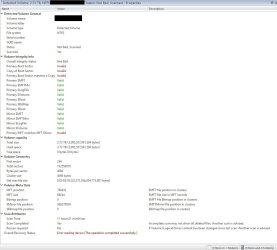
This is my external hard drive info (scan).
 

Attachments

  • Untitled19.jpg
    Untitled19.jpg
    154.2 KB · Views: 2
  • Untitled20.jpg
    Untitled20.jpg
    157 KB · Views: 3

My Computer My Computer

At a glance

Windows 10 Pro X64Intel Core i7-2670QM @ 2.20GHz16 GB
Computer type
PC/Desktop
Computer Manufacturer/Model Number
Dell
OS
Windows 10 Pro X64
CPU
Intel Core i7-2670QM @ 2.20GHz
Memory
16 GB
Browser
Chrome
My computer now detects by its own, my external hard drive (F: ) but in no way can I access it without recovery software.
 

Attachments

  • Untitled21.jpg
    Untitled21.jpg
    28.6 KB · Views: 2
Last edited:

My Computer My Computer

At a glance

Windows 10 Pro X64Intel Core i7-2670QM @ 2.20GHz16 GB
Computer type
PC/Desktop
Computer Manufacturer/Model Number
Dell
OS
Windows 10 Pro X64
CPU
Intel Core i7-2670QM @ 2.20GHz
Memory
16 GB
Browser
Chrome
UPDATE:

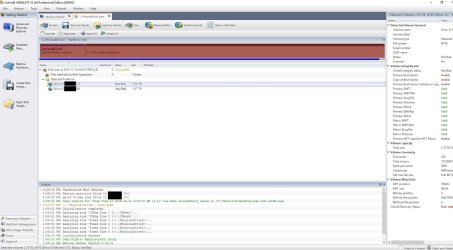
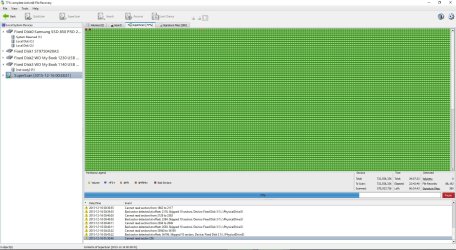
-So far, Active Data Studio is the big winner between those other three in terms of recovering data:
MiniTool Partition Wizard Free
Acronis
R-Studio
GetDataBack


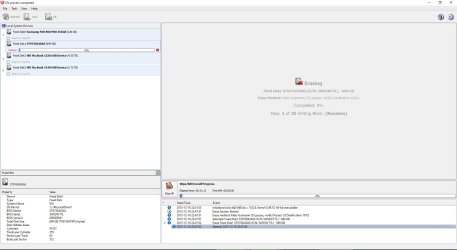
-Internal disk transfers are done. I am currently wiping the disk.
-External hard drive scans are still going after more than 24 hours. I am giving another chance to GetDataBack (transfers from the damaged external HD to another external HD) while I'm waiting for Active Data Studio to complete its scans. At the speed it's going, if no write errors occur, it will take me at least a week before the process is done and I can wipe the external hard drive.

EDIT: Forgot to mention, I am also using NoSleepHD v2.0 to make sure my external hard drive does not go to sleep at any given time. The software keeps writing empty files to the disk every 7 minutes. Very useful.

Thank you to all who helped. Will come back with updates.
 

Attachments

  • Wiping Internal Disk.jpg
    Wiping Internal Disk.jpg
    94.1 KB · Views: 3
  • Untitled24.jpg
    Untitled24.jpg
    397.5 KB · Views: 2
  • Untitled25.jpg
    Untitled25.jpg
    67.2 KB · Views: 2
  • Untitled23.jpg
    Untitled23.jpg
    3.8 KB · Views: 27
Last edited:

My Computer My Computer

At a glance

Windows 10 Pro X64Intel Core i7-2670QM @ 2.20GHz16 GB
Computer type
PC/Desktop
Computer Manufacturer/Model Number
Dell
OS
Windows 10 Pro X64
CPU
Intel Core i7-2670QM @ 2.20GHz
Memory
16 GB
Browser
Chrome
Which option are you using on Active Data Studio for this ?

378079d1450326685t-wd-my-book-not-initialized-unallocated-wiping-internal-disk.jpg
 

My Computer My Computer

At a glance

Windows 10 Pro 64-bitIntel Core i7 5600U @ 2.60GHz Broadwell-U 14n...8.00GB Dual-Channel DDR3 @ 798MHz (11-11-11-28)Intel HD Graphics 5500
Computer type
Laptop
Computer Manufacturer/Model Number
Lenovo ThinkPad X1 Carbon
OS
Windows 10 Pro 64-bit
CPU
Intel Core i7 5600U @ 2.60GHz Broadwell-U 14nm Technology
Motherboard
LENOVO 20BTS0Y500 (U3E1)
Memory
8.00GB Dual-Channel DDR3 @ 798MHz (11-11-11-28)
Graphics Card(s)
Intel HD Graphics 5500
Sound Card
Speaker/HP (Realtek High Definition Audio)
Monitor(s) Displays
Generic PnP Monitor on Intel HD Graphics 5500
Screen Resolution
1920 x 1080 x 32 bits per pixel
Hard Drives
SAMSUNG MZHPV256HDGL-000L1 (256 GB SSD)
Keyboard
Standard PS/2 Keyboard
Mouse
Logitech G102 Prodigy Gaming Mouse
Internet Speed
10 Mbps
Antivirus
Comodo Firewall 11.0.0.6606
Browser
Google Chrome and Firefox
Which option are you using on Active Data Studio for this ?

378079d1450326685t-wd-my-book-not-initialized-unallocated-wiping-internal-disk.jpg

-Tab 'Data Security'
-Option 'Active@ KillDisk'
 

My Computer My Computer

At a glance

Windows 10 Pro X64Intel Core i7-2670QM @ 2.20GHz16 GB
Computer type
PC/Desktop
Computer Manufacturer/Model Number
Dell
OS
Windows 10 Pro X64
CPU
Intel Core i7-2670QM @ 2.20GHz
Memory
16 GB
Browser
Chrome
UPDATE:

-My internal disk is at 61% on the erasing process. It is on its 22nd pass out of 35.
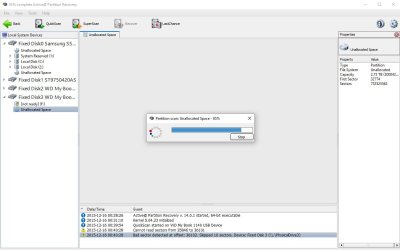
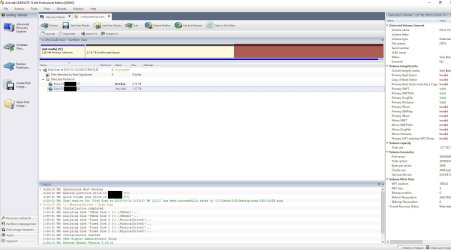
-My external disk is beyond recovery in terms of recovering the files. I could succeed but only by going 1 file at a time which will take me a long long time, and only with the GetDataBack software which I have to endure errors each time I wake up. Active Data Disk doesn't seem to be able to detect any files on that disk. Therefore, I cannot seem to be able to recover the files with that software. You can see data about that drive with the attached picture.
 

Attachments

  • Untitled26.jpg
    Untitled26.jpg
    66.4 KB · Views: 0

My Computer My Computer

At a glance

Windows 10 Pro X64Intel Core i7-2670QM @ 2.20GHz16 GB
Computer type
PC/Desktop
Computer Manufacturer/Model Number
Dell
OS
Windows 10 Pro X64
CPU
Intel Core i7-2670QM @ 2.20GHz
Memory
16 GB
Browser
Chrome

My Computer My Computer

At a glance

Windows 10 Pro X64Intel Core i7-2670QM @ 2.20GHz16 GB
Computer type
PC/Desktop
Computer Manufacturer/Model Number
Dell
OS
Windows 10 Pro X64
CPU
Intel Core i7-2670QM @ 2.20GHz
Memory
16 GB
Browser
Chrome
WD My book is hardware encrypted by the enclosure electronics. The decrypt key also is in the enclosure electronics. ( Sata to USB bridge). Even if you manage to recover the data by direct connection which perhaps is out of question since your HDD seems riddled with too many bad sectors -which you have further worsened by repeatedly trying too many software and taxing it - - that data will be the encrypted data. It will be useless.
 

My Computer My Computer

At a glance

Windows 7 Home Premium 32 bit
OS
Windows 7 Home Premium 32 bit
Update:

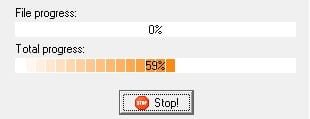
-GetDataBack finally works. I guess the errors came from Active Data Studio doing scans on the same external hard drive while trying to recover the data at the same time with GetDataBack. I am at 59% and everything works so far.
-Internal Drive is at 95% on the wiping process with Active @ KillDisk (Active Data Studio)

Everything is going great so far. Might be lucky and be done by Monday. After that, I will only need to delete the partitions and format everything so that I get them to default condition.

Anyone know how I should proceed with the external drive that still has unallocated space? Thanks again.
 

Attachments

  • Untitled27.jpg
    Untitled27.jpg
    4.2 KB · Views: 14

My Computer My Computer

At a glance

Windows 10 Pro X64Intel Core i7-2670QM @ 2.20GHz16 GB
Computer type
PC/Desktop
Computer Manufacturer/Model Number
Dell
OS
Windows 10 Pro X64
CPU
Intel Core i7-2670QM @ 2.20GHz
Memory
16 GB
Browser
Chrome
Update:

-GetDataBack finally works. I guess the errors came from Active Data Studio doing scans on the same external hard drive while trying to recover the data at the same time with GetDataBack. I am at 59% and everything works so far.
-Internal Drive is at 95% on the wiping process with Active @ KillDisk (Active Data Studio)

Everything is going great so far. Might be lucky and be done by Monday. After that, I will only need to delete the partitions and format everything so that I get them to default condition.

Anyone know how I should proceed with the external drive that still has unallocated space? Thanks again.

If you mean that unallocated space looks like RAW ? Than use LiveUSB and you can explorer all files/folders.
 

My Computer My Computer

At a glance

Windows 10 Pro 64-bitIntel Core i7 5600U @ 2.60GHz Broadwell-U 14n...8.00GB Dual-Channel DDR3 @ 798MHz (11-11-11-28)Intel HD Graphics 5500
Computer type
Laptop
Computer Manufacturer/Model Number
Lenovo ThinkPad X1 Carbon
OS
Windows 10 Pro 64-bit
CPU
Intel Core i7 5600U @ 2.60GHz Broadwell-U 14nm Technology
Motherboard
LENOVO 20BTS0Y500 (U3E1)
Memory
8.00GB Dual-Channel DDR3 @ 798MHz (11-11-11-28)
Graphics Card(s)
Intel HD Graphics 5500
Sound Card
Speaker/HP (Realtek High Definition Audio)
Monitor(s) Displays
Generic PnP Monitor on Intel HD Graphics 5500
Screen Resolution
1920 x 1080 x 32 bits per pixel
Hard Drives
SAMSUNG MZHPV256HDGL-000L1 (256 GB SSD)
Keyboard
Standard PS/2 Keyboard
Mouse
Logitech G102 Prodigy Gaming Mouse
Internet Speed
10 Mbps
Antivirus
Comodo Firewall 11.0.0.6606
Browser
Google Chrome and Firefox
Nope, I meant to put the external hard drive disk, after the transfers are done, to its original working state.
 

My Computer My Computer

At a glance

Windows 10 Pro X64Intel Core i7-2670QM @ 2.20GHz16 GB
Computer type
PC/Desktop
Computer Manufacturer/Model Number
Dell
OS
Windows 10 Pro X64
CPU
Intel Core i7-2670QM @ 2.20GHz
Memory
16 GB
Browser
Chrome
Back
Top