WD Passport HD - Failed to recognize, Disk Not Initilized error

StarCaptain

New member
Local time
10:10 PM
Messages
13
Experts,

I am similar issue as stated heredisk 1 is unknown, not initialized, unallocated

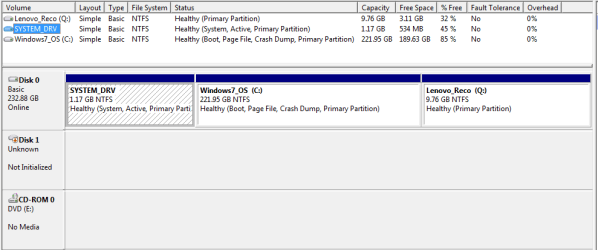
I have download MooTools and tried initializing the HDD but HD is not listing under MooTools too. Attached a screen shot of my Disk managment, under here it shows Disk1 as Not initialized.

Also attached a screen shot that shows from MooTools, disk z not recognizable

How can I trouble shoot this ? My HDD is western digital passport, also security/pwd is disabled though.
 

Attachments
  • DiskMgmngt.png
    DiskMgmngt.png
    11.4 KB · Views: 1
  • MooTools.png
    MooTools.png
    9.2 KB · Views: 1

My Computer My Computer

Computer type
Laptop
Computer Manufacturer/Model Number
Lenovo SL410
OS
Windows 7 32bit
When you go into Disk Management a pop up window should appear asking if you want to initialize the disc. You would generally select the MBR option unless you specifically want a GPT disc. If this pop up doesn't occur then right click on the disc in Disk Management and it should give you the initialize disk option. If all this fails then you could try free Partition Wizard.
 

My Computer My Computer

Computer type
PC/Desktop
Computer Manufacturer/Model Number
Own build
OS
Windows 7x64 Home Premium SP1
CPU
Intel i7 2600k
Motherboard
ASUS P8Z68 Deluxe
Memory
G.Skill Ripjaws (DDR3-1600) 2x4GB
Graphics Card(s)
Nvidia GeForce GTS 450; Intel HD Graphics 3000(GT2+)
Monitor(s) Displays
Dell Ultrasharp IPS panel U2311H, Samsung SyncMaster P2350
Screen Resolution
1920x1080
Hard Drives
Samsung 850 Pro SSD 256GB, Samsung SSD 840 120GB, Seagates 1TB Barracuda ST31000528AS x2
PSU
Seasonic M12II 520W
Case
Lian Li Lancool PC-K60
Cooling
Case: 1x120mm, 3x140mm CPU: Hyper 212+
Keyboard
Logitech MK520 (wireless)
Mouse
Logitech MK520
Internet Speed
6-7 Mbps
Antivirus
Norton Security Premium, Malwarebytes on 2 (MSE on 3rd PC)
Browser
FireFox
Other Info
Audio: Logitech Z523 2.1
yh, you are right popup was appeared but when I select MBR am getting below message
"The Request could not be performed because of an I/O device error". Not sure whats happening
 

My Computer My Computer

Computer type
Laptop
Computer Manufacturer/Model Number
Lenovo SL410
OS
Windows 7 32bit
You need to provide more details about disc 1?
Suggest you try:
See what Partition Wizard says about the disc.
Internal or external try changing the cable and ports.
Run the manufacturer's diagnostics.
 

My Computer My Computer

Computer type
PC/Desktop
Computer Manufacturer/Model Number
Own build
OS
Windows 7x64 Home Premium SP1
CPU
Intel i7 2600k
Motherboard
ASUS P8Z68 Deluxe
Memory
G.Skill Ripjaws (DDR3-1600) 2x4GB
Graphics Card(s)
Nvidia GeForce GTS 450; Intel HD Graphics 3000(GT2+)
Monitor(s) Displays
Dell Ultrasharp IPS panel U2311H, Samsung SyncMaster P2350
Screen Resolution
1920x1080
Hard Drives
Samsung 850 Pro SSD 256GB, Samsung SSD 840 120GB, Seagates 1TB Barracuda ST31000528AS x2
PSU
Seasonic M12II 520W
Case
Lian Li Lancool PC-K60
Cooling
Case: 1x120mm, 3x140mm CPU: Hyper 212+
Keyboard
Logitech MK520 (wireless)
Mouse
Logitech MK520
Internet Speed
6-7 Mbps
Antivirus
Norton Security Premium, Malwarebytes on 2 (MSE on 3rd PC)
Browser
FireFox
Other Info
Audio: Logitech Z523 2.1
Thank you for taking time to reply me,

Disk1 is my western digital passport 1TB HD, I tried running Disk status tool which is a part of WD utilities. Its failed to detect.
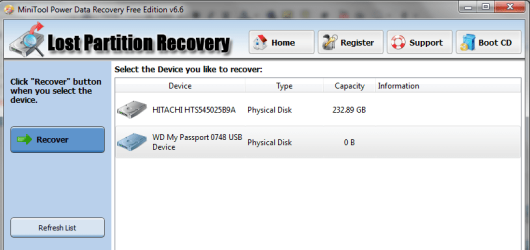
I open lost partition recovery wizard from MooTools, it has detected the drive but shows as 0kb storage.

I suspect WD software is not allowing the drive to detectable and its not pwd protected too. earlier I have reformatted my PC then installed WD tools, then drive prompted me to enter password, at that time I have disabled password feature.

Now again I have reformatted my PC, since then It stopped to be detectable.
 

My Computer My Computer

Computer type
Laptop
Computer Manufacturer/Model Number
Lenovo SL410
OS
Windows 7 32bit
I have quite a number of My Book Essential USB3 ext HDDs and find the Windows sourced drivers work fine. However, you may want to look at
Where to find a driver for a WD product or the operating system (OS) fails to recognize a WD drive
and try the WD drivers.
Someone else may know of something quirky about WD Passports that prevents them from being formated in a conventional way.

An alternative is to attempt a format via the command line.
1) Open an elevated command prompt. Type cmd in the search programs and files box (lower left). When cmd.exe apperas, right click and run as administrator.
2) At the command prompt do the following:
>diskpart
>list disk
Now identify your Passport and the disk number (say n) - it probable should have the status of offline. Be careful you select the correct disk!!
>select disk n
>clean
>create partition primary
> select partition 1
> format fs=ntfs quick
> assign
>exit
Close command prompt and see if the Passport is visible in Windows explorer.
 

My Computer My Computer

Computer type
PC/Desktop
Computer Manufacturer/Model Number
Own build
OS
Windows 7x64 Home Premium SP1
CPU
Intel i7 2600k
Motherboard
ASUS P8Z68 Deluxe
Memory
G.Skill Ripjaws (DDR3-1600) 2x4GB
Graphics Card(s)
Nvidia GeForce GTS 450; Intel HD Graphics 3000(GT2+)
Monitor(s) Displays
Dell Ultrasharp IPS panel U2311H, Samsung SyncMaster P2350
Screen Resolution
1920x1080
Hard Drives
Samsung 850 Pro SSD 256GB, Samsung SSD 840 120GB, Seagates 1TB Barracuda ST31000528AS x2
PSU
Seasonic M12II 520W
Case
Lian Li Lancool PC-K60
Cooling
Case: 1x120mm, 3x140mm CPU: Hyper 212+
Keyboard
Logitech MK520 (wireless)
Mouse
Logitech MK520
Internet Speed
6-7 Mbps
Antivirus
Norton Security Premium, Malwarebytes on 2 (MSE on 3rd PC)
Browser
FireFox
Other Info
Audio: Logitech Z523 2.1
Thanks much again, Will try looking in that forums and perform your steps. I will get back to you later in the evening (Singapore hours)
 

My Computer My Computer

Computer type
Laptop
Computer Manufacturer/Model Number
Lenovo SL410
OS
Windows 7 32bit
Hi StarCaptain,

Try this first.

Try to format your WD drive with HP USB Disk Storage Format tool v2.2.3 HP USB Disk Storage Format Tool Free Download

(Remove all other external drives. Plugin only your Western Digital external drive. Right click on the .exe file and run as administrator. If the tool can see your drive, format it.)
 

My Computer My Computer

OS
Windows 7 Home Premium 32 bit
Up to you OP but I suggest you give my suggestions a go before jumping into using the old HP tool.
 

My Computer My Computer

Computer type
PC/Desktop
Computer Manufacturer/Model Number
Own build
OS
Windows 7x64 Home Premium SP1
CPU
Intel i7 2600k
Motherboard
ASUS P8Z68 Deluxe
Memory
G.Skill Ripjaws (DDR3-1600) 2x4GB
Graphics Card(s)
Nvidia GeForce GTS 450; Intel HD Graphics 3000(GT2+)
Monitor(s) Displays
Dell Ultrasharp IPS panel U2311H, Samsung SyncMaster P2350
Screen Resolution
1920x1080
Hard Drives
Samsung 850 Pro SSD 256GB, Samsung SSD 840 120GB, Seagates 1TB Barracuda ST31000528AS x2
PSU
Seasonic M12II 520W
Case
Lian Li Lancool PC-K60
Cooling
Case: 1x120mm, 3x140mm CPU: Hyper 212+
Keyboard
Logitech MK520 (wireless)
Mouse
Logitech MK520
Internet Speed
6-7 Mbps
Antivirus
Norton Security Premium, Malwarebytes on 2 (MSE on 3rd PC)
Browser
FireFox
Other Info
Audio: Logitech Z523 2.1
Absolutely no problems, Star Captain, go ahead with mjf's suggestions first.:)
 

My Computer My Computer

OS
Windows 7 Home Premium 32 bit
Sorry guys,

Was busy with work, will try out as said here and will get back.
 

My Computer My Computer

Computer type
Laptop
Computer Manufacturer/Model Number
Lenovo SL410
OS
Windows 7 32bit
I have re-installed drivers, but this time strangly I am hearing some beep sounds from HDD. What could went wrong?

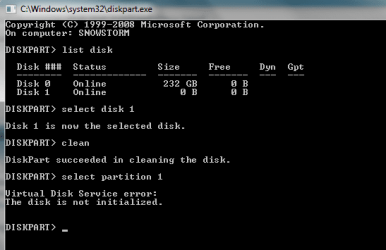
Tried with steps above, but still no luck. Did i lost partition? Why always it is displaying 0kb.
 

Attachments

  • diskpart.png
    diskpart.png
    8.6 KB · Views: 31
  • lostpartition.png
    lostpartition.png
    25.2 KB · Views: 1

My Computer My Computer

Computer type
Laptop
Computer Manufacturer/Model Number
Lenovo SL410
OS
Windows 7 32bit
Did you attach this disk to a hub or directly to a port on your computer? Maybe it is not receiving enough power through the USB port to work properly.
 

My Computer My Computer

Computer Manufacturer/Model Number
Asus N73SV
OS
Windows 7 x64 Ultimate SP1
CPU
Core i7-2630QM
Motherboard
Intel HM 65
Memory
6 GB DDR3
Graphics Card(s)
Nvidia GT 540M / Intel HD 3000 - Optimus switching
Sound Card
HD Audio (Intel Azalia/Realtek) ALC269
Monitor(s) Displays
LED flat panel
Screen Resolution
1920 x 1080
Hard Drives
2x Seagate Momentus 640 GB - 1,28 TB in total
Internet Speed
4 MB/256 kbps
Other Info
External HDs

WD Elements 1,5 TB
WD MyBook 500 GB
You need to follow the instructions.
You did not do:
>create partition primary

Teerex also raises a valid point.
 

My Computer My Computer

Computer type
PC/Desktop
Computer Manufacturer/Model Number
Own build
OS
Windows 7x64 Home Premium SP1
CPU
Intel i7 2600k
Motherboard
ASUS P8Z68 Deluxe
Memory
G.Skill Ripjaws (DDR3-1600) 2x4GB
Graphics Card(s)
Nvidia GeForce GTS 450; Intel HD Graphics 3000(GT2+)
Monitor(s) Displays
Dell Ultrasharp IPS panel U2311H, Samsung SyncMaster P2350
Screen Resolution
1920x1080
Hard Drives
Samsung 850 Pro SSD 256GB, Samsung SSD 840 120GB, Seagates 1TB Barracuda ST31000528AS x2
PSU
Seasonic M12II 520W
Case
Lian Li Lancool PC-K60
Cooling
Case: 1x120mm, 3x140mm CPU: Hyper 212+
Keyboard
Logitech MK520 (wireless)
Mouse
Logitech MK520
Internet Speed
6-7 Mbps
Antivirus
Norton Security Premium, Malwarebytes on 2 (MSE on 3rd PC)
Browser
FireFox
Other Info
Audio: Logitech Z523 2.1
Teerex,

I tried plugging to all available USB ports on my laptop. Why am hearing a beep sound? Should I change USB cable?
 

My Computer My Computer

Computer type
Laptop
Computer Manufacturer/Model Number
Lenovo SL410
OS
Windows 7 32bit
Why have you not followed mjf's instructions on diskpart in post #6?

Instead you are doing something on your own like MiniTool Power Data Recovery etc. That way its going to be difficult for any one to continue the help.

What exactly do you want to do? Do you want to recover data or do you want to format the external drive?

You also said that you reinstalled the drivers. But didn't say what drivers.

Did you try installing the SES drivers as mentioned in mjf's post #6? Or was it just the routine drivers that Windows installs?

When specific instructions are given, you must follow them and report the results. Now if you ignore them and follow your own strategy aimlessly there is absolutely no need to ask for help here.:)
 
Last edited:

My Computer My Computer

OS
Windows 7 Home Premium 32 bit
Teerex,

I tried plugging to all available USB ports on my laptop. Why am hearing a beep sound? Should I change USB cable?

It would be wise to try.
 

My Computer My Computer

Computer Manufacturer/Model Number
Asus N73SV
OS
Windows 7 x64 Ultimate SP1
CPU
Core i7-2630QM
Motherboard
Intel HM 65
Memory
6 GB DDR3
Graphics Card(s)
Nvidia GT 540M / Intel HD 3000 - Optimus switching
Sound Card
HD Audio (Intel Azalia/Realtek) ALC269
Monitor(s) Displays
LED flat panel
Screen Resolution
1920 x 1080
Hard Drives
2x Seagate Momentus 640 GB - 1,28 TB in total
Internet Speed
4 MB/256 kbps
Other Info
External HDs

WD Elements 1,5 TB
WD MyBook 500 GB
OP,
Are you reading our suggestions? I suggested the cable replace option back in post 4. You appear to go off on tangents and I am out of patience. I do hope you solve your problem.
 

My Computer My Computer

Computer type
PC/Desktop
Computer Manufacturer/Model Number
Own build
OS
Windows 7x64 Home Premium SP1
CPU
Intel i7 2600k
Motherboard
ASUS P8Z68 Deluxe
Memory
G.Skill Ripjaws (DDR3-1600) 2x4GB
Graphics Card(s)
Nvidia GeForce GTS 450; Intel HD Graphics 3000(GT2+)
Monitor(s) Displays
Dell Ultrasharp IPS panel U2311H, Samsung SyncMaster P2350
Screen Resolution
1920x1080
Hard Drives
Samsung 850 Pro SSD 256GB, Samsung SSD 840 120GB, Seagates 1TB Barracuda ST31000528AS x2
PSU
Seasonic M12II 520W
Case
Lian Li Lancool PC-K60
Cooling
Case: 1x120mm, 3x140mm CPU: Hyper 212+
Keyboard
Logitech MK520 (wireless)
Mouse
Logitech MK520
Internet Speed
6-7 Mbps
Antivirus
Norton Security Premium, Malwarebytes on 2 (MSE on 3rd PC)
Browser
FireFox
Other Info
Audio: Logitech Z523 2.1
Why have you not followed mjf's instructions on diskpart in post #6?

Instead you are doing something on your own like MiniTool Power Data Recovery etc. That way its going to be difficult for any one to continue the help.

What exactly do you want to do? Do you want to recover data or do you want to format the external drive?

You also said that you reinstalled the drivers. But didn't say what drivers.

Did you try installing the SES drivers as mentioned in mjf's post #6? Or was it just the routine drivers that Windows installs?

When specific instructions are given, you must follow them and report the results. Now if you ignore them and follow your own strategy aimlessly there is absolutely no need to ask for help here.:)

I have followed mjf's food steps, but disk did not responded. I have reintalled SES drivers, but still no luck.
And my external drive contains all my years of photography related work, I don't want to loose them.

I am no hurry, trying out these on weekends as time is not manageable during weekdays.
 

My Computer My Computer

Computer type
Laptop
Computer Manufacturer/Model Number
Lenovo SL410
OS
Windows 7 32bit
OP,
Are you reading our suggestions? I suggested the cable replace option back in post 4. You appear to go off on tangents and I am out of patience. I do hope you solve your problem.

Yes,
Thanks for taking time to reply me, I will have to try with new cable. Btw busy with my work schedule, I have only option to try out over the weekend.:cry:
 

My Computer My Computer

Computer type
Laptop
Computer Manufacturer/Model Number
Lenovo SL410
OS
Windows 7 32bit
Back
Top