WD Passport HD - Failed to recognize, Disk Not Initilized error

........And my external drive contains all my years of photography related work, I don't want to loose them........

Nowhere before had you stated that you have important data on your external drive and you want to recover it.

In that case the whole strategy should have been different with no attempt to initialise it or format it.

You should have straight away gotten on to Data Recovery mode.

You have, following mjf's instructions, run diskpart Clean command and that has really cleaned the first sector zeroing it. So now there is no MBR code/partition information in it. Fortunate you were unable to create a partition that would have destroyed all data or could have made it more difficult to recover.

Not to worry. I am now formulating a strategy to rewrite the MBR - you have already said that Partition Wizard does not even show your external drive.

For rewriting the MBR, we shall try using Bootice. Download Bootice v 1.1.5 rar file ( x86 or x64 as appropriate to your system) and extract the rar file into a folder to get the .exe file.

Booooooooting • View topic - [ BOOTICE: A poweful boot-related utility ] - v1.1.5

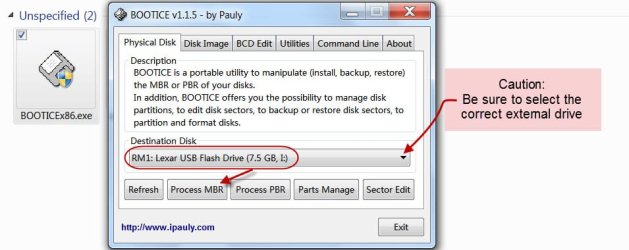
Plugin only the problem external drive (remove all other drives/pen drives), right click on the .exe file and run as administrator.

Select your external drive and then click on Process MBR.
29-09-2013 19-46-11.jpg

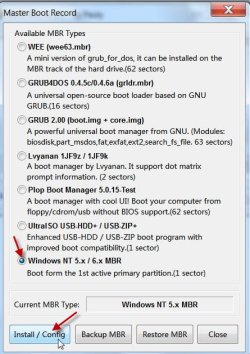
In the ensuing dialog box, select Windows NT 5.x / 6.x MBR and click on Install / Config tab.
29-09-2013 20-10-41.jpg

Once the MBR is written, close Bootice and shut down your computer. Unplug the external drive.

Reboot and then plug-in your external drive.

Now run Partition Wizard.

If the drive shows up, run Partition Recovery Wizard and try to recover the partition.

http://www.sevenforums.com/software...ive-turned-raw-partition-wizard-testdisk.html (Go to the topic Recovery with Partition Wizard: SanDisk Cruzer Blade 16GB. In your case it will be your external drive)

Note: In this procedure we are only trying to rewrite the MBR in the first sector. It in no way affects the data which remains in the other sectors. If Bootice is unable to see the Western Digital External drive, then we may have to resort to some other data recovery procedure. I am keeping my fingers crossed.:)
 

My Computer My Computer

OS
Windows 7 Home Premium 32 bit
You should have stated that you had valuable data on the HDD at the beginning. This software can be useful for extracting photos from a RAW disc. It doesn't rely on a file system
Photorec.
 

My Computer My Computer

Computer type
PC/Desktop
Computer Manufacturer/Model Number
Own build
OS
Windows 7x64 Home Premium SP1
CPU
Intel i7 2600k
Motherboard
ASUS P8Z68 Deluxe
Memory
G.Skill Ripjaws (DDR3-1600) 2x4GB
Graphics Card(s)
Nvidia GeForce GTS 450; Intel HD Graphics 3000(GT2+)
Monitor(s) Displays
Dell Ultrasharp IPS panel U2311H, Samsung SyncMaster P2350
Screen Resolution
1920x1080
Hard Drives
Samsung 850 Pro SSD 256GB, Samsung SSD 840 120GB, Seagates 1TB Barracuda ST31000528AS x2
PSU
Seasonic M12II 520W
Case
Lian Li Lancool PC-K60
Cooling
Case: 1x120mm, 3x140mm CPU: Hyper 212+
Keyboard
Logitech MK520 (wireless)
Mouse
Logitech MK520
Internet Speed
6-7 Mbps
Antivirus
Norton Security Premium, Malwarebytes on 2 (MSE on 3rd PC)
Browser
FireFox
Other Info
Audio: Logitech Z523 2.1
Exactly.

First let the OP start with the easy method.

If Bootice can see the external drive, write the MBR and subsequently PW can find and write the partition table too, then his whole drive will be restored to the previous condition without any need of another external drive to copy the files.

If not successful then PhotoRec. The OP has to start with connect another external drive too to copy the recovered files. The original folder structure will be lost.

http://www.sevenforums.com/software/193467-guide-using-photorec-recovery-software.html

Copying files listed by PhotoRec: http://www.sevenforums.com/hardware...suddenly-became-unllocated-3.html#post2395385
 

My Computer My Computer

OS
Windows 7 Home Premium 32 bit
Nowhere before had you stated that you have important data on your external drive and you want to recover it.

In that case the whole strategy should have been different with no attempt to initialise it or format it.

You should have straight away gotten on to Data Recovery mode.

You have, following mjf's instructions, run diskpart Clean command and that has really cleaned the first sector zeroing it. So now there is no MBR code/partition information in it. Fortunate you were unable to create a partition that would have destroyed all data or could have made it more difficult to recover.

Not to worry. I am now formulating a strategy to rewrite the MBR - you have already said that Partition Wizard does not even show your external drive.

For rewriting the MBR, we shall try using Bootice. Download Bootice v 1.1.5 rar file ( x86 or x64 as appropriate to your system) and extract the rar file into a folder to get the .exe file.

Booooooooting • View topic - [ BOOTICE: A poweful boot-related utility ] - v1.1.5

Plugin only the problem external drive (remove all other drives/pen drives), right click on the .exe file and run as administrator.

Select your external drive and then click on Process MBR.

View attachment 287703

In the ensuing dialog box, select Windows NT 5.x / 6.x MBR and click on Install / Config tab.

View attachment 287704

Once the MBR is written, close Bootice and shut down your computer. Unplug the external drive.

Reboot and then plug-in your external drive.

Now run Partition Wizard.

If the drive shows up, run Partition Recovery Wizard and try to recover the partition.

http://www.sevenforums.com/software...ive-turned-raw-partition-wizard-testdisk.html (Go to the topic Recovery with Partition Wizard: SanDisk Cruzer Blade 16GB. In your case it will be your external drive)

Note: In this procedure we are only trying to rewrite the MBR in the first sector. It in no way affects the data which remains in the other sectors. If Bootice is unable to see the Western Digital External drive, then we may have to resort to some other data recovery procedure. I am keeping my fingers crossed.:)

Wow..
Thank you so much for your valuable time for such detail info. You guys doing great job.
Ok, I will try out above steps during my evening, and will come back to you.
 

My Computer My Computer

Computer type
Laptop
Computer Manufacturer/Model Number
Lenovo SL410
OS
Windows 7 32bit
You should have stated that you had valuable data on the HDD at the beginning. This software can be useful for extracting photos from a RAW disc. It doesn't rely on a file system
Photorec.

Thank you again, though I have jpegs that are on G+ but i haven't stored pictures between 2005-2009. I may scared loosing them. I will come back to you on this tool usage.
 

My Computer My Computer

Computer type
Laptop
Computer Manufacturer/Model Number
Lenovo SL410
OS
Windows 7 32bit
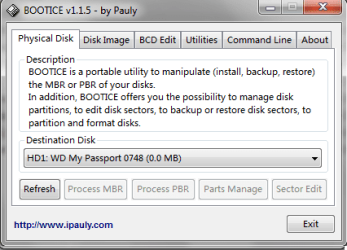
Interesting, I have downloaded Bootice and tried your steps. Process MBR doesnt shows up, looks like bootice unable to find required information.
 

Attachments

  • bootice.png
    bootice.png
    12.5 KB · Views: 30

My Computer My Computer

Computer type
Laptop
Computer Manufacturer/Model Number
Lenovo SL410
OS
Windows 7 32bit
OK, all the tabs are greyed out. Implies that all is not well with the drive. Looks like the drive is not reading at all. Hmmm... it can be a faulty interface card in the enclosure or the drive itself is dead.

Now what? Go ahead with PhotoRec. Check whether it does some magic.

If not, you may have to run Datalifeguard Diagnostics for Windows and run the Quick test. If it does not pass then the extended test. ( Do not run Write Zeroes) WD Support / Downloads / SATA & SAS / WD VelociRaptor
 

My Computer My Computer

OS
Windows 7 Home Premium 32 bit
Another thing to try of course is to try the HDD on another PC and again try a different USB cable if you haven't already. If both of these fail then it could be a faulty HDD controller card :(
 

My Computer My Computer

Computer type
PC/Desktop
Computer Manufacturer/Model Number
Own build
OS
Windows 7x64 Home Premium SP1
CPU
Intel i7 2600k
Motherboard
ASUS P8Z68 Deluxe
Memory
G.Skill Ripjaws (DDR3-1600) 2x4GB
Graphics Card(s)
Nvidia GeForce GTS 450; Intel HD Graphics 3000(GT2+)
Monitor(s) Displays
Dell Ultrasharp IPS panel U2311H, Samsung SyncMaster P2350
Screen Resolution
1920x1080
Hard Drives
Samsung 850 Pro SSD 256GB, Samsung SSD 840 120GB, Seagates 1TB Barracuda ST31000528AS x2
PSU
Seasonic M12II 520W
Case
Lian Li Lancool PC-K60
Cooling
Case: 1x120mm, 3x140mm CPU: Hyper 212+
Keyboard
Logitech MK520 (wireless)
Mouse
Logitech MK520
Internet Speed
6-7 Mbps
Antivirus
Norton Security Premium, Malwarebytes on 2 (MSE on 3rd PC)
Browser
FireFox
Other Info
Audio: Logitech Z523 2.1
Hello guys,

back after a busy hectic week. I thinking to approach nearest Western Digital service center. Hope they would shed some light for this.

Appreciate your time for taking to reply for me. You guys are really very help ful and doing great job.
 

My Computer My Computer

Computer type
Laptop
Computer Manufacturer/Model Number
Lenovo SL410
OS
Windows 7 32bit
Thanks for the compliments but you don't appear to have followed most of the suggestions given. Good luck at the service centre.
 

My Computer My Computer

Computer type
PC/Desktop
Computer Manufacturer/Model Number
Own build
OS
Windows 7x64 Home Premium SP1
CPU
Intel i7 2600k
Motherboard
ASUS P8Z68 Deluxe
Memory
G.Skill Ripjaws (DDR3-1600) 2x4GB
Graphics Card(s)
Nvidia GeForce GTS 450; Intel HD Graphics 3000(GT2+)
Monitor(s) Displays
Dell Ultrasharp IPS panel U2311H, Samsung SyncMaster P2350
Screen Resolution
1920x1080
Hard Drives
Samsung 850 Pro SSD 256GB, Samsung SSD 840 120GB, Seagates 1TB Barracuda ST31000528AS x2
PSU
Seasonic M12II 520W
Case
Lian Li Lancool PC-K60
Cooling
Case: 1x120mm, 3x140mm CPU: Hyper 212+
Keyboard
Logitech MK520 (wireless)
Mouse
Logitech MK520
Internet Speed
6-7 Mbps
Antivirus
Norton Security Premium, Malwarebytes on 2 (MSE on 3rd PC)
Browser
FireFox
Other Info
Audio: Logitech Z523 2.1
And please do report what went on. Your feedback may help us help others ( and of course we will be learning from your experience and it will help us evaluate our own suggestions.) Thanks.
 

My Computer My Computer

OS
Windows 7 Home Premium 32 bit
I have exactly the same problem as described above and have very important data on the HDD.

Is there any known solution for this as I've been browsing all over the place and can not seem to find anything workable.
 

My Computer My Computer

Computer type
PC/Desktop
OS
Windows 7 64
same wd passport problem

hey i have read all of the posts and followed all the instructions but nothing.... i still get the same issues... if anyone know the fix please post... apparently this is a common issue to WD PASSPORT.... maybe is a fabrication malfunction... tnks for helpping.
 

My Computer My Computer

OS
windows 7 x64
hardware fatal error

if the hard drive is formatted, isn't all the data is lost?
 

My Computer My Computer

Computer type
PC/Desktop
Computer Manufacturer/Model Number
asus
OS
windows 8 64bit
I am not sure in which context you are asking this question.

1. If you have wiped your disk clean - either with diskpart clean command or using any other third party software - and then format, then all data in it is lost even before formatting :) . By wiping you have effectively overwritten any data present in each sector with 00s or any other random hexadecimal number.

2. If one has accidentally formatted a drive - whether it is a Quick Format or Full Format - all data in most sectors is still present - if not overwritten by any fresh data. Formatting only writes a new File System but the data in most other sectors is still there and can be recovered . DR software like PhotoRec and Zero Assumption Recovery ignore the file system and go after the underlying data, so it will still work even if your media's file system has been severely damaged or reformatted. Most file formats can be recovered. Some cannot be recovered. But you will only get a bunch of files and the names and folder structure would be lost since the original Filesystem - which keeps the index of files/Folders - is now lost..
 

My Computer My Computer

OS
Windows 7 Home Premium 32 bit
Back
Top