Solved WD Passport HD 1 TB disk 1 is unknown

magi

New member
Local time
12:52 AM
Messages
3
Hi Admin,

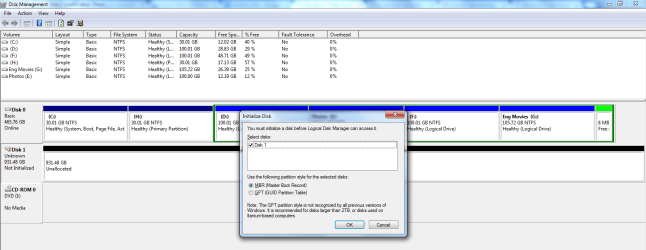
I'm also facing the same like the rest of em with My WD 1TB external HDD, whenever I connect it, the computer recognizes it's being plugged in, however it doesn't appear in My Computer. When I go to Disk Management it comes up as "Disk 1, Unknown, Not Initialized".

I tried with the Partition Wizard mentioned earlier in the post, but seems it takes lot of time. Data inside the drive doesn't matter for me. If i get it formatted that would help.. kindly advise on how to proceed further.

Also am not seeing the option, New Simple Volume when selected the Unallocated drive.

If Initialize disk is to be done, what partition type has to be selected "MBR or GPT"

Please Help !! Thank you !!
 

Attachments
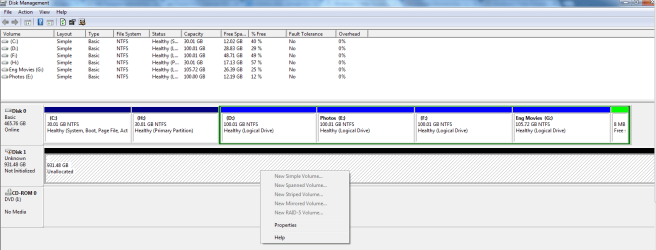
  • Disk 1 Unallocated Capture.PNG
    Disk 1 Unallocated Capture.PNG
    25.5 KB · Views: 1
  • Initialize disk Capture.PNG
    Initialize disk Capture.PNG
    38.4 KB · Views: 1
Last edited by a moderator:

My Computer My Computer

At a glance

Windows 7 Ultimate 32 bit4GB-
Computer type
PC/Desktop
Computer Manufacturer/Model Number
Custom build
OS
Windows 7 Ultimate 32 bit
Motherboard
AMD
Memory
4GB
Graphics Card(s)
-
Hard Drives
500GB
Antivirus
Kaspersky
Browser
Chrome,Firefox
Welcome onboard.

( I am not Admin but still usurp their address ;) to address this query)

Initialise it as an MBR disk. Only more than 2TB drives need to be GPT disks.
 

My Computer My Computer

At a glance

Windows 7 Home Premium 32 bit
OS
Windows 7 Home Premium 32 bit
Jumanji,

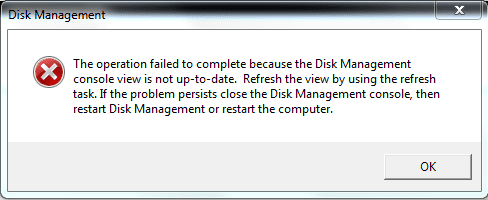
Tried the same, but got this error. Operation failed.PNG


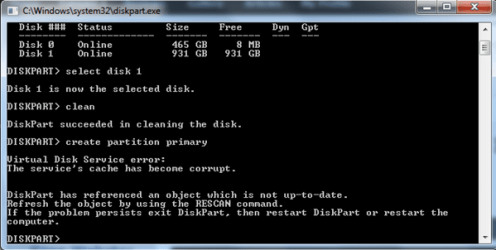
Also by browsing further in the site i got to try using the diskpart, selecting the appropriate disk and clean>> ceate partition primary >>

it showed

Virtual Disk Service error:
The Service's cache has become corrupt...Diskpart Capture.PNG
 

My Computer My Computer

At a glance

Windows 7 Ultimate 32 bit4GB-
Computer type
PC/Desktop
Computer Manufacturer/Model Number
Custom build
OS
Windows 7 Ultimate 32 bit
Motherboard
AMD
Memory
4GB
Graphics Card(s)
-
Hard Drives
500GB
Antivirus
Kaspersky
Browser
Chrome,Firefox
Unfamiliar territory for me.:)
 

My Computer My Computer

At a glance

Windows 7 Home Premium 32 bit
OS
Windows 7 Home Premium 32 bit
OK, after looking up a little, I suggest the following.

1. Instead of clean do a cleanall in diskpart. This should hopefully clear whatever data on that disk is stuck in the Virtual Disk cache memory. After completion rescan/refresh. Then create a new volume and format.

2. Instead, if your disk is visible in Partition Wizard do a clean wipe and then format it in Partition Wizard.

3. If both the above does not help, download Partition Wizard bootable CD version, create a bootable CD with that ISO , boot from it and then wipe/format your external drive with it.
 
Last edited:

My Computer My Computer

At a glance

Windows 7 Home Premium 32 bit
OS
Windows 7 Home Premium 32 bit
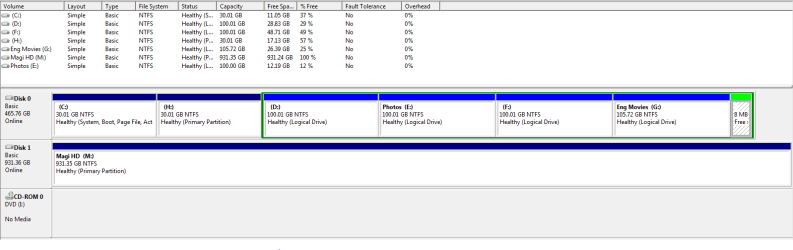
Thanks sir for the quick response, tried clean all in disk part... No use of it. Partition wizard Clean Wipe also failed. I wonder whats wrong with it all. But when i tried to Initialize it as an GPT disks rather than MBR disk, it proceeded further. Selected New Simple Volume,.... Assigned Label for the drive and hit on Format. That's it, it worked out.

Magi HD DM Capture.PNG

Will get back if any help is needed, thanks for the help once again !!
 

My Computer My Computer

At a glance

Windows 7 Ultimate 32 bit4GB-
Computer type
PC/Desktop
Computer Manufacturer/Model Number
Custom build
OS
Windows 7 Ultimate 32 bit
Motherboard
AMD
Memory
4GB
Graphics Card(s)
-
Hard Drives
500GB
Antivirus
Kaspersky
Browser
Chrome,Firefox
That is good but I am surprised.

Whatever, there is no need to initialise /format a 1TB drive as a GPT drive.

It is easier to deal with an MBR disk if and when an MBR corruption or Partition Table corruption occurs and there is a need to repair it.

So I would suggest that you convert the GPT drive to an MBR disk with Partition Wizard.

View your external drive on Partition Wizard, Right click on the leftmost portion where it says Basic, click on "Convert GPT disk to MBR disk" and then Apply.

16-11-2014 18-13-17.jpg

Note: If you have already put in some data in the GPT drive, back them up before converting from GPT to MBR disk since in the conversion process you will lose all data in the drive.
 

My Computer My Computer

At a glance

Windows 7 Home Premium 32 bit
OS
Windows 7 Home Premium 32 bit
Back
Top