Web Video Capture

tktk88

New member
Member
VIP
Local time
3:59 PM
Messages
115
Location
Florida

My Computer

Computer type
PC/Desktop
Computer Manufacturer/Model Number
CyberPower
OS
Windows 7 Pro 64 Bit SP1
CPU
Intel I7 960 3.2 ghz
Motherboard
Asus PT6 SE X58 Crossfire Triple Channel DDR3
Memory
12 Gig DDR3 1600
Graphics Card(s)
Nvidia Geforce GTX 660 Ti 3GB
Sound Card
Creative SB Xfi Xtreme
Monitor(s) Displays
ViewSonic 27 inch wb
Screen Resolution
1400 X 1050
Hard Drives
2TB SATA III 6GB 7200 RPM 64mb Cache
2TB SATA III 6GB 7200 RPM 64 MB Cache
PSU
Xtremegear 950 Watt
Case
Coolermaster HAF 932 Advanced
Cooling
Asetek 510LC 120MM Watercooler
Keyboard
Razer Death Stalker
Mouse
Logitech Trackman Wheel
Internet Speed
Cable
Antivirus
Norton Internet Security 2014
Browser
Windows Explorer 11
Okay - this is the 3rd time that I'm going to try to write this post. The forum does not like it when I spend hours composing a post (even though I visited other threads to keep the session alive). And yes, I know that I can compose offline and paste it in. I just did not do that :-(


Vcatcher crashed several times during my testing. It would not complete the download of a small 2 minute Youtube video - despite more than six attempts. And VCatcher must run using elevated privileges because the programmers were lazy. The app also saves downloaded video files to the Program Files area.

There are several other negative aspects to Vcatcher, but I don't feel like writing them out again. Virustotal says that Vcatcher is clean. I don't have the link now.

I installed Vcatcher into a fresh W7 pro 64bit Virtual Machine that had 2GB of RAM assigned. This VM was built up less than two days ago and it is all patched up - IE11 too. After completing my testing on Vcatcher, I exited the VM - which puts it back to the fresh OS install state - with no apps installed (except VitualBox guest additions).


Vdownloader did not install correctly the first time. It just froze. The second time, it told me that I needed .NET 4.0.

I installed .NET 4.5.1 and tried the Vdownloader install for a 3rd time. It still told me that I needed .NET 4 (which I figured it would) but the Vdownloader app ran just fine using .NET 4.5.1 (which I figured it would).

Vdownloader worked okay. It downloaded the same 2 minute YouTube video that I used on the other app. Vdownloader (and its installers) are all unsigned files. This is not a good sign.

Virustotal says that the installer for Vdownloader is not very clean. Again, I don't have the link now. The installer for Vdownloader launched more than a dozen windowless/silent installers. Too many for me to investigate... and yet I saw no other apps listed as having been installed.

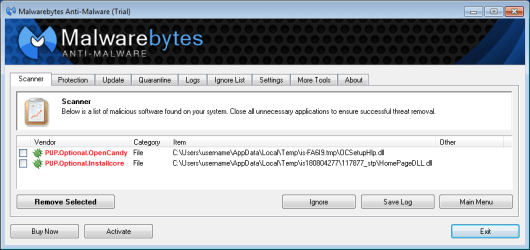
After installing Vdownloader, I ran a full scan using Malwarebytes. It would seem that the makers of Vdownloader broke this promise:

promise.png

vdownloader.png

There was no mention of OpenCandy in the License Agreement (which I read twice) that was presented by the main installer for Vdownloader.
 

My Computer

Computer type
Laptop
Computer Manufacturer/Model Number
Employer provided Dell Latitude
OS
W7 Pro SP1 64bit
CPU
i7
Memory
8GB
Graphics Card(s)
Intel HD Graphics
Hard Drives
crappy SSD
Antivirus
Employer mandated Symantec Endpoint Protection
Browser
Pale Moon 64bit, IE11 64bit & Chrome 64bit
Thanks Usernameissues for the detailed response..................based on your findings I am still searching any suggestions?
 

My Computer

Computer type
PC/Desktop
Computer Manufacturer/Model Number
CyberPower
OS
Windows 7 Pro 64 Bit SP1
CPU
Intel I7 960 3.2 ghz
Motherboard
Asus PT6 SE X58 Crossfire Triple Channel DDR3
Memory
12 Gig DDR3 1600
Graphics Card(s)
Nvidia Geforce GTX 660 Ti 3GB
Sound Card
Creative SB Xfi Xtreme
Monitor(s) Displays
ViewSonic 27 inch wb
Screen Resolution
1400 X 1050
Hard Drives
2TB SATA III 6GB 7200 RPM 64mb Cache
2TB SATA III 6GB 7200 RPM 64 MB Cache
PSU
Xtremegear 950 Watt
Case
Coolermaster HAF 932 Advanced
Cooling
Asetek 510LC 120MM Watercooler
Keyboard
Razer Death Stalker
Mouse
Logitech Trackman Wheel
Internet Speed
Cable
Antivirus
Norton Internet Security 2014
Browser
Windows Explorer 11
Unfortunately, the keepvid.com solution that I use requires the use of an old Java version. So, I install it into a virtual machine when needed. That is not very practical for most people.

Maybe others can suggest better tools.
 

My Computer

Computer type
Laptop
Computer Manufacturer/Model Number
Employer provided Dell Latitude
OS
W7 Pro SP1 64bit
CPU
i7
Memory
8GB
Graphics Card(s)
Intel HD Graphics
Hard Drives
crappy SSD
Antivirus
Employer mandated Symantec Endpoint Protection
Browser
Pale Moon 64bit, IE11 64bit & Chrome 64bit
Thanks Usernameissues for the detailed response..................based on your findings I am still searching any suggestions?
I don't know what Vcatcher and Vdownloader does but assuming you want to download videos from websites like Youtube, I suggest you using Download helper Addon in firefox. It's the best alternative if you wanted the video to be downloaded in different formats and qualities. If you wanted the original HD, I mean the highest quality youtube's streaming, you can download it or record using VLC. I don't know if using Download helper is something we shouldn't do, someone please warn me I'll never speak of it again in the forums. I feel so because I never saw someone talking about downloading videos from YT. I'm sorry if it's against forum rules, I'll delete it.
 

My Computer

Computer type
Laptop
Computer Manufacturer/Model Number
Acer 5733Z
OS
Windows 7 Professional 32bit
CPU
P6200 @ 2.13GHz
Memory
2043 MB
Graphics Card(s)
Intel HD graphics
Hard Drives
C: Total - 49899 MB; D: Total - 149999; E: Total - 149999 MB; F: Total - 123107 MB;
Antivirus
Microsoft Security Essentials, ESET NOD 32
Browser
Mozilla
Back
Top